Customer Testimonial — Free Social Proof Social Post Template
Social Proof · v1.0.0 · Updated 2026-10-16 · Instagram, Facebook & X · HTML + CSS
What's included
Features
About this template
Customer Testimonial — Free Review and Testimonial Post Template
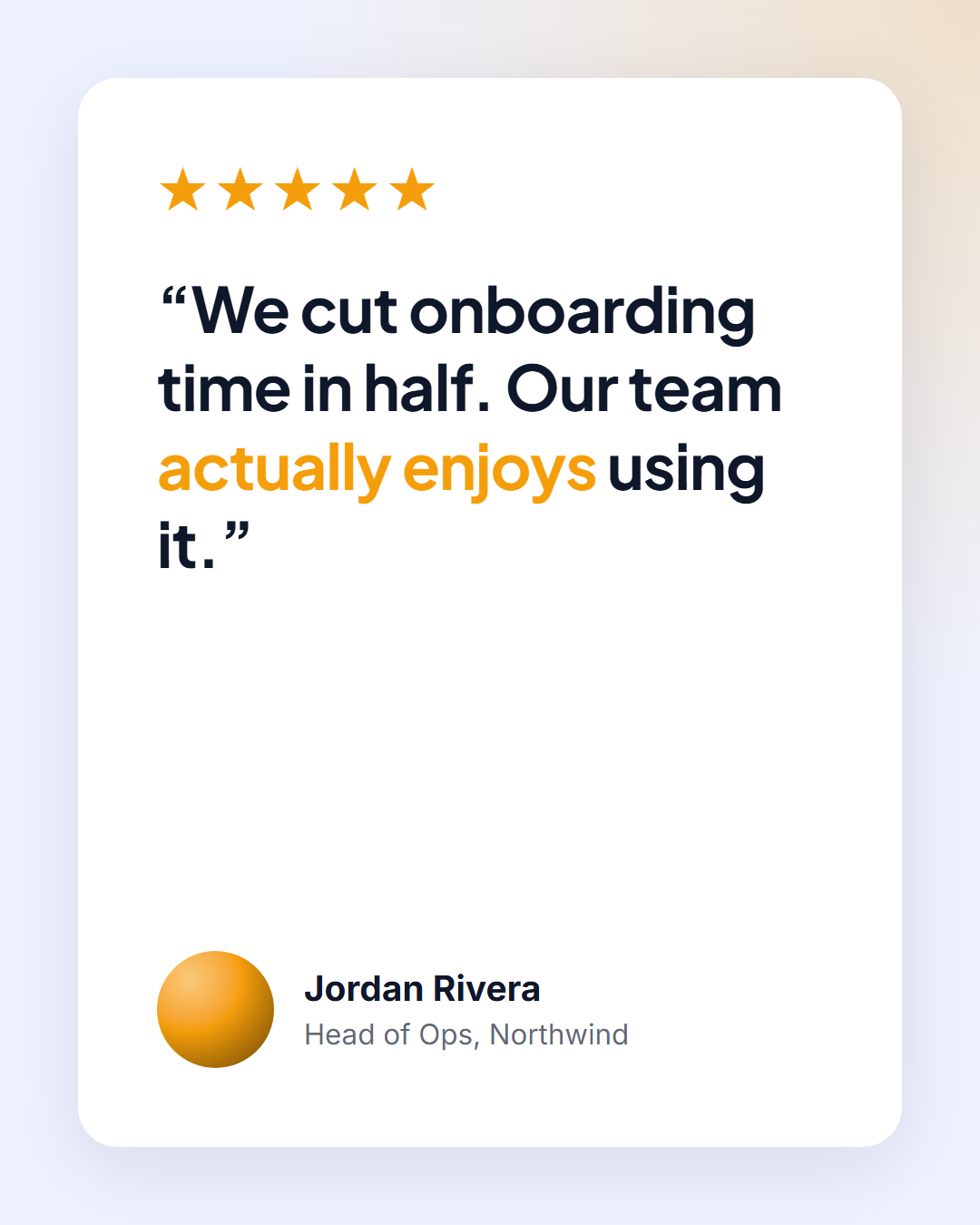
Customer Testimonial is a free social proof template for sharing reviews and client feedback on Instagram, LinkedIn, Facebook and X. A white card holds a five-star rating, the review quote, the customer's photo, name and company, and an optional company logo.
Social proof that looks credible
Real reviews outperform marketing copy, but only if they look genuine. The layout copies the familiar shape of review sites: stars first, then the quote, then a real person with a photo and job title. The company logo slot in the corner adds weight for B2B testimonials.
Readable quote, clear hierarchy
The review is set in Plus Jakarta Sans at 700 weight, large enough to read on a phone, with the key result highlighted in the accent colour using *asterisks* ("We cut onboarding time in half"). The stars are text characters in the accent colour, so you can show 4 or 4.5 stars by editing the field.
Clean card on a soft background
The white card has generous padding, large rounded corners and a soft shadow, on a pale indigo background with an amber glow in the corner. Long reviews shrink automatically to fit the card.
Every format
Use the portrait size for the Instagram feed and LinkedIn, the Story size with a link to your reviews page, and the landscape size for X.
Showing measurable results? Before & After puts two images side by side. Quoting someone without a review score? Use Big Quote.
Extend with AI
Take This Post Further With AI
Use an AI assistant to shorten long reviews into a punchy quote without changing their meaning, pick the strongest testimonials from a spreadsheet, or create a carousel of reviews from this template.
Prompt to recreate it
Copy this into your AI assistant of choice to build the effect from scratch, or as a jumping-off point for your own variant:
Design a 1080×1350 customer testimonial post in HTML and CSS.

- Pale indigo background with an amber radial glow in the top-right corner.
- A white card with large rounded corners and a soft shadow filling the post.
- Inside: a row of accent-coloured stars, a large review quote (Plus Jakarta Sans 700) with an accent highlight, and a footer with a round photo, name, role and company, plus a logo aligned right (background-size: contain).
- Use --u (1% of the shorter side) for sizing.
Want to tighten it up first? Run this prompt through the AI Prompt Studio to score it across 8 quality dimensions, catch anti-patterns, and tune the wording for Claude, ChatGPT, or Gemini before you paste it in.
Why use it
Why Use the Customer Testimonial Template
How it’s different
How It’s Different From Canva-Style Templates
Step by step
How to Use
- 1Pick the sizeChoose Portrait 4:5 (the Instagram feed default), Square, Story / Reel, Landscape 16:9 for X, a 1200×627 LinkedIn image or a 1000×1500 Pinterest pin. Customer Testimonial opens at 1080×1350.
- 2Edit the textClick any text in the preview, or use the fields on the left (stars, review, customer name, role & company and more). Wrap words in *asterisks* to colour them.
- 3Add your imagesClick a photo area in the preview or use Images to upload your customer photo and company logo. Images stay in your browser.
- 4Match your brandApply your saved brand kit or one of 12 palettes, set exact colours, and choose heading and body fonts from any Google Font or your own uploaded font.
- 5Preview it in the feedSwitch the preview to Instagram, Story, X or LinkedIn to see the post with your name, handle and caption, and fix anything the quality checks flag.
- 6Download, save or bulk createDownload PNG, JPG or PDF, every size as a ZIP, or copy the HTML. Save it to My designs to reuse later, or turn a CSV into dozens of posts with Bulk create.
Real-world uses
Common Use Cases
Follow it up
Email Templates to Match the Customer Testimonial Post
Reach the people who are not on social media with a matching email from the free responsive HTML email templates: Review Request Email. Both libraries use the same brand colours and fonts, so the post and the email look like one campaign.
Got questions?
Frequently Asked Questions
Open Customer Testimonial, paste the review, add the customer's name, role and company, upload their photo and logo, and download the 1080×1350 portrait image.
Yes. The stars are an editable text field, so type four stars, or replace them with a score like "4.8/5" or a platform name.
It's good practice to ask before using someone's name, photo or company logo. Public reviews can usually be quoted, but permission builds trust and avoids problems.
The photo slot shows an accent gradient circle by default. You can also upload the company logo there instead.
Portrait post 1080×1350 (4:5): Instagram feed (recommended), Facebook and LinkedIn feeds, X portrait. Square post 1080×1080 (1:1): Instagram, Facebook, LinkedIn and X feeds. Story / Reel 1080×1920 (9:16): Instagram and Facebook Stories, Reel covers. Landscape post 1600×900 (16:9): X feed image, Facebook landscape. LinkedIn image 1200×627 (1.91:1): LinkedIn shared image and link posts, Facebook link images. Pinterest pin 1000×1500 (2:3): Pinterest standard pin (the recommended 2:3 ratio). Switch sizes in the editor and the layout adapts, or click "All sizes (ZIP)" to download every size at once.
Press Play in the editor to watch the animation for free. Downloading it as an animated MP4 (or WebM) for Reels, Stories and WhatsApp Status is for Patreon supporters, who enter the supporter passcode once. PNG, JPG, PDF and HTML exports are free.
Yes, for Patreon supporters. Choose Export, then "Bulk create from CSV", and paste rows from a spreadsheet or upload a CSV whose column names match the Customer Testimonial fields. Every row becomes one post, and you download them all as a ZIP.
Yes. The preview switches between the plain design and mock-ups of an Instagram feed post, an Instagram Story, an X post and a LinkedIn post, using the name, handle and logo from your brand kit and the caption you type.
Yes. "Copy HTML" and "Download .html" give you one self-contained file: the markup, all the CSS and links to the Google Fonts it uses. "Fork to My Code" saves an editable copy in the UI Snippets editor. The file records the template name and version (v1.0.0).
Yes. It is free for personal and commercial posts, with no sign-up and no watermark. Everything runs in your browser and nothing you type or upload is sent to a server.