5-Star Review — Free Social Proof Social Post Template
Social Proof · v1.0.0 · Updated 2026-11-03 · Instagram, Facebook & X · HTML + CSS
What's included
Features
About this template
5-Star Review — Free Google Review Post Template with Rating
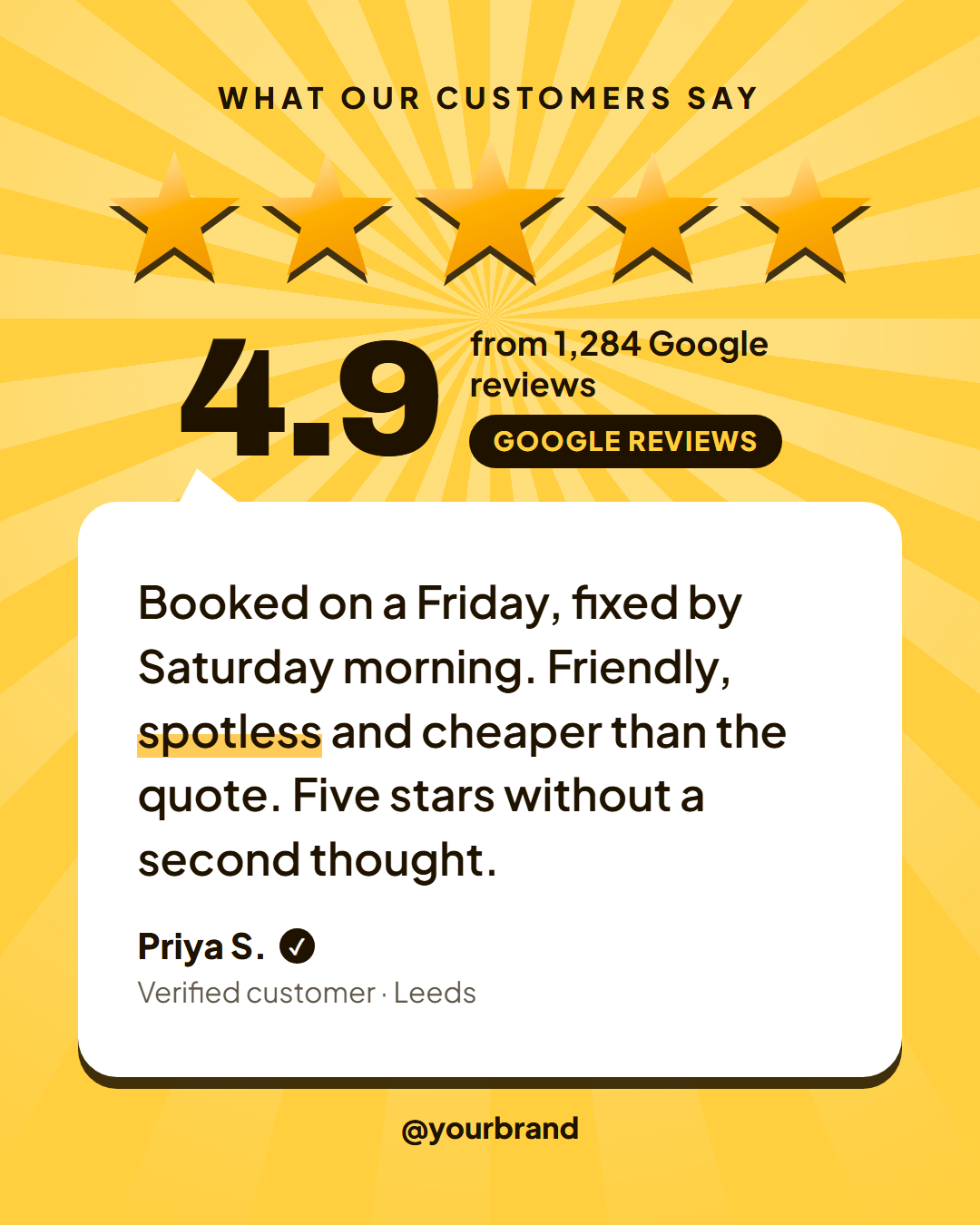
5-Star Review is a free social post template for turning a great review into a post that makes the next customer trust you. Most review graphics are a quote with a few small stars on top. This one leads with the rating, because that is what people read first on Google, Trustpilot, Amazon or Etsy, and then lets one real customer explain why.
Five big stars, then the number
On a bright golden background with a sunburst slowly turning behind it, five large stars sit in a row, the middle one slightly bigger. They are drawn shapes, not a font character, so they look identical on every device and in every export. In the animated export the stars pop in one after another, like a review being left, and then your average rating counts up from zero ("4.9"). Next to it, a line gives the proof ("from 1,284 Google reviews") and a dark chip names the platform.
One review, in the customer's words
Below sits a white speech bubble with a small tail pointing up at the score. The review is set large enough to read on a phone, and words wrapped in asterisks get a yellow highlighter mark ("*spotless*"). Underneath, the reviewer's name with a round verified tick, a detail line ("Verified customer · Leeds") and an optional photo. Without a photo the name sits on its own, so you never need to ask a customer for one.
Made for small businesses
Trades, salons, restaurants, clinics, shops and apps live on their reviews. Post one a week, and use the Story size with a "Leave us a review" link sticker to ask for more. Your handle and optional logo sit at the bottom; on 16:9 and LinkedIn the rating sits on the left and the bubble on the right.
Always ask the customer before sharing their name, and keep their words as written. For longer B2B quotes with a company logo, use Customer Testimonial; for proof in numbers, Big Stat; and to collect more reviews, send the Review Request email.
Extend with AI
Take This Post Further With AI
Ask an AI assistant to adapt the 5-Star Review HTML and CSS: pick your five most convincing reviews and trim them to two lines, write captions that ask for reviews, or turn it into a weekly review series.
Prompt to recreate it
Copy this into your AI assistant of choice to build the effect from scratch, or as a jumping-off point for your own variant:
Create a 1080×1350 five-star review social post in plain HTML and CSS.

- A golden yellow background (#ffcf3f) with a large white sunburst (repeating-conic-gradient rays, fading out with a radial mask) slowly rotating behind the top half.
- A small uppercase label "What our customers say".
- Five large stars drawn with clip-path polygons (not a font glyph), gold gradient fill with a dark hard drop-shadow, the middle star slightly larger. Animate them popping in one after another.
- A row with the rating "4.9" in huge Archivo Black (counting up from 0), and beside it "from 1,284 Google reviews" with a dark pill "Google Reviews".
- A white speech bubble with a small tail pointing up, a dark hard shadow and large rounded corners, containing the review in Plus Jakarta Sans with one word given a yellow highlighter underline, then the reviewer "Priya S." with a round dark verified tick and "Verified customer · Leeds".
- The handle at the bottom. Size everything with a CSS variable --u equal to 1% of the shorter side.
Want to tighten it up first? Run this prompt through the AI Prompt Studio to score it across 8 quality dimensions, catch anti-patterns, and tune the wording for Claude, ChatGPT, or Gemini before you paste it in.
Why use it
Why Use the 5-Star Review Template
How it’s different
How It’s Different From Canva-Style Templates
Step by step
How to Use
- 1Pick the sizeChoose Portrait 4:5 (the Instagram feed default), Square, Story / Reel, Landscape 16:9 for X, a 1200×627 LinkedIn image or a 1000×1500 Pinterest pin. 5-Star Review opens at 1080×1350.
- 2Edit the textClick any text in the preview, or use the fields on the left (label, rating, reviews line, review and more). Wrap words in *asterisks* to colour them.
- 3Add your imagesClick a photo area in the preview or use Images to upload your reviewer photo and logo. Images stay in your browser.
- 4Match your brandApply your saved brand kit or one of 12 palettes, set exact colours, and choose heading and body fonts from any Google Font or your own uploaded font.
- 5Preview it in the feedSwitch the preview to Instagram, Story, X or LinkedIn to see the post with your name, handle and caption, and fix anything the quality checks flag.
- 6Download, save or bulk createDownload PNG, JPG or PDF, every size as a ZIP, or copy the HTML. Save it to My designs to reuse later, or turn a CSV into dozens of posts with Bulk create.
Real-world uses
Common Use Cases
Follow it up
Email Templates to Match the 5-Star Review Post
Reach the people who are not on social media with a matching email from the free responsive HTML email templates: Review Request Email. Both libraries use the same brand colours and fonts, so the post and the email look like one campaign.
Got questions?
Frequently Asked Questions
Copy the review text into the Review field, add the reviewer's first name and town, set your average rating and review count, then download the 4:5 PNG for the feed or the 9:16 Story.
It is good practice to ask, especially before using a full name or photo. Many businesses use the first name and initial, keep the review word for word and never edit its meaning.
Customer Testimonial is a clean quote card for B2B case-study quotes with a company logo. 5-Star Review leads with the stars and your overall rating, which suits Google, Trustpilot and local businesses.
The five stars are decorative and always full, so use it for 4.5 and above. The rating number and review count are separate fields, so they always show your real figures.
Portrait post 1080×1350 (4:5): Instagram feed (recommended), Facebook and LinkedIn feeds, X portrait. Square post 1080×1080 (1:1): Instagram, Facebook, LinkedIn and X feeds. Story / Reel 1080×1920 (9:16): Instagram and Facebook Stories, Reel covers. Landscape post 1600×900 (16:9): X feed image, Facebook landscape. LinkedIn image 1200×627 (1.91:1): LinkedIn shared image and link posts, Facebook link images. Pinterest pin 1000×1500 (2:3): Pinterest standard pin (the recommended 2:3 ratio). Switch sizes in the editor and the layout adapts, or click "All sizes (ZIP)" to download every size at once.
Yes. Choose Export, then "Bulk create from CSV", and paste rows from a spreadsheet or upload a CSV whose column names match the 5-Star Review fields. Every row becomes one post, and you download them all as a ZIP.
Yes. The preview switches between the plain design and mock-ups of an Instagram feed post, an Instagram Story, an X post and a LinkedIn post, using the name, handle and logo from your brand kit and the caption you type.
Yes. "Copy HTML" and "Download .html" give you one self-contained file: the markup, all the CSS and links to the Google Fonts it uses. "Fork to My Code" saves an editable copy in the UI Snippets editor. The file records the template name and version (v1.0.0).
Yes. It is free for personal and commercial posts, with no sign-up and no watermark. Everything runs in your browser and nothing you type or upload is sent to a server.