Click any text to edit it right here · click an image or link to jump to its setting
- Replace the placeholder links: Header link, Rating link (the star number is added at the end), Button link, Unsubscribe link, Email preferences link.
Review Request Email — Free Responsive HTML Email Template
E-commerce · v1.0.0 · Updated 2026-10-19 · Gmail, Outlook & Apple Mail · Dark mode
What's included
Features
About this template
Review Request Email — Free HTML Product Review & Star Rating Template
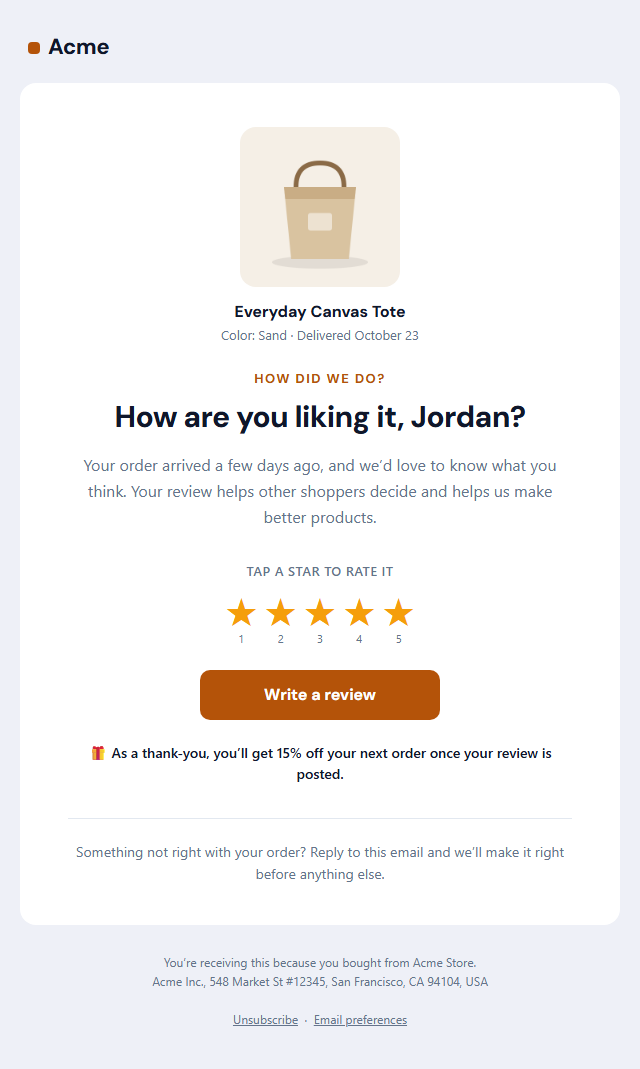
Review Request Email is a free, responsive HTML template for asking customers to review a product after it arrives. Reviews are some of the strongest sales tools a store has, and most customers are happy to leave one when they're asked at the right moment and it takes only a tap.
What's in the email
The product photo, name and delivery date at the top, so customers instantly know which order you mean, then a friendly "How are you liking it?" headline with their first name and a short intro. A row of five clickable stars lets them rate in one tap: each star links to your review page with its rating added to the link. Below that sit a "Write a review" button, an optional thank-you reward and a note inviting them to reply if something went wrong.
One-tap stars that work in email
Email can't run JavaScript, so interactive rating widgets don't work. Instead each star is a normal link, such as …&rating=4, which your review page or platform reads to pre-select the rating. The stars are text characters, not images, so they show even when images are off, and they work in Gmail, Apple Mail and Outlook. The button is Outlook-safe, and a dark palette and plain-text version are included.
Use it with your review platform
Point the links at Judge.me, Yotpo, Okendo, Trustpilot, Google reviews or your own review form, then copy the HTML into Klaviyo, Shopify Email or Mailchimp. Send it after the Shipping Confirmation email once the order has been delivered.
Why use it
Why Use the Review Request Email Template
How it’s different
How It’s Different From Other Free Email Templates
Step by step
How to Use
- 1Pick your email platformChoose Mailchimp, Klaviyo, HubSpot or Brevo under Merge tags so first names and unsubscribe links export in its syntax, or keep plain {{first_name}} tokens.
- 2Edit the contentFill in the product, message & button, star rating and thank-you reward, or click any text in the preview to jump to its field. Switch the star rating and thank-you reward on or off.
- 3Add your brandUpload or paste your logo and images, set the brand colour and the light and dark palettes, pick fonts, or apply your saved brand kit.
- 4Preview and checkSwitch between desktop, mobile and dark mode, and fix anything the pre-send checks flag, such as placeholder links or missing alt text.
- 5Export or forkCopy the HTML into Shopify, Klaviyo, Omnisend, Postmark or your own code, copy the plain-text version, download a ZIP with images, or fork it into My Code.
Real-world uses
Common Use Cases
Got questions?
Frequently Asked Questions
After the customer has had time to use the product, usually five to fourteen days after delivery depending on what you sell. Asking too early, before the parcel arrives, is one of the most common reasons review emails are ignored.
Each star is a link made from the rating link you enter plus its number, for example https://yoursite.com/review?order=10482&rating=5. Your review page or platform reads the rating from the link and pre-selects it.
You can thank customers with a reward, but rules on incentivised reviews differ by platform and country. Many platforms require you to reward any honest review, not only positive ones, and some require the review to be marked as incentivised. Check your platform's policy.
Any platform that gives you a review link: Judge.me, Yotpo, Okendo, Stamped, Trustpilot, Google reviews or your own form. Paste the link into the rating link and button fields.
It is safest to include one. Review requests can be seen as commercial email, especially with a reward, so the footer includes an unsubscribe link and your postal address.
It saves an editable copy of your Review Request Email in My Code, the UI Snippets code editor: the email markup goes in the HTML panel and its CSS (mobile and dark-mode rules plus fonts) in the CSS panel, so you can keep refining the code and save your own versions.
Yes. It is free for personal and commercial email, with no sign-up and no watermark. Everything runs in your browser, and your edits are saved locally.