Lunar New Year — Free Holidays & Seasonal Social Post Template
Holidays & Seasonal · v1.0.0 · Updated 2026-11-03 · Instagram, Facebook & X · HTML + CSS
What's included
Features
About this template
Lunar New Year — Free Chinese New Year Greeting Post Template
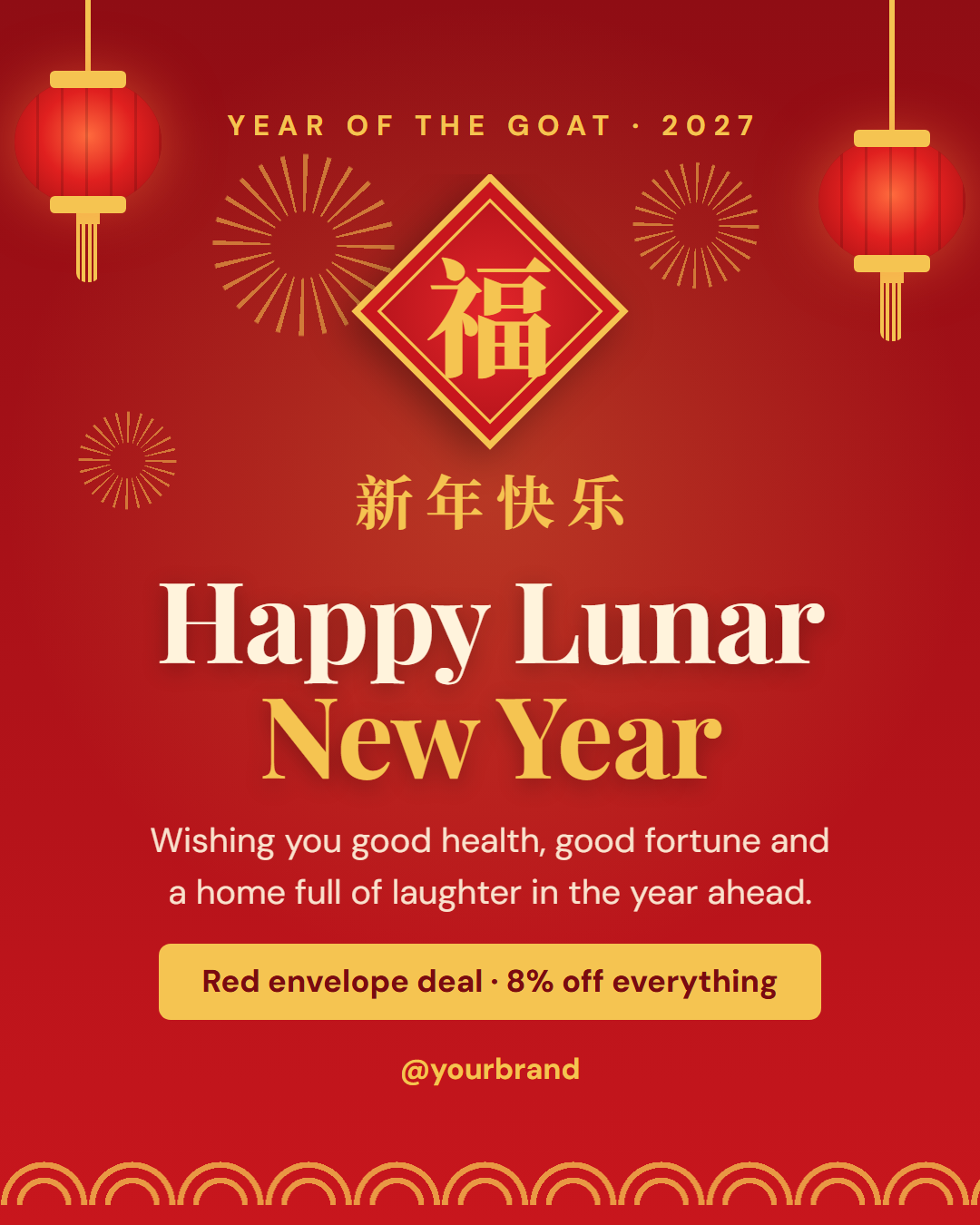
Lunar New Year is a free social post template for the biggest festival in the lunar calendar, celebrated as Chinese New Year or the Spring Festival in China, Tết in Vietnam and Seollal in Korea, and across Singapore, Malaysia and Chinese communities worldwide. In 2027 it falls on Saturday 6 February and welcomes the Year of the Goat.
Red, gold and everything that moves
The background is a deep festive red that brightens towards the bottom, with a gold scalloped border along the base. Two silk lanterns hang from the top corners on gold cords, with ribbed bodies, gold caps and tassels, and in the animated export they sway on their cords while gold fireworks burst and fade in the sky behind them.
A fortune charm at the centre
In the middle hangs a diamond-shaped red charm with a gold frame and the character 福 (fú, good fortune), the kind of paper charm families hang on their doors for the new year. It pops in first in the animation. Some families hang it upside down, because "upside down" (dào) sounds like "arrived"; the character is an editable field, so you can use 春 (spring) or 喜 (joy) instead.
Greeting, wish and a red-envelope offer
Under the charm, an editable Chinese greeting, 新年快乐 (Happy New Year), is set in Noto Serif SC, followed by "Happy Lunar *New Year*" in a large serif with the highlight in gold and a short wish for health and good fortune. The optional chip carries a red-envelope (hongbao) offer; "8% off" is a nod to eight, a lucky number because it sounds like "prosper". Clear it for a pure greeting.
For every community that celebrates
Change the greeting to "Chúc Mừng Năm Mới" for Tết or "새해 복 많이 받으세요" for Seollal (scripts outside the bundled font use your device font), and change the label to the animal of your year. On 16:9 and LinkedIn the charm sits beside the text. Pair it with Countdown for the run-up and Holiday Hours for festival closures.
Extend with AI
Take This Post Further With AI
Ask an AI assistant to adapt the Lunar New Year HTML and CSS: write greetings for Chinese, Vietnamese and Korean audiences, create a red-envelope sale series for the fifteen days, or redraw the charm with your brand initial.
Prompt to recreate it
Copy this into your AI assistant of choice to build the effect from scratch, or as a jumping-off point for your own variant:
Create a 1080×1350 Lunar New Year greeting social post in plain HTML and CSS.

- A deep red vertical gradient (#8f0d14 to #c8161d) with a soft gold glow in the centre and a gold scalloped wave border along the bottom.
- Two silk lanterns hanging from the top corners on gold cords: red ribbed ellipse bodies with a warm glow, gold caps top and bottom and a gold tassel; make them sway from the top of the cord.
- Three gold firework bursts (repeating-conic-gradient rays masked into a ring) that grow and fade.
- In the centre, a red diamond (a square rotated 45°) with a gold double border and the gold character 福 kept upright inside.
- Below: the Chinese greeting 新年快乐 in gold (Noto Serif SC), a large serif headline "Happy Lunar New Year" with "New Year" in gold, a one-line wish, and a gold chip "Red envelope deal · 8% off everything".
- A small gold label "Year of the Goat · 2027" at the top and the handle at the bottom.
- Size everything with a CSS variable --u equal to 1% of the shorter side and respect prefers-reduced-motion.
Want to tighten it up first? Run this prompt through the AI Prompt Studio to score it across 8 quality dimensions, catch anti-patterns, and tune the wording for Claude, ChatGPT, or Gemini before you paste it in.
Why use it
Why Use the Lunar New Year Template
How it’s different
How It’s Different From Canva-Style Templates
Step by step
How to Use
- 1Pick the sizeChoose Portrait 4:5 (the Instagram feed default), Square, Story / Reel, Landscape 16:9 for X, a 1200×627 LinkedIn image or a 1000×1500 Pinterest pin. Lunar New Year opens at 1080×1350.
- 2Edit the textClick any text in the preview, or use the fields on the left (label, charm character, chinese greeting, headline and more). Wrap words in *asterisks* to colour them.
- 3Add your imagesClick a photo area in the preview or use Images to upload your logo. Images stay in your browser.
- 4Match your brandApply your saved brand kit or one of 12 palettes, set exact colours, and choose heading and body fonts from any Google Font or your own uploaded font.
- 5Preview it in the feedSwitch the preview to Instagram, Story, X or LinkedIn to see the post with your name, handle and caption, and fix anything the quality checks flag.
- 6Download, save or bulk createDownload PNG, JPG or PDF, every size as a ZIP, or copy the HTML. Save it to My designs to reuse later, or turn a CSV into dozens of posts with Bulk create.
Real-world uses
Common Use Cases
Got questions?
Frequently Asked Questions
Lunar New Year 2027 is on Saturday 6 February and begins the Year of the Goat. Celebrations traditionally last fifteen days, until the Lantern Festival, and many businesses close for the first few days.
Yes. Change the Chinese greeting to "Chúc Mừng Năm Mới" for Vietnamese Tết or "새해 복 많이 받으세요" for Korean Seollal, and edit the label. The lanterns, fireworks and colours suit both.
福 (fú) means good fortune or blessing, and it is hung on doors for the new year. It is an editable field, so you can replace it with 春 (spring), 喜 (joy) or your brand initial.
Lunar New Year includes everyone who celebrates, including Vietnamese and Korean communities. If your audience is mainly Chinese, "Chinese New Year" or "Spring Festival" is common; the headline is yours to change.
Portrait post 1080×1350 (4:5): Instagram feed (recommended), Facebook and LinkedIn feeds, X portrait. Square post 1080×1080 (1:1): Instagram, Facebook, LinkedIn and X feeds. Story / Reel 1080×1920 (9:16): Instagram and Facebook Stories, Reel covers. Landscape post 1600×900 (16:9): X feed image, Facebook landscape. LinkedIn image 1200×627 (1.91:1): LinkedIn shared image and link posts, Facebook link images. Pinterest pin 1000×1500 (2:3): Pinterest standard pin (the recommended 2:3 ratio). Switch sizes in the editor and the layout adapts, or click "All sizes (ZIP)" to download every size at once.
Yes. Choose Export, then "Bulk create from CSV", and paste rows from a spreadsheet or upload a CSV whose column names match the Lunar New Year fields. Every row becomes one post, and you download them all as a ZIP.
Yes. The preview switches between the plain design and mock-ups of an Instagram feed post, an Instagram Story, an X post and a LinkedIn post, using the name, handle and logo from your brand kit and the caption you type.
Yes. "Copy HTML" and "Download .html" give you one self-contained file: the markup, all the CSS and links to the Google Fonts it uses. "Fork to My Code" saves an editable copy in the UI Snippets editor. The file records the template name and version (v1.0.0).
Yes. It is free for personal and commercial posts, with no sign-up and no watermark. Everything runs in your browser and nothing you type or upload is sent to a server.