Holiday Hours — Free Announcements Social Post Template
Announcements · v1.0.0 · Updated 2026-11-03 · Instagram, Facebook & X · HTML + CSS
What's included
Features
About this template
Holiday Hours — Free "We're Closed" Opening Hours Post Template
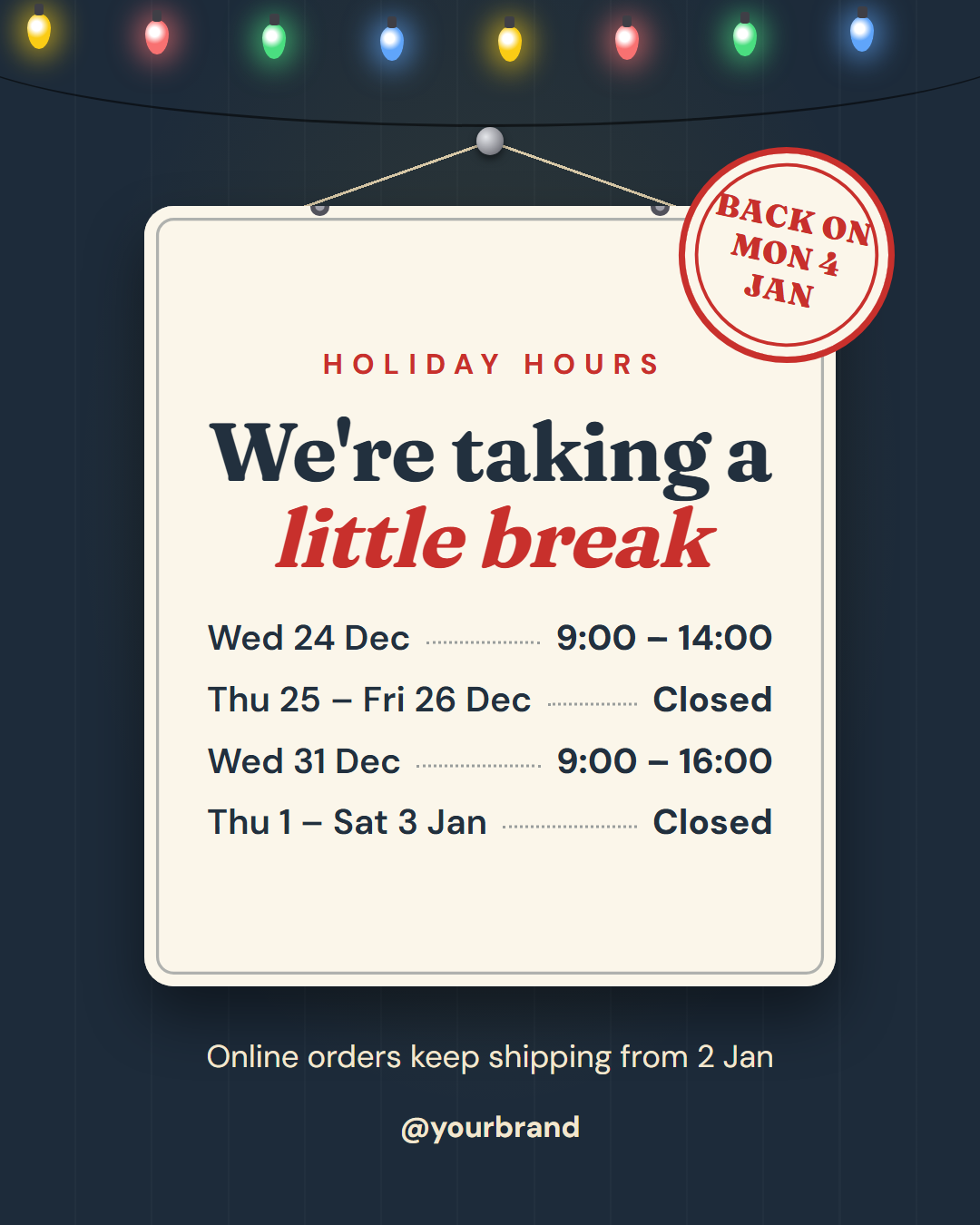
Holiday Hours is a free social post template for the notice every local business has to publish at least once a year: when you are open, when you are closed and when you are back. Customers look for it on your Instagram, Facebook and Google profile before they make the trip, and a clear post saves you a stream of "are you open on the 26th?" messages.
A shop sign, not a spreadsheet
The hours sit on a cream enamel sign that hangs from a nail on two strings, with a double rule around the edge and two silver screws on top. In the animated export the sign swings gently on its nail, a line of coloured string lights twinkles along the top of the wall, and a red "Back on Mon 4 Jan" stamp thumps down onto the corner of the sign. It feels festive without naming a single holiday, so it works for Christmas, Eid, Diwali, Lunar New Year or a summer break.
Dates and hours you can read at a glance
Under the label and a friendly serif headline ("We're taking a *little break*"), up to four rows list a date or range on the left and the hours on the right, joined by a dotted leader like a menu. Write "Closed" where you are closed. Leave a row's date empty and that row disappears, so two or three rows look just as tidy as four.
A note and your brand
Under the sign, an optional note handles the exception people ask about most, such as "Online orders keep shipping from 2 Jan" or "Emergency line open 24/7". Your handle and an optional logo finish the post.
Post it everywhere people check
Use the 4:5 size for the Instagram and Facebook feed, the 9:16 Story for a pinned highlight, and the 16:9 and LinkedIn sizes for X, LinkedIn and your Google Business Profile update. The wall, sign and stamp colours are editable. Pair it with Christmas Greeting or Happy New Year, and send the same dates in the Holiday Greetings email.
Extend with AI
Take This Post Further With AI
Ask an AI assistant to adapt the Holiday Hours HTML and CSS: write the copy for your own closure dates, make an Eid or Diwali version with a matching palette, or produce the same notice as a short email and a Google Business Profile update.
Prompt to recreate it
Copy this into your AI assistant of choice to build the effect from scratch, or as a jumping-off point for your own variant:
Create a 1080×1350 holiday opening-hours social post in plain HTML and CSS.

- A dark slate wall (#1d2b3a) with faint vertical panel lines.
- Across the top, string lights on a sagging wire: eight teardrop bulbs in yellow, red, green and blue with a soft glow; make them twinkle with a CSS animation.
- In the middle, a cream enamel sign (#fbf6ea) hanging from a silver nail on two diagonal strings, with an inner rule, two silver screws and a drop shadow; let the whole sign swing gently from the nail (rotate around the top centre).
- On the sign: a red uppercase label "Holiday hours", a serif headline "We're taking a little break" with "little break" in red italic, then four rows of date and hours joined by a dotted leader ("Wed 24 Dec … 9:00 – 14:00", "Thu 25 – Fri 26 Dec … Closed").
- A round red stamp "Back on Mon 4 Jan" tilted on the sign's top-right corner.
- Under the sign: a note "Online orders keep shipping from 2 Jan" and the handle.
- Size everything with a CSS variable --u equal to 1% of the shorter side, and respect prefers-reduced-motion.
Want to tighten it up first? Run this prompt through the AI Prompt Studio to score it across 8 quality dimensions, catch anti-patterns, and tune the wording for Claude, ChatGPT, or Gemini before you paste it in.
Why use it
Why Use the Holiday Hours Template
How it’s different
How It’s Different From Canva-Style Templates
Step by step
How to Use
- 1Pick the sizeChoose Portrait 4:5 (the Instagram feed default), Square, Story / Reel, Landscape 16:9 for X, a 1200×627 LinkedIn image or a 1000×1500 Pinterest pin. Holiday Hours opens at 1080×1350.
- 2Edit the textClick any text in the preview, or use the fields on the left (label, headline, date 1, hours 1 and more). Wrap words in *asterisks* to colour them.
- 3Add your imagesClick a photo area in the preview or use Images to upload your logo. Images stay in your browser.
- 4Match your brandApply your saved brand kit or one of 12 palettes, set exact colours, and choose heading and body fonts from any Google Font or your own uploaded font.
- 5Preview it in the feedSwitch the preview to Instagram, Story, X or LinkedIn to see the post with your name, handle and caption, and fix anything the quality checks flag.
- 6Download, save or bulk createDownload PNG, JPG or PDF, every size as a ZIP, or copy the HTML. Save it to My designs to reuse later, or turn a CSV into dozens of posts with Bulk create.
Real-world uses
Common Use Cases
Follow it up
Email Templates to Match the Holiday Hours Post
Reach the people who are not on social media with a matching email from the free responsive HTML email templates: Holiday Greetings Email. Both libraries use the same brand colours and fonts, so the post and the email look like one campaign.
Got questions?
Frequently Asked Questions
Edit the dates and hours, set the "back on" stamp, then download the 4:5 PNG for the feed and the 9:16 Story. Post it a week before, then pin the Story to a highlight until you reopen.
Yes. Leave the date field of any row empty and that row disappears. The sign keeps its layout, so two or three rows look as balanced as four.
No. The design is festive but neutral: string lights, a hanging sign and a stamp. Change the headline and dates for Eid, Diwali, Lunar New Year, Easter, a national holiday or a summer break.
Yes. Set special hours in your Google Business Profile so Maps and Search show them, and add this image as an update so people browsing your profile see it too.
Portrait post 1080×1350 (4:5): Instagram feed (recommended), Facebook and LinkedIn feeds, X portrait. Square post 1080×1080 (1:1): Instagram, Facebook, LinkedIn and X feeds. Story / Reel 1080×1920 (9:16): Instagram and Facebook Stories, Reel covers. Landscape post 1600×900 (16:9): X feed image, Facebook landscape. LinkedIn image 1200×627 (1.91:1): LinkedIn shared image and link posts, Facebook link images. Pinterest pin 1000×1500 (2:3): Pinterest standard pin (the recommended 2:3 ratio). Switch sizes in the editor and the layout adapts, or click "All sizes (ZIP)" to download every size at once.
Yes. Choose Export, then "Bulk create from CSV", and paste rows from a spreadsheet or upload a CSV whose column names match the Holiday Hours fields. Every row becomes one post, and you download them all as a ZIP.
Yes. The preview switches between the plain design and mock-ups of an Instagram feed post, an Instagram Story, an X post and a LinkedIn post, using the name, handle and logo from your brand kit and the caption you type.
Yes. "Copy HTML" and "Download .html" give you one self-contained file: the markup, all the CSS and links to the Google Fonts it uses. "Fork to My Code" saves an editable copy in the UI Snippets editor. The file records the template name and version (v1.0.0).
Yes. It is free for personal and commercial posts, with no sign-up and no watermark. Everything runs in your browser and nothing you type or upload is sent to a server.