Click any text to edit it · drag a photo to reposition it, scroll to zoom, click to replace

Christmas Greeting — Free Holidays & Seasonal Social Post Template
Holidays & Seasonal · v1.0.0 · Updated 2026-10-18 · Instagram, Facebook & X · HTML + CSS
What's included
Features
About this template
Christmas Greeting — Free Merry Christmas Social Post Template
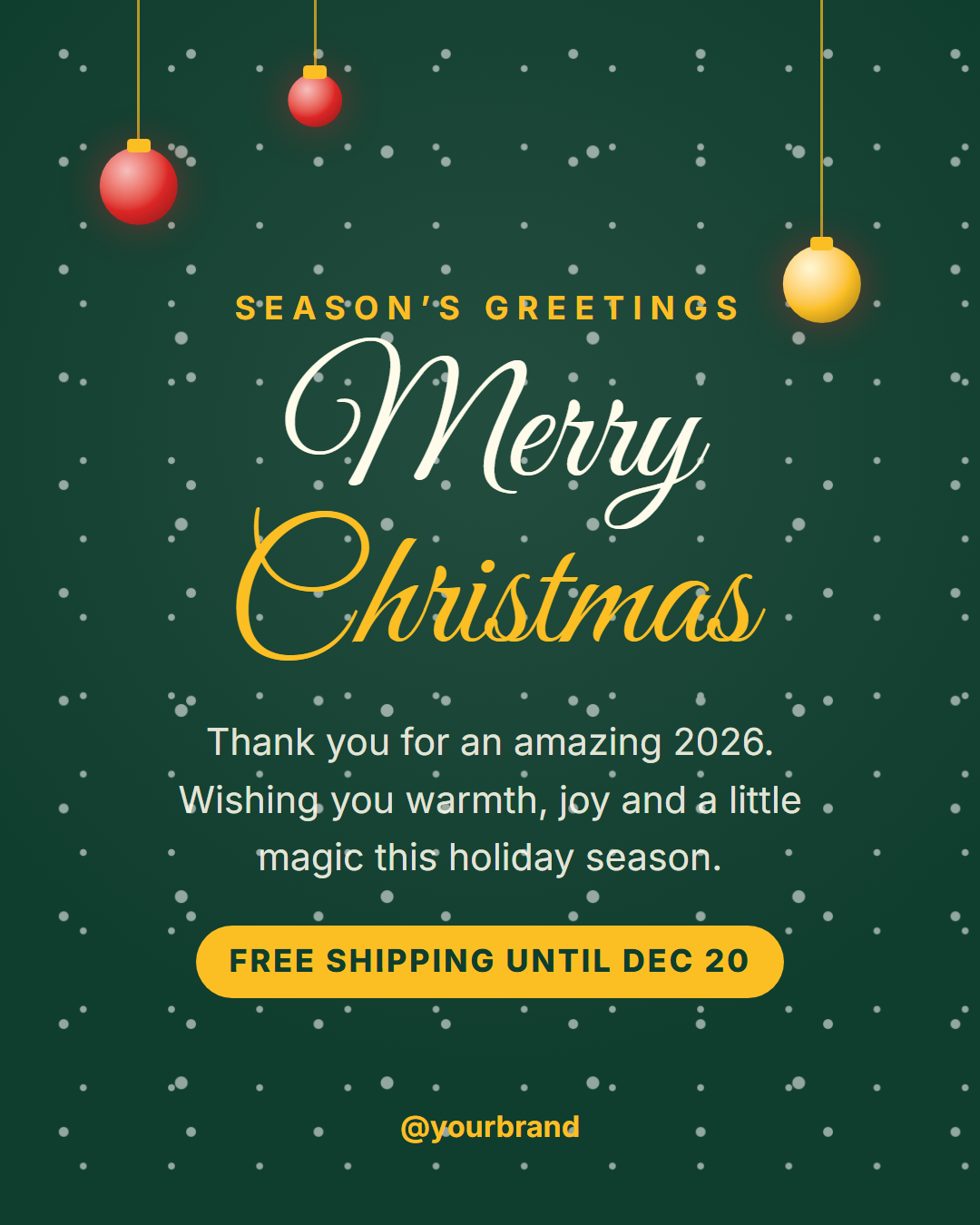
Christmas Greeting is a free Christmas and holiday post template for Instagram, Facebook, X, LinkedIn and Pinterest. Snow falls over a deep evergreen background, gold and red ornaments hang from the top edge, and a flowing script "Merry Christmas" headline sits above a short holiday message, an optional offer pill and your handle.
A greeting and a notice in one
The optional offer line turns a greeting into something useful: "Free shipping until Dec 20", "Open Christmas Eve until 2 PM" or "Gift cards available online". Leave it empty and it disappears, leaving a clean greeting card.
Festive, drawn in CSS
The snow is layered radial-gradient dots, and each ornament is a string, a gold cap and a shiny bauble made from gradients and shadows. There are no images to load, so the post exports instantly at full resolution and recolours with the palette.
Script headline
The title uses Great Vibes, a classic script from Google Fonts, with the accent word on its own line. Pick a different Google Font, or upload your own, from the Fonts section.
December dates for 2026
Christmas Day 2026 is a Friday. Most carriers' last ground-shipping dates fall around December 15 to 18, so a "shipping cut-off" version of this post in mid-December is worth scheduling alongside the greeting on the 24th or 25th.
Ending the year? Follow it with Happy New Year on December 31.
Why use it
Why Use the Christmas Greeting Template
How it’s different
How It’s Different From Canva-Style Templates
Step by step
How to Use
- 1Pick the sizeChoose Portrait 4:5 (the Instagram feed default), Square, Story / Reel, Landscape 16:9 for X, a 1200×627 LinkedIn image or a 1000×1500 Pinterest pin. Christmas Greeting opens at 1080×1350.
- 2Edit the textClick any text in the preview, or use the fields on the left (kicker, headline, message, offer and more). Wrap words in *asterisks* to colour them.
- 3Match your brandApply your saved brand kit or one of 12 palettes, set exact colours, and choose heading and body fonts from any Google Font or your own uploaded font.
- 4Preview it in the feedSwitch the preview to Instagram, Story, X or LinkedIn to see the post with your name, handle and caption, and fix anything the quality checks flag.
- 5Download, save or bulk createDownload PNG, JPG or PDF, every size as a ZIP, or copy the HTML. Save it to My designs to reuse later, or turn a CSV into dozens of posts with Bulk create.
Real-world uses
Common Use Cases
Got questions?
Frequently Asked Questions
Christmas Eve (December 24) and Christmas morning (December 25) are the most common. For shipping cut-offs, post one to two weeks earlier.
Yes. Edit the kicker and headline to "Happy Holidays", "Season's Greetings" or "Happy Hanukkah", and adjust the palette.
Yes. Clear the Offer field and the pill disappears, leaving a simple greeting.
Use the 1080×1920 Story size. The layout keeps the headline and message clear of the Story header and reply bar.
Portrait post 1080×1350 (4:5): Instagram feed (recommended), Facebook and LinkedIn feeds, X portrait. Square post 1080×1080 (1:1): Instagram, Facebook, LinkedIn and X feeds. Story / Reel 1080×1920 (9:16): Instagram and Facebook Stories, Reel covers. Landscape post 1600×900 (16:9): X feed image, Facebook landscape. LinkedIn image 1200×627 (1.91:1): LinkedIn shared image and link posts, Facebook link images. Pinterest pin 1000×1500 (2:3): Pinterest standard pin (the recommended 2:3 ratio). Switch sizes in the editor and the layout adapts, or click "All sizes (ZIP)" to download every size at once.
Yes. Choose Export, then "Bulk create from CSV", and paste rows from a spreadsheet or upload a CSV whose column names match the Christmas Greeting fields. Every row becomes one post, and you download them all as a ZIP.
Yes. The preview switches between the plain design and mock-ups of an Instagram feed post, an Instagram Story, an X post and a LinkedIn post, using the name, handle and logo from your brand kit and the caption you type.
Yes. "Copy HTML" and "Download .html" give you one self-contained file: the markup, all the CSS and links to the Google Fonts it uses. "Fork to My Code" saves an editable copy in the UI Snippets editor. The file records the template name and version (v1.0.0).
Yes. It is free for personal and commercial posts, with no sign-up and no watermark. Everything runs in your browser and nothing you type or upload is sent to a server.