

Giving Tuesday — Free Holidays & Seasonal Social Post Template
Holidays & Seasonal · v1.0.0 · Updated 2026-11-03 · Instagram, Facebook & X · HTML + CSS
What's included
Features
About this template
Giving Tuesday — Free Donation Goal Post Template for Nonprofits
Giving Tuesday is a free social post template for the global day of giving that follows Black Friday and Cyber Monday. In 2026 it falls on Tuesday 1 December. Since it began in 2012 it has grown into a movement in dozens of countries, and for many charities it opens the year-end giving season. This template is built to answer the two questions every donor has: how close are you, and what will my gift actually do?
A heart that fills as the money comes in
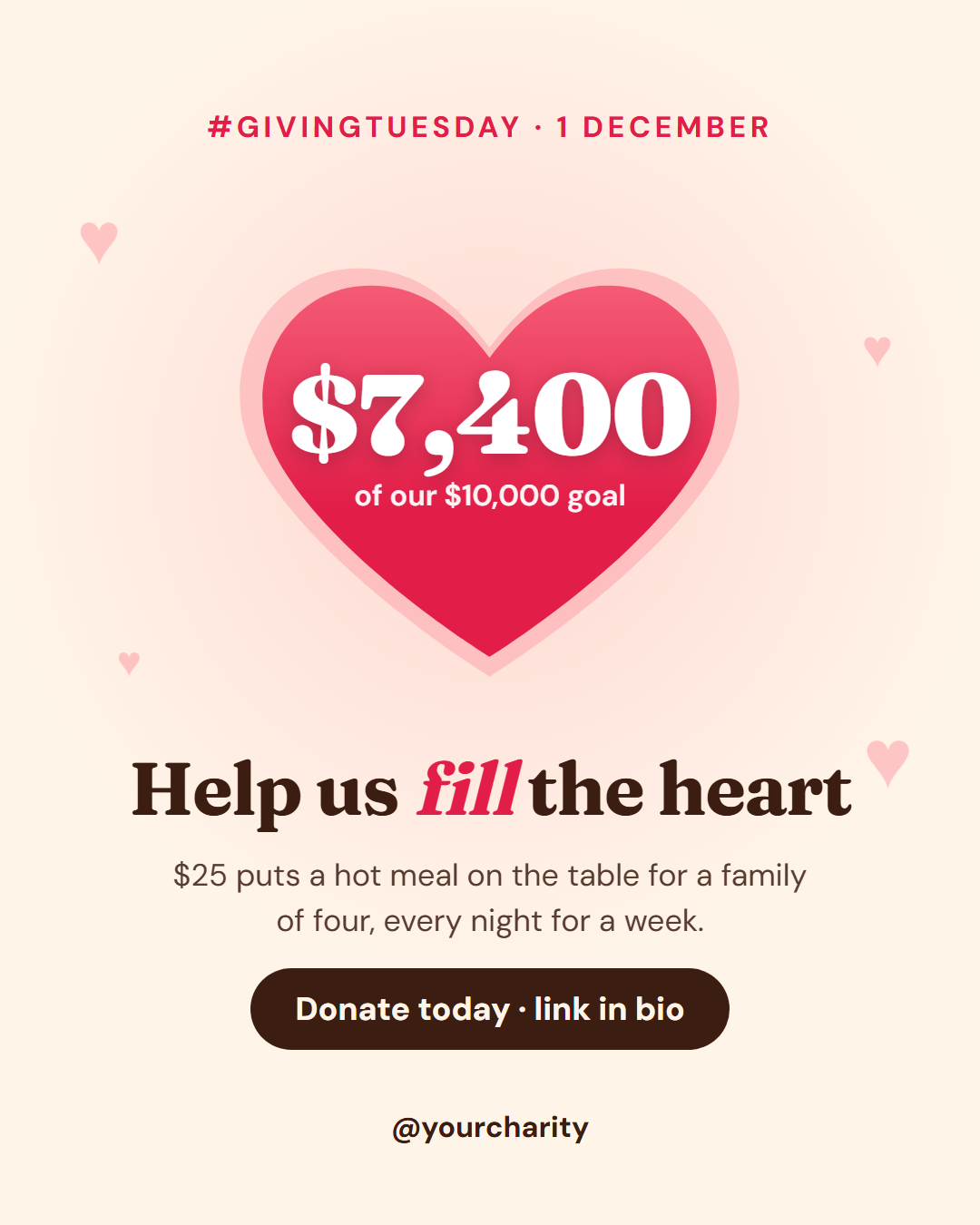
The centre of the post is a large heart drawn with a CSS mask. In the animated export it fills from the bottom like a jar while the amount raised, "$7,400", counts up from zero inside it, with the goal ("of our $10,000 goal") underneath. Then a soft halo around the heart beats gently and small hearts drift in the background. Progress is the most persuasive thing a fundraiser can show, and here it is the first thing people see.
Make one gift concrete
Under the heart, a serif headline ("Help us *fill* the heart", with the highlighted word in italic red) and a single impact line turn an abstract donation into something real: "$25 puts a hot meal on the table for a family of four, every night for a week." A dark pill carries the call to action, and the footer holds your handle and an optional logo.
Post it again as the total grows
Giving Tuesday is a one-day campaign, so most organisations post several updates. Save the design, then change only the amount raised for a morning, midday and final-hours post; the headline and impact line stay the same.
Sized for every channel
The 4:5 portrait suits Instagram and Facebook, the 9:16 Story works with a donate link sticker, and on 16:9 and LinkedIn the heart sits beside the text. Recolour the heart to your cause colour. Pair it with Thank You after the campaign and Milestone when you pass the goal.
Extend with AI
Take This Post Further With AI
Ask an AI assistant to adapt the Giving Tuesday HTML and CSS: write five impact lines for your cause, turn it into a morning, midday and final-hour update series, or add a real percentage bar under the heart.
Prompt to recreate it
Copy this into your AI assistant of choice to build the effect from scratch, or as a jumping-off point for your own variant:
Create a 1080×1350 Giving Tuesday fundraising social post in plain HTML and CSS.

- Warm cream background (#fff4e8) with a soft pink glow behind the centre and four faint hearts scattered around the edges.
- A small uppercase red label "#GivingTuesday · 1 December" at the top.
- A large heart (CSS mask with an inline SVG heart path) filled with a pink-to-red vertical gradient, with a lighter halo heart slightly larger behind it.
- Inside the heart, in white: "$7,400" in a heavy serif (Fraunces 900) and "of our $10,000 goal" below.
- Under the heart: a serif headline "Help us fill the heart" with "fill" in italic red, one line "$25 puts a hot meal on the table for a family of four, every night for a week.", and a dark pill button "Donate today · link in bio".
- A footer with an optional logo and the handle "@yourcharity".
- Animate the heart filling from the bottom (clip-path inset) and the amount counting up, with a reduced-motion fallback.
- Size everything with a CSS variable --u equal to 1% of the shorter side.
Want to tighten it up first? Run this prompt through the AI Prompt Studio to score it across 8 quality dimensions, catch anti-patterns, and tune the wording for Claude, ChatGPT, or Gemini before you paste it in.
Why use it
Why Use the Giving Tuesday Template
How it’s different
How It’s Different From Canva-Style Templates
Step by step
How to Use
- 1Pick the sizeChoose Portrait 4:5 (the Instagram feed default), Square, Story / Reel, Landscape 16:9 for X, a 1200×627 LinkedIn image or a 1000×1500 Pinterest pin. Giving Tuesday opens at 1080×1350.
- 2Edit the textClick any text in the preview, or use the fields on the left (label, amount raised, goal line, headline and more). Wrap words in *asterisks* to colour them.
- 3Add your imagesClick a photo area in the preview or use Images to upload your logo. Images stay in your browser.
- 4Match your brandApply your saved brand kit or one of 12 palettes, set exact colours, and choose heading and body fonts from any Google Font or your own uploaded font.
- 5Preview it in the feedSwitch the preview to Instagram, Story, X or LinkedIn to see the post with your name, handle and caption, and fix anything the quality checks flag.
- 6Download, save or bulk createDownload PNG, JPG or PDF, every size as a ZIP, or copy the HTML. Save it to My designs to reuse later, or turn a CSV into dozens of posts with Bulk create.
Real-world uses
Common Use Cases
Got questions?
Frequently Asked Questions
Giving Tuesday 2026 is on Tuesday 1 December, the Tuesday after US Thanksgiving, Black Friday and Cyber Monday. Many organisations start promoting it a week before and post updates throughout the day.
The heart fills completely as a symbol, while the real numbers sit inside it: the amount raised and the goal. Update the amount field for each new post and the count-up animation follows it.
Show progress towards a clear goal, make one gift concrete ("$25 feeds a family for a week"), give one easy way to donate and thank people publicly. Short, specific posts outperform long appeals in the feed.
Yes. Replace the hashtag label with your campaign name and date, such as an end-of-year appeal or a charity run, and keep the heart, amount and impact line.
Portrait post 1080×1350 (4:5): Instagram feed (recommended), Facebook and LinkedIn feeds, X portrait. Square post 1080×1080 (1:1): Instagram, Facebook, LinkedIn and X feeds. Story / Reel 1080×1920 (9:16): Instagram and Facebook Stories, Reel covers. Landscape post 1600×900 (16:9): X feed image, Facebook landscape. LinkedIn image 1200×627 (1.91:1): LinkedIn shared image and link posts, Facebook link images. Pinterest pin 1000×1500 (2:3): Pinterest standard pin (the recommended 2:3 ratio). Switch sizes in the editor and the layout adapts, or click "All sizes (ZIP)" to download every size at once.
Yes. Choose Export, then "Bulk create from CSV", and paste rows from a spreadsheet or upload a CSV whose column names match the Giving Tuesday fields. Every row becomes one post, and you download them all as a ZIP.
Yes. The preview switches between the plain design and mock-ups of an Instagram feed post, an Instagram Story, an X post and a LinkedIn post, using the name, handle and logo from your brand kit and the caption you type.
Yes. "Copy HTML" and "Download .html" give you one self-contained file: the markup, all the CSS and links to the Google Fonts it uses. "Fork to My Code" saves an editable copy in the UI Snippets editor. The file records the template name and version (v1.0.0).
Yes. It is free for personal and commercial posts, with no sign-up and no watermark. Everything runs in your browser and nothing you type or upload is sent to a server.