
Year in Review — Free Announcements Social Post Template
Announcements · v1.0.0 · Updated 2026-11-03 · Instagram, Facebook & X · HTML + CSS
What's included
Features
About this template
Year in Review — Free "Wrapped" Style Stats Post Template
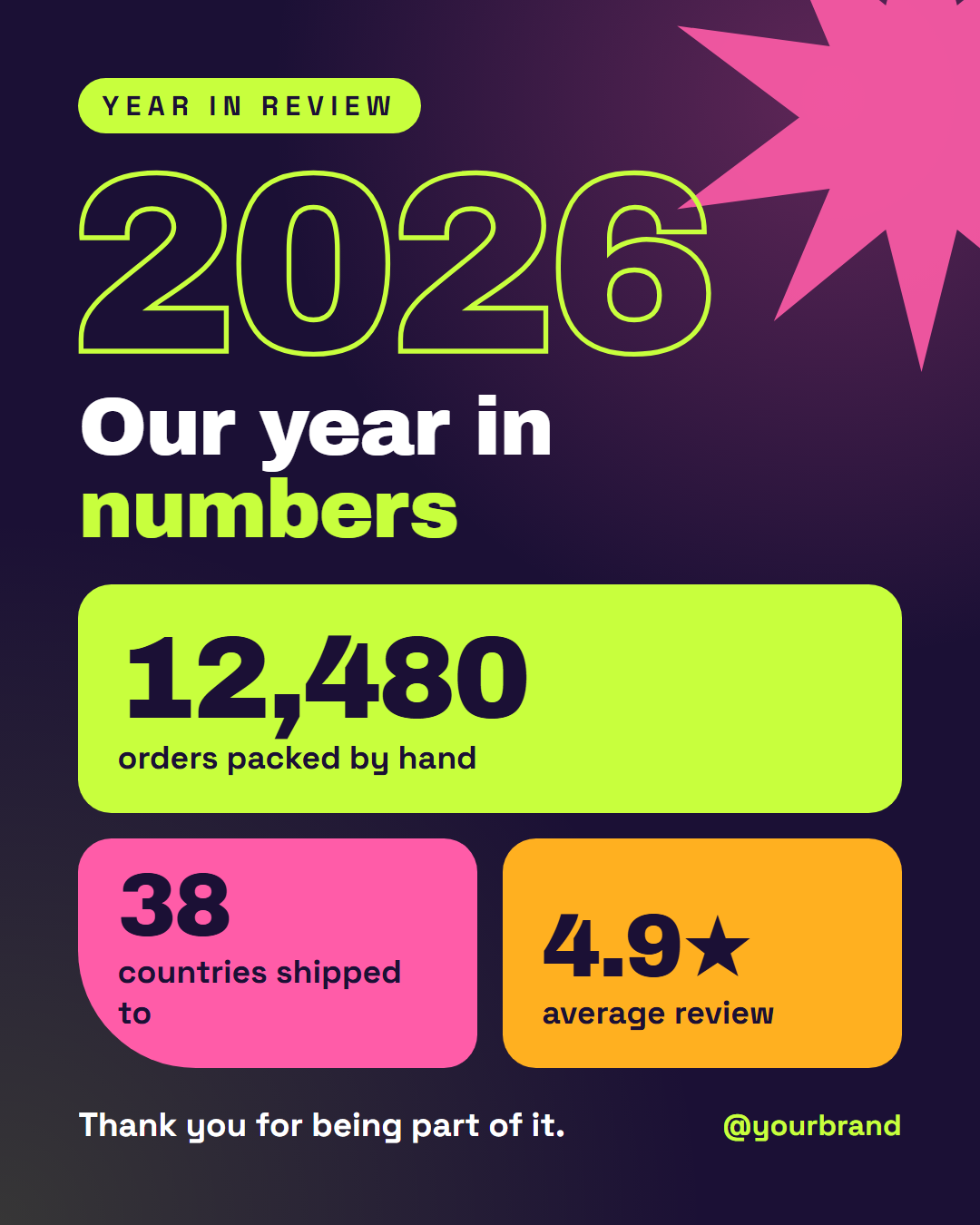
Year in Review is a free social post template for the end-of-year recap, the post that turns twelve months of work into three numbers people want to share. Year-end "wrapped" recaps from music and fitness apps have made the format familiar: bold colour, huge numbers, a little bragging and a lot of thank-you. This template brings that energy to any brand, shop, creator or nonprofit.
A year you can see from across the feed
The top of the post is the year itself, "2026", in giant outlined letters with a lime stroke, a small "Year in review" pill above it and a pink starburst turning slowly in the corner. Under it, a heavy headline ("Our year in *numbers*") sets up the stats.
Three tiles, three colours, three numbers
The stats sit in colour-block tiles: a wide lime tile for the headline number ("12,480 orders packed by hand") and two smaller pink and orange tiles side by side ("38 countries shipped to", "4.9★ average review"). In the animated export the tiles slide in from the left, the bottom and the right while every number counts up from zero. Numbers with commas, decimals, stars or units ("12,480", "4.9★", "3.2M") all count correctly.
End on a thank-you
The footer pairs a one-line thank-you with your handle and an optional logo, because a recap lands best when it credits the people who made the numbers.
Pick numbers that tell a story
Choose one big number for the wide tile and two that add colour: something human (cups of coffee, cities visited, team members hired), something about reach (countries, members, downloads) and something about quality (rating, repeat customers). Recolour the tiles to your brand; on 16:9 and LinkedIn the year and headline move to the left with the tiles on the right.
Follow it with Thank You or Happy New Year, use Big Stat for a single number in the new year, and turn the same stats into a carousel with Carousel Cover.
Extend with AI
Take This Post Further With AI
Ask an AI assistant to adapt the Year in Review HTML and CSS: choose the three most shareable numbers from your year, write captions for each, or extend it into a five-slide wrapped carousel.
Prompt to recreate it
Copy this into your AI assistant of choice to build the effect from scratch, or as a jumping-off point for your own variant:
Create a 1080×1350 "year in review" social post in a bold wrapped style, in plain HTML and CSS.

- Deep violet background (#1b1035) with a pink glow in the top-right and a lime glow bottom-left.
- A pink 16-point starburst (CSS mask with an inline SVG polygon) half off the top-right corner, slowly rotating.
- Top-left: a lime pill "YEAR IN REVIEW", the year "2026" in giant Archivo Black with a transparent fill and a lime text-stroke, and a headline "Our year in numbers" with "numbers" in lime.
- A two-row grid of stat tiles: a full-width lime tile "12,480 / orders packed by hand", then a pink tile "38 / countries shipped to" (one large rounded corner) and an orange tile "4.9★ / average review". Numbers in Archivo Black, labels in Space Grotesk, dark text on the tiles.
- Footer: "Thank you for being part of it." on the left and the handle in lime on the right.
- Animate the tiles sliding in from the left, bottom and right and the numbers counting up, with a prefers-reduced-motion fallback.
- Size everything with a CSS variable --u equal to 1% of the shorter side.
Want to tighten it up first? Run this prompt through the AI Prompt Studio to score it across 8 quality dimensions, catch anti-patterns, and tune the wording for Claude, ChatGPT, or Gemini before you paste it in.
Why use it
Why Use the Year in Review Template
How it’s different
How It’s Different From Canva-Style Templates
Step by step
How to Use
- 1Pick the sizeChoose Portrait 4:5 (the Instagram feed default), Square, Story / Reel, Landscape 16:9 for X, a 1200×627 LinkedIn image or a 1000×1500 Pinterest pin. Year in Review opens at 1080×1350.
- 2Edit the textClick any text in the preview, or use the fields on the left (label, year, headline, stat 1 number and more). Wrap words in *asterisks* to colour them.
- 3Add your imagesClick a photo area in the preview or use Images to upload your logo. Images stay in your browser.
- 4Match your brandApply your saved brand kit or one of 12 palettes, set exact colours, and choose heading and body fonts from any Google Font or your own uploaded font.
- 5Preview it in the feedSwitch the preview to Instagram, Story, X or LinkedIn to see the post with your name, handle and caption, and fix anything the quality checks flag.
- 6Download, save or bulk createDownload PNG, JPG or PDF, every size as a ZIP, or copy the HTML. Save it to My designs to reuse later, or turn a CSV into dozens of posts with Bulk create.
Real-world uses
Common Use Cases
Follow it up
Email Templates to Match the Year in Review Post
Reach the people who are not on social media with a matching email from the free responsive HTML email templates: Newsletter Email. Both libraries use the same brand colours and fonts, so the post and the email look like one campaign.
Got questions?
Frequently Asked Questions
Three numbers that tell your year at a glance: one headline result, one about reach and one about quality or people. Add a short thank-you, and save the detail for a caption or a carousel that follows.
Mid to late December, before people switch off for the holidays, or in the first week of January as a fresh-start post. Many brands post the recap on social and send the same numbers by email.
Yes. In the animated export each number counts up from zero while its tile slides in. Commas, decimals and symbols are kept, so "12,480", "4.9★" and "3.2M" all count correctly.
Yes. Change the year to a month, quarter or campaign name, such as "Q3" or "Launch week", and the outlined text and tiles work the same way.
Portrait post 1080×1350 (4:5): Instagram feed (recommended), Facebook and LinkedIn feeds, X portrait. Square post 1080×1080 (1:1): Instagram, Facebook, LinkedIn and X feeds. Story / Reel 1080×1920 (9:16): Instagram and Facebook Stories, Reel covers. Landscape post 1600×900 (16:9): X feed image, Facebook landscape. LinkedIn image 1200×627 (1.91:1): LinkedIn shared image and link posts, Facebook link images. Pinterest pin 1000×1500 (2:3): Pinterest standard pin (the recommended 2:3 ratio). Switch sizes in the editor and the layout adapts, or click "All sizes (ZIP)" to download every size at once.
Yes. Choose Export, then "Bulk create from CSV", and paste rows from a spreadsheet or upload a CSV whose column names match the Year in Review fields. Every row becomes one post, and you download them all as a ZIP.
Yes. The preview switches between the plain design and mock-ups of an Instagram feed post, an Instagram Story, an X post and a LinkedIn post, using the name, handle and logo from your brand kit and the caption you type.
Yes. "Copy HTML" and "Download .html" give you one self-contained file: the markup, all the CSS and links to the Google Fonts it uses. "Fork to My Code" saves an editable copy in the UI Snippets editor. The file records the template name and version (v1.0.0).
Yes. It is free for personal and commercial posts, with no sign-up and no watermark. Everything runs in your browser and nothing you type or upload is sent to a server.