
Raffle Ticket Giveaway — Free Promo & Sales Social Post Template
Promo & Sales · v1.0.0 · Updated 2026-11-13 · Instagram, Facebook & X · HTML + CSS
Extend with AI
Take This Post Further With AI
Ask an AI assistant to adapt the Raffle Ticket HTML and CSS: write caption copy that explains the draw rules clearly, create a matching set of "you have a ticket" Story replies, or restyle the ticket for a seasonal event.
Prompt to recreate it
Copy this into your AI assistant of choice to build the effect from scratch, or as a jumping-off point for your own variant:
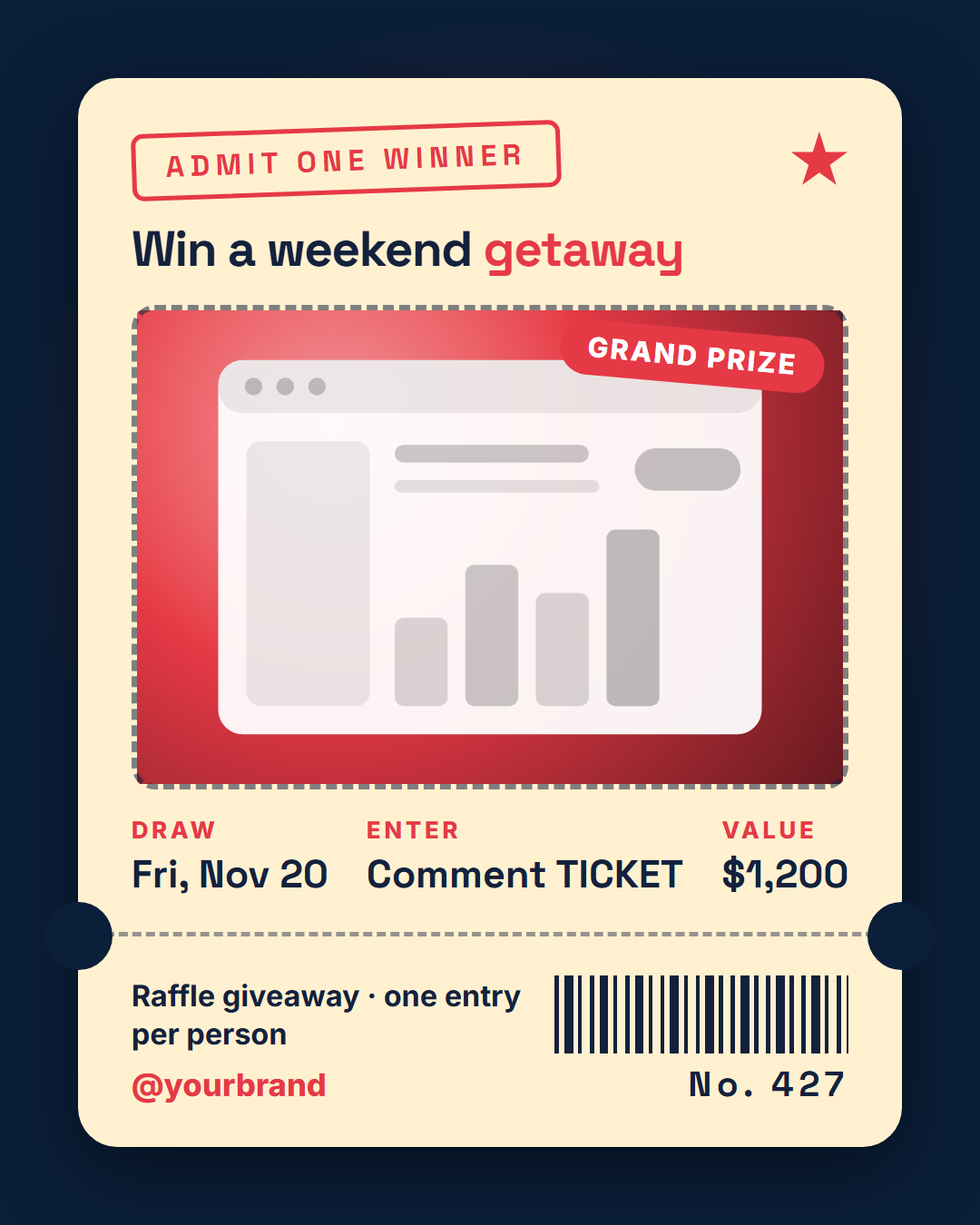
Create a 1080×1350 Instagram raffle-ticket giveaway post in plain HTML and CSS.

- A deep navy background (#0b1f3a) with a soft red radial glow behind the middle.
- One large cream (#fff1d0) ticket filling most of the canvas with rounded corners and a deep shadow. A horizontal dashed perforation line splits it into a main part and a short stub, with a round navy circle cut into each side of the perforation to look like notches.
- In the main part: a red outlined label "ADMIT ONE WINNER" (uppercase, wide letter-spacing, slightly rotated) with a small red star on the right; the headline "Win a weekend getaway" in Space Grotesk with "getaway" in red; a photo area with a dashed border and rounded corners holding the prize image (use a placeholder if none) with a red rounded "GRAND PRIZE" tag pinned to its top-right corner; and a row of three details with small red uppercase labels (Draw, Enter, Value) and bold values (Fri, Nov 20 / Comment TICKET / $1,200).
- In the stub: the line "Raffle giveaway · one entry per person", the brand handle in red, a barcode made with repeating-linear-gradient and the ticket number "No. 427" in letter-spaced type.
- Keep all text dark navy on cream and well inside the margins.
Want to tighten it up first? Run this prompt through the AI Prompt Studio to score it across 8 quality dimensions, catch anti-patterns, and tune the wording for Claude, ChatGPT, or Gemini before you paste it in.
What's included
Features
About this template
Raffle Ticket Giveaway Template — Admit-One Post for Prize Draws
A raffle ticket giveaway works because a ticket is something people want to hold. Raffle Ticket Giveaway is a free template that styles your prize draw as a cream admit-one ticket on deep navy, with cut-out notches, a perforated stub, a barcode and a ticket number.
A ticket with a prize on it
At the top an "Admit one winner" label is stamped in red, tilted slightly, beside a small star that turns in the animated export. Under it the prize headline ("Win a weekend *getaway*") has one word in ticket red. Below that, a photo area with a dashed border holds the prize, with a "Grand prize" tag pinned to its corner that wobbles. Until you add your own picture the area shows a placeholder, so the ticket already looks finished.
Three details where a ticket prints its seat
Under the photo, three small cells carry what entrants need most: when the draw is, how to enter and what the prize is worth. Each has a red label and a bold value ("Draw — Fri, Nov 20", "Enter — Comment TICKET", "Value — $1,200"). They are plain fields, so you can relabel them for a charity raffle, an event ticket draw or a "tag a friend" contest.
The perforated stub
A dashed perforation line with a round notch on each side separates the stub. It carries a short line ("Raffle giveaway · one entry per person"), your handle and optional logo, a barcode drawn in CSS and a ticket number that counts up in the video export. On the wide sizes the ticket turns sideways and the stub moves to the right.
Good for
Fundraiser raffles, event ticket giveaways, comment-to-enter contests and any draw where "one entry per person" is the rule. For the full entry rules, add the Giveaway Rules card, and announce the result with Giveaway Winner Reveal. Raffles and prize draws are regulated in many places, so check the rules that apply to you before you run one.
Why use it
Why Use the Raffle Ticket Giveaway Template
How it’s different
How It’s Different From Canva-Style Templates
Step by step
How to Use
- 1Pick the sizeChoose Portrait 4:5 (the Instagram feed default), Square, Story / Reel, Landscape 16:9 for X, a 1200×627 LinkedIn image or a 1000×1500 Pinterest pin. Raffle Ticket Giveaway opens at 1080×1350.
- 2Edit the textClick any text in the preview, or use the fields on the left (ticket label, prize headline, photo tag, detail 1 label and more). Wrap words in *asterisks* to colour them.
- 3Add your imagesClick a photo area in the preview or use Images to upload your prize photo and logo. Images stay in your browser.
- 4Match your brandApply your saved brand kit or one of 12 palettes, set exact colours, and choose heading and body fonts from any Google Font or your own uploaded font.
- 5Preview it in the feedSwitch the preview to Instagram, Story, X or LinkedIn to see the post with your name, handle and caption, and fix anything the quality checks flag.
- 6Download, save or bulk createDownload PNG, JPG or PDF, every size as a ZIP, or copy the HTML. Save it to My designs to reuse later, or turn a CSV into dozens of posts with Bulk create.
Real-world uses
Common Use Cases
Got questions?
Frequently Asked Questions
Open Raffle Ticket Giveaway, type the prize headline, upload the prize photo, fill in the draw date, how to enter and prize value, then download the 4:5 PNG for your feed or the 9:16 version for Stories.
In everyday use people mix the words. Legally they can differ, because a raffle where people pay to enter is treated as gambling in many places while a free prize draw is not. Check your local rules before you run one.
By default the draw date, how to enter and the prize value. They are ordinary text fields, so you can relabel them, for example "Where", "When" and "Prize" for an event.
No. It is decorative, drawn with CSS to make the stub look real. Do not use it for actual tickets or check-in.
Portrait post 1080×1350 (4:5): Instagram feed (recommended), Facebook and LinkedIn feeds, X portrait. Square post 1080×1080 (1:1): Instagram, Facebook, LinkedIn and X feeds. Story / Reel 1080×1920 (9:16): Instagram and Facebook Stories, Reel covers. Landscape post 1600×900 (16:9): X feed image, Facebook landscape. LinkedIn image 1200×627 (1.91:1): LinkedIn shared image and link posts, Facebook link images. Pinterest pin 1000×1500 (2:3): Pinterest standard pin (the recommended 2:3 ratio). Switch sizes in the editor and the layout adapts, or click "All sizes (ZIP)" to download every size at once.
Yes, free. Press Play in the editor to watch the animation, then open Export and download it as an animated MP4 (or WebM) for Reels, Stories and WhatsApp Status. PNG, JPG, PDF and HTML exports are free too.
Yes, and it is free. Choose Export, then "Bulk create from CSV", and paste rows from a spreadsheet or upload a CSV whose column names match the Raffle Ticket Giveaway fields. Every row becomes one post, and you download them all as a ZIP.
Yes. The preview switches between the plain design and mock-ups of an Instagram feed post, an Instagram Story, an X post and a LinkedIn post, using the name, handle and logo from your brand kit and the caption you type.
Yes. "Copy HTML" and "Download .html" give you one self-contained file: the markup, all the CSS and links to the Google Fonts it uses. "Fork to My Code" saves an editable copy in the UI Snippets editor. The file records the template name and version (v1.0.0).
Yes. It is free for personal and commercial posts, with no sign-up and no watermark. Everything runs in your browser and nothing you type or upload is sent to a server.