
Red Flag / Green Flag — Free Engagement Social Post Template
Engagement · v1.0.0 · Updated 2026-11-16 · Instagram, Facebook & X · HTML + CSS
Extend with AI
Take This Post Further With AI
Ask an AI assistant to adapt the Red Flag / Green Flag HTML and CSS: brainstorm sharp, specific flags for your industry, rewrite them as short punchy lines, or create a matching series for clients, employers and suppliers.
Prompt to recreate it
Copy this into your AI assistant of choice to build the effect from scratch, or as a jumping-off point for your own variant:
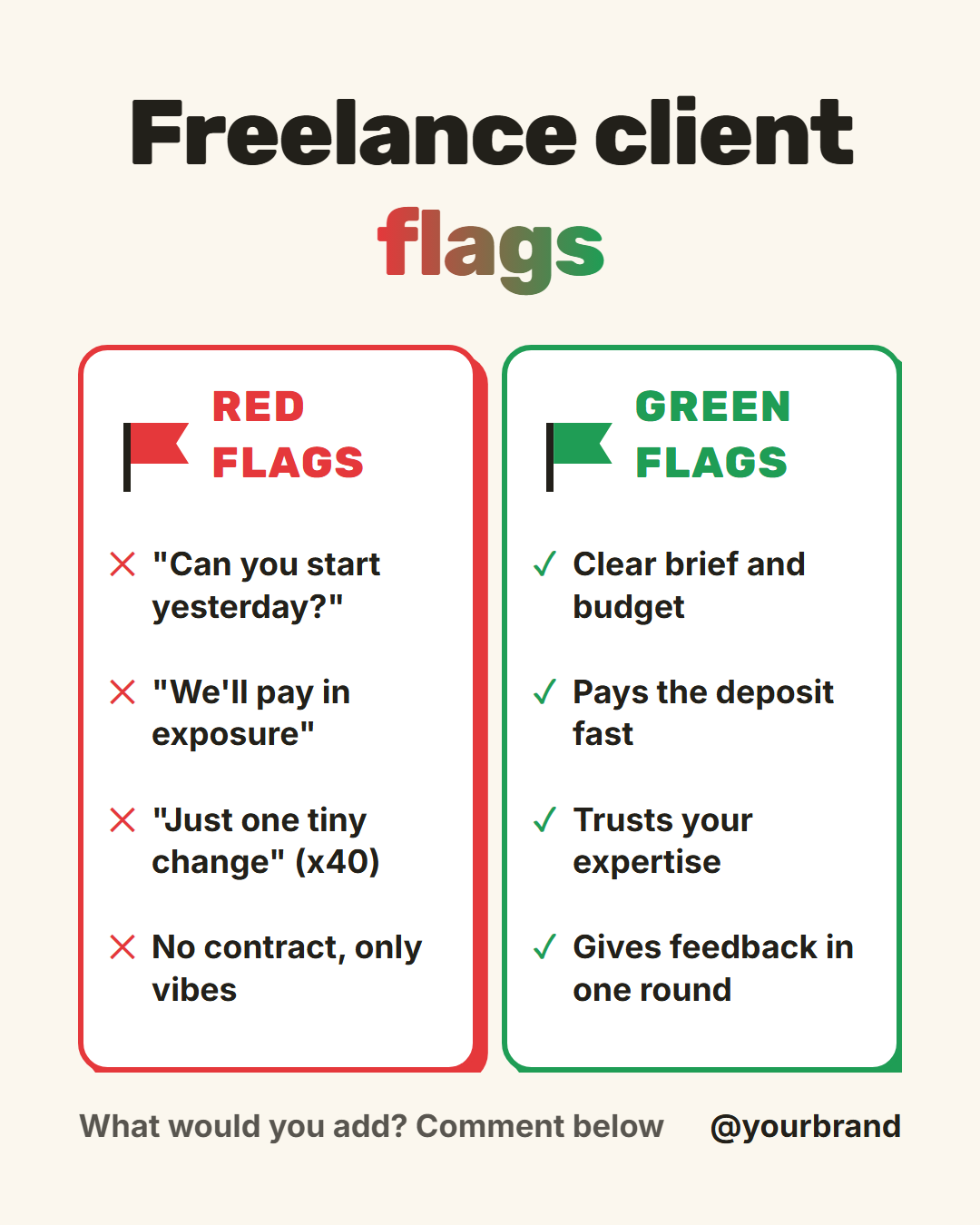
Create a 1080×1350 Instagram "red flags vs green flags" post in plain HTML and CSS.

- A warm cream background (#fbf7ee). A centred heavy headline at the top "Freelance client flags" in a bold rounded sans, with the word "flags" filled with a red-to-green gradient (background-clip text).
- Two equal cards side by side with a small gap. Each is a white rounded rectangle with a thick 4px border and a hard offset shadow in the same colour: red (#e5383b) on the left, green (#1f9d55) on the right.
- At the top of each card, a small flag (a pole made from a left border and a notched pennant made with clip-path) and an uppercase bold label, "Red flags" and "Green flags", in the card colour.
- Four short lines in each card, bold, with a red ✕ before the left lines and a green ✓ before the right lines. Left: "Can you start yesterday?", "We'll pay in exposure", "Just one tiny change (x40)", "No contract, only vibes". Right: "Clear brief and budget", "Pays the deposit fast", "Trusts your expertise", "Gives feedback in one round".
- At the bottom: a muted line "What would you add? Comment below" on the left and the brand handle on the right.
Want to tighten it up first? Run this prompt through the AI Prompt Studio to score it across 8 quality dimensions, catch anti-patterns, and tune the wording for Claude, ChatGPT, or Gemini before you paste it in.
What's included
Features
About this template
Red Flag / Green Flag Post Template — Two Lists, One Relatable Post
"Red flags" and "green flags" have become a shorthand everyone understands, which makes the pair a ready-made post format. Red Flag / Green Flag is a free template that puts both lists side by side so a viewer can read the warning signs and the good signs in one glance.
Two cards, two flags
A red card on the left and a green card on the right, each with a small flag that sways in the video export. Each card holds up to four items marked with a cross or a tick: a red "✕ We'll pay in exposure" opposite a green "✓ Pays the deposit fast". The hard offset shadows and thick coloured borders make the cards look like stickers, so the post feels playful rather than preachy.
Fits any niche
The labels are editable, so the same layout works for client red flags, job-interview red flags, product red flags, gym habits or relationship advice. Freelancers and agencies use it for client warning signs, recruiters for interview behaviour, and coaches for habits. If one side has only three items, clear the fourth and that row disappears without leaving a gap.
Why it earns comments
People recognise themselves in the list, and almost everyone has a red flag of their own to add. The closing prompt, "What would you add? Comment below", turns the post into a thread. The items slide in from the sides in the animated export, red from the left and green from the right.
Sizes and tone
The headline uses a red-to-green gradient on its key word, set on warm paper so the colours stand out. Use portrait for the feed and square for LinkedIn. For a longer list of ideas, try Mistakes to Avoid, and for a single strong opinion, Hot Take.
Why use it
Why Use the Red Flag / Green Flag Template
How it’s different
How It’s Different From Canva-Style Templates
Step by step
How to Use
- 1Pick the sizeChoose Portrait 4:5 (the Instagram feed default), Square, Story / Reel, Landscape 16:9 for X, a 1200×627 LinkedIn image or a 1000×1500 Pinterest pin. Red Flag / Green Flag opens at 1080×1350.
- 2Edit the textClick any text in the preview, or use the fields on the left (headline, red label, red 1, red 2 and more). Wrap words in *asterisks* to colour them.
- 3Add your imagesClick a photo area in the preview or use Images to upload your logo. Images stay in your browser.
- 4Match your brandApply your saved brand kit or one of 12 palettes, set exact colours, and choose heading and body fonts from any Google Font or your own uploaded font.
- 5Preview it in the feedSwitch the preview to Instagram, Story, X or LinkedIn to see the post with your name, handle and caption, and fix anything the quality checks flag.
- 6Download, save or bulk createDownload PNG, JPG or PDF, every size as a ZIP, or copy the HTML. Save it to My designs to reuse later, or turn a CSV into dozens of posts with Bulk create.
Real-world uses
Common Use Cases
Got questions?
Frequently Asked Questions
A red flag is a warning sign that something may be wrong. A green flag is a good sign. Together they make a quick, memorable way to compare behaviours, offers or choices.
Up to four per side. Leave one blank and it is removed. Short phrases work best, because the two cards sit next to each other and each line wraps at phone size.
Yes. Rename the card labels to "Do" and "Don't", "Myth" and "Fact" or "Before" and "After". The colours and markers still read clearly for any two-sided comparison.
The cards also differ by symbol (a cross and a tick), by label and by position, so the meaning does not depend on colour alone.
Us vs Them compares your offer to a typical alternative in a table. Red Flag / Green Flag is about behaviours and warning signs, written as short relatable lines, so it suits advice and opinion posts.
Portrait post 1080×1350 (4:5): Instagram feed (recommended), Facebook and LinkedIn feeds, X portrait. Square post 1080×1080 (1:1): Instagram, Facebook, LinkedIn and X feeds. Story / Reel 1080×1920 (9:16): Instagram and Facebook Stories, Reel covers. Landscape post 1600×900 (16:9): X feed image, Facebook landscape. LinkedIn image 1200×627 (1.91:1): LinkedIn shared image and link posts, Facebook link images. Pinterest pin 1000×1500 (2:3): Pinterest standard pin (the recommended 2:3 ratio). Switch sizes in the editor and the layout adapts, or click "All sizes (ZIP)" to download every size at once.
Yes, free. Press Play in the editor to watch the animation, then open Export and download it as an animated MP4 (or WebM) for Reels, Stories and WhatsApp Status. PNG, JPG, PDF and HTML exports are free too.
Yes, and it is free. Choose Export, then "Bulk create from CSV", and paste rows from a spreadsheet or upload a CSV whose column names match the Red Flag / Green Flag fields. Every row becomes one post, and you download them all as a ZIP.
Yes. The preview switches between the plain design and mock-ups of an Instagram feed post, an Instagram Story, an X post and a LinkedIn post, using the name, handle and logo from your brand kit and the caption you type.
Yes. "Copy HTML" and "Download .html" give you one self-contained file: the markup, all the CSS and links to the Google Fonts it uses. "Fork to My Code" saves an editable copy in the UI Snippets editor. The file records the template name and version (v1.0.0).
Yes. It is free for personal and commercial posts, with no sign-up and no watermark. Everything runs in your browser and nothing you type or upload is sent to a server.