


Animate Height Auto: CSS Details Accordion, No JavaScript
Animate Height Auto: CSS Details Accordion, No JavaScript · Navigation · Plain HTML, CSS & JS · Live preview
About this UI Snippet
The Accordion That Finally Animates to Height: Auto
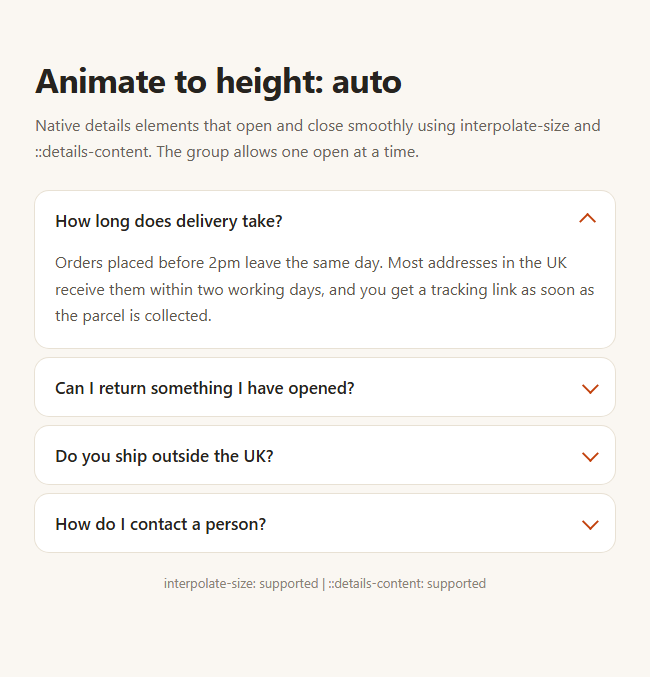
"How do I animate height auto" is one of the longest-running questions in CSS, because a browser could not interpolate between a length and a keyword. Two recent features end the workarounds: interpolate-size: allow-keywords lets height and block-size animate to auto, and the ::details-content pseudo-element exposes the part of a <details> that opens and closes. This snippet combines them into an FAQ accordion with no script.
Interpolate-size
Setting interpolate-size: allow-keywords on :root opts the page into animating intrinsic sizes. After that, a transition from block-size: 0 to block-size: auto interpolates to the real content height, whatever the text length or screen width. No measuring, no max-height guess, no wrapper.
::details-content
The browser wraps everything after the summary in a hidden box that you can style with .ad-item::details-content. The closed state sets block-size: 0, opacity: 0 and overflow: clip, and the [open] state sets block-size: auto. Adding content-visibility with allow-discrete keeps the content visible while it collapses.
Exclusive groups
Giving every <details> the same name makes the browser close the others when one opens, which used to need a click handler. Keyboard use, find-in-page and the Enter and Space keys on the summary all work natively.
Styling the summary
The default marker is removed and replaced with a chevron drawn from borders, which rotates with a transform when [open] is set. Hover and visible focus styles sit on the summary itself.
Support and fallback
Where either feature is missing the details still open and close correctly, without the animation. For more FAQ styles see accordion FAQ.
Accessibility and SEO
Because the answers are ordinary text inside <details>, crawlers and screen readers can read them whether the item is open or not, and the summary is announced as a disclosure with its expanded state. Pair it with FAQPage structured data if you use it on a real support page.
What's included
Features
Step by step
How to Use
- 1Opt in once on :rootinterpolate-size: allow-keywords lets the browser animate between 0 and the keyword auto. It is one declaration for the whole page.
- 2Style the content box that details hides.ad-item::details-content is the part that collapses. Set block-size: 0 and opacity: 0 when closed, block-size: auto and opacity: 1 when [open].
- 3Add content-visibility to the transitionInclude content-visibility with allow-discrete so the text stays visible while the box shrinks instead of vanishing at the start.
- 4Group items with a shared nameEvery details with name="ad-faq" belongs to one exclusive set: opening one closes the others, with no click handler.
- 5Allow several open at onceDelete the name attribute from the details elements and each one toggles independently.
- 6Redraw the chevronThe arrow is a bordered square rotated 45 degrees; it turns to -135 degrees under [open]. Swap in a plus or an SVG if you prefer.
Real-world uses
Common Use Cases
Got questions?
Frequently Asked Questions
Not the animation yet. interpolate-size and ::details-content ship in Chrome and Edge 131 and later. In other browsers the details still toggle with exclusive grouping, but they open instantly. That is a safe, usable fallback rather than a broken one.
Max-height needs a guessed number, so the speed is wrong and long content can be cut off. Animating block-size to auto uses the real height, works at every screen width and does not need a wrapper element or JavaScript measurement.
Remove the shared name attribute from the details elements. Each one then opens and closes on its own. Keep the name when you want a classic accordion where opening one closes the others.
Yes. It is announced as a disclosure with an expanded or collapsed state, and the summary is focusable and works with Enter and Space. Keep the summary text meaningful, and keep the visible focus outline.
Yes. While the Animate Height Auto: CSS Details Accordion, No JavaScript snippet gives you one pattern to copy, the free Responsive Navbar Builder at webdevpuneet.com/navbar-builder/ designs a whole navigation bar: logo, links and dropdown menus, a mobile hamburger menu (dropdown panel, slide-in drawer or full screen) and a scroll effect (sticky, shrink, hide on scroll or transparent). It has six presets, a live preview that runs the real code, and exports HTML + CSS + vanilla JS, React, Tailwind, Vue 3 or Angular — or you can click Fork & Edit to keep editing it in My Code.
Copy & paste
Source Code
<main class="ad-page">
  <h1>Animate to height: auto</h1>
  <p class="ad-sub">Native details elements that open and close smoothly using interpolate-size and ::details-content. The group allows one open at a time.</p>

  <div class="ad-list">
    <details class="ad-item" name="ad-faq" open>
      <summary>How long does delivery take?</summary>
      <div class="ad-body"><p>Orders placed before 2pm leave the same day. Most addresses in the UK receive them within two working days, and you get a tracking link as soon as the parcel is collected.</p></div>
    </details>
    <details class="ad-item" name="ad-faq">
      <summary>Can I return something I have opened?</summary>
      <div class="ad-body"><p>Yes, within 30 days. Keep the packaging if you can, add the order number to the label we email you, and the refund reaches your card within five working days of arriving back with us.</p></div>
    </details>
    <details class="ad-item" name="ad-faq">
      <summary>Do you ship outside the UK?</summary>
      <div class="ad-body"><p>We ship to 32 countries. Duties and taxes are shown at checkout before you pay, so there are no surprise charges on the doorstep. Delivery to the EU takes three to five working days.</p></div>
    </details>
    <details class="ad-item" name="ad-faq">
      <summary>How do I contact a person?</summary>
      <div class="ad-body"><p>Use the chat in the corner from 8am to 8pm, or email [email protected]. Replies on email usually arrive within a few hours on weekdays.</p></div>
    </details>
  </div>
</main>*{box-sizing:border-box;margin:0;padding:0}
body{font-family:system-ui,-apple-system,'Segoe UI',sans-serif;background:#faf7f2;color:#26231f;min-height:100vh}
.ad-page{max-width:620px;margin:0 auto;padding:56px 20px}
h1{font-size:clamp(26px,5vw,34px);letter-spacing:-.02em}
.ad-sub{margin:10px 0 28px;color:#6a645a;line-height:1.6}
.ad-list{display:grid;gap:10px}
.ad-item{background:#fff;border-radius:14px;box-shadow:0 0 0 1px #e8e1d4;overflow:clip}
/* 1. Let the browser animate to intrinsic sizes such as auto */
:root{interpolate-size:allow-keywords}
.ad-item summary{display:flex;justify-content:space-between;align-items:center;gap:16px;padding:18px 20px;font-weight:600;font-size:17px;cursor:pointer;list-style:none}
.ad-item summary::-webkit-details-marker{display:none}
.ad-item summary:hover{background:#faf6ee}
.ad-item summary:focus-visible{outline:3px solid #c2410c;outline-offset:-3px;border-radius:14px}
.ad-item summary::after{content:'';flex:none;width:10px;height:10px;border-right:2px solid #c2410c;border-bottom:2px solid #c2410c;transform:rotate(45deg) translateY(-2px);transition:transform .3s ease}
.ad-item[open] summary::after{transform:rotate(-135deg) translateY(-2px)}
/* 2. The content box that details shows and hides: closed = 0 height, open = auto */
.ad-item::details-content{block-size:0;opacity:0;overflow:clip;transition:block-size .35s ease,opacity .35s ease,content-visibility .35s allow-discrete}
.ad-item[open]::details-content{block-size:auto;opacity:1}
.ad-body{padding:0 20px 20px;color:#5c564c;line-height:1.65}
/* Fallback for browsers without ::details-content: a grid-rows trick would need extra markup,
so these simply open and close without animation. */
@media (prefers-reduced-motion:reduce){.ad-item::details-content,.ad-item summary::after{transition:none}}// No JavaScript is needed for the animation or for the one-open-at-a-time behaviour:
// - details name="ad-faq" makes the group exclusive (native accordion).
// - interpolate-size + ::details-content animate the height.
// This only reports which features the current browser has.
var checks = {
'interpolate-size': CSS.supports('interpolate-size', 'allow-keywords'),
'::details-content': CSS.supports('selector(::details-content)')
};
var note = document.createElement('p');
note.style.cssText = 'margin-top:22px;font-size:13px;color:#8a8376;text-align:center';
note.textContent = Object.keys(checks).map(function (k) { return k + ': ' + (checks[k] ? 'supported' : 'not supported'); }).join(' | ');
document.querySelector('.ad-page').appendChild(note);Extend with AI
Take This Snippet Further With AI
Paste this snippet into an AI coding assistant and ask it to explain how interpolate-size and ::details-content make the height animation work, and what the name attribute does. Useful follow-ups: add a plus and minus icon, add an Expand all button for non-exclusive mode, or open the item that matches the URL hash. Ask it to keep reduced-motion support.
Prompt to recreate it
Copy this into your AI assistant of choice to build the effect from scratch, or as a jumping-off point for your own variant:
Build an FAQ accordion with smooth height animation using only native details elements and modern CSS.

Requirements:
- Four <details class="ad-item" name="ad-faq"> elements (first open), each with a <summary> question and a content div with a paragraph answer. The shared name makes the group exclusive.
- On :root set interpolate-size: allow-keywords. Style .ad-item::details-content with block-size: 0, opacity: 0, overflow: clip and a transition on block-size, opacity and content-visibility (allow-discrete); in the [open] state set block-size: auto and opacity: 1.
- Remove the default marker, draw a chevron with borders on summary::after and rotate it when open. Add hover and a visible focus outline on the summary.
- Cards with a soft border, rounded corners and spacing between items. Use fictional shop FAQ copy.
- A small script that lists whether interpolate-size and ::details-content are supported.
- Respect prefers-reduced-motion and work at phone width.
Want to tighten it up first? Run this prompt through the AI Prompt Studio to score it across 8 quality dimensions, catch anti-patterns, and tune the wording for Claude, ChatGPT, or Gemini before you paste it in.