

Bootstrap Deployment Status Panel — Free HTML CSS JS Snippet
Bootstrap Deployment Status Panel · Dashboards · Plain HTML, CSS & JS · Live preview
Copy & paste
Source Code
<div class="container py-5 d-flex justify-content-center">
<div class="card bsdeploy-card">
<div class="card-body p-3">
<div class="d-flex justify-content-between align-items-center mb-3">
<h6 class="fw-bold mb-0">Deploy #482</h6>
<button type="button" class="btn btn-sm btn-outline-secondary" id="bsdeployRestart">Restart demo</button>
</div>
<div class="bsdeploy-stages" id="bsdeployStages"></div>
<p class="small mt-3 mb-0" id="bsdeployStatus"> </p>
</div>
</div>
</div>.bsdeploy-card { width: 420px; max-width: 100%; border: 1px solid #eceef1; border-radius: 14px; }
.bsdeploy-stages { display: flex; flex-direction: column; gap: 4px; }
.bsdeploy-stage { display: flex; align-items: center; gap: 10px; padding: 8px 6px; border-radius: 8px; }
.bsdeploy-dot {
width: 22px; height: 22px; border-radius: 50%; flex-shrink: 0;
display: flex; align-items: center; justify-content: center; font: 700 11px sans-serif;
background: #eceef3; color: #9ca3af;
}
.bsdeploy-stage-done .bsdeploy-dot { background: #198754; color: #fff; }
.bsdeploy-stage-active .bsdeploy-dot { background: #f5a623; color: #fff; animation: bsdeploy-pulse 1s ease-in-out infinite; }
.bsdeploy-stage-failed .bsdeploy-dot { background: #dc3545; color: #fff; }
@keyframes bsdeploy-pulse { 0%, 100% { opacity: 1; } 50% { opacity: .5; } }
.bsdeploy-name { font-size: 13px; font-weight: 600; }
.bsdeploy-stage-pending .bsdeploy-name { color: #9ca3af; font-weight: 500; }const STAGES = ['Build', 'Test', 'Staging', 'Production'];
// This attempt is scripted to fail at Staging so the failure/retry path is
// always reachable in this preview; a real pipeline's outcome per stage
// would come from actual CI/CD job results instead.
const FAIL_AT = 2;
const container = document.getElementById('bsdeployStages');
const status = document.getElementById('bsdeployStatus');
let stageStatus = STAGES.map(() => 'pending');
let timer = null;
function render() {
container.innerHTML = STAGES.map((name, i) => {
const st = stageStatus[i];
const icon = st === 'done' ? '\u2713' : st === 'failed' ? '\u2715' : String(i + 1);
return '<div class="bsdeploy-stage bsdeploy-stage-' + st + '">' +
'<div class="bsdeploy-dot">' + icon + '</div>' +
'<div class="bsdeploy-name">' + name + '</div>' +
'</div>';
}).join('');
}
function run(attempt) {
clearInterval(timer);
stageStatus = STAGES.map(() => 'pending');
render();
status.textContent = 'Deploying...';
status.className = 'small mt-3 mb-0 text-muted';
let i = 0;
stageStatus[0] = 'active';
render();
timer = setInterval(() => {
const failing = i === FAIL_AT && attempt === 1;
stageStatus[i] = failing ? 'failed' : 'done';
if (failing) {
clearInterval(timer);
render();
status.innerHTML = STAGES[i] + ' failed. <button type="button" class="btn btn-sm btn-link p-0" id="bsdeployRetry">Retry deploy</button>';
status.className = 'small mt-3 mb-0 text-danger fw-semibold';
document.getElementById('bsdeployRetry').addEventListener('click', () => run(attempt + 1));
return;
}
i++;
if (i >= STAGES.length) {
clearInterval(timer);
render();
status.textContent = 'Deployed to Production.';
status.className = 'small mt-3 mb-0 text-success fw-semibold';
return;
}
stageStatus[i] = 'active';
render();
}, 900);
}
document.getElementById('bsdeployRestart').addEventListener('click', () => run(1));
run(1);Extend with AI
Take This Snippet Further With AI
The AI prompt for this one is for Patreon supporters ($3 a month, 7 days free), along with a site with no ads. Supporters enter the passcode once and it is remembered in this browser.
What's included
Features
About this UI Snippet
Bootstrap Deployment Status Panel — HTML, CSS & JavaScript
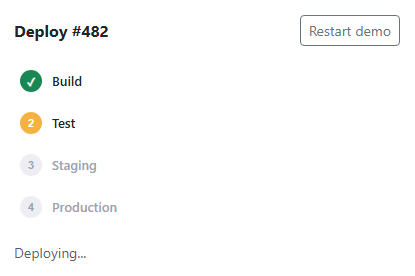
Every stage's status lives in one stageStatus array, one entry per pipeline stage, each holding 'pending', 'active', 'done', or 'failed' — render() is the single function mapping that array to markup, so the dots, colors, and checkmarks/x-marks are always a direct reflection of the array's current contents rather than separately toggled classes that could drift.
This demo scripts the first attempt to fail specifically at the Staging stage (FAIL_AT, checked against attempt === 1) so the failure state and its Retry action are actually reachable without needing a lucky outcome, matching the same guaranteed-first-failure technique used in bootstrap-data-table-error-state. Retry calls run(attempt + 1), the exact same function the initial deploy uses, which is what resets every stage back to pending and replays the whole pipeline from Build — a real CI/CD retry rarely resumes from the exact point of failure, it restarts the pipeline.
Only one stage is ever 'active' at a time, and stages complete strictly in order — the interval driving the pipeline only advances to the next stage's index after marking the current one 'done', so there's no way for, say, Staging to show as active while Test still shows pending.
Step by step
How to Use
- 1Load the snippetThe pipeline starts automatically — Build shows an animated, pulsing amber dot as the active stage.
- 2Watch it progressBuild and Test complete in order, each turning to a solid green checkmark before the next stage activates.
- 3Watch it fail at StagingThe Staging dot turns red with an X, and the status line offers a "Retry deploy" action.
- 4Click "Retry deploy"Every stage resets to pending and the whole pipeline replays from Build — this time completing successfully all the way through Production.
- 5Click "Restart demo"The pipeline runs again from the very first attempt, failing at Staging exactly as before.
Real-world uses
Common Use Cases
Got questions?
Frequently Asked Questions
So the failure state and Retry button are guaranteed to be visible in this preview, rather than depending on chance; a real implementation should reflect each stage's actual CI/CD job outcome instead of a scripted failure.
It restarts the entire pipeline from Build — this mirrors how most real CI/CD systems handle a retry, since a failed stage often means the environment or artifacts from earlier stages may also need to be regenerated.
No — the interval driving the pipeline only ever marks the next stage active after the current one finishes, so exactly one stage (or zero, once the pipeline finishes or fails) is ever in the active state at a time.
Yes. Keep stageStatus as an array in component state, update it via your framework's state-setting pattern on each interval tick, and derive each stage's dot color/icon from its current value in the render function.