


Bootstrap Version History Panel — Free HTML CSS JS Snippet
Bootstrap Version History Panel · Dashboards · Plain HTML, CSS & JS · Live preview
Copy & paste
Source Code
<div class="container py-5 d-flex justify-content-center">
  <div class="card bsver-card">
    <div class="card-body p-3">
      <h6 class="fw-bold mb-2">Version history</h6>
      <ul class="list-unstyled mb-0" id="bsverList"></ul>
    </div>
  </div>
</div>

<div class="modal fade" id="bsverModal" tabindex="-1" aria-hidden="true">
  <div class="modal-dialog modal-dialog-centered">
    <div class="modal-content">
      <div class="modal-header">
        <h5 class="modal-title fw-bold">Restore this version?</h5>
        <button type="button" class="btn-close" data-bs-dismiss="modal"></button>
      </div>
      <div class="modal-body">
        <p class="mb-0" id="bsverModalBody"></p>
      </div>
      <div class="modal-footer">
        <button type="button" class="btn btn-outline-secondary" data-bs-dismiss="modal">Cancel</button>
        <button type="button" class="btn btn-dark fw-bold" id="bsverConfirm">Restore</button>
      </div>
    </div>
  </div>
</div>
.bsver-card { width: 400px; max-width: 100%; border: 1px solid #eceef1; border-radius: 14px; }
.bsver-row { display: flex; justify-content: space-between; align-items: center; padding: 9px 0; border-bottom: 1px solid #f1f2f5; font-size: 13px; }
.bsver-row:last-child { border-bottom: none; }
.bsver-current { color: #198754; font-weight: 700; }
.bsver-meta { color: #9ca3af; font-size: 11.5px; }const VERSIONS = [
{ id: 5, author: 'Dana Reyes', time: 'Just now', summary: 'Fixed hero copy typo' },
{ id: 4, author: 'Marcus Lee', time: '2 hours ago', summary: 'Updated pricing table' },
{ id: 3, author: 'Sofia Chen', time: 'Yesterday', summary: 'Added testimonials section' },
{ id: 2, author: 'Dana Reyes', time: '3 days ago', summary: 'Rewrote intro paragraph' },
{ id: 1, author: 'Marcus Lee', time: '1 week ago', summary: 'Initial draft' },
];
const list = document.getElementById('bsverList');
const modal = new bootstrap.Modal(document.getElementById('bsverModal'));
const modalBody = document.getElementById('bsverModalBody');
const confirmBtn = document.getElementById('bsverConfirm');
let versions = VERSIONS.map(v => ({ ...v }));
let currentId = versions[0].id;
let pendingRestoreId = null;
function render() {
list.innerHTML = versions.map(v => {
const isCurrent = v.id === currentId;
return '<li class="bsver-row" data-id="' + v.id + '">' +
'<div>' +
'<div class="' + (isCurrent ? 'bsver-current' : '') + '">v' + v.id + (isCurrent ? ' (current)' : '') + ' — ' + v.summary + '</div>' +
'<div class="bsver-meta">' + v.author + ' · ' + v.time + '</div>' +
'</div>' +
(isCurrent ? '' : '<button type="button" class="btn btn-sm btn-link p-0 bsver-restore" data-id="' + v.id + '">Restore</button>') +
'</li>';
}).join('');
}
list.addEventListener('click', e => {
const btn = e.target.closest('.bsver-restore');
if (!btn) return;
pendingRestoreId = Number(btn.dataset.id);
const v = versions.find(x => x.id === pendingRestoreId);
modalBody.textContent = 'This replaces the current content with v' + v.id + ' ("' + v.summary + '"), authored by ' + v.author + '.';
modal.show();
});
confirmBtn.addEventListener('click', () => {
currentId = pendingRestoreId;
render();
modal.hide();
});
render();Extend with AI
Take This Snippet Further With AI
The AI prompt for this one is for Patreon supporters ($3 a month, 7 days free), along with a site with no ads. Supporters enter the passcode once and it is remembered in this browser.
What's included
Features
About this UI Snippet
Bootstrap Version History Panel — HTML, CSS & JavaScript
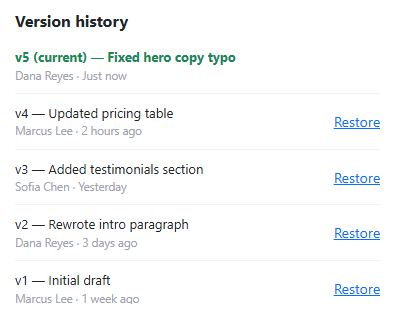
The "current" state isn't a property baked into any one version — it's a single currentId variable compared against every version's id at render time, which is what makes restoring an older version as simple as reassigning currentId and re-rendering, with the "current" badge and the missing Restore button both automatically following that reassignment on whichever row now matches.
The current version deliberately has no Restore button of its own — isCurrent ? '' : '...button...' withholds it, since restoring the version you're already on is a meaningless action a real interface shouldn't offer at all, rather than offering it and having it silently do nothing.
Restoring is a genuine two-step confirmation: clicking "Restore" on a row stores pendingRestoreId and opens a modal whose message is generated from that specific version's real summary and author, not a generic "are you sure?" — only clicking "Restore" inside the modal actually reassigns currentId. That separation matters because restoring an old version is inherently destructive to whatever's currently live, the same reasoning behind gating deletion behind a confirmation elsewhere in this collection.
Step by step
How to Use
- 1Load the snippetVersion 5 is marked "(current)" in green with no Restore button; every older version has one.
- 2Click "Restore" on version 3A modal opens naming exactly what v3 contains and who authored it, asking for confirmation.
- 3Click "Restore" inside the modalVersion 3 becomes marked "(current)", and it now has no Restore button — the same logic that applied to v5 originally.
- 4Click "Restore" on version 5 (the one that used to be current)It works the same way — restoring is fully reversible in the sense that any version can become current again.
- 5Open the restore confirmation and click "Cancel" insteadNothing changes — the current version stays exactly as it was.
Real-world uses
Common Use Cases
Got questions?
Frequently Asked Questions
Yes — currentId is just a plain comparison value, not a one-way flag, so any version (including the one that was current before the last restore) can be restored to at any time.
Nothing — currentId is only ever reassigned inside the modal's own Restore button handler, so dismissing or cancelling the modal leaves the current version completely untouched.
Restoring the version that's already current is a no-op that shouldn't be presented as an available action — omitting the button entirely is clearer than showing one that would do nothing.
Yes. Keep the versions array and currentId in component state, derive each row's "current" and Restore-button-visibility from a comparison in the render function, and manage the confirmation modal's open state and pending version id the same way.