






Canvas Fluid Cursor Trail — Free Soft Blended Trail Snippet
Canvas Fluid Cursor Trail · Animations · Plain HTML, CSS & JS · Live preview
Copy & paste
Source Code
<div class="fc-wrap">
  <canvas id="fcCanvas" class="fc-canvas"></canvas>
  <p class="fc-hint">Move your cursor across the panel.</p>
</div>*{box-sizing:border-box;margin:0;padding:0}
body{font-family:system-ui,-apple-system,sans-serif;background:#050609;color:#fff;min-height:100vh;display:flex;align-items:center;justify-content:center;padding:24px}
.fc-wrap{display:flex;flex-direction:column;align-items:center;gap:14px;width:min(720px,96vw)}
.fc-canvas{width:100%;aspect-ratio:16/9;background:#05060a;border-radius:20px;border:1px solid rgba(255,255,255,.08);display:block;cursor:none}
.fc-hint{color:#6b7284;font-size:12px;letter-spacing:.04em}const canvas = document.getElementById('fcCanvas');
const ctx = canvas.getContext('2d');
let width, height, dpr;
let blobs = [];
let pointer = { x: 0, y: 0, active: false };
let lastPointer = { x: 0, y: 0 };
function resize() {
dpr = Math.min(window.devicePixelRatio || 1, 2);
width = canvas.clientWidth;
height = canvas.clientHeight;
canvas.width = width * dpr;
canvas.height = height * dpr;
ctx.setTransform(dpr, 0, 0, dpr, 0, 0);
}
function pointerPos(e) {
const rect = canvas.getBoundingClientRect();
const t = e.touches ? e.touches[0] : e;
return { x: t.clientX - rect.left, y: t.clientY - rect.top };
}
canvas.addEventListener('mousemove', e => {
pointer = { ...pointerPos(e), active: true };
});
canvas.addEventListener('mouseleave', () => { pointer.active = false; });
canvas.addEventListener('touchmove', e => {
pointer = { ...pointerPos(e), active: true };
}, { passive: true });
function spawnBlob() {
const vx = pointer.x - lastPointer.x;
const vy = pointer.y - lastPointer.y;
const speed = Math.min(Math.hypot(vx, vy), 40);
blobs.push({
x: pointer.x,
y: pointer.y,
vx: vx * 0.15,
vy: vy * 0.15,
r: 10 + speed * 0.6,
stretch: 1 + speed * 0.03,
angle: Math.atan2(vy, vx),
life: 1,
hue: 200 + (speed * 3) % 120
});
lastPointer = { x: pointer.x, y: pointer.y };
}
function tick() {
ctx.globalCompositeOperation = 'source-over';
ctx.fillStyle = 'rgba(5,6,10,0.14)';
ctx.fillRect(0, 0, width, height);
if (pointer.active) spawnBlob();
ctx.globalCompositeOperation = 'lighter';
blobs.forEach(b => {
b.x += b.vx;
b.y += b.vy;
b.vx *= 0.94;
b.vy *= 0.94;
b.life -= 0.02;
ctx.save();
ctx.translate(b.x, b.y);
ctx.rotate(b.angle);
ctx.scale(b.stretch, 1);
const grad = ctx.createRadialGradient(0, 0, 0, 0, 0, b.r);
grad.addColorStop(0, 'hsla(' + b.hue + ',90%,70%,' + (0.5 * b.life) + ')');
grad.addColorStop(1, 'hsla(' + b.hue + ',90%,60%,0)');
ctx.fillStyle = grad;
ctx.beginPath();
ctx.arc(0, 0, b.r, 0, Math.PI * 2);
ctx.fill();
ctx.restore();
});
blobs = blobs.filter(b => b.life > 0);
ctx.globalCompositeOperation = 'source-over';
requestAnimationFrame(tick);
}
resize();
window.addEventListener('resize', resize);
tick();Extend with AI
Take This Snippet Further With AI
The AI prompt for this one is for Patreon supporters ($3 a month), along with a site with no ads. Supporters enter the passcode once and it is remembered in this browser.
What's included
Features
About this UI Snippet
Canvas Fluid Cursor Trail — A Lightweight, Glowing Cursor Trail
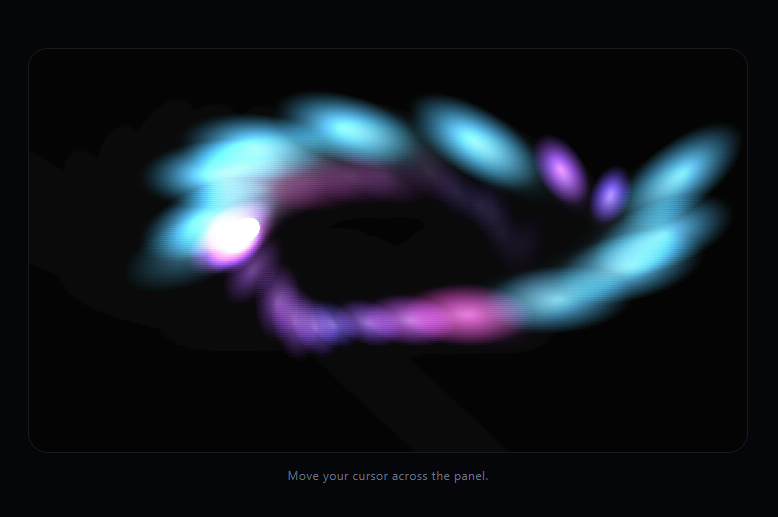
The fluid cursor trail snippet follows your cursor with a soft, glowing streak of blended blobs that stretch along your movement direction and fade out behind you. It's worth being upfront about what this is and isn't: it's a tasteful *approximation* of a fluid look, built from layered radial gradients, velocity-based stretching, and additive blending on the Canvas 2D API — not a real Navier-Stokes fluid simulation, and it doesn't need to be one to look good.
Velocity, not just position, drives the shape
Every pointer move, spawnBlob() compares the current pointer position to the last recorded one to get a velocity vector. That velocity feeds three things at once: the blob's own drift (vx * 0.15), its stretch factor (faster movement elongates the blob along the direction of travel via ctx.rotate + ctx.scale), and its hue, so quick flicks read visually differently from slow, deliberate movement.
Additive blending is what makes it glow
Each blob is drawn with ctx.globalCompositeOperation = 'lighter', which adds color values where blobs overlap instead of simply layering opaque shapes on top of each other. Where several fresh, bright blobs overlap near the cursor, colors blow out toward white-hot; where they're sparse and faded, they stay a soft, dim glow — that additive overlap is most of what sells the "fluid" read, along with the radial gradient giving each blob a soft falloff instead of a hard edge.
The trail fades via a translucent overlay, not per-blob alpha alone
Instead of clearing the canvas every frame, tick() paints a low-opacity dark rectangle over the whole canvas (rgba(5,6,10,0.14)) before drawing new blobs. That partial-opacity wash is what leaves old blobs visibly lingering and dimming across several frames — a cheap way to get a persistent trail without storing and re-rendering a history array of past frames.
Individually aging, independently moving blobs
Each blob is a plain object with its own position, velocity (with damping via *= 0.94), lifespan, size, and hue, pushed into a blobs array and filtered out once its life reaches zero. There's no shared physics grid or pressure field — this is closer to a lightweight particle system tuned to look fluid-ish than a genuine fluid solver, and that honesty is intentional: it stays fast and dependency-free.
Customizing it
Adjust the fade rectangle's opacity for a longer or shorter trail, tune the hue formula for a different palette, or change globalCompositeOperation to 'screen' or 'overlay' for a different blend character. Pair it with particle network or starfield for other ambient canvas backgrounds, or canvas ripple click effect for a click-driven companion interaction.
Step by step
How to Use
- 1Paste HTML, CSS, and JSA canvas panel and hint text render.
- 2Move the cursor over the panelA glowing, stretched blob trail follows it.
- 3Move quicklyBlobs stretch and shift hue with higher velocity.
- 4Hold stillThe trail fades out and stops growing.
- 5Leave the panelNew blobs stop spawning until the cursor re-enters.
- 6Resize the windowThe canvas adapts to the new panel size.
Real-world uses
Common Use Cases
Got questions?
Frequently Asked Questions
No, and it's not trying to be. A genuine fluid simulation solves the Navier-Stokes equations across a velocity field, which is significantly more expensive to compute. This snippet approximates a fluid look using layered, velocity-stretched radial gradients and additive blending — a lightweight visual trick that looks fluid-ish without the underlying physics.
Two things together: ctx.globalCompositeOperation = 'lighter' adds overlapping colors rather than layering opaque shapes, so dense clusters of blobs near the cursor blow out brighter; and each blob is drawn as a radial gradient fading to transparent, giving it a soft, glowing edge instead of a hard circle outline.
Instead of clearing the canvas each frame, tick() paints a low-opacity dark rectangle over the entire canvas before drawing new blobs. That partial wash slightly dims everything already there on every frame, so older blobs visibly fade over several frames — a much cheaper approach than storing and re-rendering a growing history of past positions.
Blob size, stretch factor, and hue are all derived from the pointer's velocity between frames. Faster movement produces larger, more elongated blobs with a shifted hue, while slow, deliberate movement produces smaller, rounder, more static-colored blobs — that's what gives fast flicks and slow drags visually distinct trails.
Move the canvas setup, pointer listeners, and animation loop into a mount effect scoped to a canvas ref, and cancel the requestAnimationFrame loop plus remove event listeners in the cleanup function. Keep the blobs array and pointer state outside of component re-renders (in refs) so the animation loop doesn't get recreated on every render.