

Copy & paste
Source Code
<div class="page">
<div class="backdrop" id="backdrop"></div>
<div class="banner" id="banner">
<div class="banner-left">
<svg width="22" height="22" viewBox="0 0 24 24" fill="none" stroke="currentColor" stroke-width="2"><circle cx="12" cy="12" r="10"/><circle cx="9" cy="9" r="1.5" fill="currentColor"/><circle cx="15" cy="9" r="1" fill="currentColor"/><circle cx="10" cy="14" r="1" fill="currentColor"/><circle cx="14" cy="13" r="1.5" fill="currentColor"/></svg>
<div>
<div class="banner-title">We use cookies</div>
<div class="banner-sub">We use cookies to personalise content and ads, analyse traffic, and improve your experience.</div>
</div>
</div>
<div class="banner-btns">
<button class="btn-pref" onclick="openModal()">Manage Preferences</button>
<button class="btn-reject" onclick="reject()">Reject All</button>
<button class="btn-accept" onclick="acceptAll()">Accept All</button>
</div>
</div>
<div class="modal" id="modal" style="display:none">
<div class="modal-box">
<div class="modal-head">
<h2 class="modal-title">Cookie Preferences</h2>
<button class="modal-close" onclick="closeModal()">
<svg width="16" height="16" viewBox="0 0 24 24" fill="none" stroke="currentColor" stroke-width="2.5"><line x1="18" y1="6" x2="6" y2="18"/><line x1="6" y1="6" x2="18" y2="18"/></svg>
</button>
</div>
<p class="modal-desc">Choose which cookies you allow us to use. You can change these preferences at any time.</p>
<div class="pref-list">
<div class="pref-row required">
<div class="pref-info">
<div class="pref-name">Essential Cookies <span class="required-badge">Required</span></div>
<div class="pref-desc">Necessary for the website to function correctly. Cannot be disabled.</div>
</div>
<label class="toggle disabled"><input type="checkbox" checked disabled><span class="track"></span></label>
</div>
<div class="pref-row">
<div class="pref-info">
<div class="pref-name">Analytics Cookies</div>
<div class="pref-desc">Help us understand how visitors interact with the site (Google Analytics, Hotjar).</div>
</div>
<label class="toggle"><input type="checkbox" id="analytics" checked><span class="track"></span></label>
</div>
<div class="pref-row">
<div class="pref-info">
<div class="pref-name">Marketing Cookies</div>
<div class="pref-desc">Used to show personalised ads and track campaigns across platforms.</div>
</div>
<label class="toggle"><input type="checkbox" id="marketing"><span class="track"></span></label>
</div>
<div class="pref-row">
<div class="pref-info">
<div class="pref-name">Preference Cookies</div>
<div class="pref-desc">Remember your settings like language, region, and display preferences.</div>
</div>
<label class="toggle"><input type="checkbox" id="preferences" checked><span class="track"></span></label>
</div>
</div>
<div class="modal-footer">
<button class="btn-reject-sm" onclick="reject()">Reject All</button>
<button class="btn-save" onclick="savePrefs()">Save Preferences</button>
<button class="btn-accept" onclick="acceptAll()">Accept All</button>
</div>
</div>
</div>
<div class="page-content">
<h1>Demo Page</h1>
<p>This page shows a cookie banner at the bottom. Click "Manage Preferences" to open the cookie preferences modal.</p>
<div class="status-box" id="statusBox" style="display:none">
<div class="status-icon">✓</div>
<div id="statusMsg"></div>
</div>
</div>
</div>* { box-sizing: border-box; margin: 0; padding: 0; }
body { font-family: system-ui, sans-serif; background: #f8fafc; min-height: 100vh; }
.page { min-height: 100vh; }
.page-content { max-width: 600px; margin: 0 auto; padding: 60px 20px; }
.page-content h1 { font-size: 28px; font-weight: 800; color: #0f172a; margin-bottom: 12px; }
.page-content p { font-size: 15px; color: #64748b; line-height: 1.7; }
.status-box { display: flex; align-items: center; gap: 12px; margin-top: 24px; background: #f0fdf4; border: 1px solid #bbf7d0; border-radius: 12px; padding: 14px 18px; color: #16a34a; font-size: 14px; font-weight: 600; }
.status-icon { font-size: 18px; }
.backdrop { position: fixed; inset: 0; background: rgba(0,0,0,0.45); display: none; z-index: 100; }
.backdrop.show { display: block; }
.banner { position: fixed; bottom: 20px; left: 50%; transform: translateX(-50%); width: calc(100% - 40px); max-width: 860px; background: #1e293b; border-radius: 16px; padding: 18px 20px; display: flex; align-items: center; justify-content: space-between; gap: 16px; flex-wrap: wrap; z-index: 200; box-shadow: 0 8px 40px rgba(0,0,0,0.3); }
.banner-left { display: flex; align-items: flex-start; gap: 14px; flex: 1; color: #e2e8f0; min-width: 200px; }
.banner-title { font-size: 14px; font-weight: 700; color: #f8fafc; margin-bottom: 3px; }
.banner-sub { font-size: 12px; color: #94a3b8; line-height: 1.5; }
.banner-btns { display: flex; gap: 8px; flex-wrap: wrap; flex-shrink: 0; }
.btn-pref { background: none; border: 1px solid #475569; color: #94a3b8; padding: 8px 14px; border-radius: 8px; font-size: 13px; cursor: pointer; transition: all 0.15s; white-space: nowrap; }
.btn-pref:hover { border-color: #94a3b8; color: #f8fafc; }
.btn-reject { background: none; border: 1px solid #475569; color: #94a3b8; padding: 8px 14px; border-radius: 8px; font-size: 13px; cursor: pointer; transition: all 0.15s; white-space: nowrap; }
.btn-reject:hover { border-color: #94a3b8; color: #f8fafc; }
.btn-accept { background: #6366f1; border: none; color: #fff; padding: 8px 18px; border-radius: 8px; font-size: 13px; font-weight: 700; cursor: pointer; transition: background 0.15s; white-space: nowrap; }
.btn-accept:hover { background: #4f46e5; }
.modal { position: fixed; inset: 0; display: flex; align-items: center; justify-content: center; z-index: 300; padding: 20px; }
.modal-box { background: #fff; border-radius: 20px; max-width: 520px; width: 100%; max-height: 90vh; overflow-y: auto; box-shadow: 0 24px 80px rgba(0,0,0,0.25); }
.modal-head { display: flex; align-items: center; justify-content: space-between; padding: 24px 24px 0; }
.modal-title { font-size: 18px; font-weight: 800; color: #0f172a; }
.modal-close { background: none; border: 1px solid #e2e8f0; color: #94a3b8; width: 32px; height: 32px; border-radius: 8px; cursor: pointer; display: flex; align-items: center; justify-content: center; transition: all 0.15s; }
.modal-close:hover { background: #f1f5f9; color: #475569; }
.modal-desc { font-size: 13px; color: #64748b; padding: 12px 24px 0; line-height: 1.6; }
.pref-list { padding: 16px 24px; display: flex; flex-direction: column; gap: 0; }
.pref-row { display: flex; align-items: center; justify-content: space-between; gap: 16px; padding: 16px 0; border-bottom: 1px solid #f1f5f9; }
.pref-row:last-child { border-bottom: none; }
.pref-info { flex: 1; }
.pref-name { font-size: 14px; font-weight: 600; color: #1e293b; margin-bottom: 3px; display: flex; align-items: center; gap: 8px; }
.required-badge { font-size: 10px; font-weight: 700; background: rgba(99,102,241,0.1); color: #6366f1; padding: 1px 7px; border-radius: 10px; }
.pref-desc { font-size: 12px; color: #94a3b8; line-height: 1.5; }
.toggle { position: relative; width: 44px; height: 24px; flex-shrink: 0; }
.toggle input { opacity: 0; width: 0; height: 0; }
.track { position: absolute; inset: 0; background: #e2e8f0; border-radius: 12px; cursor: pointer; transition: background 0.2s; }
.track::after { content: ''; position: absolute; width: 18px; height: 18px; border-radius: 50%; background: #fff; top: 3px; left: 3px; transition: transform 0.2s; box-shadow: 0 1px 3px rgba(0,0,0,0.2); }
.toggle input:checked + .track { background: #6366f1; }
.toggle input:checked + .track::after { transform: translateX(20px); }
.toggle.disabled .track { background: #c7d2fe; cursor: not-allowed; }
.toggle.disabled .track::after { transform: translateX(20px); }
.modal-footer { display: flex; gap: 8px; justify-content: flex-end; padding: 16px 24px 24px; border-top: 1px solid #f1f5f9; flex-wrap: wrap; }
.btn-reject-sm { background: none; border: 1px solid #e2e8f0; color: #64748b; padding: 9px 14px; border-radius: 8px; font-size: 13px; cursor: pointer; transition: all 0.15s; }
.btn-reject-sm:hover { background: #f8fafc; }
.btn-save { background: #0f172a; color: #fff; border: none; padding: 9px 18px; border-radius: 8px; font-size: 13px; font-weight: 700; cursor: pointer; transition: background 0.15s; }
.btn-save:hover { background: #1e293b; }function openModal() {
document.getElementById('modal').style.display = 'flex';
document.getElementById('backdrop').classList.add('show');
}
function closeModal() {
document.getElementById('modal').style.display = 'none';
document.getElementById('backdrop').classList.remove('show');
}
function acceptAll() {
document.getElementById('analytics').checked = true;
document.getElementById('marketing').checked = true;
document.getElementById('preferences').checked = true;
dismiss('All cookies accepted. Thank you!');
}
function reject() {
document.getElementById('analytics').checked = false;
document.getElementById('marketing').checked = false;
document.getElementById('preferences').checked = false;
dismiss('Non-essential cookies rejected.');
}
function savePrefs() {
var analytics = document.getElementById('analytics').checked;
var marketing = document.getElementById('marketing').checked;
var preferences = document.getElementById('preferences').checked;
var msg = 'Saved: Essential ✓' + (analytics ? ' · Analytics ✓' : '') + (marketing ? ' · Marketing ✓' : '') + (preferences ? ' · Preferences ✓' : '');
dismiss(msg);
}
function dismiss(msg) {
closeModal();
document.getElementById('banner').style.display = 'none';
var box = document.getElementById('statusBox');
document.getElementById('statusMsg').textContent = msg;
box.style.display = 'flex';
}Extend with AI
Take This Snippet Further With AI
The AI prompt for this one is for Patreon supporters ($3 a month), along with a site with no ads. Supporters enter the passcode once and it is remembered in this browser.
What's included
Features
About this UI Snippet
Cookie Preferences Modal — GDPR Consent Banner with Category Toggles
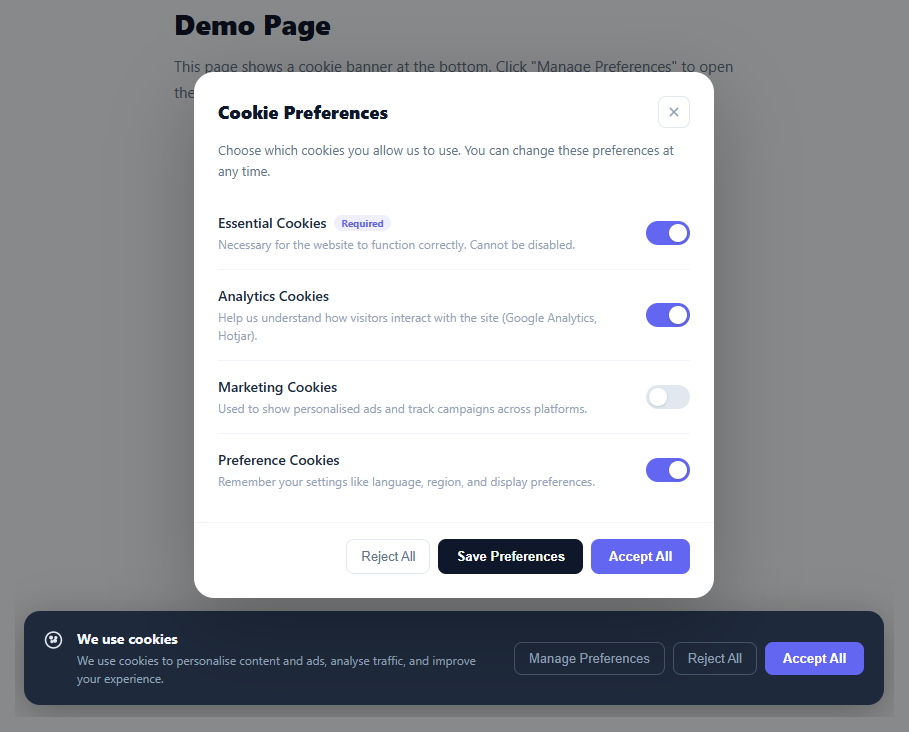
A cookie preferences modal is a legal requirement for websites under GDPR (EU), CCPA (California), and similar privacy regulations. This snippet provides a complete cookie consent system: a fixed bottom banner with Accept All, Reject All, and Manage Preferences buttons; a modal overlay with per-category toggle switches (Essential, Analytics, Marketing, Preferences); and a confirmation state after any choice is saved.
The banner layout
The .banner uses position: fixed, bottom: 20px, left: 50% with transform: translateX(-50%) to centre it above the page footer. A max-width: 860px keeps it from stretching too wide on large screens. The backdrop is a fixed overlay that darkens the page when the modal is open.
The CSS toggle switches
Each cookie category uses the same CSS toggle pattern: a hidden checkbox + .track pseudo-element. The Essential Cookies toggle has disabled attribute and .disabled class — its .track background is set to a light indigo (always-on appearance) without the cursor: pointer, communicating that it cannot be changed. The other three toggles start with different default states (Analytics: on, Marketing: off, Preferences: on) to demonstrate a realistic defaults scenario.
The three action paths
Accept All checks all three optional checkboxes before calling dismiss(). Reject All unchecks all three before calling dismiss(). Save Preferences reads the current checkbox states and builds a summary message before calling dismiss(). All three then hide the banner and show the status confirmation box on the page.
GDPR compliance notes
This snippet provides the UI pattern. For actual legal compliance, integrate with a Consent Management Platform (CMP) like the GDPR consent manager or store consent preferences in a cookie: document.cookie = "consent=" + JSON.stringify({ analytics, marketing, preferences }) + "; max-age=31536000; SameSite=Lax". Only load third-party analytics/ad scripts after the user has given consent.
Conditional script injection after consent
The most important production step is ensuring that tracking scripts are never executed before the user grants the relevant consent. The standard technique is to not include script tags for Google Analytics, Facebook Pixel, or any ad network in the initial HTML. Instead, dynamically create and append script elements only inside the acceptAll() or savePrefs() callback after reading the consent flags. For Tag Manager (GTM) workflows, push a custom dataLayer event: window.dataLayer.push({ event: "cookie_consent_update", analytics_consent: "granted" }) and configure GTM triggers that fire only when this event is present. This keeps all tracking logic in GTM without code changes for future tag additions.
Re-opening the preferences modal
Users must be able to withdraw or change consent at any time under GDPR. Add a "Cookie Settings" link in your site footer that calls openModal() to re-show the modal at any time. Read the current saved consent cookie and pre-populate the toggle checkboxes to their last saved state so users see their existing choices before making changes. After they save again, overwrite the consent cookie with the new values and apply or remove scripts accordingly — marketing scripts already injected may need a page reload to fully deactivate.
Step by step
How to Use
- 1See the banner on page loadThe cookie banner appears fixed at the bottom of the page. It has three buttons: Manage Preferences, Reject All, and Accept All.
- 2Open the preferences modalClick "Manage Preferences" to open the modal with four cookie categories. Essential is always on. Toggle Analytics, Marketing, and Preferences independently.
- 3Save, Accept, or RejectClick "Save Preferences" to save your current toggle states. "Accept All" turns on all optional categories. "Reject All" turns them all off. The banner dismisses and a confirmation appears on the page.
- 4Persist consent to a cookieIn the dismiss() function, save the consent state: document.cookie = "consent=" + JSON.stringify({ analytics, marketing, preferences }) + "; max-age=31536000". On page load, read this cookie and skip showing the banner if it exists.
- 5Load scripts conditionally on consentAfter accept/save, check each consent flag before injecting analytics or marketing scripts: if (analytics) { const s = document.createElement("script"); s.src = "https://www.google-analytics.com/analytics.js"; document.head.appendChild(s); }
- 6Export for your frameworkClick "JSX" for a React component with useState for modal open state and toggle values. Click "Vue" for a Vue 3 SFC with reactive consent object.
Real-world uses
Common Use Cases
Got questions?
Frequently Asked Questions
Use a cookie: document.cookie = "cookie_consent=" + JSON.stringify({ analytics: true, marketing: false, preferences: true }) + "; max-age=31536000; path=/; SameSite=Lax". On DOMContentLoaded, read with document.cookie and skip showing the banner if "cookie_consent=" is found. Parse with JSON.parse(cookieVal) to get the per-category choices.
The UI meets the visual and functional requirements (prior consent, granular controls, easy rejection, no pre-ticked marketing boxes). Legal compliance also requires: storing a dated consent record linked to the user, a privacy policy link, ability to withdraw consent, and only loading tracking scripts after consent. Consult a lawyer or use a full CMP for regulated environments.
In acceptAll() or savePrefs(), check analytics consent: if (analytics) { window.dataLayer = window.dataLayer || []; function gtag(){ dataLayer.push(arguments); } gtag("js", new Date()); gtag("config", "GA_ID"); const s = document.createElement("script"); s.src = "https://www.googletagmanager.com/gtag/js?id=GA_ID"; s.async = true; document.head.appendChild(s); }
In React, manage state with const [visible, setVisible] = useState(true) for the banner, const [modalOpen, setModalOpen] = useState(false), and const [prefs, setPrefs] = useState({ analytics: true, marketing: false, preferences: true }). Read persisted consent from localStorage on mount in useEffect. In Vue 3, use ref(true) for bannerVisible and a reactive() object for prefs. In Angular, create a CookieConsentService with BehaviorSubject<ConsentPrefs> and inject it into your app root component. All three frameworks follow the same pattern: read → show banner if no saved consent → save on user action.