
Hover Card With No JavaScript: interestfor and popover
Hover Card With No JavaScript: interestfor and popover · Modals · Plain HTML, CSS & JS · Live preview
About this UI Snippet
Interest Invokers: Hover and Focus Cards Without Event Handlers
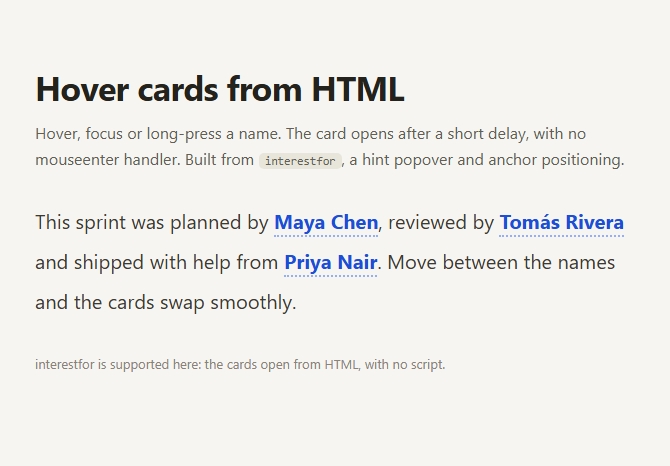
Every tooltip and profile hover card has needed the same script: listen for mouseenter, wait, show; listen for mouseleave, wait, hide; remember keyboard focus; cancel timers when the pointer jumps. The interestfor attribute moves that into the browser. A link or button with interestfor="cardId" shows the popover with that id when someone hovers, focuses or long-presses it, and hides it when interest ends.
The pieces
A trigger carries interestfor. The target is an element with popover="hint", the kind of popover meant for light, transient content. "Hint" popovers do not close other popovers, so a card can appear while a menu stays open.
Delays in CSS
interest-delay on the trigger sets how long to wait before showing and before hiding, written as .35s .15s. The short hide delay lets the pointer travel from the link into the card without it vanishing.
Positioning with anchors
Each link is an anchor (anchor-name), each card sets position-anchor, and position-area: bottom span-right places the card under the link. position-try-fallbacks: flip-block, flip-inline flips it above the link or to the left when it would run off the screen.
Keyboard and touch
Interest is raised by focus as well as hover, and by a long press on touch screens, so the card is not mouse-only. Escape dismisses it.
Fallback
If interestForElement is missing, the script downgrades the cards to popover="manual" and shows them on hover and focus with 350 ms and 150 ms timers. Use the pattern for user cards, link previews and glossary terms; for confirmations use the animated dialog.
Accessibility notes
Hover cards must never hold the only copy of important information. The names here are real links that work without the cards, the cards open on keyboard focus, Escape closes them, and their content is informational rather than interactive. Keep the text short, because a screen magnifier user may not see a card that appears far from the pointer.
What's included
Features
Step by step
How to Use
- 1Mark the triggerAdd interestfor="cardMaya" to the link or button. Use a real link or button, so keyboard users get the card on focus.
- 2Make the target a hint popoverWrite <div id="cardMaya" popover="hint">; hint popovers do not dismiss other open popovers.
- 3Set the delayPut interest-delay: .35s .15s on the trigger: show after 350 ms, hide after 150 ms so the pointer can reach the card.
- 4Anchor the cardGive the trigger an anchor-name, the card a position-anchor and position-area: bottom span-right.
- 5Add flip fallbacksposition-try-fallbacks: flip-block, flip-inline keeps the card on screen near the viewport edges.
- 6Keep the fallbackThe script detects missing support and switches the cards to manual popovers driven by hover and focus timers.
Real-world uses
Common Use Cases
Got questions?
Frequently Asked Questions
It is new: Chrome and Edge 142 and later. Other browsers use the snippet's fallback, which shows the same popovers on hover and focus with timers, so the experience stays close even where the attribute is unknown.
An auto popover closes other auto popovers when it opens. A hint popover is for lightweight, passing content and leaves other popovers alone, so a hover card can show while a menu stays open.
The trigger is a normal link or button that opens the card on focus as well as hover, and Escape dismisses it. Keep the card content informational, not interactive, and make sure the link still goes somewhere useful when activated.
position-try-fallbacks lets the browser flip the card above the trigger or to the other side. The fallback script clamps the top and left values into the viewport for browsers without anchor positioning.
Copy & paste
Source Code
<main class="ih-page">
<h1>Hover cards from HTML</h1>
<p class="ih-sub">Hover, focus or long-press a name. The card opens after a short delay, with no mouseenter handler. Built from <code>interestfor</code>, a hint popover and anchor positioning.</p>
<p class="ih-text">
This sprint was planned by
<a class="ih-link" href="#maya" interestfor="cardMaya">Maya Chen</a>,
reviewed by <a class="ih-link" href="#tomas" interestfor="cardTomas">Tomás Rivera</a>
and shipped with help from <a class="ih-link" href="#priya" interestfor="cardPriya">Priya Nair</a>.
Move between the names and the cards swap smoothly.
</p>
<div class="ih-card" id="cardMaya" popover="hint">
<div class="ih-av" style="--h:20">MC</div><div><b>Maya Chen</b><small>Product lead</small><p>Owns the roadmap and writes the weekly update. Based in Leeds.</p></div>
</div>
<div class="ih-card" id="cardTomas" popover="hint">
<div class="ih-av" style="--h:210">TR</div><div><b>Tomás Rivera</b><small>Staff engineer</small><p>Reviews every release branch. Ask about the build pipeline.</p></div>
</div>
<div class="ih-card" id="cardPriya" popover="hint">
<div class="ih-av" style="--h:140">PN</div><div><b>Priya Nair</b><small>Design engineer</small><p>Built the new settings screens and the shared form controls.</p></div>
</div>
<p class="ih-note" id="ihNote"></p>
</main>*{box-sizing:border-box;margin:0;padding:0}
body{font-family:system-ui,-apple-system,'Segoe UI',sans-serif;background:#f6f5f1;color:#24221d;min-height:100vh}
.ih-page{max-width:640px;margin:0 auto;padding:64px 20px}
h1{font-size:clamp(26px,5vw,34px);letter-spacing:-.02em}
.ih-sub{margin:10px 0 30px;color:#635f55;line-height:1.6}
.ih-sub code{background:#e8e5db;padding:1px 6px;border-radius:5px;font-size:.9em}
.ih-text{font-size:20px;line-height:2;color:#3d3a32}
.ih-link{color:#1d4ed8;text-decoration:none;font-weight:700;border-bottom:2px dotted #93b0f5;padding-bottom:1px}
.ih-link:hover,.ih-link:focus-visible{background:#e5edff;border-bottom-style:solid}
.ih-link:focus-visible{outline:3px solid #1d4ed8;outline-offset:3px;border-radius:3px}
.ih-note{margin-top:34px;font-size:13px;color:#8a8478}
/* Delay before the card opens or closes (the interest-delay property) */
.ih-link{interest-delay:.35s .15s}
/* Each trigger is an anchor for its card */
[interestfor="cardMaya"]{anchor-name:--maya}[interestfor="cardTomas"]{anchor-name:--tomas}[interestfor="cardPriya"]{anchor-name:--priya}
#cardMaya{position-anchor:--maya}#cardTomas{position-anchor:--tomas}#cardPriya{position-anchor:--priya}
.ih-card{position:fixed;inset:auto;margin:0;width:min(300px,calc(100vw - 24px));padding:16px;border:0;border-radius:16px;background:#fff;color:#24221d;display:flex;gap:14px;
box-shadow:0 18px 40px rgb(40 35 15 / .2),0 0 0 1px #e8e4d6;
position-area:bottom span-right;margin-top:10px;position-try-fallbacks:flip-block,flip-inline;
opacity:0;transform:translateY(6px);transition:opacity .2s,transform .2s,overlay .2s allow-discrete,display .2s allow-discrete}
.ih-card:popover-open{opacity:1;transform:none}
@starting-style{.ih-card:popover-open{opacity:0;transform:translateY(6px)}}
.ih-av{flex:none;width:48px;height:48px;border-radius:50%;display:grid;place-items:center;font:800 15px system-ui,sans-serif;color:#fff;background:hsl(var(--h) 65% 42%)}
.ih-card b{display:block;font-size:16px}
.ih-card small{display:block;font-size:12.5px;color:#7a7568;margin-bottom:6px}
.ih-card p{font-size:14px;line-height:1.5;color:#4b483f}
@media (prefers-reduced-motion:reduce){.ih-card{transition-duration:.01ms}}// Where interest invokers exist (Chrome 142+) nothing here runs for the cards.
// Fallback: show and hide the same popovers on hover and focus with timers.
var supported = 'interestForElement' in HTMLAnchorElement.prototype;
document.getElementById('ihNote').textContent = supported
? 'interestfor is supported here: the cards open from HTML, with no script.'
: 'interestfor is not supported here, so a small hover and focus fallback is running.';
if (!supported) {
var open = null, timer = 0;
function place(card, link) {
var r = link.getBoundingClientRect();
card.style.top = Math.min(r.bottom + 10, innerHeight - card.offsetHeight - 8) + 'px';
card.style.left = Math.max(8, Math.min(r.left, innerWidth - card.offsetWidth - 8)) + 'px';
}
function hide() { if (open) { try { open.hidePopover(); } catch (e) {} open = null; } }
Array.prototype.forEach.call(document.querySelectorAll('[interestfor]'), function (link) {
var card = document.getElementById(link.getAttribute('interestfor'));
card.setAttribute('popover', 'manual');
function show() { clearTimeout(timer); timer = setTimeout(function () { hide(); card.showPopover(); place(card, link); open = card; }, 350); }
function leave() { clearTimeout(timer); timer = setTimeout(hide, 150); }
link.addEventListener('mouseenter', show); link.addEventListener('focus', show);
link.addEventListener('mouseleave', leave); link.addEventListener('blur', leave);
card.addEventListener('mouseenter', function () { clearTimeout(timer); });
card.addEventListener('mouseleave', leave);
});
document.addEventListener('keydown', function (e) { if (e.key === 'Escape') hide(); });
}Extend with AI
Take This Snippet Further With AI
Paste this snippet into an AI coding assistant and ask it to explain how interestfor, popover="hint" and interest-delay work together, and how the flip fallbacks keep the card on screen. Useful follow-ups: add a small arrow pointing at the link, show a link preview image, or reuse one card for many triggers. Ask it to keep the keyboard focus behaviour and the timer fallback.
Prompt to recreate it
Copy this into your AI assistant of choice to build the effect from scratch, or as a jumping-off point for your own variant:
Build hover cards using the HTML interestfor attribute in plain HTML, CSS and JavaScript.

Requirements:
- A paragraph with three links that each have interestfor pointing to a card id. Each card is a div with popover="hint" containing an initials avatar (coloured with an hsl custom property), a name, a role and one sentence.
- CSS: interest-delay: .35s .15s on the links; anchor-name on each link and position-anchor on its card; position-area: bottom span-right; position-try-fallbacks: flip-block, flip-inline; a fade and lift entrance with :popover-open and @starting-style.
- Links need hover and :focus-visible styles. Respect prefers-reduced-motion and keep cards within the viewport width on phones.
- Script: if !('interestForElement' in HTMLAnchorElement.prototype), set the cards to popover="manual" and show them on mouseenter and focus after 350 ms, hide after 150 ms on mouseleave and blur (cancelling timers when the pointer enters the card), position them by clamping into the viewport, and close on Escape. Show a note stating which mode is active.
Want to tighten it up first? Run this prompt through the AI Prompt Studio to score it across 8 quality dimensions, catch anti-patterns, and tune the wording for Claude, ChatGPT, or Gemini before you paste it in.