

Quill Rich Text Editor with Custom Toolbar and Character Limit

CodeMirror JSON Editor with Validation Gutter

CodeMirror Code Editor with Line Numbers, Folding and Themes

Marked + DOMPurify Live Markdown Preview

FilePond Image Upload with Preview and Reorder

Cropper.js Aspect-Ratio Presets for Social Posts
Flight Search Form — Travel Booking HTML CSS JS
Flight Search Form · Forms · Plain HTML, CSS & JS · Live preview
Copy & paste
Source Code
<div class="fsf-card">
  <div class="fsf-tabs">
    <button type="button" class="fsf-tab active" id="fsfTabRound" onclick="fsfSetTrip('round')">Round trip</button>
    <button type="button" class="fsf-tab" id="fsfTabOne" onclick="fsfSetTrip('one')">One way</button>
  </div>

  <div class="fsf-row fsf-locations">
    <div class="fsf-field">
      <label for="fsfFrom">From</label>
      <input type="text" id="fsfFrom" value="New York (JFK)">
    </div>
    <button type="button" class="fsf-swap" id="fsfSwap" aria-label="Swap origin and destination">
      <svg width="16" height="16" viewBox="0 0 24 24" fill="none" stroke="currentColor" stroke-width="2.2" stroke-linecap="round" stroke-linejoin="round"><polyline points="17 1 21 5 17 9"/><path d="M3 11V9a4 4 0 0 1 4-4h14"/><polyline points="7 23 3 19 7 15"/><path d="M21 13v2a4 4 0 0 1-4 4H3"/></svg>
    </button>
    <div class="fsf-field">
      <label for="fsfTo">To</label>
      <input type="text" id="fsfTo" value="London (LHR)">
    </div>
  </div>

  <div class="fsf-row fsf-dates">
    <div class="fsf-field">
      <label for="fsfDepart">Depart</label>
      <input type="date" id="fsfDepart">
    </div>
    <div class="fsf-field" id="fsfReturnField">
      <label for="fsfReturn">Return</label>
      <input type="date" id="fsfReturn">
    </div>
    <div class="fsf-field fsf-pax-field">
      <label>Travelers</label>
      <button type="button" class="fsf-pax-btn" id="fsfPaxBtn">1 adult <span class="fsf-caret">▾</span></button>
      <div class="fsf-pax-pop" id="fsfPaxPop">
        <div class="fsf-pax-row">
          <div>
            <div class="fsf-pax-label">Adults</div>
            <div class="fsf-pax-sub">Age 18+</div>
          </div>
          <div class="fsf-stepper">
            <button type="button" onclick="fsfStep('adults',-1)" aria-label="Decrease adults">−</button>
            <span id="fsfAdults">1</span>
            <button type="button" onclick="fsfStep('adults',1)" aria-label="Increase adults">+</button>
          </div>
        </div>
        <div class="fsf-pax-row">
          <div>
            <div class="fsf-pax-label">Children</div>
            <div class="fsf-pax-sub">Age 2–17</div>
          </div>
          <div class="fsf-stepper">
            <button type="button" onclick="fsfStep('children',-1)" aria-label="Decrease children">−</button>
            <span id="fsfChildren">0</span>
            <button type="button" onclick="fsfStep('children',1)" aria-label="Increase children">+</button>
          </div>
        </div>
        <button type="button" class="fsf-pax-done" id="fsfPaxDone">Done</button>
      </div>
    </div>
  </div>

  <p class="fsf-error" id="fsfError" hidden></p>
  <button type="button" class="fsf-submit" id="fsfSubmit">
    <svg class="fsf-spin" width="16" height="16" viewBox="0 0 24 24" fill="none" stroke="currentColor" stroke-width="3" hidden><circle cx="12" cy="12" r="9" stroke-opacity=".25"/><path d="M21 12a9 9 0 0 0-9-9"/></svg>
    <span id="fsfSubmitLabel">Search flights</span>
  </button>
</div>*{box-sizing:border-box;margin:0;padding:0}
body{font-family:system-ui,-apple-system,sans-serif;background:#f1f5f9;min-height:100vh;display:flex;align-items:center;justify-content:center;padding:24px}
.fsf-card{background:#fff;border-radius:18px;padding:22px;width:100%;max-width:560px;box-shadow:0 18px 44px rgba(15,23,42,.12)}
.fsf-tabs{display:inline-flex;background:#f1f5f9;border-radius:999px;padding:4px;margin-bottom:16px}
.fsf-tab{border:none;background:transparent;padding:7px 16px;border-radius:999px;font-size:13px;font-weight:700;color:#64748b;cursor:pointer;transition:background .15s,color .15s}
.fsf-tab.active{background:#2563eb;color:#fff}
.fsf-row{display:flex;gap:10px;margin-bottom:12px}
.fsf-locations{align-items:center}
.fsf-field{flex:1;display:flex;flex-direction:column;gap:5px;position:relative}
.fsf-field label{font-size:11px;font-weight:700;color:#64748b;text-transform:uppercase;letter-spacing:.04em}
.fsf-field input{border:1.5px solid #e2e8f0;border-radius:10px;padding:10px 12px;font-size:14px;font-weight:600;color:#0f172a;font-family:inherit;transition:border-color .15s,box-shadow .15s}
.fsf-field input:focus{outline:none;border-color:#2563eb;box-shadow:0 0 0 3px rgba(37,99,235,.15)}
.fsf-swap{align-self:flex-end;margin-bottom:9px;width:36px;height:36px;border-radius:50%;border:1.5px solid #e2e8f0;background:#fff;color:#2563eb;display:flex;align-items:center;justify-content:center;cursor:pointer;flex-shrink:0;transition:transform .25s,background .15s}
.fsf-swap:hover{background:#eff6ff}
.fsf-swap.spun{transform:rotate(180deg)}
.fsf-dates{align-items:flex-start}
.fsf-pax-field{position:relative}
.fsf-pax-btn{border:1.5px solid #e2e8f0;border-radius:10px;padding:10px 12px;font-size:14px;font-weight:600;color:#0f172a;background:#fff;cursor:pointer;text-align:left;font-family:inherit;display:flex;align-items:center;justify-content:space-between;gap:6px}
.fsf-caret{color:#94a3b8;font-size:11px;transition:transform .2s}
.fsf-pax-field.open .fsf-caret{transform:rotate(180deg)}
.fsf-pax-pop{position:absolute;top:calc(100% + 8px);right:0;width:240px;background:#fff;border:1px solid #e2e8f0;border-radius:12px;box-shadow:0 16px 40px rgba(15,23,42,.16);padding:14px;z-index:10;
opacity:0;transform:translateY(-6px) scale(.97);pointer-events:none;transform-origin:top right;transition:opacity .15s,transform .15s}
.fsf-pax-field.open .fsf-pax-pop{opacity:1;transform:translateY(0) scale(1);pointer-events:all}
.fsf-pax-row{display:flex;align-items:center;justify-content:space-between;padding:7px 0}
.fsf-pax-label{font-size:13px;font-weight:700;color:#0f172a}
.fsf-pax-sub{font-size:11.5px;color:#94a3b8}
.fsf-stepper{display:flex;align-items:center;gap:10px}
.fsf-stepper button{width:26px;height:26px;border-radius:50%;border:1.5px solid #e2e8f0;background:#fff;color:#2563eb;font-size:16px;font-weight:700;cursor:pointer;display:flex;align-items:center;justify-content:center;line-height:1}
.fsf-stepper button:disabled{opacity:.35;cursor:not-allowed}
.fsf-stepper span{font-size:14px;font-weight:700;min-width:14px;text-align:center}
.fsf-pax-done{width:100%;margin-top:8px;background:#2563eb;color:#fff;border:none;border-radius:8px;padding:8px;font-size:13px;font-weight:700;cursor:pointer}
.fsf-error{color:#dc2626;font-size:12.5px;font-weight:600;margin-bottom:10px}
.fsf-submit{width:100%;background:linear-gradient(135deg,#2563eb,#1d4ed8);color:#fff;border:none;border-radius:12px;padding:13px;font-size:15px;font-weight:700;cursor:pointer;display:flex;align-items:center;justify-content:center;gap:8px;transition:transform .15s,box-shadow .15s}
.fsf-submit:hover{box-shadow:0 10px 24px rgba(37,99,235,.35)}
.fsf-submit:disabled{opacity:.75;cursor:default}
.fsf-spin{animation:fsfSpin .7s linear infinite}
@keyframes fsfSpin{to{transform:rotate(360deg)}}var trip = 'round';
var pax = { adults: 1, children: 0 };
function fsfSetTrip(mode) {
trip = mode;
document.getElementById('fsfTabRound').classList.toggle('active', mode === 'round');
document.getElementById('fsfTabOne').classList.toggle('active', mode === 'one');
var returnField = document.getElementById('fsfReturnField');
returnField.style.visibility = mode === 'one' ? 'hidden' : 'visible';
returnField.querySelector('input').disabled = mode === 'one';
}
document.getElementById('fsfSwap').addEventListener('click', function () {
var from = document.getElementById('fsfFrom');
var to = document.getElementById('fsfTo');
var tmp = from.value;
from.value = to.value;
to.value = tmp;
this.classList.add('spun');
setTimeout(function () { document.getElementById('fsfSwap').classList.remove('spun'); }, 250);
});
function fsfStep(key, delta) {
var next = pax[key] + delta;
if (key === 'adults' && next < 1) return;
if (next < 0) return;
if (pax.adults + pax.children + delta > 8) return;
pax[key] = next;
document.getElementById(key === 'adults' ? 'fsfAdults' : 'fsfChildren').textContent = next;
updatePaxLabel();
}
function updatePaxLabel() {
var total = pax.adults + pax.children;
var label = pax.adults + (pax.adults === 1 ? ' adult' : ' adults');
if (pax.children > 0) label += ', ' + pax.children + (pax.children === 1 ? ' child' : ' children');
document.getElementById('fsfPaxBtn').firstChild.textContent = label + ' ';
}
var paxField = document.getElementById('fsfPaxField') || document.querySelector('.fsf-pax-field');
document.getElementById('fsfPaxBtn').addEventListener('click', function (e) {
e.stopPropagation();
paxField.classList.toggle('open');
});
document.getElementById('fsfPaxDone').addEventListener('click', function () {
paxField.classList.remove('open');
});
document.addEventListener('click', function (e) {
if (!paxField.contains(e.target)) paxField.classList.remove('open');
});
document.getElementById('fsfSubmit').addEventListener('click', function () {
var from = document.getElementById('fsfFrom').value.trim();
var to = document.getElementById('fsfTo').value.trim();
var depart = document.getElementById('fsfDepart').value;
var ret = document.getElementById('fsfReturn').value;
var error = document.getElementById('fsfError');
var msg = '';
if (!from || !to) msg = 'Enter both an origin and a destination.';
else if (from.toLowerCase() === to.toLowerCase()) msg = 'Origin and destination cannot be the same.';
else if (!depart) msg = 'Choose a departure date.';
else if (trip === 'round' && ret && ret < depart) msg = 'Return date must be after the departure date.';
if (msg) { error.textContent = msg; error.hidden = false; return; }
error.hidden = true;
var btn = this, label = document.getElementById('fsfSubmitLabel'), spin = btn.querySelector('.fsf-spin');
btn.disabled = true; spin.hidden = false; label.textContent = 'Searching…';
setTimeout(function () {
spin.hidden = true; label.textContent = 'Flights found ✓'; btn.disabled = false;
setTimeout(function () { label.textContent = 'Search flights'; }, 1800);
}, 1100);
});
(function () {
var d = new Date(); d.setDate(d.getDate() + 14);
var r = new Date(d); r.setDate(r.getDate() + 7);
document.getElementById('fsfDepart').value = d.toISOString().slice(0, 10);
document.getElementById('fsfReturn').value = r.toISOString().slice(0, 10);
})();Extend with AI
Take This Snippet Further With AI
The AI prompt for this one is for Patreon supporters ($3 a month), along with a site with no ads. Supporters enter the passcode once and it is remembered in this browser.
What's included
Features
About this UI Snippet
Flight Search Form — Origin/Destination Swap, Passenger Stepper & Date Validation
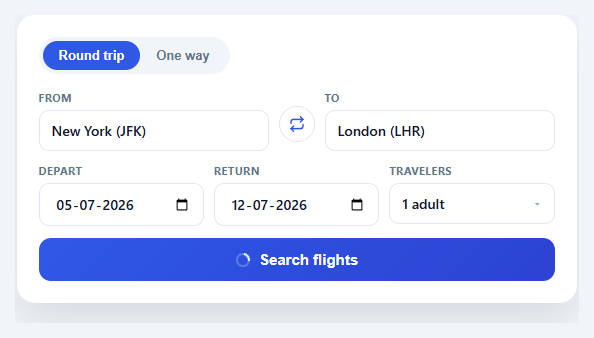
Every travel booking site opens with the same widget: an origin/destination pair, departure and return dates, a passenger count, and a search button — yet getting the small interactions right (swapping cities, picking a traveler count without a clunky native select, validating dates) is what separates a form that feels professional from one that feels like a prototype. This snippet builds the full pattern in plain HTML, CSS, and vanilla JavaScript.
Round trip vs. one way
A pill-style tab toggle switches between "Round trip" and "One way". Choosing one way hides the return-date field by setting its visibility to hidden (not display: none, which would reflow the row and shift the passenger field) and disables its input so a hidden date can't be submitted. This keeps the three-column date row visually stable while the modes change.
The swap button
Between the From and To fields, a circular button swaps the two input values directly — a one-line value exchange — and adds a .spun class that rotates the icon 180° via a CSS transform transition, removed after 250ms with setTimeout. Because only transform is animated, the rotation is GPU-friendly and converts safely to every export target.
Passenger stepper popover
Rather than a native <select> (which can't show "Adults" and "Children" as separate counters), the traveler field opens a popover with two stepper rows, each with decrement/increment buttons bound to a shared fsfStep(key, delta) function. The function enforces a floor of one adult, a floor of zero children, and a combined cap of eight travelers, then updates both the visible counts and a computed summary label ("2 adults, 1 child") on the trigger button. The popover animates in with opacity and transform: translateY() scale() only — never height — so it stays smooth after every framework export. A document-level click listener closes it when you click outside, and a "Done" button closes it explicitly.
Submit validation
Clicking Search runs through ordered checks — both fields filled, origin and destination not identical (case-insensitive), a departure date chosen, and (in round-trip mode) a return date on or after departure — surfacing the first failing message in a red error line above the button. Passing validation triggers a simulated search: the button disables, shows a spinning ring icon and "Searching…", then resolves to a checkmark label before resetting, so the interaction reads as asynchronous even without a real API call.
Sensible defaults
On load, the departure date defaults to two weeks out and the return date to one week after that, so the form never starts on today's date (which would make the date pickers feel arbitrary) and demonstrates working dates immediately.
Step by step
How to Use
- 1Paste HTML, CSS, and JSA flight search card appears with round-trip/one-way tabs, From/To fields, dates, and a traveler stepper.
- 2Swap origin and destinationClick the circular arrow button between the fields — the two values exchange instantly with a rotating icon.
- 3Open the traveler popoverClick the "1 adult" button. Use the +/− steppers to adjust adults and children; the label updates live.
- 4Switch trip typeClick "One way" to hide and disable the return date field; click "Round trip" to bring it back.
- 5Submit and see validationClick Search with empty or identical fields to see the inline error message; fix it and the button proceeds.
- 6Wire up real flight dataReplace the simulated setTimeout in the submit handler with a fetch to your flight-search API and render results below the form.
Real-world uses
Common Use Cases
Got questions?
Frequently Asked Questions
Replace the setTimeout block in the submit handler with a fetch call passing the from, to, depart, return, and pax values; render the returned flight list below the form on success and show the API's error message in the existing #fsfError element on failure.
Attach an input listener to the From/To fields that filters a static airport array and renders a positioned dropdown below the field, similar to the suggestion-list pattern in an address autocomplete field, then set the input's value on selection.
Add a third tab "Multi-city" that renders a repeatable list of From/To/date row groups with an "Add another flight" button; reuse the existing swap and validation logic per row.
Tailwind's default transition utility (and most framework export targets) only reliably animates transform, opacity, and a few color properties. Animating height or visibility directly causes the popover to snap instead of glide after conversion, so this snippet sticks to transform/opacity for guaranteed cross-framework smoothness.
In React, hold trip, pax, and field values in useState and derive the passenger label with useMemo; in Vue, use ref()/computed(); in Angular, use component fields and a getter. The validation order and popover open/close logic translate directly into each framework's event handlers.