


Copy & paste
Source Code
<div class="lp-card">
  <div class="lp-glow"></div>
  <div class="lp-head">
    <div>
      <div class="lp-tier"><span class="lp-dot"></span>Gold member</div>
      <div class="lp-balance"><span id="lpPoints">1680</span> <span class="lp-unit">pts</span></div>
    </div>
    <div class="lp-crown">👑</div>
  </div>

  <div class="lp-progress-head">
    <span id="lpNext">320 pts to Platinum</span>
    <span id="lpPct">84%</span>
  </div>
  <div class="lp-track"><div class="lp-fill" id="lpFill"></div></div>

  <div class="lp-rewards">
    <div class="lp-rtitle">Redeem your points</div>

    <div class="lp-reward" data-cost="500">
      <span class="lp-remoji">🎟️</span>
      <span class="lp-rinfo"><span class="lp-rname">$5 voucher</span><span class="lp-rcost">500 pts</span></span>
      <button class="lp-redeem" onclick="redeem(this)">Redeem</button>
    </div>
    <div class="lp-reward" data-cost="800">
      <span class="lp-remoji">🚚</span>
      <span class="lp-rinfo"><span class="lp-rname">Free shipping</span><span class="lp-rcost">800 pts</span></span>
      <button class="lp-redeem" onclick="redeem(this)">Redeem</button>
    </div>
    <div class="lp-reward" data-cost="1500">
      <span class="lp-remoji">💸</span>
      <span class="lp-rinfo"><span class="lp-rname">$20 voucher</span><span class="lp-rcost">1500 pts</span></span>
      <button class="lp-redeem" onclick="redeem(this)">Redeem</button>
    </div>
    <div class="lp-reward" data-cost="2500">
      <span class="lp-remoji">✨</span>
      <span class="lp-rinfo"><span class="lp-rname">Members-only drop</span><span class="lp-rcost">2500 pts</span></span>
      <button class="lp-redeem" onclick="redeem(this)">Redeem</button>
    </div>
  </div>

  <div class="lp-toast" id="lpToast"></div>
</div>*{box-sizing:border-box;margin:0;padding:0}
body{font-family:system-ui,-apple-system,sans-serif;background:#0f172a;min-height:100vh;display:flex;align-items:center;justify-content:center;padding:24px}
.lp-card{position:relative;background:linear-gradient(160deg,#1e293b,#0f172a);border:1px solid #334155;border-radius:20px;padding:24px;width:100%;max-width:360px;overflow:hidden;box-shadow:0 20px 50px rgba(0,0,0,.4)}
.lp-glow{position:absolute;top:-60px;right:-60px;width:180px;height:180px;border-radius:50%;background:radial-gradient(circle,rgba(245,158,11,.35),transparent 70%);pointer-events:none}
.lp-head{display:flex;justify-content:space-between;align-items:flex-start;position:relative;margin-bottom:20px}
.lp-tier{display:flex;align-items:center;gap:7px;font-size:12px;font-weight:700;color:#fbbf24;text-transform:uppercase;letter-spacing:.05em}
.lp-dot{width:7px;height:7px;border-radius:50%;background:#fbbf24;box-shadow:0 0 8px #fbbf24}
.lp-balance{font-size:38px;font-weight:800;color:#fff;margin-top:6px;line-height:1;font-variant-numeric:tabular-nums}
.lp-unit{font-size:15px;font-weight:700;color:#94a3b8}
.lp-crown{font-size:30px;filter:drop-shadow(0 4px 8px rgba(245,158,11,.4))}
.lp-progress-head{display:flex;justify-content:space-between;font-size:12px;font-weight:600;color:#94a3b8;margin-bottom:8px}
.lp-progress-head span:last-child{color:#fbbf24;font-weight:800}
.lp-track{height:8px;background:rgba(148,163,184,.2);border-radius:999px;overflow:hidden;margin-bottom:22px}
.lp-fill{height:100%;width:0;border-radius:999px;background:linear-gradient(90deg,#f59e0b,#fbbf24);transition:width .8s cubic-bezier(.4,0,.2,1);box-shadow:0 0 10px rgba(251,191,36,.6)}
.lp-rtitle{font-size:11px;font-weight:700;color:#64748b;text-transform:uppercase;letter-spacing:.05em;margin-bottom:10px}
.lp-rewards{display:flex;flex-direction:column;gap:8px}
.lp-reward{display:flex;align-items:center;gap:11px;padding:11px 12px;background:rgba(148,163,184,.08);border:1px solid rgba(148,163,184,.12);border-radius:12px;transition:opacity .25s,transform .25s}
.lp-reward.gone{opacity:0;transform:translateX(16px);height:0;padding:0;margin:0;border:0}
.lp-remoji{font-size:20px;flex-shrink:0}
.lp-rinfo{flex:1;display:flex;flex-direction:column;gap:1px;min-width:0}
.lp-rname{font-size:13px;font-weight:700;color:#e2e8f0}
.lp-rcost{font-size:11px;color:#94a3b8;font-weight:600}
.lp-redeem{background:#fbbf24;color:#1e293b;border:none;border-radius:9px;padding:8px 14px;font-size:12px;font-weight:800;cursor:pointer;font-family:inherit;transition:background .15s,transform .1s;white-space:nowrap}
.lp-redeem:hover:not(:disabled){background:#f59e0b}
.lp-redeem:active:not(:disabled){transform:scale(.95)}
.lp-redeem:disabled{background:rgba(148,163,184,.2);color:#64748b;cursor:not-allowed}
.lp-toast{position:absolute;left:50%;bottom:18px;transform:translate(-50%,20px);background:#fbbf24;color:#1e293b;font-size:12px;font-weight:800;padding:8px 16px;border-radius:999px;opacity:0;pointer-events:none;transition:opacity .25s,transform .25s;box-shadow:0 8px 20px rgba(0,0,0,.3)}
.lp-toast.show{opacity:1;transform:translate(-50%,0)}var points = 1680;
var NEXT_TIER = 2000;
var toastTimer;
function animateBalance(from, to) {
var start = performance.now();
function tick(now) {
var p = Math.min(1, (now - start) / 500);
var eased = 1 - Math.pow(1 - p, 3);
document.getElementById('lpPoints').textContent = Math.round(from + (to - from) * eased);
if (p < 1) requestAnimationFrame(tick);
}
requestAnimationFrame(tick);
}
function updateUI() {
var pct = Math.min(100, Math.round((points / NEXT_TIER) * 100));
document.getElementById('lpFill').style.width = pct + '%';
document.getElementById('lpPct').textContent = pct + '%';
var toGo = Math.max(0, NEXT_TIER - points);
document.getElementById('lpNext').textContent = toGo > 0 ? toGo + ' pts to Platinum' : 'Platinum unlocked!';
document.querySelectorAll('.lp-reward').forEach(function (r) {
var cost = +r.dataset.cost;
var btn = r.querySelector('.lp-redeem');
if (btn.dataset.done) return;
btn.disabled = points < cost;
btn.textContent = points < cost ? 'Need ' + (cost - points) : 'Redeem';
});
}
function showToast(msg) {
var t = document.getElementById('lpToast');
t.textContent = msg;
t.classList.add('show');
clearTimeout(toastTimer);
toastTimer = setTimeout(function () { t.classList.remove('show'); }, 1800);
}
function redeem(btn) {
var reward = btn.closest('.lp-reward');
var cost = +reward.dataset.cost;
if (points < cost) return;
var prev = points;
points -= cost;
animateBalance(prev, points);
showToast('Redeemed ' + reward.querySelector('.lp-rname').textContent + '!');
btn.dataset.done = '1';
btn.disabled = true;
btn.textContent = '✓ Done';
setTimeout(updateUI, 520);
}
updateUI();
requestAnimationFrame(function () { updateUI(); });Extend with AI
Take This Snippet Further With AI
The AI prompt for this one is for Patreon supporters ($3 a month), along with a site with no ads. Supporters enter the passcode once and it is remembered in this browser.
What's included
Features
points variable and updateUI drive the balance, progress bar, tier copy, and every reward button — trivial to wire to a real account.updateUI sets the gradient bar's width to points / NEXT_TIER with a cubic-bezier transition and a glow, capping at 100%.animateBalance tweens the number with a cubic ease-out requestAnimationFrame loop, making each spend feel tangible.updateUI re-evaluates every reward against the new balance, flipping now-unaffordable buttons to "Need N".data-cost, so adding or repricing rewards is a markup edit with no JavaScript changes.About this UI Snippet
Loyalty Points Widget — Tier Progress Bar, Redeemable Rewards & Affordability-Gated Buttons
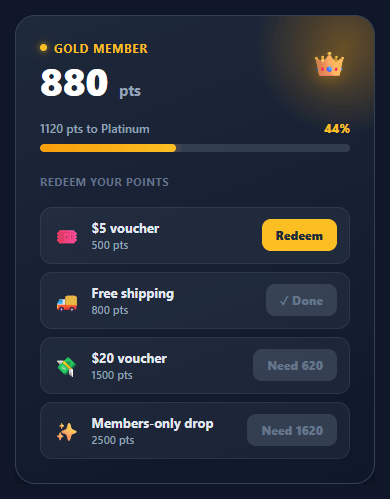
Loyalty programmes work because they give customers a reason to come back and a visible sense of progress toward a reward. The widget that surfaces a member's points has to do three jobs at once: show the current balance with status, show how close they are to the next tier, and let them spend points on rewards they can actually afford. This snippet implements all three in plain HTML, CSS, and vanilla JavaScript: a points balance with tier badge, an animated progress bar toward the next tier, a list of redeemable rewards, affordability-gated redeem buttons, an animated count-down on spend, and a confirmation toast.
Balance, tier, and progress
The card leads with a large points balance and a "Gold member" tier badge on a dark gradient with a warm glow — the premium treatment that loyalty programmes use to make membership feel valuable. Below it, updateUI computes progress toward NEXT_TIER as a percentage, animates the gradient bar's width with a cubic-bezier transition, and writes the remaining points ("320 pts to Platinum"). When the balance reaches the threshold, the copy switches to "Platinum unlocked!".
Affordability-gated redemption
Each reward carries its cost on a data-cost attribute. updateUI walks every reward and decides its button state: if the member can afford it, the button reads "Redeem"; if not, it disables and reads "Need N" — telling the user exactly how many more points they require rather than just greying out silently. This turns a dead-end into a goal, which is the whole point of a loyalty programme.
Animated balance count-down
When a reward is redeemed, redeem checks affordability, subtracts the cost, and calls animateBalance, which tweens the displayed number from the old value to the new one over 500ms using an eased requestAnimationFrame loop (cubic ease-out). Watching the points tick down makes the spend feel tangible — and then updateUI re-runs to re-gate every other reward against the new, lower balance, so buttons that are now unaffordable immediately switch to "Need N".
Confirmation toast
A pill toast slides up from the bottom of the card confirming the redeemed reward by name, auto-dismissing after a moment via a cleared-and-reset timer so rapid redemptions never stack stale toasts. The redeemed reward's own button locks to "✓ Done".
Everything is driven by a single points variable and the updateUI function, so wiring it to a real account is a matter of seeding points from your API and POSTing redemptions. Pair this widget with a stats card for account metrics, a progress bar for other goals, a gradient progress ring, or an order summary where vouchers apply.
Step by step
How to Use
- 1Paste HTML, CSS, and JSA dark loyalty card appears showing 1680 points, a "Gold member" badge, a progress bar at 84% toward Platinum, and four rewards.
- 2Check affordability gatingRewards you can afford show "Redeem"; the 2500-point members-only drop is disabled and reads "Need 820", telling you exactly how short you are.
- 3Redeem a rewardClick "Redeem" on the $5 voucher — the balance counts down from 1680 to 1180, a toast confirms "Redeemed $5 voucher!", and the button locks to "✓ Done".
- 4Watch the bar updateThe progress bar shrinks toward the next tier and the "pts to Platinum" figure recalculates from the new balance.
- 5See re-gating in actionAfter spending, rewards you can no longer afford flip to "Need N" automatically — the whole list re-evaluates against the new balance.
- 6Seed real dataSet the
pointsvariable from your account API and adjustNEXT_TIERand rewarddata-costvalues; the rest of the UI follows.
Real-world uses
Common Use Cases
Got questions?
Frequently Asked Questions
Seed the points variable from your loyalty API on load and render the reward rows from your catalogue, setting each data-cost. Call updateUI() once and the progress bar, tier copy, and button gating all reflect the live balance. Set NEXT_TIER from the member's current tier threshold.
In redeem, after the affordability check, POST the reward id to your endpoint and only commit the local deduction on success; on failure, revert the balance and re-enable the button. To avoid double-spends from rapid clicks, disable the button immediately (this snippet does) and treat the server's returned balance as authoritative.
Keep an array of tiers with thresholds and names, and in updateUI find the current and next tier from points to drive the badge and the "pts to next" copy. You can also list the perks unlocked at each tier below the bar so members see what the next level grants.
Give the progress bar role="progressbar" with aria-valuenow/aria-valuemax, put the redeem confirmation toast in an aria-live="polite" region, and make sure the "Need N" button text conveys the gating without relying on colour. The redeem controls are real <button> elements, so they are keyboard-operable by default.
In React, hold points in useState, derive the percentage and each button's disabled/label state in render, and animate the balance with a small effect or a tween library. In Vue, use a ref for points and computed values for progress and gating. In Angular, track points on the component and bind [style.width] and [disabled]. The card styling and bar CSS port unchanged.