

Nested Row Carousels — HTML CSS JS Snippet
Nested Row Carousels · Carousels · Plain HTML, CSS & JS · Live preview
What's included
Features
About this UI Snippet
Nested Row Carousels — One Reusable Pattern Applied to Every Row
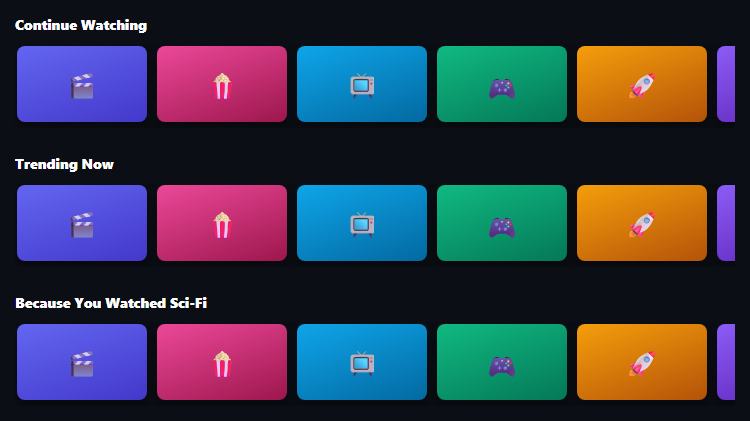
Streaming apps don't show one carousel — they show a *stack* of them, each scrolling independently. This snippet builds that with native horizontal scrolling (overflow-x: auto, scroll-behavior: smooth) instead of a JavaScript translateX carousel, then applies the exact same wiring to every .nrc-row found on the page with a single querySelectorAll(...).forEach.
Why native scroll instead of a transform-based track
A transform-based carousel needs its own drag handling, bounds-checking, and snap logic — three carousels' worth of that is three times the code and three times the edge cases. Native scrolling gets free momentum, free bounds (you physically can't scroll past the content), and free touch support from the browser itself. The arrow buttons don't reimplement scrolling; they just call track.scrollBy({ left: ±450, behavior: 'smooth' }), letting the browser's own smooth-scroll do the animating.
Each row is independently self-contained
Because the forEach closure captures its own track, left, and right variables per iteration, each row's scroll position, arrow visibility, and event listeners are completely isolated from every other row — scrolling row two has zero effect on row one's state. That isolation is what makes the pattern trivially stackable: adding a fourth .nrc-row to the HTML wires it up automatically, with no changes to the JS.
Arrows that hide themselves at the edges
A scroll listener on each track checks scrollLeft against 0 and against scrollWidth - clientWidth to toggle each arrow's visibility — so the left arrow disappears at the true start of a row and the right arrow disappears at the true end, rather than staying visible and clickable when there's nothing left to scroll to.
Step by step
How to Use
- 1Paste HTML, CSS, and JSThree labeled rows appear, each auto-populated with eight colored tiles.
- 2Hover a rowLeft/right arrow buttons fade in over that row only.
- 3Click an arrowThe row smooth-scrolls by roughly three tiles' width in that direction.
- 4Scroll to an edgeThe arrow on that side disappears since there's nothing further to scroll to.
- 5Add a fourth rowCopy an .nrc-row block with a new title — it's wired up automatically by the same forEach loop.
Real-world uses
Common Use Cases
.nrc-row however many exist.Got questions?
Frequently Asked Questions
Native scrolling gets free momentum, free boundary clamping, and free touch/trackpad support directly from the browser — a transform-based approach would need to reimplement all three, once per row, for no visual benefit here.
Change the step variable inside the forEach loop (in pixels) — it currently scrolls roughly three tile-widths per click.
Yes — wrap each generated tile's content in an <a> or add a click handler when creating it in the loop; the scroll/arrow logic is unaffected either way.
updateArrows hides an arrow specifically when there is nothing left to scroll toward on that side — check that the row actually has more tiles than fit in the visible width; a row shorter than its container has nothing to scroll.
Arrow buttons are real <button> elements with aria-labels, and because the tracks use native overflow-x: auto, they are also fully operable by keyboard (Tab into the track, then arrow keys or Page Up/Down scroll it) and by screen readers without any extra wiring.
Build with AI
Build, Understand, Optimize, and Extend It With AI
Paste this snippet's HTML, CSS, and JS into an AI coding assistant like Claude and ask it to explain why this carousel uses native overflow-x: auto with scroll-behavior: smooth instead of a JavaScript translateX-based track like most other carousels, and what specific behaviors (momentum, touch, bounds) come free as a result. It's also worth asking the assistant to add lazy-loading for tile images so only the visible ones load initially, or to make each row remember its scroll position across a page reload using localStorage.
Prompt to recreate it
Copy this into your AI assistant of choice to build the effect from scratch, or as a jumping-off point for your own variant:
Build a stack of independent, Netflix-style horizontally scrolling content rows in plain HTML, CSS, and vanilla JavaScript, using native browser scrolling rather than a custom transform-based carousel — no library.

Requirements:
- Several row containers stacked vertically, each with its own title heading and its own horizontally-scrollable track using native CSS overflow-x with smooth scroll behavior, not a JavaScript-animated transform.
- A single JavaScript routine that selects every row container present on the page and applies identical setup logic to each one independently — adding a new row to the HTML must automatically wire it up with no JavaScript changes required.
- Each row's track must have its own left and right arrow button that, when clicked, scrolls that specific row's track by a set distance using the native smooth-scroll API, without affecting or referencing any other row's scroll position.
- Arrow buttons must be visually hidden (but present) until the user hovers over that specific row, and must additionally hide themselves automatically whenever that row's track is already scrolled to the corresponding start or end boundary, updating live as the user scrolls.
- The horizontal scrollbar itself must be hidden across browsers while the track remains fully scrollable by mouse drag, trackpad, mouse wheel, and the arrow buttons.
- Each row's tiles/cards must be populated dynamically in JavaScript (not hand-written once per row in the HTML) so the same generation logic produces every row's content.
Want to tighten it up first? Run this prompt through the AI Prompt Studio to score it across 8 quality dimensions, catch anti-patterns, and tune the wording for Claude, ChatGPT, or Gemini before you paste it in.
Source Code
<div class="nrc-wrap" id="nrcWrap">
  <div class="nrc-row" data-title="Continue Watching">
    <h3 class="nrc-rowTitle">Continue Watching</h3>
    <div class="nrc-rowBody"><button class="nrc-arrow nrc-arrow-l" aria-label="Scroll left">‹</button>
      <div class="nrc-track"></div>
      <button class="nrc-arrow nrc-arrow-r" aria-label="Scroll right">›</button></div>
  </div>
  <div class="nrc-row" data-title="Trending Now">
    <h3 class="nrc-rowTitle">Trending Now</h3>
    <div class="nrc-rowBody"><button class="nrc-arrow nrc-arrow-l" aria-label="Scroll left">‹</button>
      <div class="nrc-track"></div>
      <button class="nrc-arrow nrc-arrow-r" aria-label="Scroll right">›</button></div>
  </div>
  <div class="nrc-row" data-title="Because You Watched Sci-Fi">
    <h3 class="nrc-rowTitle">Because You Watched Sci-Fi</h3>
    <div class="nrc-rowBody"><button class="nrc-arrow nrc-arrow-l" aria-label="Scroll left">‹</button>
      <div class="nrc-track"></div>
      <button class="nrc-arrow nrc-arrow-r" aria-label="Scroll right">›</button></div>
  </div>
</div>*{box-sizing:border-box;margin:0;padding:0}
body{font-family:system-ui,-apple-system,sans-serif;background:#0b0e14;min-height:100vh;padding:32px 24px}
.nrc-wrap{max-width:720px;margin:0 auto;display:flex;flex-direction:column;gap:26px}
.nrc-rowTitle{color:#fff;font-size:14px;font-weight:800;margin-bottom:10px}
.nrc-rowBody{position:relative;display:flex;align-items:center}
.nrc-track{display:flex;gap:10px;overflow-x:auto;scroll-behavior:smooth;padding:2px 2px 6px;scrollbar-width:none}
.nrc-track::-webkit-scrollbar{display:none}
.nrc-tile{flex:0 0 130px;height:76px;border-radius:8px;display:flex;align-items:center;justify-content:center;color:#fff;font-size:26px;box-shadow:0 6px 14px rgba(0,0,0,.4);transition:transform .18s}
.nrc-tile:hover{transform:scale(1.06)}
.nrc-arrow{position:absolute;top:0;bottom:6px;width:32px;border:none;background:linear-gradient(90deg,#0b0e14,rgba(11,14,20,0));color:#fff;font-size:20px;cursor:pointer;z-index:2;display:flex;align-items:center;justify-content:center;opacity:0;transition:opacity .15s}
.nrc-rowBody:hover .nrc-arrow:not(.is-disabled){opacity:1}
.nrc-arrow.is-disabled{pointer-events:none}
.nrc-arrow-l{left:0}
.nrc-arrow-r{right:0;background:linear-gradient(270deg,#0b0e14,rgba(11,14,20,0));justify-content:flex-end}var palette = ['#6366f1,#4338ca', '#ec4899,#9d174d', '#0ea5e9,#0369a1', '#10b981,#047857', '#f59e0b,#b45309', '#8b5cf6,#5b21b6', '#ef4444,#991b1b', '#14b8a6,#0f766e'];
var icons = ['🎬', '🍿', '📺', '🎮', '🚀', '🌊', '🔥', '🎧'];
document.querySelectorAll('.nrc-row').forEach(function (row) {
var track = row.querySelector('.nrc-track');
for (var i = 0; i < 8; i++) {
var tile = document.createElement('div');
tile.className = 'nrc-tile';
tile.style.background = 'linear-gradient(160deg,' + palette[i % palette.length] + ')';
tile.textContent = icons[i % icons.length];
track.appendChild(tile);
}
var left = row.querySelector('.nrc-arrow-l');
var right = row.querySelector('.nrc-arrow-r');
var step = 150 * 3;
left.addEventListener('click', function () { track.scrollBy({ left: -step, behavior: 'smooth' }); });
right.addEventListener('click', function () { track.scrollBy({ left: step, behavior: 'smooth' }); });
function updateArrows() {
left.classList.toggle('is-disabled', track.scrollLeft <= 4);
right.classList.toggle('is-disabled', track.scrollLeft >= track.scrollWidth - track.clientWidth - 4);
}
track.addEventListener('scroll', updateArrows, { passive: true });
updateArrows();
});