



Pull Quote — Free HTML CSS JS Blockquote Snippet
Pull Quote · Layouts · Plain HTML, CSS & JS · Live preview
Copy & paste
Source Code
<article class="pq-article">
  <p class="pq-para">Good design is invisible. When an interface works, the people using it never notice the hundreds of decisions that went into it — they simply get what they came for and move on with their day.</p>

  <figure class="pq-quote">
    <svg class="pq-mark" viewBox="0 0 24 24" aria-hidden="true"><path d="M10 11H6a1 1 0 0 1-1-1V7a3 3 0 0 1 3-3h1a1 1 0 0 1 0 2H8a1 1 0 0 0-1 1v1h3a1 1 0 0 1 1 1v3a3 3 0 0 1-3 3 1 1 0 0 1 0-2 1 1 0 0 0 1-1zm9 0h-4a1 1 0 0 1-1-1V7a3 3 0 0 1 3-3h1a1 1 0 0 1 0 2h-1a1 1 0 0 0-1 1v1h3a1 1 0 0 1 1 1v3a3 3 0 0 1-3 3 1 1 0 0 1 0-2 1 1 0 0 0 1-1z"/></svg>
    <blockquote class="pq-text" id="pqText">The best interface is the one you never have to think about.</blockquote>
    <figcaption class="pq-cite">
      <span class="pq-avatar">JR</span>
      <span class="pq-byline"><strong>Jordan Rivera</strong><span>Principal Designer, Northwind</span></span>
    </figcaption>
    <button class="pq-copy" id="pqCopy" type="button" aria-label="Copy quote">
      <svg class="pq-ico-copy" viewBox="0 0 24 24" aria-hidden="true"><rect x="9" y="9" width="11" height="11" rx="2"/><path d="M5 15V5a2 2 0 0 1 2-2h10"/></svg>
      <svg class="pq-ico-check" viewBox="0 0 24 24" aria-hidden="true"><polyline points="20 6 9 17 4 12"/></svg>
      <span class="pq-copy-label">Copy</span>
    </button>
  </figure>

  <p class="pq-para">That invisibility is hard-won. It comes from removing everything that does not earn its place, then testing what remains against real people doing real tasks under real pressure.</p>
</article>
* { box-sizing: border-box; margin: 0; padding: 0; }
body { font-family: Georgia, 'Times New Roman', serif; background: #f8fafc; min-height: 100vh; display: flex; align-items: center; justify-content: center; padding: 40px 24px; }
.pq-article { max-width: 620px; }
.pq-para { font-size: 17px; line-height: 1.75; color: #475569; margin: 0 0 22px; }
.pq-quote {
position: relative;
margin: 34px 0;
padding: 28px 30px 26px 34px;
background: #fff;
border-left: 4px solid #6366f1;
border-radius: 4px 14px 14px 4px;
box-shadow: 0 10px 36px rgba(15, 23, 42, 0.08);
}
.pq-mark {
position: absolute;
top: -14px; left: 22px;
width: 36px; height: 36px;
padding: 7px;
fill: #fff;
background: #6366f1;
border-radius: 50%;
box-shadow: 0 6px 16px rgba(99, 102, 241, 0.4);
}
.pq-text {
font-size: 25px;
line-height: 1.42;
font-weight: 600;
font-style: italic;
color: #0f172a;
letter-spacing: -0.01em;
}
.pq-cite { display: flex; align-items: center; gap: 12px; margin-top: 20px; }
.pq-avatar {
width: 38px; height: 38px; flex-shrink: 0;
display: flex; align-items: center; justify-content: center;
background: linear-gradient(135deg, #6366f1, #8b5cf6);
color: #fff; font-family: system-ui, sans-serif; font-size: 13px; font-weight: 700;
border-radius: 50%;
}
.pq-byline { display: flex; flex-direction: column; font-family: system-ui, sans-serif; }
.pq-byline strong { font-size: 14px; font-weight: 700; color: #1e293b; font-style: normal; }
.pq-byline span { font-size: 12.5px; color: #94a3b8; }
.pq-copy {
position: absolute;
top: 16px; right: 16px;
display: flex; align-items: center; gap: 6px;
padding: 6px 12px;
background: #f1f5f9;
border: 1px solid #e2e8f0;
border-radius: 8px;
font-family: system-ui, sans-serif; font-size: 12px; font-weight: 600;
color: #64748b; cursor: pointer;
transition: background 0.15s, color 0.15s, border-color 0.15s;
}
.pq-copy:hover { background: #e2e8f0; color: #475569; }
.pq-copy svg { width: 14px; height: 14px; fill: none; stroke: currentColor; stroke-width: 2.2; stroke-linecap: round; stroke-linejoin: round; }
.pq-ico-check { display: none; }
.pq-copy.copied { background: #ecfdf5; border-color: #a7f3d0; color: #059669; }
.pq-copy.copied .pq-ico-copy { display: none; }
.pq-copy.copied .pq-ico-check { display: block; }
@media (max-width: 520px) {
.pq-text { font-size: 21px; }
.pq-copy-label { display: none; }
.pq-copy { padding: 7px; }
}const quote = document.getElementById('pqText');
const copyBtn = document.getElementById('pqCopy');
const label = copyBtn.querySelector('.pq-copy-label');
let resetTimer = null;
copyBtn.addEventListener('click', async () => {
const text = quote.textContent.trim();
try {
await navigator.clipboard.writeText('"' + text + '" — Jordan Rivera');
} catch (e) {
// Fallback for non-secure contexts / older browsers
const ta = document.createElement('textarea');
ta.value = text;
ta.style.position = 'fixed';
ta.style.opacity = '0';
document.body.appendChild(ta);
ta.select();
document.execCommand('copy');
document.body.removeChild(ta);
}
copyBtn.classList.add('copied');
if (label) label.textContent = 'Copied';
clearTimeout(resetTimer);
resetTimer = setTimeout(() => {
copyBtn.classList.remove('copied');
if (label) label.textContent = 'Copy';
}, 1800);
});Extend with AI
Take This Snippet Further With AI
The AI prompt for this one is for Patreon supporters ($3 a month), along with a site with no ads. Supporters enter the passcode once and it is remembered in this browser.
What's included
Features
About this UI Snippet
Pull Quote — Editorial Blockquote with Author Byline and Copy-to-Clipboard
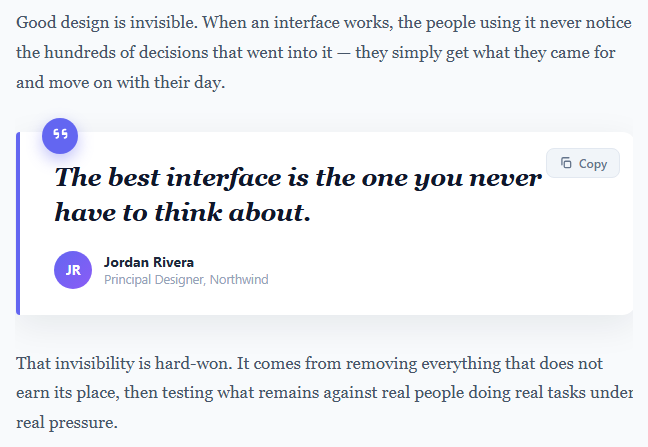
The pull quote is a publishing staple: a sentence lifted out of the body copy, enlarged and set apart so a skimming reader catches the single idea that matters most. Newspapers, long-form articles, case studies, and marketing pages all use it to break up dense text and give the eye a place to rest. This component implements the pattern the way modern editorial sites do — a card with a coloured accent rule, a floating quotation-mark badge, the quote in a large italic serif, an author byline with an avatar, and a copy-to-clipboard button so readers can share the line in one click. It is built entirely in semantic HTML, CSS, and a few lines of vanilla JavaScript with no dependencies.
Semantic HTML structure
The markup uses the correct elements for the job, which matters for both accessibility and SEO. The quote lives inside a <figure> element, the quote text itself is a <blockquote>, and the attribution sits in a <figcaption> — the same structure the HTML spec recommends for quotations with a visible source. Screen readers announce the figure as a self-contained unit, and search engines can associate the citation with the quoted text. The surrounding body paragraphs use plain <p> tags so the pull quote reads as a genuine interruption of the article flow rather than a detached widget.
The floating quotation-mark badge
The decorative quote mark is an inline <svg> positioned with position: absolute and pulled up out of the card with a negative top: -14px. It sits inside a circular indigo badge with a soft drop shadow, half-overlapping the top edge of the card. This overlap trick — an element straddling a container border — is a common editorial flourish that adds depth without an image. Because the mark is SVG, it stays razor-sharp at any zoom level and inherits the accent colour, so re-theming the component is a one-line change.
Typography and the accent rule
The quote text uses a large italic serif at 25px with tightened letter-spacing and a line-height of 1.42 — values chosen so two or three lines of text feel like a deliberate, composed statement rather than running prose. A 4px indigo border-left runs down the card with an asymmetric border-radius (square on the accent side, rounded on the other) so the rule reads as a margin marker, the way a highlighter or editor's pen would mark an important passage. The body paragraphs deliberately use a muted slate colour while the quote is near-black, creating the contrast that makes the eye jump to the quote first.
Copy-to-clipboard with a robust fallback
Clicking the Copy button writes the quote plus its attribution to the clipboard using the asynchronous navigator.clipboard.writeText() API. Because that API only works in secure contexts (HTTPS or localhost), the handler wraps it in a try/catch and falls back to the legacy approach: it creates a hidden <textarea>, selects its contents, and calls document.execCommand('copy') before removing the element. This two-tier strategy means the button works in modern browsers, older browsers, and insecure preview iframes alike.
Confirmation feedback and state reset
On a successful copy the button gains a .copied class that swaps the clipboard icon for a green checkmark and changes the label to "Copied" — using a pure-CSS icon swap (display: none toggled by the class) rather than rebuilding DOM. A setTimeout reverts the button to its idle state after 1.8 seconds, and the timer is cleared on every click with clearTimeout so rapid repeated clicks never leave the button stuck in a half-reset state. To customise the component, edit the quote text, the byline name and role, the avatar initials, and swap the #6366f1 accent for your brand colour — the badge, rule, and avatar gradient all reference it.
Step by step
How to Use
- 1Paste the HTML, CSS, and JSAn article with two body paragraphs and a highlighted pull quote between them renders immediately — quotation-mark badge, italic quote, author byline, and a Copy button.
- 2Replace the quote and attributionEdit the text inside the <blockquote>, then update the byline name, role, and the two-letter avatar initials in the <figcaption>.
- 3Click Copy to test the clipboardThe button copies the quote plus author to the clipboard, turns green, shows a checkmark, and reads "Copied" for 1.8 seconds before resetting.
- 4Recolour to your brandSwap the #6366f1 accent used by the border rule, badge, and avatar gradient for your own colour to match your design system.
- 5Use a real photoReplace the initials .pq-avatar span with an <img> set to object-fit: cover for a real author headshot.
- 6Drop it into article markupPlace the <figure> anywhere inside flowing body copy; it is self-contained and inherits the page width up to its 620px max.
Real-world uses
Common Use Cases
Got questions?
Frequently Asked Questions
Edit the writeText() argument in the JS. It currently copies '"<quote>" — Jordan Rivera'. You can append your article URL, a hashtag, or a "via @handle" so the pasted text is ready to share. To build a Twitter/X intent link instead, set the button to window.open('https://twitter.com/intent/tweet?text=' + encodeURIComponent(quote.textContent)) rather than copying.
Semantic elements give the quote meaning, not just appearance. <blockquote> tells assistive technology and search engines that the text is a quotation, and <figcaption> associates the author with it. This improves accessibility (screen readers announce it as a quote) and can help search engines display the attribution correctly. A styled div looks the same but carries none of that meaning.
navigator.clipboard.writeText() only works in a secure context (HTTPS or localhost) and in sandboxed iframes it can be blocked. That is why the handler includes a fallback that creates a hidden textarea and calls document.execCommand('copy'). If both fail in a restricted sandbox, the visual "Copied" feedback still fires; copying will work normally once the page is served over HTTPS.
Replace the <span class="pq-avatar">JR</span> with <img class="pq-avatar" src="author.jpg" alt="Jordan Rivera"> and add object-fit: cover to the .pq-avatar rule so the photo fills the circle without distortion. Keep the gradient background as a fallback shown behind transparent or slow-loading images.
The markup and CSS port unchanged — only the copy handler moves into the framework. In React, store a "copied" boolean in useState and call navigator.clipboard.writeText in the onClick, toggling the class; in Vue, use a ref and @click; in Angular, a component property and (click). Use a ref/template ref to read the blockquote text rather than document.getElementById, and clear the reset timeout in a cleanup (useEffect return / onUnmounted / ngOnDestroy).