


Smart TV Mockup — Free CSS TV Screen UI Snippet
Smart TV Mockup · Layouts · Plain HTML, CSS & JS · Live preview
Copy & paste
Source Code
<div class="tv-stage">
  <div class="tv-set">
    <div class="tv-screen">
      <div class="tv-ui" id="tvUi" tabindex="0">
        <div class="tv-hero">
          <span class="tv-tag">SERIES</span>
          <h2>Nightfall</h2>
          <p>A detective unravels a city-wide conspiracy across one endless night.</p>
          <div class="tv-actions"><span class="tv-play" data-f>▶ Play</span><span class="tv-more" data-f>+ My List</span></div>
        </div>
        <div class="tv-row">
          <h3>Trending now</h3>
          <div class="tv-tiles">
            <span class="t1" data-f></span><span class="t2" data-f></span><span class="t3" data-f></span><span class="t4" data-f></span><span class="t5" data-f></span>
          </div>
        </div>
      </div>
    </div>
  </div>
  <div class="tv-stand"></div><div class="tv-foot"></div>
  <p class="tv-hint">Click the screen, then use arrow keys to move focus</p>
</div>*{box-sizing:border-box;margin:0;padding:0}
body{font-family:system-ui,-apple-system,sans-serif;background:#e2e8f0;display:flex;flex-direction:column;justify-content:center;align-items:center;min-height:100vh;padding:24px}
.tv-set{width:480px;max-width:90vw;background:#0b0f17;border-radius:14px;padding:10px;box-shadow:0 26px 50px -22px rgba(15,23,42,.6),inset 0 0 0 2px #1e293b}
.tv-screen{aspect-ratio:16/9;border-radius:6px;overflow:hidden;background:#000}
.tv-ui{width:100%;height:100%;overflow:hidden;background:linear-gradient(120deg,#1e1b4b,#0f172a 60%);color:#fff;outline:none;position:relative}
.tv-hero{padding:26px 28px 14px;max-width:70%}
.tv-tag{font-size:9px;font-weight:800;letter-spacing:2px;color:#a5b4fc}
.tv-hero h2{font-size:30px;font-weight:800;margin:5px 0 7px}
.tv-hero p{font-size:12px;color:#cbd5e1;line-height:1.45;margin-bottom:14px}
.tv-actions{display:flex;gap:10px}
.tv-actions span{font-size:12px;font-weight:700;padding:7px 16px;border-radius:7px;background:rgba(255,255,255,.16);cursor:pointer}
.tv-play{background:#fff!important;color:#0f172a}
.tv-row{padding:6px 28px 20px}
.tv-row h3{font-size:13px;font-weight:700;margin-bottom:9px;color:#e2e8f0}
.tv-tiles{display:flex;gap:11px}
.tv-tiles span{flex:1;height:74px;border-radius:8px;cursor:pointer}
.t1{background:linear-gradient(135deg,#6366f1,#22d3ee)}.t2{background:linear-gradient(135deg,#ec4899,#f59e0b)}.t3{background:linear-gradient(135deg,#10b981,#14b8a6)}.t4{background:linear-gradient(135deg,#8b5cf6,#ec4899)}.t5{background:linear-gradient(135deg,#f43f5e,#fb923c)}
[data-f]{transition:transform .18s,box-shadow .18s;position:relative}
[data-f].focus{transform:scale(1.07);box-shadow:0 0 0 3px #fff,0 10px 24px -8px rgba(0,0,0,.6);z-index:3}
.tv-stand{width:90px;height:30px;background:linear-gradient(#1e293b,#0b0f17);margin-top:-2px;clip-path:polygon(28% 0,72% 0,100% 100%,0 100%)}
.tv-foot{width:170px;height:9px;background:#94a3b8;border-radius:6px}
.tv-hint{margin-top:16px;font-size:12px;color:#475569;font-weight:600}var ui = document.getElementById('tvUi');
var items = Array.prototype.slice.call(ui.querySelectorAll('[data-f]'));
var focusIndex = 0;
function setFocus(i) {
focusIndex = Math.max(0, Math.min(items.length - 1, i));
items.forEach(function (el, idx) { el.classList.toggle('focus', idx === focusIndex); });
items[focusIndex].scrollIntoView({ block: 'nearest', inline: 'nearest' });
}
// D-pad style navigation. Group 0-1 are the hero buttons; 2-6 the tiles.
ui.addEventListener('keydown', function (e) {
var heroCount = 2;
if (e.key === 'ArrowRight') { setFocus(focusIndex + 1); e.preventDefault(); }
else if (e.key === 'ArrowLeft') { setFocus(focusIndex - 1); e.preventDefault(); }
else if (e.key === 'ArrowDown' && focusIndex < heroCount) { setFocus(heroCount); e.preventDefault(); }
else if (e.key === 'ArrowUp' && focusIndex >= heroCount) { setFocus(0); e.preventDefault(); }
else if (e.key === 'Enter') { items[focusIndex].style.transform = 'scale(.96)'; setTimeout(function () { setFocus(focusIndex); }, 120); }
});
items.forEach(function (el, idx) { el.addEventListener('click', function () { ui.focus(); setFocus(idx); }); });
ui.addEventListener('focus', function () { setFocus(focusIndex); });
setFocus(0);Extend with AI
Take This Snippet Further With AI
The AI prompt for this one is for Patreon supporters ($3 a month), along with a site with no ads. Supporters enter the passcode once and it is remembered in this browser.
What's included
Features
About this UI Snippet
Smart TV Mockup — CSS TV Frame with D-Pad Focus
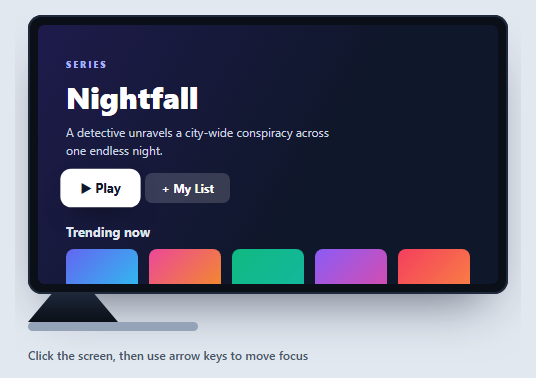
A smart TV mockup frames a streaming or app interface inside a television, complete with the focus-based navigation that remote-driven TV UIs rely on. This snippet builds a flat-screen TV in pure HTML and CSS — bezel, stand, foot — with a sample streaming home screen and real D-pad arrow-key navigation, in vanilla JavaScript with no dependency. It's a strong reference for the "10-foot UI" focus model that web TV apps (and devices like Apple TV or Android TV) use.
The TV body and stand
The set is a near-black rounded box with a thin inset bezel and a soft shadow, wrapping a 16/9 aspect-ratio screen so it keeps TV proportions at any width. Below it, a clip-path trapezoid forms the angled neck of the stand and a rounded bar is the foot — a recognizable TV silhouette built entirely from CSS shapes.
Focus-driven navigation, not a cursor
TV interfaces don't have a pointer; users move a *focus highlight* with a remote's directional pad. This mockup implements exactly that: every focusable element is tagged [data-f], and a setFocus(i) function moves a .focus class that scales the element and draws a white ring. Arrow keys drive it — Left/Right move within a group, Down jumps from the hero buttons into the tile row, Up returns — with the index clamped so focus never falls off the ends.
Spatial groups
The handler models two rows: the hero actions (indices 0–1) and the content tiles (2–6). Down from the hero lands on the first tile; Up from any tile returns to the first action. This is a simplified version of the spatial-navigation logic TV frameworks implement, and it shows the core idea — mapping directional input to the nearest focusable item — without a library.
Visible focus and Enter
The focus ring is deliberately bold (a white outline plus a lift), because on a TV viewed from across the room the focused item must be unmistakable. Pressing Enter gives a quick press animation, standing in for selecting a title. scrollIntoView({ block: 'nearest' }) keeps the focused tile in view if the row scrolls.
Reusing it
Replace the rows with your real content and tag focusable items with data-f; the navigation adapts to however many you add. Use it to prototype a streaming app, a kiosk, or any carousel-driven TV interface, and pair it with a laptop mockup to show a cross-device product.
Step by step
How to Use
- 1Paste HTML, CSS, and JSA CSS smart TV renders a streaming home screen.
- 2Click the screenFocus the UI so it can receive key input.
- 3Press arrow keysA focus ring moves between the hero buttons and tiles.
- 4Go down then acrossDown enters the tile row; Left/Right move along it.
- 5Press EnterThe focused item gives a quick select animation.
- 6Add your contentTag focusable items with data-f and the nav adapts.
Real-world uses
Common Use Cases
Got questions?
Frequently Asked Questions
Every focusable element is tagged with a data-f attribute and collected into an array. A setFocus(index) function toggles a focus class — scaling the item and drawing a white ring — and arrow keys change the index: Left/Right move within a row, Down jumps from the hero buttons into the tiles, and Up returns. The index is clamped so focus stays on a valid item.
TV interfaces are driven by a remote's directional pad, not a pointer, so navigation moves a visible focus highlight between elements. This mockup models that "10-foot UI" pattern, which is how Apple TV, Android TV, and web TV apps work. The bold focus ring exists because the focused item must be obvious from across a room.
No. The set is a rounded near-black box with an inset bezel, the screen uses a 16/9 aspect-ratio, and the stand is a clip-path trapezoid with a rounded foot bar. Everything is CSS, so it scales crisply and you can recolor or resize the frame freely.
Put your rows and tiles in the screen and add the data-f attribute to anything that should be focusable. The script collects all data-f elements automatically, so the navigation works with however many you add. You can extend the keydown handler to model more rows for richer spatial movement.
Render the rows from data and keep the focused index in state, applying the focus class conditionally. Handle arrow keys in a keydown listener on the container ref and update the index. For production TV apps, consider a spatial-navigation library, but this shows the core mapping of directional input to the nearest focusable item. Tailwind styles the frame and tiles with utilities.