


Browser Window Mockup — Free CSS Browser Frame Snippet
Browser Window Mockup · Layouts · Plain HTML, CSS & JS · Live preview
Copy & paste
Source Code
<div class="bw-stage">
<div class="bw-window" id="bwWindow">
<div class="bw-bar">
<div class="bw-lights"><span class="r"></span><span class="y"></span><span class="g"></span></div>
<div class="bw-tabs">
<div class="bw-tab active"><span class="bw-fav"></span>Dashboard<i class="bw-x">×</i></div>
<div class="bw-tab">Docs<i class="bw-x">×</i></div>
<span class="bw-add">+</span>
</div>
</div>
<div class="bw-toolbar">
<button class="bw-nav" aria-label="Back">‹</button>
<button class="bw-nav" aria-label="Forward">›</button>
<button class="bw-nav" id="bwReload" aria-label="Reload">⟳</button>
<div class="bw-url"><span class="bw-lock"></span><input id="bwUrl" value="https://acme.app/dashboard" spellcheck="false"></div>
<button class="bw-nav" aria-label="Menu">⋮</button>
</div>
<div class="bw-content" id="bwContent">
<div class="bw-hero">
<span class="bw-eyebrow">Acme Analytics</span>
<h1>Ship faster with insight</h1>
<p>Real-time product metrics in one clean place.</p>
<div class="bw-row"><button class="bw-cta">Get started</button><button class="bw-ghost">Live demo</button></div>
</div>
<div class="bw-grid"><span></span><span></span><span></span></div>
</div>
</div>
</div>*{box-sizing:border-box;margin:0;padding:0}
body{font-family:system-ui,-apple-system,sans-serif;background:#cbd5e1;display:flex;justify-content:center;align-items:center;min-height:100vh;padding:24px}
.bw-window{width:100%;max-width:480px;background:#fff;border-radius:13px;overflow:hidden;box-shadow:0 30px 60px -22px rgba(15,23,42,.5);border:1px solid #cbd5e1}
.bw-bar{display:flex;align-items:flex-end;gap:14px;background:#e2e8f0;padding:10px 12px 0}
.bw-lights{display:flex;gap:7px;padding-bottom:9px}
.bw-lights span{width:12px;height:12px;border-radius:50%}
.bw-lights .r{background:#ff5f57}.bw-lights .y{background:#febc2e}.bw-lights .g{background:#28c840}
.bw-tabs{display:flex;align-items:flex-end;gap:5px}
.bw-tab{display:flex;align-items:center;gap:7px;background:#cbd5e1;color:#475569;font-size:12px;font-weight:600;padding:8px 11px;border-radius:9px 9px 0 0;max-width:130px;white-space:nowrap;cursor:pointer}
.bw-tab.active{background:#fff;color:#0f172a}
.bw-fav{width:12px;height:12px;border-radius:3px;background:linear-gradient(135deg,#6366f1,#22d3ee);flex-shrink:0}
.bw-x{font-style:normal;font-size:14px;color:#94a3b8;line-height:1}
.bw-x:hover{color:#ef4444}
.bw-add{font-size:17px;color:#64748b;padding:4px 6px;cursor:pointer;align-self:center}
.bw-toolbar{display:flex;align-items:center;gap:7px;padding:9px 12px;border-bottom:1px solid #e2e8f0}
.bw-nav{border:none;background:transparent;color:#64748b;font-size:16px;cursor:pointer;width:26px;height:26px;border-radius:7px;line-height:1}
.bw-nav:hover{background:#f1f5f9;color:#0f172a}
.bw-url{flex:1;display:flex;align-items:center;gap:7px;background:#f1f5f9;border-radius:8px;padding:0 10px}
.bw-lock{width:9px;height:8px;border:1.5px solid #16a34a;border-radius:2px;position:relative;flex-shrink:0;margin-top:-3px}
.bw-lock::before{content:'';position:absolute;top:-4px;left:1px;width:5px;height:5px;border:1.5px solid #16a34a;border-bottom:none;border-radius:3px 3px 0 0}
.bw-url input{flex:1;border:none;background:transparent;padding:8px 0;font-size:12.5px;color:#334155;font-family:inherit;outline:none}
.bw-content{height:280px;overflow-y:auto;background:linear-gradient(160deg,#eef2ff,#fff 40%)}
.bw-hero{padding:38px 28px 22px;text-align:center}
.bw-eyebrow{font-size:11px;font-weight:800;color:#6366f1;text-transform:uppercase;letter-spacing:.08em}
.bw-hero h1{font-size:27px;font-weight:800;color:#0f172a;margin:8px 0}
.bw-hero p{font-size:14px;color:#64748b;margin-bottom:18px}
.bw-row{display:flex;gap:10px;justify-content:center}
.bw-cta{background:#6366f1;color:#fff;border:none;border-radius:9px;padding:10px 18px;font-weight:700;font-size:13px;cursor:pointer;font-family:inherit}
.bw-ghost{background:#fff;color:#4338ca;border:1px solid #e2e8f0;border-radius:9px;padding:10px 18px;font-weight:700;font-size:13px;cursor:pointer;font-family:inherit}
.bw-grid{display:grid;grid-template-columns:repeat(3,1fr);gap:12px;padding:0 28px 28px}
.bw-grid span{height:64px;border-radius:12px;background:#fff;border:1px solid #e2e8f0;box-shadow:0 8px 18px -12px rgba(0,0,0,.25)}
.bw-content.loading{opacity:.4;transition:opacity .1s}
@keyframes bwSpin{to{transform:rotate(360deg)}}
.bw-nav.spin{animation:bwSpin .6s linear}var reload = document.getElementById('bwReload');
var content = document.getElementById('bwContent');
var urlInput = document.getElementById('bwUrl');
// Reload: spin the icon and briefly dim the page like a real refresh.
reload.addEventListener('click', function () {
reload.classList.remove('spin'); void reload.offsetWidth; reload.classList.add('spin');
content.classList.add('loading');
setTimeout(function () { content.classList.remove('loading'); content.scrollTop = 0; }, 450);
});
// Pressing Enter in the address bar re-triggers the reload animation.
urlInput.addEventListener('keydown', function (e) {
if (e.key === 'Enter') { urlInput.blur(); reload.click(); }
});
// Tab close / switch is purely cosmetic here.
document.querySelectorAll('.bw-tab').forEach(function (tab) {
tab.addEventListener('click', function (e) {
if (e.target.classList.contains('bw-x')) { e.stopPropagation(); return; }
document.querySelectorAll('.bw-tab').forEach(function (t) { t.classList.remove('active'); });
tab.classList.add('active');
});
});Extend with AI
Take This Snippet Further With AI
The AI prompt for this one is for Patreon supporters ($3 a month), along with a site with no ads. Supporters enter the passcode once and it is remembered in this browser.
What's included
Features
About this UI Snippet
Browser Window Mockup — CSS Browser Chrome Wrapper
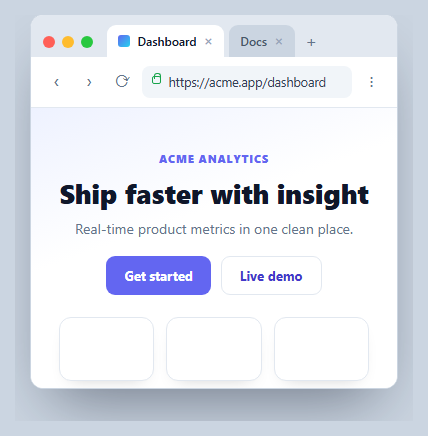
A browser window mockup wraps a screenshot or live page in realistic browser chrome — traffic-light buttons, tabs, an address bar — for landing pages, documentation, and product shots. This one is pure HTML and CSS with a few interactive touches (a spinning reload, tab switching, an editable URL), in vanilla JavaScript with no dependency, so you can drop any content inside and present it as if it were running in a browser.
The chrome, built from scratch
The window is a rounded card with three stacked regions: a tab strip with the macOS-style traffic lights (three colored circles), a toolbar with navigation buttons and the address bar, and the content area. The tabs use border-radius only on the top corners and a darker inactive background so the active tab appears to merge into the page below — the classic browser-tab look achieved with plain CSS.
A convincing address bar
The URL field is a real <input> inside a pill, preceded by a CSS-drawn padlock: a small bordered box with a ::before pseudo-element forming the shackle, in green to signal HTTPS. The input is editable, and pressing Enter blurs it and triggers the reload animation, mimicking a navigation. It's a believable detail that most static mockups fake with an image.
Reload that feels real
Clicking reload restarts a bwSpin keyframe on the icon (using the void offsetWidth reflow trick so it replays every click) and adds a .loading class that briefly dims the content and resets its scroll — a lightweight imitation of a page refresh. Nothing actually navigates, but the motion sells it.
Cosmetic tabs
Clicking a tab moves the .active class, and the close (×) and add (+) controls are present for realism; tab clicks ignore the close button via stopPropagation. You can wire these to real routes if you embed the mockup in an interactive demo.
Reusing it as a wrapper
Replace the .bw-content markup with your own page or a screenshot and the frame becomes a reusable container. Set the value of the address input to your URL, and keep the chrome as a component so any hero section or dashboard can be shown "in a browser" on a marketing page or in docs.
Step by step
How to Use
- 1Paste HTML, CSS, and JSA browser window renders with tabs, a toolbar, and a sample page.
- 2Edit the URLType in the address bar and press Enter to trigger a reload.
- 3Click reloadThe icon spins and the page briefly dims like a refresh.
- 4Switch tabsClicking a tab moves the active highlight.
- 5Drop in your contentReplace the content area with your page or screenshot.
- 6Reuse as a wrapperKeep the chrome as a component with a content slot.
Real-world uses
Common Use Cases
Got questions?
Frequently Asked Questions
No, it's pure CSS. The traffic-light buttons are three colored circles, the tabs are top-rounded boxes that merge into the page, the address bar is a styled input with a CSS padlock pseudo-element, and the toolbar buttons are HTML characters. Because nothing is an image, it stays crisp and you can recolor or resize any part.
It's a real, editable input. Typing and pressing Enter blurs it and triggers the same reload animation as the reload button, simulating a navigation. It doesn't load a new page — it's a presentational mockup — but you can wire the Enter handler to real routing if you embed it in an interactive demo.
Clicking reload restarts a CSS spin keyframe on the icon using the void offsetWidth reflow trick so it replays on every click, and adds a loading class that briefly lowers the content's opacity and resets its scroll position. The combination reads as a page refresh without any real network activity.
Replace the markup inside .bw-content with your page or an <img> screenshot, and set the address input's value to your URL. The chrome is independent of the content, so your page just fills the content area, which scrolls if it's taller than the frame. Keep the window as a reusable wrapper component.
Make the window a component with a content slot (children, slot, or ng-content) and props for the URL and tab list. The reload spin and loading dim are class toggles you can drive from state. In Tailwind, build the chrome with flex rows, rounded-t utilities for tabs, and small inline SVGs or characters for the controls.