


Scroll Receipt Printer: GSAP Itemized Bill Animation
Scroll Receipt Printer: GSAP Itemized Bill Animation · Scroll · Plain HTML, CSS & JS · Live preview
Copy & paste
Source Code
<section class="rc-stage" id="rcStage">
<div class="rc-copy">
<p class="rc-kicker">Itemized pricing</p>
<h1>Every line, printed as you scroll</h1>
<p>A thermal printer feeds the receipt out one step at a time, so a long price breakdown reads like it is being handed over.</p>
</div>
<div class="rc-machine">
<div class="rc-window">
<div class="rc-paper" id="rcPaper">
<p class="rc-shop">PIXEL & PINE STUDIO</p>
<p class="rc-meta">Project receipt #4821 · 18 Nov</p>
<ul class="rc-lines">
<li><span>Brand sprint</span><b>1,200.00</b></li>
<li><span>Logo suite</span><b>640.00</b></li>
<li><span>Landing page</span><b>1,800.00</b></li>
<li><span>CMS setup</span><b>450.00</b></li>
<li><span>Copy edit</span><b>220.00</b></li>
<li><span>Stock photos</span><b>90.00</b></li>
</ul>
<div class="rc-sum"><span>Subtotal</span><b>4,400.00</b></div>
<div class="rc-sum"><span>Tax 8%</span><b>352.00</b></div>
<div class="rc-sum rc-total"><span>TOTAL</span><b>4,752.00</b></div>
<div class="rc-bar" aria-hidden="true"></div>
<p class="rc-thanks">Thank you. Keep this receipt.</p>
<span class="rc-stamp" id="rcStamp">PAID</span>
</div>
</div>
<div class="rc-printer"><span class="rc-slot"></span><i class="rc-led"></i><b>PRINT-80</b></div>
</div>
</section>
<section class="rc-after"><p>Receipt done. The page carries on.</p></section>*{box-sizing:border-box;margin:0;padding:0}
body{font-family:system-ui,-apple-system,sans-serif;background:#12151c;color:#e8eaf0}
.rc-stage{height:100vh;display:grid;grid-template-columns:minmax(0,1fr) 320px;gap:clamp(24px,6vw,80px);align-items:center;justify-content:center;padding:24px clamp(20px,8vw,120px);max-width:1100px;margin:0 auto}
.rc-copy{display:grid;gap:12px}
.rc-kicker{font-size:12px;font-weight:700;letter-spacing:.16em;text-transform:uppercase;color:#f59e0b}
.rc-copy h1{font-size:clamp(28px,4.4vw,52px);letter-spacing:-.025em;line-height:1.06}
.rc-copy p:last-child{color:#98a0b5;font-size:15px;max-width:420px}
.rc-machine{width:320px;display:flex;flex-direction:column;align-items:center}
.rc-window{overflow:hidden;width:290px;display:grid}
.rc-paper{position:relative;background:#fffdf6;color:#1c1c1c;font-family:'Courier New',ui-monospace,monospace;font-size:13px;padding:22px 18px 16px;-webkit-mask:conic-gradient(from 135deg at top,#0000,#000 1deg 89deg,#0000 90deg) 0 0/14px 7px repeat-x,linear-gradient(#000 0 0) 0 7px/100% calc(100% - 7px) no-repeat;mask:conic-gradient(from 135deg at top,#0000,#000 1deg 89deg,#0000 90deg) 0 0/14px 7px repeat-x,linear-gradient(#000 0 0) 0 7px/100% calc(100% - 7px) no-repeat}
.rc-shop{text-align:center;font-weight:700;letter-spacing:.08em}
.rc-meta{text-align:center;font-size:11px;color:#6b6b6b;margin:2px 0 12px}
.rc-lines{list-style:none;display:grid;gap:5px;border-top:1px dashed #aaa;border-bottom:1px dashed #aaa;padding:10px 0;margin-bottom:8px}
.rc-lines li,.rc-sum{display:flex;justify-content:space-between;gap:10px}
.rc-sum{margin:3px 0}
.rc-total{font-weight:700;font-size:16px;border-top:1px solid #1c1c1c;padding-top:7px;margin-top:8px}
.rc-bar{height:38px;margin:14px 0 8px;background:repeating-linear-gradient(90deg,#1c1c1c 0 2px,transparent 2px 4px,#1c1c1c 4px 5px,transparent 5px 9px,#1c1c1c 9px 12px,transparent 12px 14px)}
.rc-thanks{text-align:center;font-size:11px;color:#6b6b6b}
.rc-stamp{position:absolute;left:22px;top:73%;border:3px solid #dc2626;color:#dc2626;font:700 26px/1 system-ui,sans-serif;letter-spacing:.1em;padding:4px 12px;border-radius:6px;opacity:0;transform:rotate(-12deg)}
.rc-printer{position:relative;z-index:2;width:320px;height:70px;margin-top:-12px;border-radius:16px;background:linear-gradient(#2b3140,#1a1e29);box-shadow:0 18px 30px rgba(0,0,0,.5);display:flex;align-items:flex-end;justify-content:space-between;padding:0 22px 12px}
.rc-slot{position:absolute;left:14px;right:14px;top:10px;height:9px;border-radius:5px;background:#05070b;box-shadow:inset 0 2px 3px #000}
.rc-printer b{font-size:11px;letter-spacing:.14em;color:#7b8498}
.rc-led{width:9px;height:9px;border-radius:50%;background:#34d399;box-shadow:0 0 8px #34d399;animation:rcBlink 1s steps(2) infinite}
@keyframes rcBlink{50%{opacity:.25}}
.rc-after{min-height:70vh;display:grid;place-items:center;color:#98a0b5;font-size:15px;padding:24px;text-align:center}
@media(max-width:760px){.rc-stage{grid-template-columns:1fr;justify-items:center;text-align:center;gap:14px;padding:16px}.rc-copy p:last-child{display:none}.rc-copy h1{font-size:26px}.rc-machine,.rc-printer{width:min(320px,92vw)}.rc-window{width:min(290px,84vw)}}
@media(prefers-reduced-motion:reduce){.rc-led{animation:none}}gsap.registerPlugin(ScrollTrigger);
var stage = document.getElementById('rcStage');
var paper = document.getElementById('rcPaper');
var stamp = document.getElementById('rcStamp');
var tl = gsap.timeline({ defaults: { ease: 'none' } });
// steps() makes the paper advance in small jerks, like a real thermal feed,
// instead of gliding. The paper starts fully hidden below the slot's clip.
tl.fromTo(paper, { yPercent: 100 }, { yPercent: 0, ease: 'steps(28)', duration: 0.9 }, 0);
tl.fromTo(stamp, { scale: 1.8, opacity: 0 }, { scale: 1, opacity: 1, ease: 'back.out(2)', duration: 0.1 }, 0.9);
if (window.matchMedia('(prefers-reduced-motion: reduce)').matches) {
tl.progress(1); // show the finished receipt, no pin
} else {
ScrollTrigger.create({
trigger: stage,
start: 'top top',
end: '+=1800',
pin: true,
scrub: 0.3,
animation: tl
});
}Extend with AI
Take This Snippet Further With AI
Paste this snippet into an AI coding assistant and ask it to explain how a hidden-overflow window, a raised printer body and a stepped ease combine to make paper look like it is printing. Useful follow-ups: a version where the total counts up as it prints, a landscape receipt that prints sideways, or a "tear off" interaction that lets the user click the paper to remove it. Ask it to keep reduced-motion support.
Prompt to recreate it
Copy this into your AI assistant of choice to build the effect from scratch, or as a jumping-off point for your own variant:
Build a "scroll receipt printer" in plain HTML, CSS and JavaScript using GSAP with ScrollTrigger (from a CDN).

Requirements:
- A full-viewport pinned stage with a heading and short paragraph on the left and a printer on the right (stacked on screens under 760px).
- The printer is a dark rounded body with a slot, a blinking green LED and a label. Above it is a window with overflow hidden that contains the paper. The printer body sits over the window with a higher z-index so the paper appears to come out of the slot.
- The paper is a cream block in a monospace font: shop name, receipt number and date, six line items with right-aligned prices, subtotal, tax and a bold total, a CSS barcode and a thank-you line. Cut the zigzag top edge with a CSS mask (conic-gradient plus linear-gradient).
- One GSAP timeline: tween the paper from yPercent 100 to 0 with ease steps(28), then at the end scale a red PAID stamp in with a back ease.
- Attach the timeline with ScrollTrigger (pin: true, scrub about 0.3, end: '+=1800') so scrolling back up pulls the receipt back in.
- If prefers-reduced-motion is set, set the timeline to its end and skip the pin.
Want to tighten it up first? Run this prompt through the AI Prompt Studio to score it across 8 quality dimensions, catch anti-patterns, and tune the wording for Claude, ChatGPT, or Gemini before you paste it in.
What's included
Features
About this UI Snippet
Scroll Receipt Printer: An Itemized Bill That Prints as You Scroll
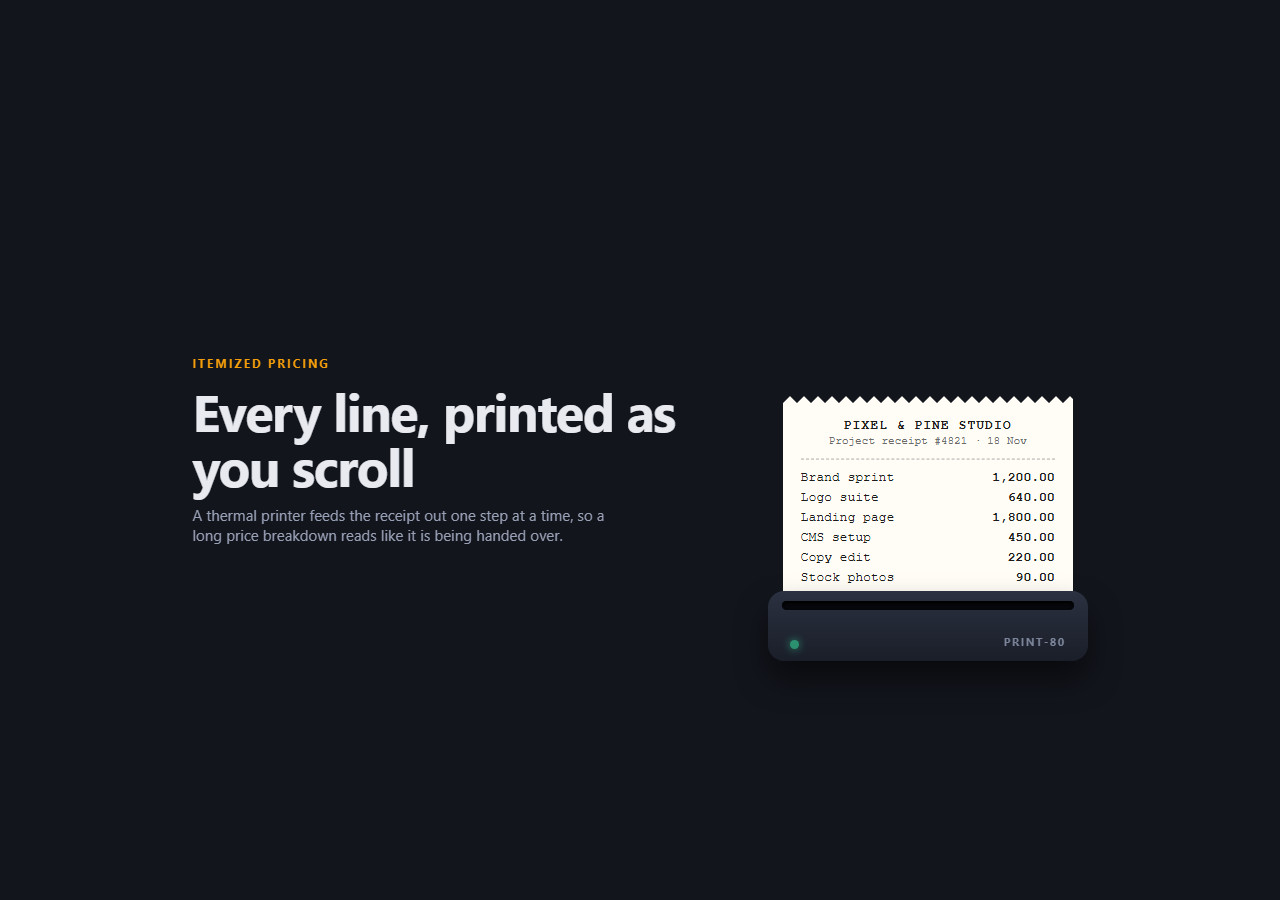
A price breakdown is easy to skim past. This snippet turns it into a small event: a thermal printer sits at the bottom of a pinned stage, and as you scroll, a paper receipt feeds up out of the slot one jerk at a time. The shop name appears first, then each line item, the subtotal, tax and total, a barcode, and finally a red PAID stamp.
The paper moves, nothing else does
The whole receipt is one block. A single GSAP tween moves it from yPercent: 100 (hidden below the slot) to 0. A window with overflow: hidden clips whatever has not left the slot yet, and the printer body sits above it with a higher z-index, so the paper really appears to come out of the machine.
Stepped easing gives the mechanical feel
The tween uses ease: 'steps(28)'. Instead of sliding smoothly, the paper advances in 28 small increments across the scroll range. It is the detail that makes the result read as a printer rather than a generic reveal.
A pinned, scrubbed timeline
A ScrollTrigger.create() call pins the stage for +=1800 pixels of scrolling and scrubs the timeline with scrub: 0.3. Scrolling back up pulls the receipt back into the slot. The stamp is placed on the same timeline at 0.9, so it lands only when the last line is out.
A torn edge without images
The zigzag top is a CSS mask: a repeating conic-gradient forms the teeth and a linear-gradient fills the rest. There are no image files, and the paper keeps its shape at any width.
Accessibility and responsive layout
The receipt text is real, selectable HTML in the right reading order. With prefers-reduced-motion the timeline jumps to its end and the pin is skipped. Below 760px the copy collapses to a headline so the printer still fits the screen. Change the lines, prices and shop name to match your own offer, or pair it with a scroll stat reveal story for the numbers that follow.
Step by step
How to Use
- 1Add the GSAP CDNsInclude gsap and ScrollTrigger from the CDN panel.
- 2Paste HTML, CSS and JSA heading and a printer with a blank slot render on a dark stage.
- 3Edit the receiptChange the shop, line items, tax and total inside .rc-paper.
- 4Scroll downThe paper feeds out of the slot in small steps and the PAID stamp lands last.
- 5Change the paceEdit steps(28) for coarser or finer feed, and end: '+=1800' for scroll length.
- 6Scroll back upThe receipt is pulled back into the printer.
Real-world uses
Common Use Cases
Got questions?
Frequently Asked Questions
The paper sits inside a container with overflow hidden. It starts translated 100% downward, fully clipped, and moves to 0. The printer body is layered on top with a higher z-index and a small negative margin, so the paper appears to emerge from its slot.
It makes the tween advance in 28 discrete jumps across its duration instead of a smooth slide. Scrubbed against scroll, the paper moves in small mechanical increments. Use a larger number for a finer feed or remove it for a smooth glide.
Yes. The paper's own height is what the tween travels, so adding rows just makes it longer. Keep the receipt within the viewport height, or lower the font size, so the finished receipt is fully visible at the end.
No. It is decorative, drawn with a repeating-linear-gradient. For a scannable barcode or QR code, swap that element for an SVG from a barcode library and keep the same container.