



Split Payment Calculator — Bill Splitter HTML CSS JS
Split Payment Calculator · Tools · Plain HTML, CSS & JS · Live preview
Copy & paste
Source Code
<div class="spc-card">
  <h3>Split the bill</h3>

  <div class="spc-field">
    <label for="spcTotal">Bill total</label>
    <div class="spc-input-wrap">
      <span>$</span>
      <input type="number" id="spcTotal" value="186.40" min="0" step="0.01">
    </div>
  </div>

  <div class="spc-field">
    <label>Tip</label>
    <div class="spc-tip-row">
      <button type="button" class="spc-tip-btn" data-tip="0">0%</button>
      <button type="button" class="spc-tip-btn" data-tip="15">15%</button>
      <button type="button" class="spc-tip-btn active" data-tip="18">18%</button>
      <button type="button" class="spc-tip-btn" data-tip="20">20%</button>
      <div class="spc-input-wrap spc-tip-custom">
        <input type="number" id="spcTipCustom" placeholder="Custom %" min="0">
      </div>
    </div>
  </div>

  <div class="spc-field">
    <label>Split between</label>
    <div class="spc-stepper">
      <button type="button" id="spcMinus" aria-label="Fewer people">−</button>
      <span id="spcPeople">4</span>
      <button type="button" id="spcPlus" aria-label="More people">+</button>
    </div>
  </div>

  <label class="spc-uneven-toggle">
    <input type="checkbox" id="spcUneven">
    Uneven split (set each person's share manually)
  </label>

  <div class="spc-uneven-list" id="spcUnevenList" hidden></div>

  <div class="spc-totals">
    <div class="spc-totals-row"><span>Subtotal</span><span id="spcSubtotalOut">$0.00</span></div>
    <div class="spc-totals-row"><span>Tip</span><span id="spcTipOut">$0.00</span></div>
    <div class="spc-totals-row spc-grand"><span>Total</span><span id="spcGrandOut">$0.00</span></div>
  </div>

  <div class="spc-per-person" id="spcPerPerson"></div>
</div>*{box-sizing:border-box;margin:0;padding:0}
body{font-family:system-ui,-apple-system,sans-serif;background:#f1f5f9;min-height:100vh;display:flex;align-items:center;justify-content:center;padding:24px}
.spc-card{background:#fff;border-radius:18px;padding:22px;width:100%;max-width:380px;box-shadow:0 18px 44px rgba(15,23,42,.12)}
.spc-card h3{font-size:16px;font-weight:800;color:#0f172a;margin-bottom:16px}
.spc-field{margin-bottom:16px}
.spc-field label{display:block;font-size:12px;font-weight:700;color:#64748b;margin-bottom:7px}
.spc-input-wrap{display:flex;align-items:center;border:1.5px solid #e2e8f0;border-radius:10px;padding:0 12px;transition:border-color .15s,box-shadow .15s}
.spc-input-wrap:focus-within{border-color:#10b981;box-shadow:0 0 0 3px rgba(16,185,129,.15)}
.spc-input-wrap span{font-size:14px;font-weight:700;color:#94a3b8}
.spc-input-wrap input{border:none;outline:none;padding:11px 6px;font-size:15px;font-weight:700;color:#0f172a;font-family:inherit;width:100%}
.spc-tip-row{display:flex;gap:7px;flex-wrap:wrap}
.spc-tip-btn{flex:1;min-width:52px;border:1.5px solid #e2e8f0;border-radius:9px;background:#fff;padding:9px 0;font-size:13px;font-weight:700;color:#475569;cursor:pointer;transition:background .15s,border-color .15s,color .15s}
.spc-tip-btn:hover{border-color:#10b981}
.spc-tip-btn.active{background:#10b981;border-color:#10b981;color:#fff}
.spc-tip-custom{flex:1.4;min-width:90px;padding:0 10px}
.spc-tip-custom input{padding:8px 4px;font-size:13px}
.spc-stepper{display:flex;align-items:center;justify-content:center;gap:18px;border:1.5px solid #e2e8f0;border-radius:10px;padding:9px}
.spc-stepper button{width:30px;height:30px;border-radius:50%;border:1.5px solid #e2e8f0;background:#fff;font-size:17px;font-weight:700;color:#10b981;cursor:pointer;display:flex;align-items:center;justify-content:center}
.spc-stepper button:disabled{opacity:.35;cursor:not-allowed}
.spc-stepper span{font-size:16px;font-weight:800;color:#0f172a;min-width:18px;text-align:center}
.spc-uneven-toggle{display:flex;align-items:center;gap:8px;font-size:12.5px;font-weight:600;color:#475569;margin-bottom:8px;cursor:pointer}
.spc-uneven-list{display:flex;flex-direction:column;gap:8px;margin-bottom:14px;padding:12px;background:#f8fafc;border-radius:10px}
.spc-uneven-row{display:flex;align-items:center;justify-content:space-between;gap:10px}
.spc-uneven-row span{font-size:12.5px;font-weight:700;color:#1e293b}
.spc-uneven-row .spc-input-wrap{width:110px;padding:0 8px}
.spc-uneven-row input{padding:7px 4px;font-size:13px}
.spc-uneven-error{font-size:11.5px;color:#dc2626;font-weight:700}
.spc-totals{border-top:1px dashed #e2e8f0;padding-top:14px;margin-bottom:14px}
.spc-totals-row{display:flex;justify-content:space-between;font-size:13px;color:#64748b;margin-bottom:6px;font-variant-numeric:tabular-nums}
.spc-grand{font-size:16px;font-weight:800;color:#0f172a;margin-top:8px}
.spc-per-person{background:#ecfdf5;border:1px solid #a7f3d0;border-radius:10px;padding:12px 14px;display:flex;align-items:center;justify-content:space-between}
.spc-per-person strong{font-size:19px;color:#047857;font-variant-numeric:tabular-nums}
.spc-per-person span{font-size:12.5px;font-weight:700;color:#047857}var tipPct = 18;
var people = 4;
function num(id) { return parseFloat(document.getElementById(id).value) || 0; }
function setTip(pct) {
tipPct = pct;
document.querySelectorAll('.spc-tip-btn').forEach(function (b) { b.classList.toggle('active', +b.dataset.tip === pct); });
document.getElementById('spcTipCustom').value = '';
calculate();
}
document.querySelectorAll('.spc-tip-btn').forEach(function (btn) {
btn.addEventListener('click', function () { setTip(+btn.dataset.tip); });
});
document.getElementById('spcTipCustom').addEventListener('input', function () {
if (this.value === '') return;
tipPct = parseFloat(this.value) || 0;
document.querySelectorAll('.spc-tip-btn').forEach(function (b) { b.classList.remove('active'); });
calculate();
});
document.getElementById('spcTotal').addEventListener('input', calculate);
document.getElementById('spcMinus').addEventListener('click', function () {
if (people <= 2) return;
people--; syncPeopleUI();
});
document.getElementById('spcPlus').addEventListener('click', function () {
if (people >= 20) return;
people++; syncPeopleUI();
});
function syncPeopleUI() {
document.getElementById('spcPeople').textContent = people;
document.getElementById('spcMinus').disabled = people <= 2;
document.getElementById('spcPlus').disabled = people >= 20;
if (document.getElementById('spcUneven').checked) buildUnevenList();
calculate();
}
document.getElementById('spcUneven').addEventListener('change', function () {
document.getElementById('spcUnevenList').hidden = !this.checked;
if (this.checked) buildUnevenList();
calculate();
});
function buildUnevenList() {
var list = document.getElementById('spcUnevenList');
var rows = '';
for (var i = 1; i <= people; i++) {
rows += '<div class="spc-uneven-row"><span>Person ' + i + '</span>' +
'<div class="spc-input-wrap"><span>%</span><input type="number" class="spc-share" data-i="' + i + '" min="0" value="' + (100 / people).toFixed(0) + '"></div></div>';
}
rows += '<div class="spc-uneven-error" id="spcUnevenError" hidden></div>';
list.innerHTML = rows;
list.querySelectorAll('.spc-share').forEach(function (inp) { inp.addEventListener('input', calculate); });
}
function calculate() {
var total = num('spcTotal');
var tip = total * (tipPct / 100);
var grand = total + tip;
document.getElementById('spcSubtotalOut').textContent = '$' + total.toFixed(2);
document.getElementById('spcTipOut').textContent = '$' + tip.toFixed(2);
document.getElementById('spcGrandOut').textContent = '$' + grand.toFixed(2);
var perPersonEl = document.getElementById('spcPerPerson');
var uneven = document.getElementById('spcUneven').checked;
if (uneven) {
var shares = Array.prototype.map.call(document.querySelectorAll('.spc-share'), function (i) { return parseFloat(i.value) || 0; });
var sum = shares.reduce(function (a, b) { return a + b; }, 0);
var errorEl = document.getElementById('spcUnevenError');
if (Math.round(sum) !== 100) {
errorEl.hidden = false;
errorEl.textContent = 'Shares add up to ' + sum.toFixed(0) + '% — should total 100%.';
perPersonEl.innerHTML = '<span>Fix the shares above</span>';
return;
}
errorEl.hidden = true;
perPersonEl.innerHTML = shares.map(function (pct, i) {
return '<div><strong>$' + (grand * pct / 100).toFixed(2) + '</strong><span> P' + (i + 1) + '</span></div>';
}).join('');
perPersonEl.style.flexWrap = 'wrap';
perPersonEl.style.gap = '10px';
} else {
var each = grand / people;
perPersonEl.style.flexWrap = '';
perPersonEl.innerHTML = '<strong>$' + each.toFixed(2) + '</strong><span>per person × ' + people + '</span>';
}
}
syncPeopleUI();
calculate();Extend with AI
Take This Snippet Further With AI
The AI prompt for this one is for Patreon supporters ($3 a month, 7 days free), along with a site with no ads. Supporters enter the passcode once and it is remembered in this browser.
What's included
Features
About this UI Snippet
Split Payment Calculator — Tip Presets, People Stepper & Validated Uneven Split
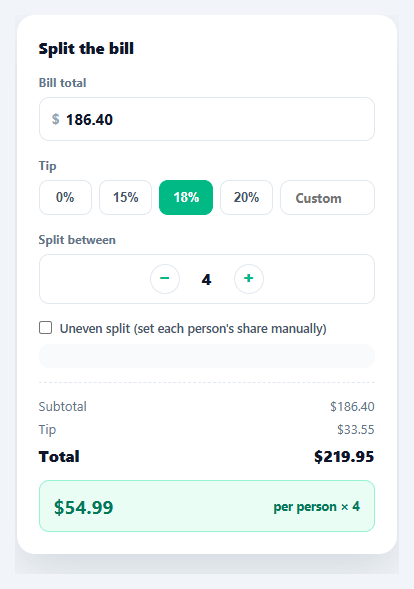
Splitting a restaurant bill fairly is simple math that's annoying to do by hand, especially with a tip and an odd number of people — which is exactly why every group-dinner app ships some version of this calculator. This snippet builds a complete bill splitter: quick tip presets with a custom override, a people stepper, an even split by default, and an optional uneven-split mode that validates percentages sum to 100% before showing per-person amounts.
Tip presets that share state with a custom field
Four preset buttons (0/15/18/20%) and a custom number input all write to the same tipPct variable. Clicking a preset clears the custom field and highlights the matching button; typing in the custom field clears every preset's active state instead — so the UI never shows a highlighted preset that disagrees with a manually typed percentage, a small consistency detail that's easy to get wrong when two inputs can set the same value.
A people stepper with sane bounds
The stepper clamps between 2 and 20 people, disabling the relevant button at each boundary rather than letting the count go to 1 (at which point "splitting" stops meaning anything) or to an unreasonably large number. Every increment or decrement immediately recalculates the per-person amount and, if uneven mode is active, regenerates the share-percentage inputs for the new headcount.
Uneven split with real validation
Toggling "Uneven split" reveals one percentage input per person, defaulting to an even 100 / people split that's then free to be adjusted. calculate() sums every entered percentage and refuses to show per-person dollar amounts until that sum rounds to exactly 100% — instead surfacing a specific error ("Shares add up to 92% — should total 100%") so the user knows exactly how far off they are, rather than silently showing wrong numbers or blocking the whole calculator.
One calculate function, every output
Every visible number — subtotal, tip, grand total, and the per-person breakdown in both modes — flows through a single calculate() call triggered by every relevant input. There's no per-field update logic to keep in sync; changing the bill total, the tip, the people count, or any individual share simply re-runs the same function against the current state.
Rounding, the part most bill splitters get wrong
Dividing a grand total evenly across several people in floating-point arithmetic can leave the displayed shares off by a cent from the actual total — three people splitting $10.00 each get $3.33, and $3.33 × 3 is $9.99, not $10.00. This demo accepts that tiny float-formatting reality for clarity; a finance-grade version should round every share with toFixed(2), sum the rounded values, and silently add or subtract the few-cent remainder to the largest share so the displayed numbers always reconcile exactly with the bill.
Step by step
How to Use
- 1Paste HTML, CSS, and JSA bill-splitting card renders with a $186.40 example total, an 18% tip selected, and a 4-person even split.
- 2Adjust the bill total or tipEdit the total field or pick a different tip preset (or type a custom percentage) — the subtotal, tip, and total update instantly.
- 3Change the headcountUse the +/− stepper to change how many people are splitting; the per-person amount recalculates immediately.
- 4Turn on uneven splitCheck "Uneven split" to reveal a percentage input per person, defaulting to an even share.
- 5Adjust individual sharesChange any person's percentage — if the total doesn't sum to 100%, an error shows exactly how far off it is instead of a wrong dollar amount.
- 6Fix the shares to see amountsOnce the percentages sum to 100%, each person's exact dollar share (including their portion of the tip) displays.
Real-world uses
Common Use Cases
Got questions?
Frequently Asked Questions
Floating-point per-person division can leave the sum off by a cent due to rounding; compute every person's amount with toFixed(2), sum those rounded values, and add or subtract the few-cent difference to/from the largest share so the displayed amounts reconcile exactly with the grand total.
Add a toggle between "percentage" and "dollar amount" modes for the uneven-split inputs; in dollar mode, validate that the entered amounts sum to the grand total (with the same actionable error message pattern) instead of validating percentages summing to 100%.
Replace the hardcoded "$" in the input wrapper and output strings with a currency symbol from a selected locale, and use toLocaleString(locale, { style: 'currency', currency }) instead of a manual "$" + toFixed(2) concatenation for correct formatting per currency.
Add a button that computes the tip percentage needed to make the grand total a round number (Math.ceil(total) - total, converted to a percentage of the subtotal) and calls setTip() with that computed value.
In React, keep total, tipPct, people, and an array of share percentages in useState and derive every output with useMemo; in Vue, use ref()/computed(); in Angular, use component fields with getters. The 100%-sum validation logic ports directly into each framework's reactive model.