


Switchyard Train Switch Puzzle Game – HTML, CSS & JS
Switchyard Train Switch Puzzle Game · Games · Plain HTML, CSS & JS · Live preview
For supporters
Source Code
Want the source code?
Play the game for free. Become a WebDevPuneet supporter to unlock the complete HTML, CSS and JavaScript source code, the exports (HTML, React, Vue, Angular, Tailwind) and Fork.
Extend with AI
Take This Snippet Further With AI
The AI prompt for this one is for Patreon supporters ($3 a month), along with a site with no ads. Supporters enter the passcode once and it is remembered in this browser.
What's included
Features
About this UI Snippet
Switchyard — A Wide Canvas Train Routing Puzzle with 20 Levels, Daily Routes and Streaks
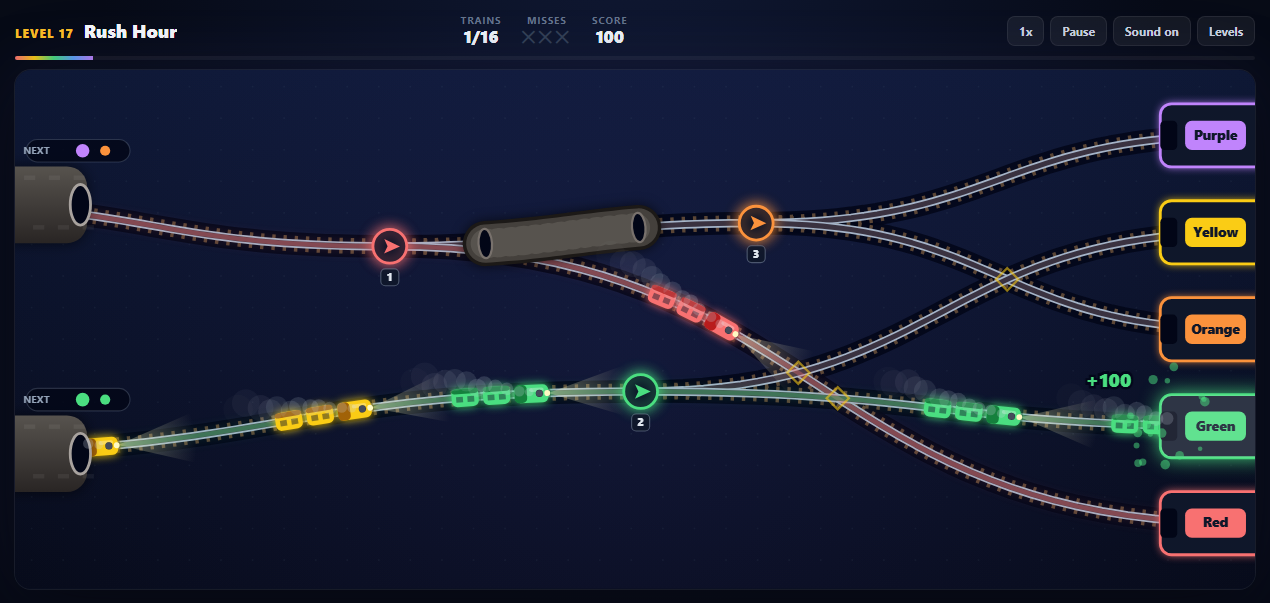
Switchyard is a train routing puzzle built for a wide desktop screen. Coloured trains roll out of tunnels on the left of the yard and run to the right along branching tracks. Every station on the right edge has a colour, and your job is to flip the junctions so each train arrives at the station that matches it. Three misses end the run. It is plain HTML, CSS and JavaScript on one canvas, with no libraries, no images and no audio files.
A yard generated from data
Each of the 20 levels is a small object in the LEVELS array: how many stations, one or two entry tunnels, the train speed, how many trains, the average gap between them, how many track tunnels and whether the entry tunnel is long. tryLayout() turns that into a track network. It splits the stations into a random binary tree (each split is a junction), places junctions in columns across the width, and draws every track as a cubic Bezier curve with a lookup table for travelling along it. A seeded random generator (mulberry32) means a level always produces the same yard, and layouts that are cramped or confusing are rejected and rebuilt from the next seed.
Trains that follow the switches
A train keeps a short history of the track pieces it has travelled and its distance along the current one. When its head reaches a junction, it reads the switch at that moment and continues on the chosen branch, so flipping a switch after a train has passed has no effect on it. The engine and its two wagons are placed at fixed distances behind the head, which makes them bend naturally around curves. The engine throws a headlight cone ahead and puffs steam.
Readability: the live route glows
The route from each tunnel through the current switch positions glows in the colour of the station it ends at, and each junction's ring and arrow take the same colour. You can read at a glance where the next train will go. A "Next" chip at each tunnel shows the colours of the next two trains, and the first one pulses just before it appears.
Five groups of mechanics
Levels 1 to 8 add junctions, colours and speed. Levels 9 to 12 add tunnels that hide passing trains and a long entry tunnel, so you see each train's colour later and the "Next" chip shows a question mark. Levels 13 to 16 add a second entry tunnel whose tracks cross the first. Crossings are marked with yellow diamonds, and two trains that meet there crash. Levels 17 to 20 combine everything at higher speeds.
Reasons to come back
Every level awards one to three stars (three for no misses), the next level unlocks with one star, and the menu shows your total out of 60. The Daily Route builds a new yard from the date, so everyone gets the same puzzle that day. Clearing it keeps a day streak going, and a Copy result button gives a short line to share. Progress, best scores and the streak are saved in localStorage inside try/catch, so the game still runs in a sandboxed iframe.
Feel
Sound comes from a tiny Web Audio synth: a click when a switch flips, a whistle when a train leaves its tunnel, a chime whose pitch rises with your combo, a buzz on a wrong station and a crash. Deliveries in a row build a combo up to x5. Particles, a screen shake on crashes and an animated star reveal on the results screen finish it off. Behind the menu, a demo yard runs itself with an autopilot that sets each switch for the nearest train.
Step by step
How to Use
- 1Pick a level or the Daily RouteThe menu shows 20 levels in five colour groups, your stars on each and your total out of 60. Level 1 is open at first, and each level unlocks when the one before it gets at least one star. The yellow Daily Route button starts the yard of the day.
- 2Read the yardTrains come out of the tunnels on the left. Stations on the right are labelled with their colour. The glowing line from each tunnel shows where a train would go right now, and the "Next" chip shows the colours of the next two trains.
- 3Flip the switchesClick a junction, or press the number on its badge, to send trains up or down. A switch only matters when a train reaches it, so you can set it for the next train as soon as the previous one has passed.
- 4Watch for tunnels and crossingsFrom level 9, tunnels hide passing trains and the entry tunnel gets longer. From level 13, a second tunnel feeds tracks that cross the first ones at the yellow diamonds. Two trains meeting there crash.
- 5Score stars and combosEach correct delivery scores 100 points times your combo (up to x5). A wrong station or a crash is a miss and resets the combo. Three misses end the run. Finish with no misses for three stars.
- 6Use the controlsSpace pauses, F switches between normal and double speed, R restarts, Esc opens the level menu, and the sound button mutes the synth. The game pauses itself when the tab is hidden.
Real-world uses
Common Use Cases
Got questions?
Frequently Asked Questions
tryLayout() splits the level's stations into a random binary tree, where every split is a junction. Junctions are placed in columns across the width and lean from the tunnel towards the stations they serve, and each track is a cubic Bezier curve. The random generator is seeded with the level number, so a level always has the same yard. Layouts with junctions too close together, very steep tracks or tracks passing too near another tunnel's junctions are rejected and built again from the next seed.
Each train stores the track pieces it has travelled and its distance along the current one. When that distance passes the end of a piece that ends at a junction, the train reads the junction's state and continues onto the chosen branch. Because the decision happens on arrival, you can change a switch as soon as one train has passed it to prepare it for the next.
todayNumber() counts days since a fixed start date, and dailyDef() turns that number into a level with a seeded random generator, so everyone gets the same yard on the same day. Clearing it with at least one star on the day after your last clear adds one to the streak, while a gap of more than a day resets it. The result line copied by the button includes the day number, the stars, the trains delivered and the streak.
Add an object to the LEVELS array with a name, the number of stations (2 to 6), entries (1 or 2), speed in pixels per second, number of trains, average gap in milliseconds, number of tunnels and dark set to true or false. The level select uses ten columns, and the "60 stars" total in the HTML should be updated if you add levels. Slower speed and longer gaps make a level easier.
It is designed for a desktop screen, but junctions can also be tapped, and the canvas scales to any width. All localStorage access is wrapped in try/catch, so in a sandboxed iframe the game runs without saving progress. The AudioContext is created on the first level start, which browsers require, and every sound call is wrapped as well.