


Table with Merged Row Groups (rowspan) — Free HTML CSS JS Snippet
Table with Merged Row Groups (rowspan) · Tables · Plain HTML, CSS & JS · Live preview
Copy & paste
Source Code
<div class="wrap">
  <div class="table-head">
    <h2 class="table-title">Course Schedule by Department</h2>
    <span class="hint">Click a department cell to collapse its group</span>
  </div>
  <table class="tbl" id="tbl">
    <thead>
      <tr>
        <th>Department</th>
        <th>Course</th>
        <th>Instructor</th>
        <th class="num">Seats</th>
      </tr>
    </thead>
    <tbody id="tbody"></tbody>
  </table>
</div>
* { box-sizing: border-box; margin: 0; padding: 0; }
body { font-family: system-ui, sans-serif; background: #f8fafc; min-height: 100vh; padding: 32px 20px; }
.wrap { max-width: 640px; margin: 0 auto; }
.table-head { display: flex; align-items: baseline; justify-content: space-between; gap: 12px; margin-bottom: 12px; flex-wrap: wrap; }
.table-title { font-size: 17px; font-weight: 800; color: #0f172a; }
.hint { font-size: 11px; color: #94a3b8; font-weight: 600; }
.tbl { width: 100%; border-collapse: collapse; background: #fff; border-radius: 12px; overflow: hidden; box-shadow: 0 1px 6px rgba(0,0,0,0.06); }
.tbl thead tr { background: #f8fafc; }
.tbl th { padding: 11px 14px; text-align: left; font-size: 11px; font-weight: 700; text-transform: uppercase; letter-spacing: 0.4px; color: #64748b; border-bottom: 1px solid #e2e8f0; }
.tbl th.num, .tbl td.num { text-align: right; }
.tbl td { padding: 10px 14px; border-bottom: 1px solid #f1f5f9; font-size: 13px; color: #334155; vertical-align: middle; }
.tbl tbody tr:last-child td { border-bottom: none; }
.tbl tbody tr td:not(.dept-cell):hover { background: #fafafa; }
.dept-cell { font-weight: 800; color: #0f172a; cursor: pointer; user-select: none; background: #f8fafc; border-right: 1px solid #f1f5f9; transition: background 0.15s; }
.dept-cell:hover { background: #f1f5f9; }
.dept-cell .chev { display: inline-block; margin-right: 8px; transition: transform 0.2s ease; color: #94a3b8; }
.dept-cell.collapsed .chev { transform: rotate(-90deg); }
.dept-count { font-size: 10.5px; font-weight: 700; color: #94a3b8; margin-left: 6px; }
.tbl tbody tr.hidden { display: none; }
.seats-val { font-variant-numeric: tabular-nums; font-weight: 700; }
.seats-val.full { color: #dc2626; }
.seats-val.open { color: #16a34a; }const GROUPS = [
{ dept: 'Computer Science', rows: [
{ course: 'CS 101 — Intro to Programming', instructor: 'Dr. Patel', seats: 3 },
{ course: 'CS 240 — Data Structures', instructor: 'Dr. Nakamura', seats: 0 },
{ course: 'CS 410 — Distributed Systems', instructor: 'Dr. Reyes', seats: 12 },
] },
{ dept: 'Mathematics', rows: [
{ course: 'MATH 151 — Calculus I', instructor: 'Dr. Okafor', seats: 22 },
{ course: 'MATH 310 — Linear Algebra', instructor: 'Dr. Voss', seats: 0 },
] },
{ dept: 'Physics', rows: [
{ course: 'PHYS 201 — Mechanics', instructor: 'Dr. Bianchi', seats: 7 },
{ course: 'PHYS 330 — Thermodynamics', instructor: 'Dr. Kessler', seats: 15 },
{ course: 'PHYS 450 — Quantum Theory', instructor: 'Dr. Lindqvist', seats: 2 },
] },
];
function seatsHtml(seats) {
if (seats === 0) return '<span class="seats-val full">Full</span>';
if (seats <= 3) return '<span class="seats-val full">' + seats + ' left</span>';
return '<span class="seats-val open">' + seats + ' open</span>';
}
function render() {
const tbody = document.getElementById('tbody');
let html = '';
GROUPS.forEach((group, gi) => {
group.rows.forEach((row, ri) => {
html += '<tr data-group="' + gi + '"' + (ri > 0 ? ' class="grouped-row"' : '') + '>';
if (ri === 0) {
html += '<td class="dept-cell" rowspan="' + group.rows.length + '" data-group="' + gi + '">' +
'<span class="chev">\u25be</span>' + group.dept +
'<span class="dept-count">(' + group.rows.length + ')</span>' +
'</td>';
}
html += '<td>' + row.course + '</td>' +
'<td>' + row.instructor + '</td>' +
'<td class="num">' + seatsHtml(row.seats) + '</td>' +
'</tr>';
});
});
tbody.innerHTML = html;
}
document.getElementById('tbody').addEventListener('click', (e) => {
const deptCell = e.target.closest('.dept-cell');
if (!deptCell) return;
const gi = deptCell.dataset.group;
const collapsed = deptCell.classList.toggle('collapsed');
document.querySelectorAll('tr[data-group="' + gi + '"].grouped-row').forEach((row) => {
row.classList.toggle('hidden', collapsed);
});
});
render();Extend with AI
Take This Snippet Further With AI
The AI prompt for this one is for Patreon supporters ($3 a month, 7 days free), along with a site with no ads. Supporters enter the passcode once and it is remembered in this browser.
What's included
Features
About this UI Snippet
Table with Merged Row Groups — rowspan Category Column & Click-to-Collapse
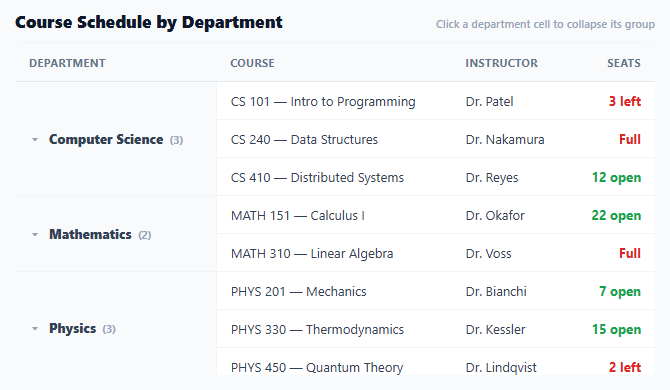
Repeating the same department or category name on every row of a grouped table wastes visual space and makes it harder to see where one group ends and the next begins — a merged cell that spans the whole group communicates both facts at once: what the group is, and exactly how many rows belong to it. This table builds that merged-cell layout directly with the HTML rowspan attribute, and layers a click-to-collapse toggle on top so any group can be tucked away without leaving the table.
rowspan computed from group length, not hardcoded
render() only emits a <td class="dept-cell" rowspan="..."> on the *first* row of each group (ri === 0), and its rowspan value is set directly from group.rows.length — so a department with three courses gets rowspan="3", a department with two gets rowspan="2", with no manual counting required anywhere. Every subsequent row in that group simply omits the department <td> entirely, letting the browser's native table layout algorithm handle the vertical merge — this is what rowspan does structurally, not a CSS visual trick layered on top of a normal grid of cells.
Collapse state lives on the DOM, driven by a data attribute match
Clicking a .dept-cell toggles its own .collapsed class and then queries every tr[data-group="N"].grouped-row sharing that group's index to hide or show them via a .hidden class (display: none). Every row — including the first row that holds the merged department cell — carries a data-group attribute, but only rows *after* the first get the additional .grouped-row class, since the first row (which holds the always-visible merged department cell) should never itself be hidden when its own group collapses — only the rows beneath it.
A rotating chevron indicates collapse state without extra text
The department cell's ▾ (down-caret) character is wrapped in a .chev span with a CSS transition: transform 0.2s; adding .collapsed to the parent .dept-cell rotates it -90deg to point sideways, the same expand/collapse convention used throughout this library's accordion and tree patterns, applied here inside a table cell instead of a standalone button.
Seat availability color-coded independently of the grouping
seatsHtml() renders each row's seat count as "Full" (red) at zero seats, a red "N left" warning at three or fewer, or a green "N open" otherwise — a status signal layered on top of, and entirely independent from, the department grouping and collapse mechanics. This demonstrates that the rowspan-merge pattern composes cleanly with other per-row styling; grouping the rows visually doesn't require flattening or simplifying what each individual row can show.
Why the group index, not the department name, drives the query
Hiding rows uses data-group="N" (a numeric array index) rather than matching on the department name string — avoiding any ambiguity if two groups happened to share a display name, and avoiding the need to escape a name value into a CSS attribute-selector string, which is a more fragile approach once department names can contain quotes or other characters that need selector-escaping.
Step by step
How to Use
- 1Click any department cellCollapses that department's course rows, leaving only the merged department cell visible with its course count.
- 2Click again to expandThe chevron rotates back and the group's rows reappear.
- 3Notice the seat availability colorsZero seats shows red "Full," three or fewer shows a red "N left" warning, and anything above shows a green "N open."
- 4Replace GROUPS with real dataUpdate the array with your own department/category names and per-row course, instructor, and seat data — rowspan values compute automatically from each group's row count.
- 5Adjust the seat-warning thresholdChange the "seats <= 3" condition in seatsHtml() to whatever count should trigger the warning styling.
- 6Export in your formatClick "HTML" for a standalone file, "JSX" for a React component, or "Tailwind" for a Tailwind CSS version.
Real-world uses
Common Use Cases
Got questions?
Frequently Asked Questions
render() sets the rowspan attribute on each group's first-row department cell directly to group.rows.length — the number of course rows in that group. A department with three courses automatically gets rowspan="3" with no manual counting or hardcoded values anywhere in the code.
The .grouped-row class is only applied to rows after the first row in each group (ri > 0). The first row holds the merged department cell via rowspan and must always stay visible even when its own group is collapsed, since that cell is what the user clicks to expand the group again — only the rows beneath it should ever be hidden.
Matching hidden rows against a numeric array index (data-group="2") avoids two problems a name-based approach would have: ambiguity if two groups ever shared the same display name, and the need to safely escape a name string for use inside a CSS attribute selector, which becomes fragile once names can contain quotes or special characters.
The department cell's .chev span has a CSS transition on transform. When the parent .dept-cell gains the .collapsed class (toggled on click), a rule rotates the chevron -90 degrees; removing the class rotates it back to its default downward-pointing orientation. This is the same rotating-indicator convention used by this library's accordion and tree-menu patterns.
No — the click handler reads only the clicked cell's own data-group value and queries rows matching that exact group index, so collapsing or expanding one department has no effect on any other department's rows or collapse state.
Add more objects to the GROUPS array (each with a dept name and a rows array), or add more row objects to an existing group's rows array. The rowspan value, row rendering, and collapse-toggle logic all derive from the array structure automatically, requiring no other code changes.