
Grid.js Searchable Table with Row Details — Free JS Snippet
Grid.js Lightweight Searchable Table with Row Details · Tables · Plain HTML, CSS & JS · Live preview
What's included
Features
About this UI Snippet
Grid.js Lightweight Searchable Table — HTML, CSS & JavaScript
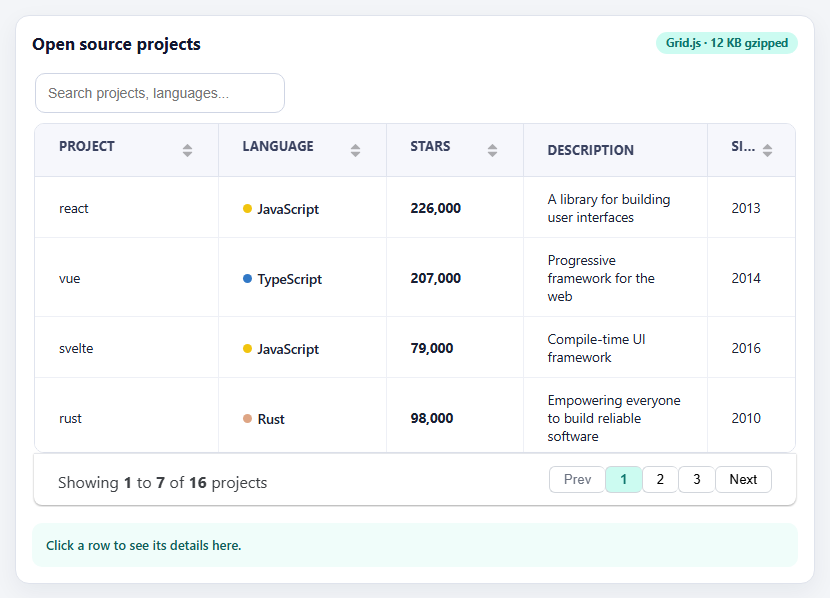
Not every table needs a full data-grid framework. When you have a few hundred rows and want search, sorting and pagination without pulling in a large library or a UI-framework dependency, Grid.js is the lightweight option. It is framework-agnostic, weighs about twelve kilobytes gzipped, and turns a configuration object into a clean table with those three features switched on by three options. That makes it a good fit for documentation sites, dashboards embedded in content pages and quick admin tools.
The API is deliberately small. columns describes the headers and, optionally, how each one renders; data is a plain array of arrays (or objects); and the features are options — search, sort and pagination — that can be true or an object of settings. Here search has a debounceTimeout so typing does not re-render on every keystroke, pagination sets a page size with a "Showing 1 to 7 of 16 results" summary, and fixedHeader with a height keeps the header visible while the body scrolls. The whole grid is created with new gridjs.Grid(config) and drawn with .render(element).
Two details deserve attention. First, formatters. A column's formatter receives the cell value and returns what to show, and returning a string displays it as text. To show markup — the coloured language dot, the bold star count — the return value must be wrapped in gridjs.html(), which marks it as trusted HTML. That is a deliberate safety feature, and it puts responsibility on you: anything user-supplied that goes into a gridjs.html() string must be escaped first, or the table becomes an injection point. Second, sort comparison. Grid.js sorts values as strings by default unless told otherwise, so a numeric column needs a custom compare function, as the stars column has, or 9,000 sorts after 226,000.
The rowClick event provides the pointer event and the row, whose cells hold the raw values rather than formatted markup, which is what the detail panel below the table uses. The snippet also marks the clicked row with a class, because Grid.js does not track selection itself. Styling works through Grid.js's stable class names, so the look is set with ordinary CSS overrides, and the language option customises every label — useful both for localisation and for making the interface read naturally.
Step by step
How to Use
- 1SearchType in the search box. The table filters across every column after a short debounce.
- 2Sort a columnClick a column heading to sort. The Stars column sorts numerically, not alphabetically.
- 3Page through resultsUse the pagination controls under the table; the summary shows which results are visible.
- 4Click a rowSelect a row to highlight it and read its full description in the panel below.
- 5Search for nothingType a nonsense term to see the custom "No projects match" message.
Real-world uses
Common Use Cases
Got questions?
Frequently Asked Questions
Formatters return text by default. Wrap the string in gridjs.html() to render it as markup, and escape any untrusted content first.
Values may sort as strings. Provide sort: { compare: (a, b) => a - b } on the column.
Use search: { debounceTimeout: 150 } so the table waits for a pause in typing.
Listen with grid.on("rowClick", (event, row) => ...). row.cells holds each cell's raw data.
Use the language option to override search, pagination and no-results text.
Yes. Replace data with a server option containing a url and a then function, and optionally enable server-side search, sort and pagination.
Yes. Use the JSX, Vue, Angular or Tailwind export buttons on this page to convert the markup and styles. The behaviour comes from Grid.js, so in a framework project install it with npm install gridjs (or gridjs-react / gridjs-angular / gridjs-vue) instead of the CDN tag, render it in useEffect / onMounted / ngAfterViewInit into a host element, and release it with destroy() when the component unmounts.
Build with AI
Build, Understand, Optimize, and Extend It With AI
Ask an AI assistant like Claude to load the data from a REST endpoint with server-side pagination, add column visibility toggles, or export the visible rows to CSV.
Prompt to recreate it
Copy this into your AI assistant of choice to build the effect from scratch, or as a jumping-off point for your own variant:
Build a searchable, sortable, paginated table with Grid.js 6 loaded from a CDN (UMD script and the mermaid theme CSS).

Requirements:
- Create new gridjs.Grid({ columns, data, search: { debounceTimeout: 150 }, sort: true, pagination: { limit: 7, summary: true }, fixedHeader: true, height: '330px' }) and render it into a div.
- Use a formatter with gridjs.html() to show a coloured language dot, and a numeric compare function so the Stars column sorts correctly.
- Customise labels through the language option, including noRecordsFound.
- Listen for rowClick, highlight the clicked row, and show the raw row data in a detail panel.
- Restyle the table through Grid.js class names (gridjs-th, gridjs-td, gridjs-input).
Want to tighten it up first? Run this prompt through the AI Prompt Studio to score it across 8 quality dimensions, catch anti-patterns, and tune the wording for Claude, ChatGPT, or Gemini before you paste it in.
Source Code
<div class="gj-wrap">
<div class="gj-head">
<h3>Open source projects</h3>
<span class="gj-tag">Grid.js · 12 KB gzipped</span>
</div>
<div id="gjHost"></div>
<div class="gj-detail" id="gjDetail" aria-live="polite">Click a row to see its details here.</div>
</div>body { background: #f3f5f8; padding: 18px; font-family: system-ui, sans-serif; }
.gj-wrap { max-width: 800px; margin: 0 auto; background: #fff; border: 1px solid #dfe3ec; border-radius: 14px; padding: 16px; box-shadow: 0 8px 24px rgba(20,30,70,.06); }
.gj-head { display: flex; justify-content: space-between; align-items: center; margin-bottom: 12px; gap: 8px; flex-wrap: wrap; }
.gj-head h3 { margin: 0; font-size: 17px; color: #12162e; }
.gj-tag { font: 700 11.5px/1 system-ui, sans-serif; color: #0f766e; background: #ccfbf1; padding: 5px 10px; border-radius: 999px; }
/* Grid.js exposes CSS variables and stable class names, so restyling is override-only. */
.gridjs-container { color: #1b2033; }
.gridjs-wrapper { border-radius: 10px; box-shadow: none; border: 1px solid #e0e4ee; }
th.gridjs-th { background: #f6f7fc; color: #3a4260; font-size: 12.5px; text-transform: uppercase; letter-spacing: .04em; border-color: #e0e4ee; }
td.gridjs-td { border-color: #eef0f6; font-size: 13.5px; }
tr.gridjs-tr:hover td.gridjs-td { background: #f0fdfa; cursor: pointer; }
tr.gj-selected td.gridjs-td { background: #ccfbf1 !important; }
input.gridjs-input { border-radius: 10px; border-color: #cfd5e4; padding: 9px 12px; }
input.gridjs-input:focus { border-color: #0d9488; box-shadow: 0 0 0 3px rgba(13,148,136,.16); }
.gridjs-pagination .gridjs-pages button { border-radius: 6px; }
.gridjs-pagination .gridjs-pages button.gridjs-currentPage { background: #ccfbf1; color: #0f766e; font-weight: 700; }
.lang { display: inline-flex; align-items: center; gap: 6px; font-weight: 600; }
.lang i { width: 9px; height: 9px; border-radius: 50%; }
.stars { font-variant-numeric: tabular-nums; font-weight: 700; }
.gj-detail { margin-top: 12px; padding: 12px 14px; border-radius: 10px; background: #f0fdfa; color: #115e59; font: 600 13px/1.5 system-ui, sans-serif; }const REPOS = [
['react', 'JavaScript', 226000, 'A library for building user interfaces', 2013],
['vue', 'TypeScript', 207000, 'Progressive framework for the web', 2014],
['svelte', 'JavaScript', 79000, 'Compile-time UI framework', 2016],
['rust', 'Rust', 98000, 'Empowering everyone to build reliable software', 2010],
['deno', 'Rust', 98000, 'A secure runtime for JavaScript and TypeScript', 2018],
['vite', 'TypeScript', 69000, 'Next-generation frontend tooling', 2020],
['django', 'Python', 79000, 'The web framework for perfectionists', 2005],
['flask', 'Python', 68000, 'A lightweight WSGI web application framework', 2010],
['gin', 'Go', 79000, 'HTTP web framework written in Go', 2014],
['kubernetes', 'Go', 110000, 'Production-grade container orchestration', 2014],
['laravel', 'PHP', 77000, 'The PHP framework for web artisans', 2011],
['rails', 'Ruby', 55000, 'Ruby on Rails web framework', 2004],
['pytorch', 'Python', 82000, 'Tensors and dynamic neural networks', 2016],
['tailwindcss', 'CSS', 84000, 'A utility-first CSS framework', 2017],
['fastapi', 'Python', 78000, 'Modern, fast web framework for building APIs', 2018],
['nextjs', 'JavaScript', 123000, 'The React framework for the web', 2016],
];
const COLORS = { JavaScript: '#f1c40f', TypeScript: '#3178c6', Rust: '#dea584', Python: '#3572a5', Go: '#00add8', PHP: '#8892bf', Ruby: '#cc342d', CSS: '#7c3aed' };
const detail = document.getElementById('gjDetail');
let selected = null;
const grid = new gridjs.Grid({
columns: [
{ name: 'Project', width: '24%' },
{ name: 'Language', width: '22%', formatter: function (cell) {
// gridjs.html() marks a string as trusted markup; escape anything user-supplied first.
return gridjs.html('<span class="lang"><i style="background:' + (COLORS[cell] || '#94a3b8') + '"></i>' + cell + '</span>');
} },
{ name: 'Stars', width: '18%', formatter: function (cell) { return gridjs.html('<span class="stars">' + cell.toLocaleString('en-US') + '</span>'); },
sort: { compare: function (a, b) { return a - b; } } },
{ name: 'Description', sort: false },
{ name: 'Since', width: '12%' },
],
data: REPOS,
search: { debounceTimeout: 150 },
sort: true,
pagination: { limit: 7, summary: true },
fixedHeader: true,
height: '330px',
language: {
search: { placeholder: 'Search projects, languages...' },
pagination: { previous: 'Prev', next: 'Next', showing: 'Showing', results: function () { return 'projects'; } },
noRecordsFound: 'No projects match your search',
},
});
grid.render(document.getElementById('gjHost'));
// rowClick receives (pointerEvent, row); row.cells hold the raw values.
grid.on('rowClick', function (evt, row) {
const c = row.cells.map(function (x) { return x.data; });
const tr = evt.target.closest('tr');
if (selected) selected.classList.remove('gj-selected');
if (tr) { tr.classList.add('gj-selected'); selected = tr; }
detail.textContent = c[0] + ' - ' + c[3] + '. ' + c[1] + ', ' + Number(c[2]).toLocaleString('en-US') + ' stars, started ' + c[4] + '.';
});