
Tabulator Sortable Filterable Data Grid — Free JS Snippet
Tabulator Sortable Filterable Data Grid · Tables · Plain HTML, CSS & JS · Live preview
What's included
Features
About this UI Snippet
Tabulator Sortable Filterable Data Grid — HTML, CSS & JavaScript
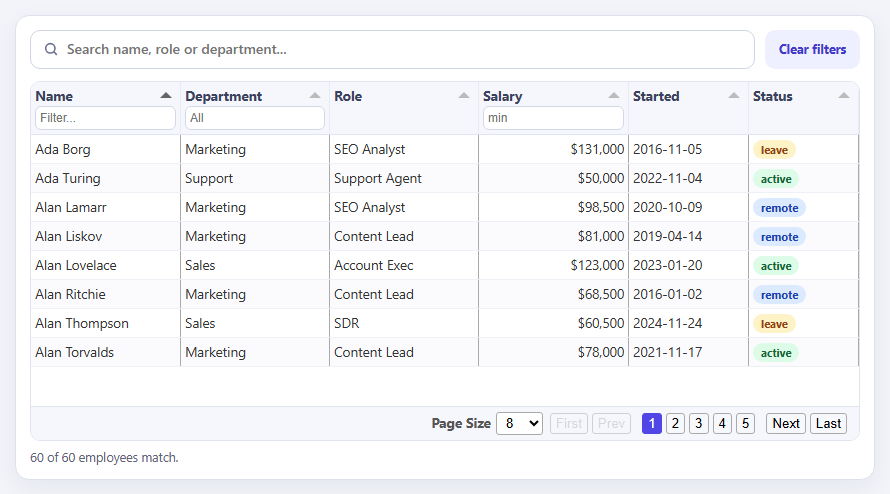
A plain HTML table is fine for twelve rows and hopeless for a real dataset. Users expect to sort by any column, filter to what they care about, page through the rest and rearrange the layout, and building all of that by hand is weeks of work. Tabulator is a dependency-free data-grid library that provides it from a configuration object. You describe the data and the columns, and it renders a grid with sorting, filtering, pagination, column dragging and resizing already wired up.
The configuration is worth reading closely, because most of the value is in options that are easy to overlook. layout: 'fitColumns' makes columns share the available width instead of overflowing. movableColumns lets users drag headers into their preferred order. pagination with paginationSizeSelector adds page controls and a rows-per-page menu. initialSort applies a starting order. Columns carry their own behaviour: a headerFilter of 'input' adds a text box under the header, 'list' adds a dropdown built from the values you pass, and a number filter with headerFilterFunc '>=' makes the salary filter mean "at least this much" rather than "exactly this".
The search box above the grid demonstrates the part of the filter API that is least obvious. setFilter accepts a list of conditions that are all ANDed together, but a nested array inside that list is an OR group. Passing one nested array containing a like-condition per column gives a single search box that matches a name, a role or a department, which is what people mean by "search". clearFilter(false) removes that search while leaving the header filters alone, and clearFilter(true) clears everything; both matter because header filters and programmatic filters are separate layers.
Modern Tabulator has one rule that trips up nearly everyone migrating from older versions: the table builds asynchronously, and calling data methods before it has finished silently does nothing or throws. The snippet respects that by wiring its count display to the tableBuilt and dataFiltered events, using the rows array that dataFiltered passes to its callback to report how many rows currently pass the filters. Cells can be rendered with formatters — the money formatter for salary, and a custom function that returns a coloured badge for status — so presentation lives in the column definition instead of a separate templating step. The data is generated deterministically so the grid looks the same on every load.
Step by step
How to Use
- 1Sort a columnClick a column header to sort ascending, again for descending. The grid opens sorted by name.
- 2Use header filtersType in the Name filter, choose a department from the dropdown, or enter a minimum salary.
- 3Search across columnsType in the search box above the grid. It matches names, roles and departments at the same time.
- 4Page and resizeUse the page controls and rows-per-page menu, drag a column header to reorder, and drag its edge to resize.
- 5Clear everythingPress Clear filters to remove the search and all header filters. The footer shows the match count.
Real-world uses
Common Use Cases
Got questions?
Frequently Asked Questions
The table builds asynchronously. Call methods like setFilter or getData only after the tableBuilt event has fired.
Pass setFilter a nested array of conditions. A nested array is an OR group, so any matching column includes the row.
clearFilter(true) also clears header filters; clearFilter(false) removes only programmatic filters and leaves the header filters.
Set headerFilterFunc to ">=" on a number header filter so it compares with greater-or-equal instead of equality.
Listen for the dataFiltered event. Its second argument is the array of rows that passed, across every page, so its length is the match count.
Yes. Use ajaxURL with remote pagination and sorting, or fetch the data yourself and call setData.
Yes. Use the JSX, Vue, Angular or Tailwind export buttons on this page to convert the markup and styles. The behaviour comes from Tabulator, so in a framework project install it with npm install tabulator-tables (or react-tabulator) instead of the CDN tag, create it in useEffect / onMounted / ngAfterViewInit and wait for the tableBuilt event, and release it with destroy() when the component unmounts.
Build with AI
Build, Understand, Optimize, and Extend It With AI
Ask an AI assistant like Claude to add row selection with bulk actions, export to CSV, or persistence of the sort and filter state in the URL.
Prompt to recreate it
Copy this into your AI assistant of choice to build the effect from scratch, or as a jumping-off point for your own variant:
Build a data grid with Tabulator 6 loaded from a CDN (script and CSS).

Requirements:
- Generate around 60 employee rows and define columns for name, department, role, salary, start date and status, with layout: 'fitColumns', movableColumns, pagination and a page-size selector.
- Add header filters: an input for name, a list for department and a numeric minimum for salary using headerFilterFunc '>='.
- Format salary with the money formatter and status with a custom function returning a coloured badge.
- Add a search box that calls setFilter with a single nested array (an OR group) across name, role and department, and a Clear button using clearFilter(true) and clearHeaderFilter().
- Wire a footer count to tableBuilt and dataFiltered, using the length of the rows array passed to the dataFiltered callback.
Want to tighten it up first? Run this prompt through the AI Prompt Studio to score it across 8 quality dimensions, catch anti-patterns, and tune the wording for Claude, ChatGPT, or Gemini before you paste it in.
Source Code
<div class="tg-card">
  <div class="tg-bar">
    <div class="tg-search">
      <svg width="16" height="16" viewBox="0 0 24 24" fill="none" stroke="currentColor" stroke-width="2.4" stroke-linecap="round" aria-hidden="true"><circle cx="11" cy="11" r="7"/><path d="m20 20-3.5-3.5"/></svg>
      <input id="tgSearch" type="search" placeholder="Search name, role or department..." aria-label="Search the table">
    </div>
    <button type="button" id="tgClear" class="tg-btn">Clear filters</button>
  </div>
  <div id="tgTable"></div>
  <div class="tg-foot" id="tgFoot" aria-live="polite"></div>
</div>
body { background: #f2f4f9; padding: 18px; font-family: system-ui, sans-serif; }
.tg-card { max-width: 860px; margin: 0 auto; background: #fff; border: 1px solid #dde1ec; border-radius: 14px; padding: 14px; box-shadow: 0 8px 24px rgba(20,30,70,.06); }
.tg-bar { display: flex; gap: 10px; margin-bottom: 12px; flex-wrap: wrap; }
.tg-search { flex: 1; min-width: 220px; display: flex; align-items: center; gap: 8px; padding: 0 12px; border: 1.5px solid #cfd5e4; border-radius: 10px; color: #6b7290; }
.tg-search:focus-within { border-color: #4f46e5; box-shadow: 0 0 0 3px rgba(79,70,229,.14); }
.tg-search input { flex: 1; border: 0; outline: 0; padding: 10px 0; font: 500 14px/1.2 system-ui, sans-serif; color: #12162e; background: none; }
.tg-btn { font: 700 12.5px/1 system-ui, sans-serif; color: #4338ca; background: #eef0ff; border: 0; border-radius: 10px; padding: 0 14px; cursor: pointer; }
.tg-btn:hover { background: #e0e4ff; }
.tg-foot { margin-top: 8px; font-size: 12.5px; color: #5b6279; }
/* Tabulator theming through its own classes */
.tabulator { border: 1px solid #e0e4ee; border-radius: 10px; font-size: 13.5px; background: #fff; }
.tabulator .tabulator-header { background: #f6f7fc; border-bottom: 1px solid #e0e4ee; color: #3a4260; }
.tabulator .tabulator-header .tabulator-col { background: #f6f7fc; border-right: 1px solid #e8ebf3; }
.tabulator .tabulator-header .tabulator-col .tabulator-header-filter input, .tabulator .tabulator-header .tabulator-col .tabulator-header-filter select { border: 1px solid #d3d8e6; border-radius: 6px; padding: 4px 6px; font-size: 12px; }
.tabulator-row { border-bottom: 1px solid #eef0f6; }
.tabulator-row.tabulator-row-even { background: #fbfbfe; }
.tabulator-row:hover { background: #eef0ff !important; }
.tabulator .tabulator-footer { background: #f6f7fc; border-top: 1px solid #e0e4ee; }
.tabulator .tabulator-footer .tabulator-page.active { background: #4f46e5; color: #fff; border-color: #4f46e5; }
.badge { display: inline-block; font: 700 11px/1 system-ui, sans-serif; padding: 4px 8px; border-radius: 999px; }
.badge.active { background: #dcfce7; color: #166534; } .badge.leave { background: #fef3c7; color: #92400e; } .badge.remote { background: #dbeafe; color: #1e40af; }// Deterministic pseudo-random data so the preview is the same on every load.
let seed = 7;
const rnd = function () { seed = (seed * 16807) % 2147483647; return seed / 2147483647; };
const pick = function (a) { return a[Math.floor(rnd() * a.length)]; };
const FIRST = ['Ada', 'Grace', 'Alan', 'Linus', 'Margaret', 'Dennis', 'Barbara', 'Ken', 'Radia', 'Tim', 'Hedy', 'Vint', 'Sophie', 'Guido', 'Anita', 'Yukihiro'];
const LAST = ['Lovelace', 'Hopper', 'Turing', 'Torvalds', 'Hamilton', 'Ritchie', 'Liskov', 'Thompson', 'Perlman', 'Berners', 'Lamarr', 'Cerf', 'Wilson', 'Rossum', 'Borg', 'Matsumoto'];
const DEPTS = ['Engineering', 'Design', 'Marketing', 'Sales', 'Support'];
const ROLES = { Engineering: ['Frontend Dev', 'Backend Dev', 'SRE'], Design: ['Product Designer', 'UX Researcher'], Marketing: ['Content Lead', 'SEO Analyst'], Sales: ['Account Exec', 'SDR'], Support: ['Support Agent', 'Success Manager'] };
const rows = [];
for (let i = 1; i <= 60; i++) {
const dept = pick(DEPTS);
rows.push({
id: i,
name: pick(FIRST) + ' ' + pick(LAST),
dept: dept,
role: pick(ROLES[dept]),
salary: Math.round((48000 + rnd() * 90000) / 500) * 500,
start: new Date(2016 + Math.floor(rnd() * 9), Math.floor(rnd() * 12), 1 + Math.floor(rnd() * 27)).toISOString().slice(0, 10),
status: pick(['active', 'active', 'active', 'remote', 'leave']),
});
}
const table = new Tabulator('#tgTable', {
data: rows,
height: 360,
layout: 'fitColumns',
movableColumns: true,
pagination: true,
paginationSize: 8,
paginationSizeSelector: [8, 15, 30],
initialSort: [{ column: 'name', dir: 'asc' }],
columns: [
{ title: 'Name', field: 'name', minWidth: 150, headerFilter: 'input', headerFilterPlaceholder: 'Filter...' },
{ title: 'Department', field: 'dept', headerFilter: 'list', headerFilterParams: { values: DEPTS, clearable: true }, headerFilterPlaceholder: 'All' },
{ title: 'Role', field: 'role', minWidth: 130 },
{ title: 'Salary', field: 'salary', hozAlign: 'right', sorter: 'number', formatter: 'money', formatterParams: { symbol: '$', precision: 0 }, headerFilter: 'number', headerFilterPlaceholder: 'min', headerFilterFunc: '>=' },
{ title: 'Started', field: 'start', sorter: 'date', sorterParams: { format: 'yyyy-MM-dd' }, width: 120 },
{ title: 'Status', field: 'status', width: 110, formatter: function (cell) { const v = cell.getValue(); return '<span class="badge ' + v + '">' + v + '</span>'; } },
],
});
const foot = document.getElementById('tgFoot');
function updateFoot(shown) {
foot.textContent = shown + ' of ' + rows.length + ' employees match' + (shown === rows.length ? '.' : ' the current filters.');
}
// The API is only safe to call after the table has finished building. dataFiltered hands us the rows that
// passed the filters (across all pages), which is the count we want; it fires again on every change.
table.on('tableBuilt', function () { updateFoot(rows.length); });
table.on('dataFiltered', function (filters, passed) { updateFoot(passed.length); });
// One search box across several columns: a nested array inside setFilter is an OR group.
const search = document.getElementById('tgSearch');
search.addEventListener('input', function () {
const v = search.value.trim();
if (!v) { table.clearFilter(false); return; } // false keeps the header filters
table.setFilter([[
{ field: 'name', type: 'like', value: v },
{ field: 'role', type: 'like', value: v },
{ field: 'dept', type: 'like', value: v },
]]);
});
document.getElementById('tgClear').addEventListener('click', function () {
search.value = '';
table.clearFilter(true); // true also clears the header filter inputs
table.clearHeaderFilter();
});