
Learn Coding Visually
Learn to code with interactive, live-preview playgrounds — HTML, CSS, JavaScript, React & more.
 HTML Playground42 lessons · Click-based · Live preview
 CSS PlaygroundLearn CSS with a live editor
 JavaScript Playground60 lessons · DOM · Async · Canvas
 React PlaygroundLearn React with a live code editor
 GSAP PlaygroundLearn GSAP animation interactively
 SVG Playground44 lessons · shapes · paths · animation
 SCSS Playground45 lessons · Sass modules · tokens
 Tailwind PlaygroundLearn Tailwind CSS with a live editor
 Bootstrap 5 Playground50 lessons · live preview
Accessible Tree Table with Nested Rows — Free JS Snippet
Accessible Tree Table with Expandable Nested Rows · Tables · Plain HTML, CSS & JS · Live preview
What's included
Features
About this UI Snippet
Accessible Tree Table with Expandable Rows — HTML, CSS & JavaScript
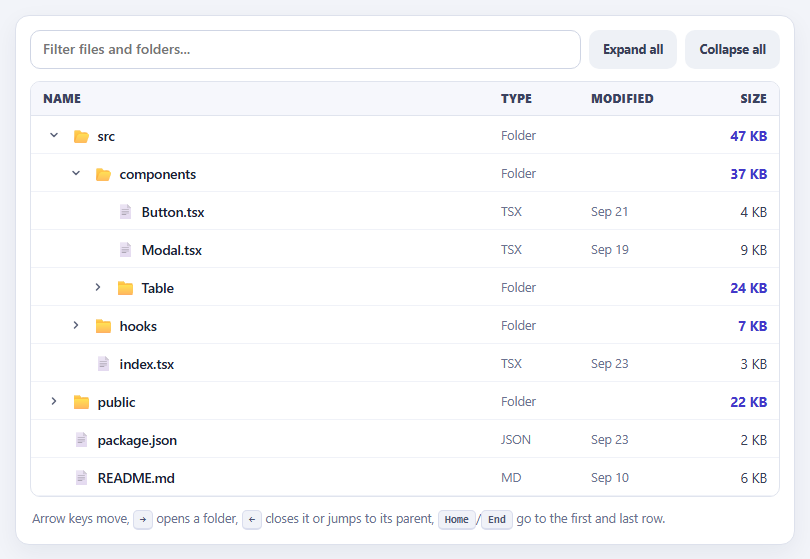
A tree table combines two structures that browsers do not natively combine: the columns of a table and the expandable hierarchy of a tree. File explorers, chart-of-accounts screens, organisation charts and nested task lists all use it. Building one that merely looks right is easy — indent some rows and toggle their visibility. Building one that behaves correctly for keyboard and screen-reader users is where the work is, and this snippet is structured around that.
The data model does two things worth noticing. Each node stores its parent and its depth, assigned once by a prep() pass, so indentation is a level times 22 pixels and "go to parent" is a property lookup. And folder sizes are a roll-up: a folder's size is the sum of everything beneath it, computed recursively when the tree is prepared, which is how file explorers show that a folder is 60 KB before you open it. Expansion state is kept separately in a Set of open folder ids, so rendering is a pure function of the tree, the open set and the current filter — call render() and the DOM is rebuilt to match.
Only currently visible rows are produced. A recursive walk emits a node and descends into its children only if the folder is open, which yields a flat list that maps straight onto table rows. Filtering has one subtle rule that most implementations get wrong: a node matches if its own name matches or any descendant does. Without the descendant check, searching for "Row" would hide the folders containing Row.tsx and the hit would appear orphaned at the top level. With it, ancestors of every match stay visible and are forced open while a filter is active, and the matched text is highlighted.
The accessibility model follows the WAI-ARIA treegrid pattern. The container has role="treegrid" and rows carry aria-level, aria-posinset, aria-setsize and, for folders, aria-expanded, so a screen reader can announce "Table, folder, expanded, level 3, 2 of 8". Focus uses a roving tabindex — exactly one row is tabindex 0 — so the whole grid is a single tab stop. The keyboard handler implements the standard interactions: Up and Down move between rows, Right opens a closed folder or steps into its first child, Left closes an open folder or jumps to the parent, Home and End go to the ends, and Enter or Space toggles. Chevron rotation is CSS-only, driven from aria-expanded.
Build with AI
Build, Understand, Optimize, and Extend It With AI
Ask an AI assistant like Claude to add lazy loading of children from an API, drag-and-drop to move files between folders, or multi-select with checkboxes and tri-state parents.
Prompt to recreate it
Copy this into your AI assistant of choice to build the effect from scratch, or as a jumping-off point for your own variant:
Build an accessible tree table (role="treegrid") in vanilla JavaScript for a nested file structure.

Requirements:
- Prepare the tree once: assign each node an id, parent and level, and compute each folder's size as the recursive sum of its children.
- Keep expanded folder ids in a Set; render() flattens only visible rows and rebuilds the DOM, indenting by level.
- Add a filter that matches a node if its name or any descendant matches, force-opens ancestors while filtering, and highlights the match with escaped HTML.
- Add aria-level, aria-posinset, aria-setsize and aria-expanded on rows, a roving tabindex, and the treegrid keyboard model (Up/Down, Right to open or enter, Left to close or go to parent, Home/End, Enter/Space).
- Provide Expand all and Collapse all buttons and a rotating chevron driven by aria-expanded.
Want to tighten it up first? Run this prompt through the AI Prompt Studio to score it across 8 quality dimensions, catch anti-patterns, and tune the wording for Claude, ChatGPT, or Gemini before you paste it in.
Source Code
<div class="tt-wrap">
<div class="tt-bar">
<input id="ttFilter" type="search" placeholder="Filter files and folders..." aria-label="Filter the tree">
<button type="button" id="ttExpand">Expand all</button>
<button type="button" id="ttCollapse">Collapse all</button>
</div>
<div class="tt-grid" role="treegrid" aria-label="Project files" id="ttGrid">
<div class="tt-head" role="row"><span role="columnheader">Name</span><span role="columnheader">Type</span><span role="columnheader">Modified</span><span role="columnheader" class="r">Size</span></div>
<div id="ttBody"></div>
</div>
<p class="tt-help" id="ttHelp">Arrow keys move, <kbd>→</kbd> opens a folder, <kbd>←</kbd> closes it or jumps to its parent, <kbd>Home</kbd>/<kbd>End</kbd> go to the first and last row.</p>
</div>body { background: #f2f4f9; padding: 18px; font-family: system-ui, sans-serif; }
.tt-wrap { max-width: 780px; margin: 0 auto; background: #fff; border: 1px solid #dde1ec; border-radius: 14px; padding: 14px; box-shadow: 0 8px 24px rgba(20,30,70,.06); }
.tt-bar { display: flex; gap: 8px; margin-bottom: 12px; flex-wrap: wrap; }
.tt-bar input { flex: 1; min-width: 200px; padding: 10px 12px; border: 1.5px solid #cfd5e4; border-radius: 10px; font: 500 14px/1.2 system-ui, sans-serif; }
.tt-bar input:focus { outline: 0; border-color: #4f46e5; box-shadow: 0 0 0 3px rgba(79,70,229,.14); }
.tt-bar button { font: 700 12.5px/1 system-ui, sans-serif; color: #384057; background: #eef1f6; border: 0; border-radius: 10px; padding: 0 14px; cursor: pointer; }
.tt-bar button:hover { background: #e0e5ee; }
.tt-grid { border: 1px solid #e0e4ee; border-radius: 10px; overflow: hidden; font-size: 13.5px; }
.tt-head, .tt-row { display: grid; grid-template-columns: minmax(0, 1fr) 90px 110px 90px; align-items: center; }
.tt-head { background: #f6f7fc; border-bottom: 1px solid #e0e4ee; font: 800 11.5px/1 system-ui, sans-serif; letter-spacing: .05em; text-transform: uppercase; color: #3a4260; }
.tt-head span { padding: 11px 12px; } .r { text-align: right; }
.tt-row { height: 38px; border-bottom: 1px solid #f0f2f8; color: #1b2033; cursor: default; outline: 0; }
.tt-row:hover { background: #f5f6ff; }
.tt-row:focus-visible { box-shadow: inset 0 0 0 2px #4f46e5; background: #eef0ff; }
.tt-row > span { padding: 0 12px; overflow: hidden; text-overflow: ellipsis; white-space: nowrap; }
.tt-name { display: flex; align-items: center; gap: 6px; font-weight: 600; }
.tt-tog { width: 22px; height: 22px; flex: none; display: grid; place-items: center; border: 0; background: none; border-radius: 6px; color: #5b6279; cursor: pointer; padding: 0; }
.tt-tog:hover { background: #dfe3f5; }
.tt-tog svg { transition: transform .15s; }
.tt-row[aria-expanded="true"] .tt-tog svg { transform: rotate(90deg); }
.tt-tog.leaf { visibility: hidden; }
.tt-ico { font-size: 15px; }
.tt-meta { color: #6b7290; font-size: 12.5px; }
.tt-size { text-align: right; font-variant-numeric: tabular-nums; color: #384057; }
.tt-row.folder .tt-size { color: #4338ca; font-weight: 700; }
.tt-row mark { background: #fde68a; color: inherit; border-radius: 3px; }
.tt-empty { padding: 26px; text-align: center; color: #6b7290; }
.tt-help { margin: 10px 2px 0; font-size: 12.5px; color: #6b7290; line-height: 1.8; }
kbd { font: 700 11px/1 ui-monospace, Menlo, monospace; background: #f0f2f8; border: 1px solid #d9dded; border-bottom-width: 2px; border-radius: 5px; padding: 2px 6px; color: #4a5270; }// Files carry a size in KB; a folder's size is the ROLL-UP of everything beneath it.
const TREE = [
{ name: 'src', children: [
{ name: 'components', children: [
{ name: 'Button.tsx', size: 4, mod: 'Sep 21' }, { name: 'Modal.tsx', size: 9, mod: 'Sep 19' },
{ name: 'Table', children: [{ name: 'Table.tsx', size: 18, mod: 'Sep 22' }, { name: 'Row.tsx', size: 6, mod: 'Sep 22' }] },
] },
{ name: 'hooks', children: [{ name: 'useDebounce.ts', size: 2, mod: 'Sep 12' }, { name: 'useFetch.ts', size: 5, mod: 'Sep 15' }] },
{ name: 'index.tsx', size: 3, mod: 'Sep 23' },
] },
{ name: 'public', children: [{ name: 'favicon.ico', size: 15, mod: 'Aug 30' }, { name: 'logo.svg', size: 7, mod: 'Sep 02' }] },
{ name: 'package.json', size: 2, mod: 'Sep 23' },
{ name: 'README.md', size: 6, mod: 'Sep 10' },
];
let uid = 0;
function prep(list, parent, level) {
list.forEach(function (n) {
n.id = ++uid; n.parent = parent; n.level = level;
if (n.children) { n.size = 0; prep(n.children, n, level + 1); n.children.forEach(function (c) { n.size += c.size; }); }
});
}
prep(TREE, null, 1);
const open = new Set([1, 2]); // ids of expanded folders: "src" and "components"
let query = '';
const body = document.getElementById('ttBody');
const fmt = function (kb) { return kb >= 1024 ? (kb / 1024).toFixed(1) + ' MB' : kb + ' KB'; };
const esc = function (s) { return s.replace(/[&<>"]/g, function (c) { return { '&': '&', '<': '<', '>': '>', '"': '"' }[c]; }); };
function mark(text) {
if (!query) return esc(text);
const i = text.toLowerCase().indexOf(query);
return i < 0 ? esc(text) : esc(text.slice(0, i)) + '<mark>' + esc(text.slice(i, i + query.length)) + '</mark>' + esc(text.slice(i + query.length));
}
// A node matches if its own name does, or any descendant does - so ancestors of a hit stay visible.
function matches(n) {
if (!query) return true;
if (n.name.toLowerCase().indexOf(query) !== -1) return true;
return !!n.children && n.children.some(matches);
}
// Flatten only the rows that are currently visible.
function visible() {
const out = [];
(function walk(list) {
list.forEach(function (n) {
if (!matches(n)) return;
out.push(n);
const isOpen = n.children && (query ? true : open.has(n.id)); // searching auto-opens folders that contain hits
if (isOpen) walk(n.children);
});
})(TREE);
return out;
}
const CHEV = '<svg width="12" height="12" viewBox="0 0 24 24" fill="none" stroke="currentColor" stroke-width="3" stroke-linecap="round" stroke-linejoin="round"><path d="m9 6 6 6-6 6"/></svg>';
let focusId = 1;
function render() {
const rows = visible();
if (!rows.length) { body.innerHTML = '<div class="tt-empty">Nothing matches "' + esc(query) + '"</div>'; return; }
if (!rows.some(function (r) { return r.id === focusId; })) focusId = rows[0].id;
body.innerHTML = rows.map(function (n, i) {
const folder = !!n.children;
const isOpen = folder && (query ? true : open.has(n.id));
return '<div class="tt-row' + (folder ? ' folder' : '') + '" role="row" data-id="' + n.id + '" aria-level="' + n.level + '" aria-posinset="' + (i + 1) + '" aria-setsize="' + rows.length + '"' +
(folder ? ' aria-expanded="' + isOpen + '"' : '') + ' tabindex="' + (n.id === focusId ? 0 : -1) + '">' +
'<span role="gridcell" class="tt-name" style="padding-left:' + (12 + (n.level - 1) * 22) + 'px">' +
'<button type="button" tabindex="-1" class="tt-tog' + (folder ? '' : ' leaf') + '" aria-hidden="true">' + CHEV + '</button>' +
'<span class="tt-ico" aria-hidden="true">' + (folder ? (isOpen ? '📂' : '📁') : '📄') + '</span>' + mark(n.name) + '</span>' +
'<span role="gridcell" class="tt-meta">' + (folder ? 'Folder' : n.name.split('.').pop().toUpperCase()) + '</span>' +
'<span role="gridcell" class="tt-meta">' + (folder ? '' : n.mod) + '</span>' +
'<span role="gridcell" class="tt-size">' + fmt(n.size) + '</span></div>';
}).join('');
}
function toggle(id, force) {
if (query) return; // folders are forced open while filtering
const on = force === undefined ? !open.has(id) : force;
if (on) open.add(id); else open.delete(id);
render();
}
function focusRow(id) {
focusId = id; render();
const el = body.querySelector('[data-id="' + id + '"]'); if (el) el.focus();
}
const byId = function (id) { let f = null; (function w(l) { l.forEach(function (n) { if (n.id === id) f = n; if (n.children) w(n.children); }); })(TREE); return f; };
body.addEventListener('click', function (e) {
const row = e.target.closest('.tt-row'); if (!row) return;
const n = byId(Number(row.dataset.id));
if (n.children) toggle(n.id);
focusRow(n.id);
});
// The WAI-ARIA treegrid keyboard model.
body.addEventListener('keydown', function (e) {
const row = e.target.closest('.tt-row'); if (!row) return;
const rows = visible(), i = rows.findIndex(function (r) { return r.id === Number(row.dataset.id); }), n = rows[i];
const isOpen = n.children && (query ? true : open.has(n.id));
let handled = true;
if (e.key === 'ArrowDown') focusRow(rows[Math.min(rows.length - 1, i + 1)].id);
else if (e.key === 'ArrowUp') focusRow(rows[Math.max(0, i - 1)].id);
else if (e.key === 'Home') focusRow(rows[0].id);
else if (e.key === 'End') focusRow(rows[rows.length - 1].id);
else if (e.key === 'ArrowRight') { if (n.children && !isOpen) { toggle(n.id, true); focusRow(n.id); } else if (isOpen && n.children.length) focusRow(n.children.filter(matches)[0].id); }
else if (e.key === 'ArrowLeft') { if (n.children && isOpen && !query) { toggle(n.id, false); focusRow(n.id); } else if (n.parent) focusRow(n.parent.id); }
else if (e.key === 'Enter' || e.key === ' ') { if (n.children) { toggle(n.id); focusRow(n.id); } }
else handled = false;
if (handled) e.preventDefault();
});
document.getElementById('ttFilter').addEventListener('input', function (e) { query = e.target.value.trim().toLowerCase(); render(); });
document.getElementById('ttExpand').addEventListener('click', function () { (function w(l) { l.forEach(function (n) { if (n.children) { open.add(n.id); w(n.children); } }); })(TREE); render(); });
document.getElementById('ttCollapse').addEventListener('click', function () { open.clear(); render(); });
render();Step by step
How to Use
- 1Expand and collapseClick a folder or its arrow to open it. Folder sizes are the total of everything inside, even when collapsed.
- 2Use the keyboardTab into the tree, then use the arrow keys. Right opens a folder, Left closes it or jumps to its parent.
- 3Expand allUse Expand all and Collapse all to open or fold the whole hierarchy at once.
- 4FilterType "Row" or "hook". Matching files appear with their parent folders kept open and the match highlighted.
- 5Check the semanticsInspect the rows to see aria-level, aria-expanded, aria-posinset and aria-setsize on each one.
Real-world uses
Common Use Cases
Got questions?
Frequently Asked Questions
A tree is a hierarchical list. A treegrid is a hierarchy laid out in rows and columns, so each node can show multiple cells such as type, date and size.
It separates the state from the DOM, so render() can rebuild the view from the data, the open set and the filter every time.
If only the node's own name is tested, folders that contain a match are hidden and the result appears without context. Checking descendants keeps the ancestors visible.
Only one row has tabindex 0 and the others have -1, so the tree is a single tab stop, and arrow keys move focus within it.
Each folder's size is the sum of its children's sizes, computed recursively once when the tree is prepared.
Mark folders as having unloaded children, fetch them on first expand, insert the nodes, then call render() and set aria-busy while loading.
Yes. Use the JSX, Vue, Angular or Tailwind export buttons on this page. It uses no library, so port the tree data and the open-folder Set into component state, render the visible rows from them, and keep the roving tabindex and keyboard handler on the treegrid element.