
Virtualized 100k-Row Table — Free JS Snippet
Virtualized 100,000-Row Table in Vanilla JavaScript · Tables · Plain HTML, CSS & JS · Live preview
What's included
Features
About this UI Snippet
Virtualized 100,000-Row Table — HTML, CSS & JavaScript
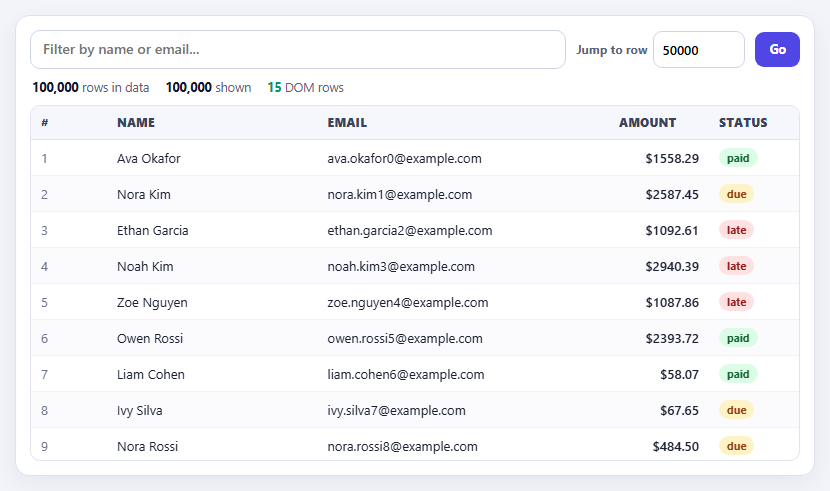
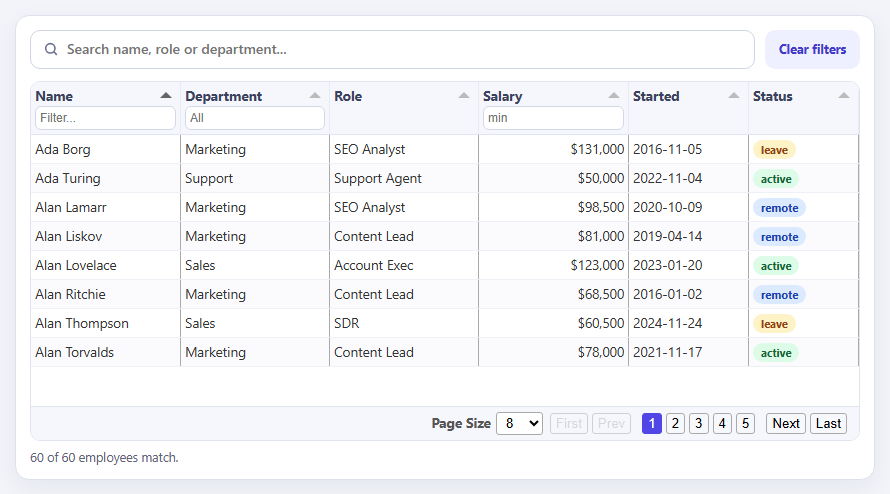
Put a hundred thousand rows into a normal HTML table and the browser stops being usable. Creating that many elements takes seconds, every one of them costs memory, and layout and scrolling turn into a slideshow. The fix is virtualization, sometimes called windowing: the user can only see about ten rows at once, so render only those and fake the rest. The scrollbar still represents the whole dataset, but the DOM holds a few dozen rows at any moment. The counters above the table make this concrete — 100,000 rows in the data, but only around 20 in the DOM.
The technique is surprisingly small when row height is fixed, which is why this snippet fixes it at 36 pixels. An empty sizer element is given a height of rowCount × 36, which makes the browser draw a scrollbar for the full dataset. On every scroll, the first visible row is scrollTop divided by row height and the last is that plus the viewport height divided by row height — plain arithmetic, no measuring of any element. Only that slice is turned into HTML, with a few buffer rows above and below so fast scrolling never flashes blank space, and the whole rows container is moved into place with a translateY transform. Variable row heights are much harder because you must measure or estimate every row; fixed height is the technique's sweet spot.
Two performance details matter as much as the windowing. Scroll events fire far more often than frames are painted, so the handler only schedules a render with requestAnimationFrame if one is not already pending, coalescing bursts into one update per frame. And the data is never copied for sorting or filtering: a view array holds indexes into the original rows, and is null when nothing is applied so no hundred-thousand-entry array is allocated. Sorting sorts the indexes, not the objects.
The rest is what makes it a usable table. Header buttons sort with aria-sort updated for assistive technology, the filter is debounced by 150 milliseconds, and Jump to row sets scrollTop so the target row lands in the middle and briefly flashes. Because only visible rows exist, browser find-in-page and screen-reader table navigation cannot reach off-screen rows, which is the real cost of virtualization; aria-rowcount and aria-rowindex tell assistive technology the true size and position, and a server-side search is the honest answer when full-text find matters.
Step by step
How to Use
- 1Scroll fastDrag the scrollbar or use the mouse wheel. The DOM row counter stays near 20 while the table represents 100,000 rows.
- 2Sort a columnClick a header to sort all 100,000 rows. Click again to reverse. The sort arrow follows the active column.
- 3FilterType a name or email fragment. The row count drops and the scrollbar shrinks to match the results.
- 4Jump to a rowEnter a row number and press Go. The table scrolls there, centres the row and flashes it.
- 5Watch the countersCompare "rows in data", "shown" and "DOM rows" to see how few elements are actually rendered.
Real-world uses
Common Use Cases
requestAnimationFrame.Got questions?
Frequently Asked Questions
Rendering only the items currently visible, plus a small buffer, while making the scroll area the size of the full list. The DOM stays small no matter how much data there is.
With a constant height, the first visible row is just scrollTop / rowHeight. Variable heights require measuring or estimating every row.
Scroll events can fire many times per frame. Scheduling one render per animation frame avoids wasted work and jank.
It sorts an array of indexes rather than copying row objects, and only the visible slice is turned into DOM.
Off-screen rows do not exist, so find-in-page and screen reader navigation cannot reach them. aria-rowcount and aria-rowindex describe the full size, but server-side search is better for finding text.
react-window and react-virtual for React, TanStack Virtual for several frameworks, and AG Grid or Tabulator's virtual DOM for full grids.
Yes. Use the JSX, Vue, Angular or Tailwind export buttons on this page. It has no library dependency, so the logic ports directly: keep the scroll position in state, compute the first and last visible index with the same arithmetic, and render only that slice. For production React or Vue apps, TanStack Virtual or react-window give you the same technique with variable row heights.
Build with AI
Build, Understand, Optimize, and Extend It With AI
Ask an AI assistant like Claude to support variable row heights with measured caching, sticky group headers, or keyboard navigation with a roving row focus.
Prompt to recreate it
Copy this into your AI assistant of choice to build the effect from scratch, or as a jumping-off point for your own variant:
Build a virtualized table in vanilla JavaScript that stays fast with 100,000 rows.

Requirements:
- Generate 100,000 row objects. Use a fixed row height of 36px; make a sizer element with height rowCount * 36 inside a scroll container, and render only the visible rows plus a buffer of 6 into an absolutely positioned container moved with translateY.
- Coalesce scroll events with requestAnimationFrame.
- Sort and filter using an array of indexes into the data (null when nothing applies) instead of copying rows; sortable headers with aria-sort, and a debounced text filter.
- Add a Jump to row control that scrolls the row to the centre and flashes it.
- Show live counters for total rows, rows shown and DOM rows, and set aria-rowcount and aria-rowindex.
Want to tighten it up first? Run this prompt through the AI Prompt Studio to score it across 8 quality dimensions, catch anti-patterns, and tune the wording for Claude, ChatGPT, or Gemini before you paste it in.
Source Code
<div class="vt-wrap">
  <div class="vt-bar">
    <input id="vtSearch" type="search" placeholder="Filter by name or email..." aria-label="Filter rows">
    <label class="vt-jump">Jump to row <input id="vtJump" type="number" min="1" value="50000"></label>
    <button type="button" id="vtGo">Go</button>
  </div>
  <div class="vt-stats" aria-live="polite">
    <span><b id="vtTotal">100,000</b> rows in data</span>
    <span><b id="vtShown">0</b> shown</span>
    <span class="vt-hot"><b id="vtDom">0</b> DOM rows</span>
  </div>
  <div class="vt-table" role="table" aria-label="Virtualized data table" aria-rowcount="100000">
    <div class="vt-head" role="row" id="vtHead"></div>
    <div class="vt-scroll" id="vtScroll" tabindex="0">
      <div class="vt-sizer" id="vtSizer"><div class="vt-rows" id="vtRows"></div></div>
    </div>
  </div>
</div>
body { background: #f2f4f9; padding: 18px; font-family: system-ui, sans-serif; }
.vt-wrap { max-width: 800px; margin: 0 auto; background: #fff; border: 1px solid #dde1ec; border-radius: 14px; padding: 14px; box-shadow: 0 8px 24px rgba(20,30,70,.06); }
.vt-bar { display: flex; gap: 10px; align-items: center; flex-wrap: wrap; }
.vt-bar > input[type="search"] { flex: 1; min-width: 200px; padding: 10px 12px; border: 1.5px solid #cfd5e4; border-radius: 10px; font: 500 14px/1.2 system-ui, sans-serif; }
.vt-bar > input[type="search"]:focus, .vt-jump input:focus { outline: 0; border-color: #4f46e5; box-shadow: 0 0 0 3px rgba(79,70,229,.14); }
.vt-jump { display: flex; align-items: center; gap: 6px; font: 700 12px/1 system-ui, sans-serif; color: #5b6279; }
.vt-jump input { width: 92px; padding: 9px 8px; border: 1.5px solid #cfd5e4; border-radius: 9px; font: 600 13px/1 system-ui, sans-serif; }
#vtGo { font: 700 12.5px/1 system-ui, sans-serif; color: #fff; background: #4f46e5; border: 0; border-radius: 9px; padding: 11px 14px; cursor: pointer; }
.vt-stats { display: flex; gap: 16px; margin: 10px 2px; font-size: 12.5px; color: #5b6279; flex-wrap: wrap; }
.vt-stats b { color: #12162e; font-variant-numeric: tabular-nums; }
.vt-hot b { color: #059669; }
.vt-table { border: 1px solid #e0e4ee; border-radius: 10px; overflow: hidden; }
.vt-head, .vt-row { display: grid; grid-template-columns: 76px 1.3fr 1.8fr 100px 90px; align-items: center; }
.vt-head { background: #f6f7fc; border-bottom: 1px solid #e0e4ee; }
.vt-head button { text-align: left; font: 800 11.5px/1 system-ui, sans-serif; letter-spacing: .05em; text-transform: uppercase; color: #3a4260; background: none; border: 0; padding: 11px 10px; cursor: pointer; }
.vt-head button:hover { background: #eceefa; }
.vt-head button[aria-sort="ascending"]::after { content: ' \25B2'; color: #4f46e5; } .vt-head button[aria-sort="descending"]::after { content: ' \25BC'; color: #4f46e5; }
.vt-scroll { height: 320px; overflow-y: auto; position: relative; outline: 0; }
.vt-scroll:focus-visible { box-shadow: inset 0 0 0 2px #4f46e5; }
.vt-sizer { position: relative; }
.vt-rows { position: absolute; left: 0; right: 0; top: 0; will-change: transform; }
.vt-row { height: 36px; border-bottom: 1px solid #f0f2f8; font-size: 13px; color: #1b2033; }
.vt-row:nth-child(even) { background: #fbfbfe; }
.vt-row > span { padding: 0 10px; overflow: hidden; text-overflow: ellipsis; white-space: nowrap; }
.vt-row .num { font-variant-numeric: tabular-nums; color: #6b7290; }
.vt-row .amt { text-align: right; font-variant-numeric: tabular-nums; font-weight: 600; }
.vt-row.flash { animation: vtFlash 1.4s ease-out; }
@keyframes vtFlash { from { background: #c7d2fe; } to { background: transparent; } }
.st { display: inline-block; font: 700 11px/1 system-ui, sans-serif; padding: 4px 8px; border-radius: 999px; }
.st.paid { background: #dcfce7; color: #166534; } .st.due { background: #fef3c7; color: #92400e; } .st.late { background: #fee2e2; color: #991b1b; }const ROW_H = 36; // fixed row height is what makes the maths cheap
const BUFFER = 6; // extra rows above and below the viewport to avoid blank flashes
const N = 100000;
// ---- data: 100k rows, generated once in typed/plain arrays ----
let seed = 11;
const rnd = function () { seed = (seed * 16807) % 2147483647; return seed / 2147483647; };
const FIRST = ['Ava', 'Noah', 'Mia', 'Liam', 'Zoe', 'Ethan', 'Ivy', 'Owen', 'Ruby', 'Leo', 'Nora', 'Finn'];
const LAST = ['Patel', 'Nguyen', 'Smith', 'Garcia', 'Kim', 'Okafor', 'Rossi', 'Muller', 'Silva', 'Cohen', 'Ali', 'Novak'];
const STATUS = ['paid', 'due', 'late'];
const data = new Array(N);
for (let i = 0; i < N; i++) {
const f = FIRST[Math.floor(rnd() * FIRST.length)], l = LAST[Math.floor(rnd() * LAST.length)];
data[i] = { id: i + 1, name: f + ' ' + l, email: (f + '.' + l + (i % 97)).toLowerCase() + '@example.com', amount: Math.round(rnd() * 500000) / 100, status: STATUS[Math.floor(rnd() * 3)] };
}
const COLS = [['id', '#'], ['name', 'Name'], ['email', 'Email'], ['amount', 'Amount'], ['status', 'Status']];
const head = document.getElementById('vtHead');
const scroller = document.getElementById('vtScroll');
const sizer = document.getElementById('vtSizer');
const rowsEl = document.getElementById('vtRows');
// view = list of indexes into data, after filtering and sorting. Rows never get copied.
let view = null; // null means "identity" - avoids allocating 100k numbers when unfiltered
let sortKey = null, sortDir = 1;
const count = function () { return view ? view.length : N; };
const at = function (i) { return data[view ? view[i] : i]; };
head.innerHTML = COLS.map(function (c) { return '<button type="button" role="columnheader" data-k="' + c[0] + '" aria-sort="none">' + c[1] + '</button>'; }).join('');
function esc(s) { return String(s).replace(/[&<>"]/g, function (c) { return { '&': '&', '<': '<', '>': '>', '"': '"' }[c]; }); }
const rowHtml = function (r, i) {
return '<div class="vt-row" role="row" aria-rowindex="' + (i + 1) + '"><span class="num">' + r.id + '</span><span>' + esc(r.name) + '</span><span>' + esc(r.email) + '</span>' +
'<span class="amt">$' + r.amount.toFixed(2) + '</span><span><i class="st ' + r.status + '">' + r.status + '</i></span></div>';
};
let raf = 0, flashIdx = -1;
function render() {
raf = 0;
const total = count();
sizer.style.height = total * ROW_H + 'px';
const top = scroller.scrollTop, h = scroller.clientHeight;
let first = Math.max(0, Math.floor(top / ROW_H) - BUFFER);
const last = Math.min(total, Math.ceil((top + h) / ROW_H) + BUFFER);
let html = '';
for (let i = first; i < last; i++) html += rowHtml(at(i), i);
rowsEl.style.transform = 'translateY(' + first * ROW_H + 'px)'; // slide the small window into place
rowsEl.innerHTML = html;
if (flashIdx >= first && flashIdx < last) rowsEl.children[flashIdx - first].classList.add('flash');
document.getElementById('vtShown').textContent = total.toLocaleString('en-US');
document.getElementById('vtDom').textContent = (last - first).toLocaleString('en-US');
}
// Scroll events fire far faster than frames: coalesce them to one render per animation frame.
scroller.addEventListener('scroll', function () { if (!raf) raf = requestAnimationFrame(render); });
function rebuild() {
const q = document.getElementById('vtSearch').value.trim().toLowerCase();
let idx = null;
if (q) { idx = []; for (let i = 0; i < N; i++) { const r = data[i]; if (r.name.toLowerCase().indexOf(q) !== -1 || r.email.indexOf(q) !== -1) idx.push(i); } }
if (sortKey) {
idx = idx || Array.from({ length: N }, function (_, i) { return i; });
const k = sortKey;
idx.sort(function (a, b) {
const x = data[a][k], y = data[b][k];
return (x < y ? -1 : x > y ? 1 : 0) * sortDir;
});
}
view = idx;
scroller.scrollTop = 0;
render();
}
head.addEventListener('click', function (e) {
const b = e.target.closest('button'); if (!b) return;
const k = b.dataset.k;
if (sortKey === k) sortDir = -sortDir; else { sortKey = k; sortDir = 1; }
head.querySelectorAll('button').forEach(function (x) { x.setAttribute('aria-sort', x === b ? (sortDir === 1 ? 'ascending' : 'descending') : 'none'); });
rebuild();
});
let t = null;
document.getElementById('vtSearch').addEventListener('input', function () { clearTimeout(t); t = setTimeout(rebuild, 150); });
function jump() {
const n = Math.min(Math.max(1, Number(document.getElementById('vtJump').value) || 1), count());
flashIdx = n - 1;
scroller.scrollTop = Math.max(0, (n - 1) * ROW_H - scroller.clientHeight / 2 + ROW_H / 2); // centre the row
render();
}
document.getElementById('vtGo').addEventListener('click', jump);
document.getElementById('vtJump').addEventListener('keydown', function (e) { if (e.key === 'Enter') jump(); });
render();