


Tree Table — Expandable Hierarchy Rows HTML CSS JS
Tree Table · Tables · Plain HTML, CSS & JS · Live preview
Copy & paste
Source Code
<div class="trt-card">
  <div class="trt-head">
    <h3>Budget by department</h3>
    <button type="button" class="trt-toggle-all" id="trtToggleAll">Collapse all</button>
  </div>
  <table class="trt-table">
    <thead>
      <tr><th>Category</th><th class="trt-num">Budget</th><th class="trt-num">Spent</th><th class="trt-num">Remaining</th></tr>
    </thead>
    <tbody id="trtBody"></tbody>
  </table>
</div>*{box-sizing:border-box;margin:0;padding:0}
body{font-family:system-ui,-apple-system,sans-serif;background:#f8fafc;min-height:100vh;display:flex;align-items:flex-start;justify-content:center;padding:40px 24px}
.trt-card{background:#fff;border-radius:16px;padding:18px;width:100%;max-width:600px;box-shadow:0 18px 44px rgba(15,23,42,.08)}
.trt-head{display:flex;align-items:center;justify-content:space-between;margin-bottom:12px}
.trt-head h3{font-size:16px;font-weight:800;color:#0f172a}
.trt-toggle-all{border:1.5px solid #e2e8f0;background:#fff;border-radius:8px;padding:6px 12px;font-size:12px;font-weight:700;color:#475569;cursor:pointer}
.trt-toggle-all:hover{border-color:#cbd5e1}
.trt-table{width:100%;border-collapse:collapse;font-size:13px}
.trt-table th,.trt-table td{padding:10px 12px;text-align:left}
.trt-num{text-align:right!important;font-variant-numeric:tabular-nums}
.trt-table thead th{background:#f8fafc;color:#475569;font-weight:700;font-size:11.5px;text-transform:uppercase;letter-spacing:.03em;border-bottom:1.5px solid #e2e8f0}
.trt-table tbody td{border-bottom:1px solid #f1f5f9;color:#334155}
.trt-table tbody tr:hover{background:#fafbfc}
.trt-name{display:flex;align-items:center;gap:6px}
.trt-toggle{width:18px;height:18px;border:none;background:none;color:#94a3b8;cursor:pointer;display:flex;align-items:center;justify-content:center;flex-shrink:0;border-radius:4px;transition:background .12s,transform .2s}
.trt-toggle:hover{background:#f1f5f9}
.trt-row.expanded .trt-toggle{transform:rotate(90deg)}
.trt-toggle.leaf{visibility:hidden}
.trt-row[data-depth="0"] .trt-name{font-weight:800;color:#0f172a}
.trt-row[data-depth="1"] td:first-child{padding-left:34px}
.trt-row[data-depth="2"] td:first-child{padding-left:58px}
.trt-row[data-depth="1"] .trt-name{font-weight:600}
.trt-row[data-depth="2"] .trt-name{font-weight:500;color:#64748b}
.trt-row.hidden-row{display:none}
.trt-bar{display:inline-block;width:42px;height:5px;border-radius:999px;background:#f1f5f9;overflow:hidden;vertical-align:middle;margin-left:8px}
.trt-bar i{display:block;height:100%;border-radius:999px;background:#6366f1}var DATA = [
{ id: 'eng', name: 'Engineering', budget: 480000, spent: 312000, children: [
{ id: 'eng-plat', name: 'Platform', budget: 220000, spent: 158000, children: [
{ id: 'eng-plat-1', name: 'Infrastructure', budget: 130000, spent: 99000 },
{ id: 'eng-plat-2', name: 'Tooling', budget: 90000, spent: 59000 },
]},
{ id: 'eng-app', name: 'Applications', budget: 260000, spent: 154000, children: [
{ id: 'eng-app-1', name: 'Web', budget: 150000, spent: 92000 },
{ id: 'eng-app-2', name: 'Mobile', budget: 110000, spent: 62000 },
]},
]},
{ id: 'mkt', name: 'Marketing', budget: 210000, spent: 178000, children: [
{ id: 'mkt-1', name: 'Paid acquisition', budget: 140000, spent: 131000 },
{ id: 'mkt-2', name: 'Content', budget: 70000, spent: 47000 },
]},
{ id: 'ops', name: 'Operations', budget: 95000, spent: 71000 },
];
var body = document.getElementById('trtBody');
var expanded = {}; // id -> true
function money(n) { return '$' + n.toLocaleString(); }
function flatten(nodes, depth, parentId, out) {
nodes.forEach(function (n) {
out.push({ node: n, depth: depth, parentId: parentId, hasChildren: !!(n.children && n.children.length) });
if (n.children) flatten(n.children, depth + 1, n.id, out);
});
return out;
}
function isVisible(row, byId) {
// A row is visible only if every ancestor is expanded.
var p = row.parentId;
while (p) {
if (!expanded[p]) return false;
p = byId[p].parentId;
}
return true;
}
function render() {
var rows = flatten(DATA, 0, null, []);
var byId = {};
rows.forEach(function (r) { byId[r.node.id] = r; });
body.innerHTML = rows.map(function (r) {
var n = r.node;
var remaining = n.budget - n.spent;
var pct = Math.min(100, Math.round((n.spent / n.budget) * 100));
var vis = isVisible(r, byId);
var caret = r.hasChildren
? '<button type="button" class="trt-toggle" data-id="' + n.id + '"><svg width="11" height="11" viewBox="0 0 24 24" fill="none" stroke="currentColor" stroke-width="3" stroke-linecap="round" stroke-linejoin="round"><polyline points="9 18 15 12 9 6"/></svg></button>'
: '<span class="trt-toggle leaf"></span>';
return '<tr class="trt-row' + (expanded[n.id] ? ' expanded' : '') + (vis ? '' : ' hidden-row') + '" data-depth="' + r.depth + '">' +
'<td><span class="trt-name">' + caret + n.name + '</span></td>' +
'<td class="trt-num">' + money(n.budget) + '</td>' +
'<td class="trt-num">' + money(n.spent) + '<span class="trt-bar"><i style="width:' + pct + '%;background:' + (pct >= 90 ? '#ef4444' : '#6366f1') + '"></i></span></td>' +
'<td class="trt-num">' + money(remaining) + '</td>' +
'</tr>';
}).join('');
}
body.addEventListener('click', function (e) {
var btn = e.target.closest('.trt-toggle');
if (!btn || btn.classList.contains('leaf')) return;
var id = btn.dataset.id;
expanded[id] = !expanded[id];
render();
});
var allOpen = true;
document.getElementById('trtToggleAll').addEventListener('click', function () {
allOpen = !allOpen;
expanded = {};
if (allOpen) flatten(DATA, 0, null, []).forEach(function (r) { if (r.hasChildren) expanded[r.node.id] = true; });
this.textContent = allOpen ? 'Collapse all' : 'Expand all';
render();
});
// Start with top level expanded.
DATA.forEach(function (n) { if (n.children) expanded[n.id] = true; });
flatten(DATA, 0, null, []).forEach(function (r) { if (r.hasChildren) expanded[r.node.id] = true; });
render();Extend with AI
Take This Snippet Further With AI
The AI prompt for this one is for Patreon supporters ($3 a month), along with a site with no ads. Supporters enter the passcode once and it is remembered in this browser.
What's included
Features
About this UI Snippet
Tree Table — Collapsible Nested Rows for Hierarchical Data
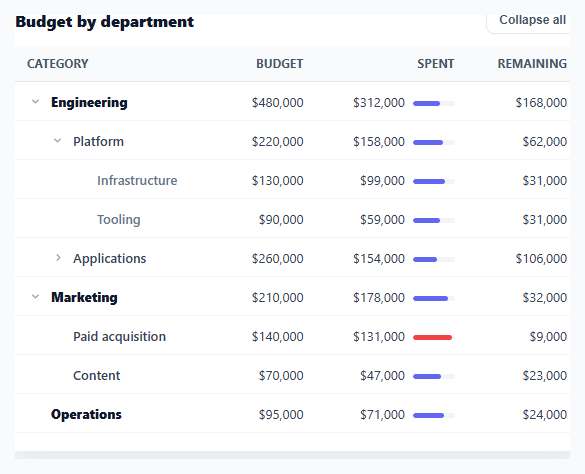
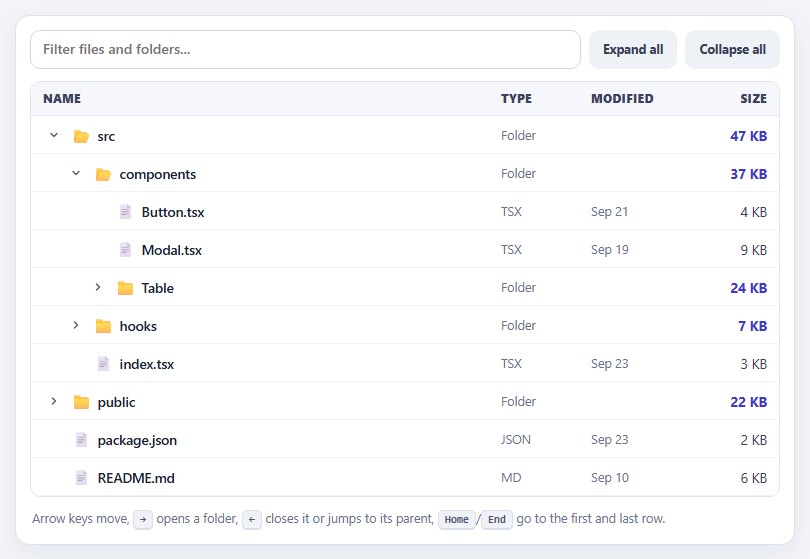
Some data is naturally a hierarchy — a budget by department and sub-team, a file system, a category tree, an org chart of accounts — and a flat table can't show those parent/child relationships. A tree table solves it: rows nest under expandable parents, indented by depth, so you can drill from a top-level total down to its details and collapse what you don't need. This snippet builds that pattern in plain HTML, CSS, and vanilla JavaScript over a real <table>, with any depth of nesting.
Nested data, flattened for rendering
The source is a nested tree of objects, each with optional children. flatten() walks that tree depth-first into a flat list of rows, each tagged with its depth and parent id — because a <table> body is a flat list of <tr>s, not a nested structure. This flatten-with-metadata step is the core technique: it lets you keep your data as a natural hierarchy while rendering it as the linear rows a table requires, and it works for unlimited depth (the demo goes three levels deep).
Visibility derived from ancestor expansion
A child row is visible only when *every* ancestor above it is expanded — collapsing a top-level row should hide its grandchildren too, not just its direct children. isVisible() walks up the parent chain and returns false if any ancestor is collapsed, so the show/hide logic is always correct no matter how deep the nesting or which level you collapse. Expansion state lives in a simple expanded map of id → boolean, the single source of truth that the render reads.
Indentation and disclosure triangles
Each row indents by its depth (via a left-padding rule per depth level) and shows a rotating disclosure triangle that points right when collapsed and down when expanded — the universal tree-control affordance. Leaf rows (no children) get an invisible spacer where the triangle would be, so their text still aligns with siblings that do have triangles. Top-level rows are bold, deeper rows progressively lighter, reinforcing the hierarchy visually beyond just indentation.
Roll-up context per row
Because tree tables usually show aggregates (a parent's budget is the sum of its children's), each row here includes a little spend bar that fills proportionally and turns red past 90% — so you can scan utilization down the hierarchy. In a real app the parent values would be computed from the children (covered in the FAQs); the structure supports either pre-computed or rolled-up totals.
Expand-all / collapse-all
A header button toggles the entire tree open or closed at once — essential for a deep hierarchy where expanding level by level is tedious. It rebuilds the expanded map (all parent ids true, or empty) and re-renders, flipping its own label between "Expand all" and "Collapse all." The tree starts with the top level expanded so the structure is immediately visible without hiding everything.
A real table, kept accessible
It's a genuine semantic <table> with <thead>/<tbody>, so it reads as tabular data to assistive tech and works with table styling. The disclosure triangles are real <button>s. For full accessibility you'd add aria-expanded to each toggle and role="treegrid" semantics (covered in the FAQs), but the foundation — semantic table, flattened render, ancestor-aware visibility — is the right base for any hierarchical table.
Step by step
How to Use
- 1Paste HTML, CSS, and JSA budget tree table renders with departments expanded, showing nested sub-teams and line items.
- 2Collapse a branchClick a parent's triangle to collapse it — all its descendants hide, and the triangle rotates to point right.
- 3Drill downExpand a department, then a sub-team, to reach the deepest line items; indentation shows the depth.
- 4Toggle everythingUse "Collapse all" / "Expand all" in the header to open or close the whole tree at once.
- 5Read the spend barsEach row's mini bar shows budget utilization, turning red past 90%, so you can scan the hierarchy.
- 6Use your own dataReplace the DATA tree with your nested objects (name, values, optional children) — any depth renders.
Real-world uses
Common Use Cases
Got questions?
Frequently Asked Questions
Add a recursive aggregate function that, for any node with children, sums its children's values (which themselves may be sums) — compute budget/spent for parents as the total of their descendants rather than storing them. Run it once on the DATA tree before rendering, so every parent row shows the true roll-up of everything beneath it, and the numbers stay consistent as you edit leaves.
An HTML table body is a flat list of rows; nesting <table>s inside cells breaks column alignment and accessibility. Flattening the tree into rows tagged with depth and parent id keeps one aligned table while preserving the hierarchy in the data — indentation conveys depth visually, and the parent/depth metadata drives expand/collapse and visibility. It's the standard approach for tree tables.
Use role="treegrid" on the table, add aria-expanded (true/false) to each parent's toggle button reflecting its state, aria-level matching the depth on each row, and aria-setsize/aria-posinset for position. Ensure the toggles are keyboard-operable (they're buttons, so Enter/Space work) and consider arrow-key navigation between rows. The semantic <table> base makes layering these straightforward.
Mark nodes that have children but haven't loaded them (e.g. hasChildren: true, children: null), render their toggle, and on first expand fetch the children from your API, insert them into the node, and re-render. This avoids loading a massive tree upfront — the flatten/visibility logic works the same once children are populated.
In React, hold the expanded map (or a Set of ids) in useState and derive the flattened, visibility-filtered rows with useMemo, rendering with .map(); in Vue, use a reactive expanded object with a computed rows list; in Angular, use a component field and a getter. The flatten and isVisible functions are plain JavaScript that port unchanged — only the per-toggle re-render moves into the framework.