Desktop · 1280px · shown at 0% · edit the text, images and colours in the panel


Class Timetable — Free Website Section Template
Menus & listings · v1.0.0 · Updated 2026-10-22 · Responsive · GSAP animation · HTML, React & Vue
What's included
Features
About this section
Class Timetable — Free HTML Schedule Section Template
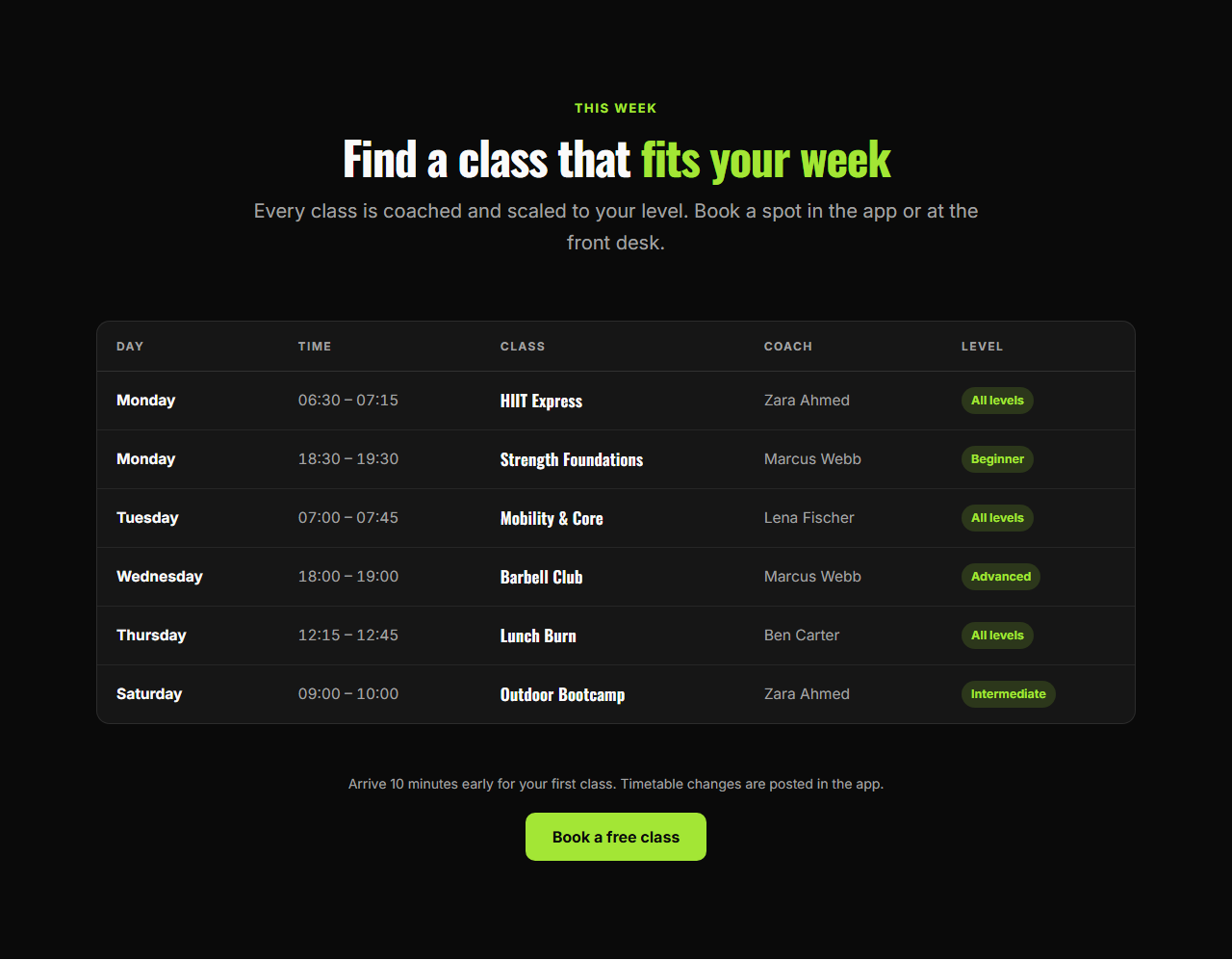
Class Timetable puts your weekly schedule on the page in a format people can actually use. On larger screens it is an accessible table with the day, time, class, coach and level; on phones each row becomes a labelled card that is easy to read with one thumb.
Works for any schedule
Column headings are editable, so the same section serves gyms and yoga studios, dance and music schools, language courses, workshops and conference agendas. Rows are an editable list of up to 40 classes, and level badges make suitable sessions easy to spot.
Book from the timetable
A note covers first visits or changes, and an optional button links to bookings or a free trial. The bold dark theme with a lime accent suits fitness brands; switch to any preset for a calmer look.
Pair it with the Team Grid to introduce the coaches. Export HTML, a ZIP, React or Vue.
Why use it
Why Use the Class Timetable
How it’s different
How It’s Different From Other Free Section Templates
Step by step
How to Use
- 1Edit the contentFill in the heading, column headings, classes and note & button in the panel. Wrap words in *asterisks* to colour them.
- 2Add your imagesUpload your own images (resized in your browser and kept on your device) or paste a hosted image URL.
- 3Match your brandPick a colour preset or exact colours, choose heading and body fonts from Google Fonts or your own uploaded font, set the corner radius and width, or apply your brand kit.
- 4Animate and previewChoose a GSAP entrance effect and speed, press Play animation, and check the section on desktop, tablet and mobile.
- 5Save and exportSave it to My designs, then export a single HTML file, a ZIP with your images, a React or Vue component, or fork it into My Code.
Real-world uses
Common Use Cases
Got questions?
Frequently Asked Questions
Yes. Every column heading is an editable field, and the phone layout uses the same labels, so it stays consistent.
Below 720px the header row is hidden visually and each class becomes a card where every value has its label, such as Day or Coach.
Yes. It uses a real table with column headers and a row header for each class name, which screen readers use to announce the context of every cell.
Leave a class’s coach or level empty and that cell stays blank; empty levels show no badge.
It saves an editable copy of your Class Timetable in My Code, the UI Snippets code editor: the section markup goes in the HTML panel, its CSS (theme variables, base styles and layout) in the CSS panel, and the GSAP library is added as a CDN link, so you can keep refining the code and save your own versions.
Yes. It is free for personal and commercial websites, with no sign-up, no watermark and no attribution required. Everything runs in your browser and your edits are saved locally.