Desktop · 1280px · shown at 0% · edit the text, images and colours in the panel

Footer With Newsletter — Free Website Section Template
Footer · v1.0.0 · Updated 2026-10-20 · Responsive · GSAP animation · HTML, React & Vue
What's included
Features
About this section
Footer With Newsletter — Free Footer Signup Template
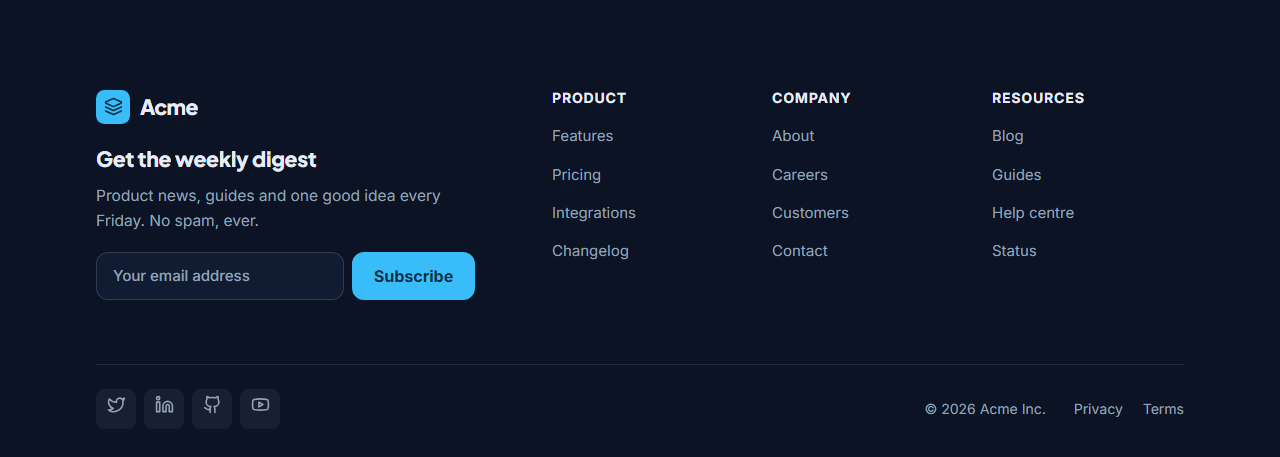
Footer With Newsletter turns the bottom of every page into a sign-up opportunity. On the left: your logo, a short title and pitch ("Get the weekly digest") and an email form; on the right: columns of links; underneath: social icons, the copyright notice and legal links.
A working sign-up form
The form posts directly to your email service. Paste the form action URL from Mailchimp, Kit (ConvertKit), Buttondown, Brevo or your own endpoint, and set the email field name your service expects. The URL is checked before use, and the input has the right email type, autocomplete and required attributes. In the editor the form never submits, so you can try it safely.
Links and socials
Up to four link columns, each written one link per line as Label | URL, plus social icons for X, LinkedIn, GitHub, YouTube, Instagram and more. On phones the form stacks and the link columns sit two by two.
Deep navy theme
It ships in a deep navy with a sky-blue accent, which works for media sites, SaaS and stores, and every colour is a theme token you can change with presets or your brand kit.
Export it
Download HTML, a ZIP, React or Vue, or fork into My Code. For a full-width sign-up section elsewhere on the page, see the Newsletter Signup CTA.
Why use it
Why Use the Footer With Newsletter
How it’s different
How It’s Different From Other Free Section Templates
Step by step
How to Use
- 1Edit the contentFill in the logo, newsletter, link columns, social links and bottom bar in the panel. Switch the social links on or off. Wrap words in *asterisks* to colour them.
- 2Add your imagesUpload your own images (resized in your browser and kept on your device) or paste a hosted image URL.
- 3Match your brandPick a colour preset or exact colours, choose heading and body fonts from Google Fonts or your own uploaded font, set the corner radius and width, or apply your brand kit.
- 4Animate and previewChoose a GSAP entrance effect and speed, press Play animation, and check the section on desktop, tablet and mobile.
- 5Save and exportSave it to My designs, then export a single HTML file, a ZIP with your images, a React or Vue component, or fork it into My Code.
Real-world uses
Common Use Cases
Got questions?
Frequently Asked Questions
Copy the form action URL from your email service’s embed code into Form URL and set Email field name (for example EMAIL for Mailchimp, email_address for Kit). The exported form posts sign-ups straight to your list.
No. Submissions are blocked in the preview so you can test the layout. The exported page submits normally.
Each column has a title and a links box where you write one link per line as Label | URL. Add, reorder or remove columns in the panel.
Yes. On narrow widths the newsletter block sits above the links, the form stacks with a full-width button, and link columns go two by two.
It saves an editable copy of your Footer With Newsletter in My Code, the UI Snippets code editor: the section markup goes in the HTML panel, its CSS (theme variables, base styles and layout) in the CSS panel, and the GSAP library is added as a CDN link, so you can keep refining the code and save your own versions.
Yes. It is free for personal and commercial websites, with no sign-up, no watermark and no attribution required. Everything runs in your browser and your edits are saved locally.