
Startup Launch & Waitlist Template
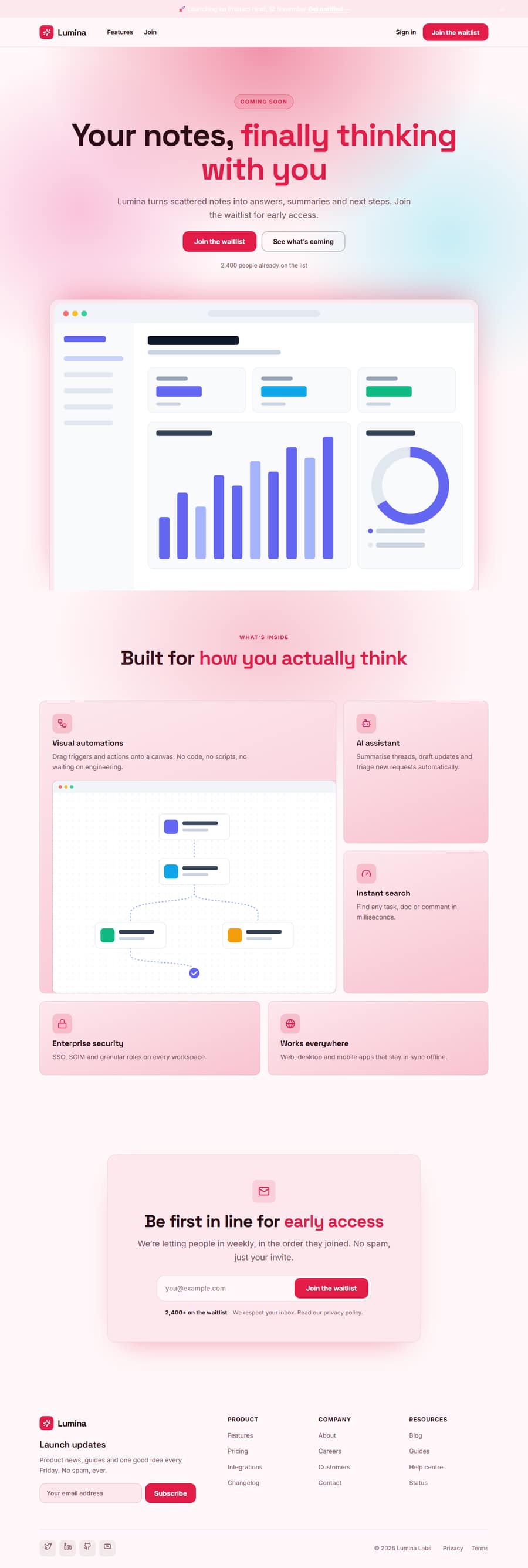
A short, punchy page for collecting sign-ups before launch: an announcement bar with the launch date, a bold hero, a bento grid of what is coming and a newsletter form that sends straight to your email tool.
One page keeps everything on a single scrolling page. The 4-page website opens all its pages in the editor: Home, FAQ, About, Privacy.



Startup Launch & Waitlist Template — Free, Editable, Export HTML
Software · One page or 4 pages · 6 sections · Space Grotesk + Inter · Responsive · GSAP animation
Extend with AI
Take This Template Further With AI
The AI prompt for this one is for Patreon supporters ($3 a month, 7 days free), along with a site with no ads. Supporters enter the passcode once and it is remembered in this browser.
Multi-page version
Pages in the 4-Page Startup Launch & Waitlist Template
What's included
Sections in the Startup Launch & Waitlist Template
Checklist
What a startup launch & waitlist Website Needs
About this template
A Free Startup Launch & Waitlist Template You Can Edit Online
A short, punchy page for collecting sign-ups before launch: an announcement bar with the launch date, a bold hero, a bento grid of what is coming and a newsletter form that sends straight to your email tool.
Use it as one scrolling page, or as a 4-page website (Home, FAQ, About, Privacy) sharing one navbar, footer and theme. The one-page version is built from 6 sections of the Website Section Templates library and opens in the free Website Builder, where you can change every word and image, swap sections, set your own colours and fonts and export the finished site as clean HTML pages. The page is responsive, accessible and animated with GSAP, with content that stays visible without JavaScript.
The template ships with a Space Grotesk and Inter font pairing and a colour theme suited to startup launch & waitlist websites; switch to any Google Font, upload your own, or apply your brand kit in one click.
Extras included
Extras Built Into the Startup Launch & Waitlist Template
Beyond the standard sections, the Startup Launch & Waitlist template includes one extra that you can edit, move or remove in the builder.
Horizontal Timeline: a pinned horizontal roadmap that slides along as you scroll, from the beta to launch day.
Each extra has its own page in the free Website Section Templates library, where you can try its settings on their own before you use it here.
Make it yours
How to Get the Most From the Startup Launch & Waitlist Template
A launch page is judged on one number: how many visitors leave their email. This template removes everything that competes with that. A thin announcement bar sets the date, a gradient hero carries the promise and the sign-up field, bento-style feature cards show what is coming in a quick scan, and a newsletter section repeats the call to action for people who scrolled to the end.
Use it for a waitlist before launch, a Product Hunt day or a new feature release. Write the headline as the problem you remove, give people a reason to join now (early access, a founder discount, a launch date) and connect the form to your mailing tool. The newsletter form takes the form URL from your mailing tool, so you do not need a backend to collect addresses.
Who it’s for
Best For
Step by step
How to Use This Template
- 1Open the templateClick “Use as one page” or “Use as 4-page website” to load it in the Website Builder. Your current website is kept in Saved.
- 2Make it yoursClick any section to change its text, images and links; upload your logo and photos.
- 3Set your brandPick colours and fonts in the Theme tab, or apply your saved brand kit.
- 4Adjust the pageAdd sections from the library, drag to reorder, duplicate or remove what you don’t need.
- 5Export and publishDownload the ZIP (one HTML file per page for the multi-page version) and upload it to Netlify, Vercel or any host.
Got questions?
Frequently Asked Questions
The newsletter section has a Form URL field: paste the form action URL from Mailchimp, Kit (ConvertKit) or any other service and the exported page sends sign-ups there, with an animated success and error message.
Yes. Put the launch date in the announcement bar, link the bar to your Product Hunt page and keep the sign-up form as the main action. After launch day, change the bar text and keep the page as a product page.
Usually no. A single focused page converts best. The multi-page version adds an FAQ and About page for products that need more explanation, but start with one page.
There is no countdown timer in the template. State the date clearly in the announcement bar and the hero, which works for search and for visitors, and add a timer from a script if you need one.
Yes. The Startup Launch & Waitlist template is free for personal and commercial use, with no sign-up, no watermark and no attribution required.
Click “Use this template” to open it in the free Website Builder. Click any section to change its text, images and links, change colours and fonts for the whole page in the Theme tab, and add, remove or drag sections to reorder them.
Both. Use it as one scrolling page, or as a 4-page website (Home, FAQ, About, Privacy) that opens with every page in the editor. The pages share one navbar, footer and theme, and the menu links to every page automatically. Add more pages (About, Pricing, Contact, Blog and others) or remove any you don’t need in the builder’s Pages tab.
Yes. As one page you get a ZIP with index.html and an assets folder. As a 4-page website you get one HTML file per page (index.html, faq.html, about.html, privacy.html), a shared styles.css and script.js, and an assets folder with your images, then upload it to any web host. Links between pages also work when you open the files from your computer.