Desktop · 1280px · shown at 0% · scroll inside the preview to see the effect
Horizontal Timeline — Free Website Section Template
Timelines · v1.0.0 · Updated 2026-10-30 · Responsive · GSAP animation · HTML, React & Vue
What's included
Features
About this section
Horizontal Timeline: Free Scrollable Timeline Section With Numbered or Icon Markers
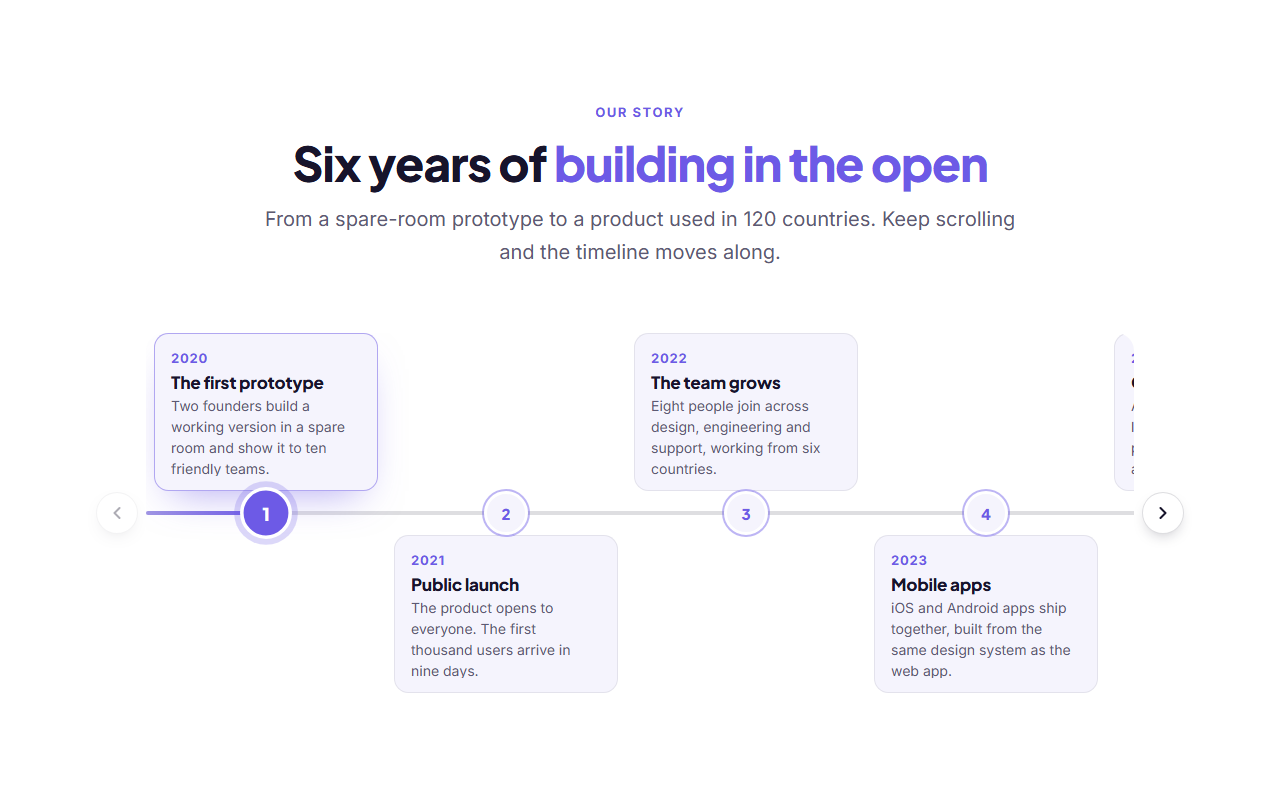
Horizontal Timeline lays your events out from left to right along one continuous line, which makes a story of dates and milestones easy to scan. Every event has a round marker on the line, either a number or an icon, with its date, title and text above or below it. When there are more events than fit on the screen, the row scrolls sideways, with arrow buttons, swipe, mouse drag and the keyboard.
Markers, line and content
Choose whether the markers show the event number (counted automatically, so reordering events renumbers them) or an icon you pick for each event. The content can alternate above and below the line, which fits more events into the width, or sit always below or always above. On phones everything moves below the line so cards never overlap.
Pinned scroll mode
By default the section pins to the screen and scrolling the page slides the timeline to the right. A GSAP ScrollTrigger scrubs the movement, so it follows the scroll exactly and reverses when you scroll back. The progress line grows along the timeline and each event becomes active as the line reaches it. The row rests on the last event before the page carries on, and clicking a marker scrolls the page to that event. Phones, reduced-motion visitors and pages without GSAP get the swipe and arrows version below, and you can choose it on purpose with the Free scroll mode.
Navigation for overflow
Previous and next buttons scroll the row by most of a screen and disable themselves at each end. They are hidden when every event already fits. The row also scrolls with a swipe on touch screens, a click-and-drag with the mouse and the arrow, Home and End keys, and it snaps to events so nothing stops half in view.
Active event and smooth animation
Click a marker and that event becomes active: its marker fills and grows, its card lifts and gets a brand-coloured border, the row glides to centre it and the progress line animates along to it. You choose which event is active when the page loads. Entrance animations come from the template's GSAP motion presets, and reduced-motion settings switch the transitions off.
Responsive and accessible
The timeline responds to the width of its own container, so it works in a narrow column or a full-width section. The scrolling row is a labelled, focusable region, each marker is a real button named after its event, and the active marker is marked with aria-current.
Edit and export
The events are a repeater list of two to twelve items, each with a date, title, text and icon. Change the heading, colours and fonts, then export HTML, a ZIP, React or Vue, or fork it into My Code. For a vertical, path-style story see the Scroll Path Timeline, or for numbered steps see the How It Works Steps.
Extend with AI
Take This Section Further With AI
Ask an AI assistant to adapt the Horizontal Timeline HTML, CSS and JavaScript: auto-advance through the events, add images to the cards, build a vertical version for phones, or turn it into a React component.
Prompt to recreate it
Copy this into your AI assistant of choice to build the effect from scratch, or as a jumping-off point for your own variant:
Create a horizontal timeline in plain HTML, CSS and vanilla JavaScript.

- An ordered list laid out in a row inside a scroll container (overflow-x auto, scroll-snap, hidden scrollbar). A continuous 4px line runs through the middle of the row, and every item has a 44px round marker button centred on it showing a number from a CSS counter, or an icon.
- Each item has a card with a date, a title and a short text. Alternate the cards above and below the line, and put them all below on narrow screens. Give each card a small pointer towards its marker.
- On screens 768px and wider, pin the section with GSAP ScrollTrigger (pin: true, scrub: 0.6) and animate the list's x from 0 to minus the overflow width, so scrolling the page slides the timeline to the right. Grow the progress line with the scroll and activate each event as the line reaches it. Clicking a marker scrolls the page to that event.
- On narrow screens, with reduced motion or without GSAP, use previous and next round buttons that scroll the container by most of a screen and disable at each end, plus touch swipe, mouse drag, and the arrow, Home and End keys, with a labelled, focusable scroll region.
- Clicking a marker sets it active: fill the marker, lift the card with a brand-coloured border, centre it with scrollTo and animate a progress line (a pseudo-element whose width is a CSS variable) to that marker.
- Use real buttons with aria-current for the active marker, and respect prefers-reduced-motion.
Want to tighten it up first? Run this prompt through the AI Prompt Studio to score it across 8 quality dimensions, catch anti-patterns, and tune the wording for Claude, ChatGPT, or Gemini before you paste it in.
Why use it
Why Use the Horizontal Timeline
How it’s different
How It’s Different From Other Free Section Templates
Step by step
How to Use
- 1Edit the contentFill in the heading, timeline settings and events in the panel. Wrap words in *asterisks* to colour them.
- 2Add your imagesUpload your own images (resized in your browser and kept on your device) or paste a hosted image URL.
- 3Match your brandPick a colour preset or exact colours, choose heading and body fonts from Google Fonts or your own uploaded font, set the corner radius and width, or apply your brand kit.
- 4Animate and previewThis section is driven by scrolling: scroll inside the preview to see the effect, press Refresh to restart it from the top, and check the section on desktop, tablet and mobile.
- 5Save and exportSave it to My designs, then export a single HTML file, a ZIP with your images, a React or Vue component, or fork it into My Code.
Real-world uses
Common Use Cases
In real websites
Website Templates That Use the Horizontal Timeline Section
The Horizontal Timeline section is part of 5 complete website templates in the free Website Builder, so you can see it in a full page before you use it on its own: Startup Launch & Waitlist, Online Course Website, Event & Conference Website, Nonprofit & Charity Website, School Website. Open any of them in the builder to edit the whole page, or keep customising this section by itself.
Got questions?
Frequently Asked Questions
Add as many as twelve events. In pinned mode the section holds on screen and scrolling the page slides the events to the right. In free mode, and on phones, swipe, drag, the arrow buttons or the arrow keys move the row.
Yes. Set the marker to show icons and pick an icon for each event. With numbers, the markers count automatically, so reordering the events renumbers them.
Yes. Choose alternating above and below, always below, or always above. On phones the content always sits below the line, so cards never overlap in a narrow space.
That event becomes active: its marker fills, its card is highlighted, the row scrolls to centre it and the progress line animates along to it. You can choose which event starts active.
Yes. The scrolling row is a labelled, focusable region that works with the arrow keys, each marker is a real button named after its event, and the active one uses aria-current. Reduced motion is respected.
It saves an editable copy of your Horizontal Timeline in My Code, the UI Snippets code editor: the section markup goes in the HTML panel, its CSS (theme variables, base styles and layout) in the CSS panel, and the GSAP library is added as a CDN link, so you can keep refining the code and save your own versions.
Yes. It is free for personal and commercial websites, with no sign-up, no watermark and no attribution required. Everything runs in your browser and your edits are saved locally.