Timeline Section Templates
1 free, editable timelines section template. Timelines for company history, roadmaps and milestones, laid out along a scrollable line. Change the text, images, colours and fonts in your browser, add a GSAP animation, then export HTML, React or Vue.
Timeline Section Templates
1 section · Responsive · GSAP animation · HTML, React & Vue
About these sections
Timeline Section Templates
A timeline turns a list of dates into a story. It tells visitors where a company, project or course has been and where it is going, and it is one of the quickest ways to build trust on an about page.
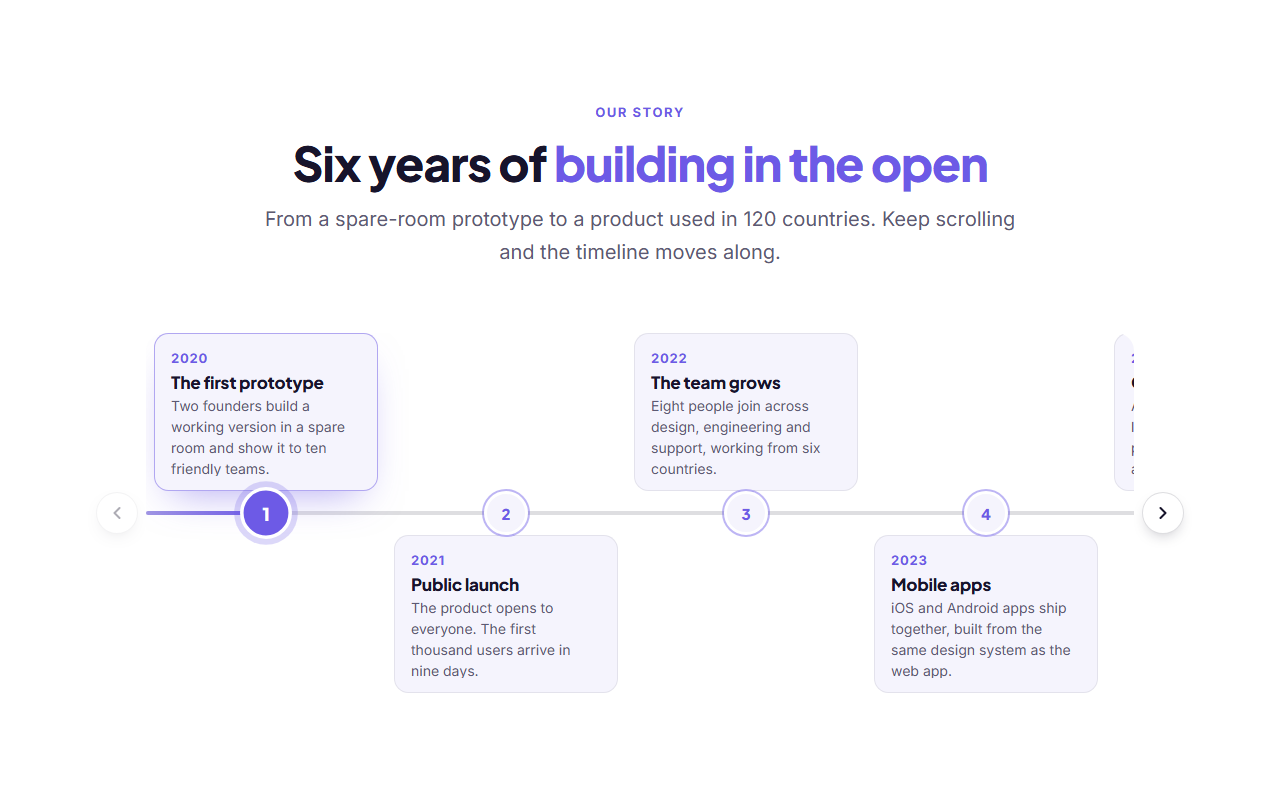
The Horizontal Timeline lays events along one continuous line with round numbered or icon markers, and puts each date, title and short text above or below. By default the section pins to the screen and scrolling the page slides the timeline to the right with GSAP ScrollTrigger, while a progress line grows and each event lights up in turn. On phones, or in free mode, the row scrolls with arrow buttons, swipe, drag or the keyboard, and clicking a marker centres that event.
Events are a repeater list, so you can add, remove and reorder them, and pick the layout (alternating or all below), the marker style and which event starts active. The timeline adapts to phones, respects reduced motion and exports to HTML, a ZIP, React or Vue.
Use a timeline for company history, product roadmaps, course schedules and project milestones. For a vertical, scroll-drawn story see the Scroll Path Timeline.
Horizontal Timeline: A horizontal timeline for company history, roadmaps and project milestones. Events sit left to right along one continuous line, each with a round numbered or icon marker and its date, title and text above or below. By default the section pins to the screen and scrolling the page slides the events along to the right, with a progress line that grows and each event lighting up as it is reached. On phones, with reduced motion, or in free mode, the row scrolls with swipe, drag or arrow buttons and snaps to each event. It works with a keyboard.
Real-world uses
Best Uses for Timelines Sections
How it’s different
How These Section Templates Are Different
Step by step
How to Use
- 1Pick a sectionOpen one of the timelines sections above. Your edits autosave in your browser as you go.
- 2Edit the contentChange the text, buttons, links and images in the panel, and switch optional parts on or off.
- 3Add your brandPick colours, fonts, radius and width, or apply your saved brand kit; every section shares the same theme.
- 4Animate and previewChoose a GSAP entrance effect, press Play animation, and check desktop, tablet and mobile.
- 5ExportDownload HTML or a ZIP, copy a React or Vue component, or fork it into My Code.
Got questions?
Frequently Asked Questions
It shows a series of dated events from left to right, such as a company history, a product roadmap, a course schedule or the milestones of a project, so visitors see the order and pace at a glance.
From two to twelve events. If they do not all fit on the screen, the row scrolls sideways with arrows, swipe, drag and keyboard keys, and snaps to each event.
Yes. On phones the content moves below the line, the row scrolls with a swipe and the arrow buttons stay available, so every event remains readable and easy to reach.
Yes. Choose icon markers and pick an icon for each event, or keep automatic numbers that renumber themselves when you reorder the events.
Horizontal Timeline: A horizontal timeline for company history, roadmaps and project milestones. Events sit left to right along one continuous line, each with a round numbered or icon marker and its date, title and text above or below. By default the section pins to the screen and scrolling the page slides the events along to the right, with a progress line that grows and each event lighting up as it is reached. On phones, with reduced motion, or in free mode, the row scrolls with swipe, drag or arrow buttons and snaps to each event. It works with a keyboard.
Yes. Every section is free for personal and commercial websites, with no account and no watermark. Everything runs in your browser and your edits are saved locally.