
Desktop · 1280px · shown at 0% · edit the text, images and colours in the panel
Service Area Checker — Free Website Section Template
Contact · v1.0.0 · Updated 2026-11-15 · Responsive · GSAP animation · HTML, React & Vue
Extend with AI
Take This Section Further With AI
To cover every street exactly, an AI assistant can check postcodes against a real postcode API, draw your area on a map, or collect an email from visitors outside it so you know where demand is.
Prompt to recreate it
Copy this into your AI assistant of choice to build the effect from scratch, or as a jumping-off point for your own variant:
Create a service area checker section in HTML, CSS and JavaScript.

- Two columns: on the left a heading, a short paragraph, a postcode field with a "Check my area" button and a result message; on the right a panel titled "Areas we cover" with chips, each showing a code in monospace (M1, M20) and an area name.
- On submit, normalise the postcode (letters and digits only, upper case). Cut off the last three characters and compare the rest exactly with the chip codes. If it matches, highlight the chip and show a green message like "Good news: we cover M20 4BT (Didsbury). We can usually be with you within 45 minutes." and reveal a "Book a visit" button. If not, show an amber message; if the postcode is too short, show a red message.
- Use aria-live polite for the result, keep everything in the browser, and stack into one column on narrow screens.
Want to tighten it up first? Run this prompt through the AI Prompt Studio to score it across 8 quality dimensions, catch anti-patterns, and tune the wording for Claude, ChatGPT, or Gemini before you paste it in.
What's included
Features
About this section
Service Area Checker — Free Postcode Coverage Section
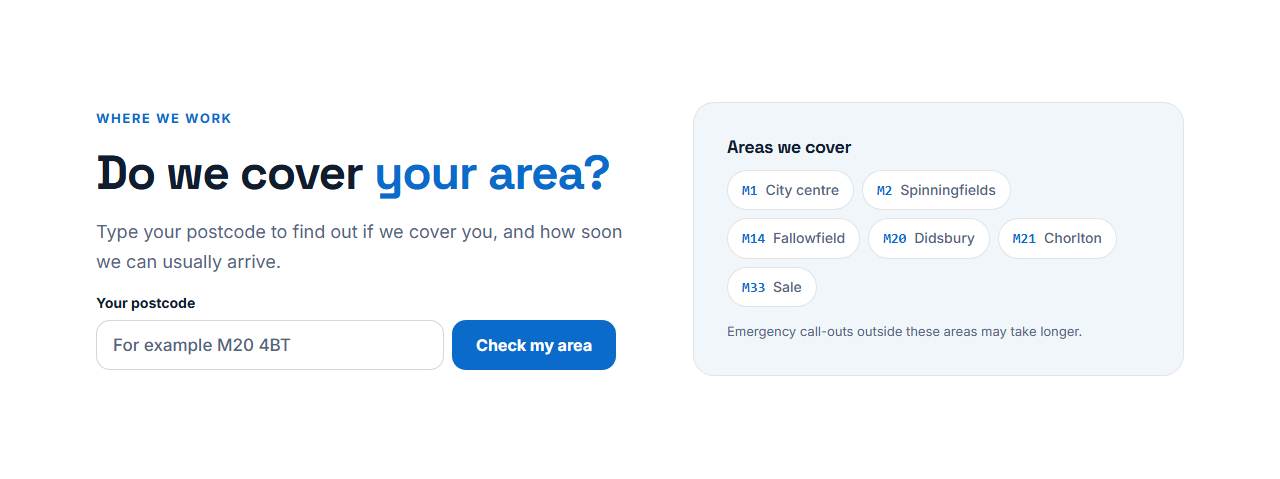
Service Area Checker answers the question every local customer asks before they call: "do you cover my area?". A visitor types their postcode and gets an answer at once, with the area name and how soon you can usually be there, and a Book button when they are covered. Beside the checker, the areas you cover are listed as chips, each with its code, so people can also scan the list.
Works with UK postcodes and ZIP codes
In UK mode the checker cuts the postcode before its last three characters and matches the first part exactly, so M20 4BT is checked against M20 and never against M2 or M200. In "starts with" mode a ZIP or other postal code that begins with a code you list is a match, and the longest matching code wins. Spaces, lower case and punctuation are ignored.
Your words, your promises
The messages for "covered", "not covered" and "incomplete postcode" are fields you write, with placeholders for the postcode, the area name and the arrival time. Only promise an arrival time you can keep, and use the small print to say that emergencies outside your usual area may take longer.
Private and fast
The lookup runs in the visitor's browser against the list you typed, so no postcode is sent or stored. The covered area is highlighted in the chip list, which confirms the answer visually, and the result is announced politely to screen readers.
Setting up your patch
Add one chip per postcode district you serve, with an honest arrival time, and the checker uses that same list. The export carries the short checking script, so nothing depends on an outside postcode service. A Services & Booking List above it and a booking form below shorten the path from "do you cover me?" to a booked visit.
Keeping the list clear
List every outward code you really serve, give honest arrival times, and put the checker near your booking button. If you cover a whole city, a short list of the main districts is clearer than fifty codes.
Why use it
Why Use the Service Area Checker
How it’s different
How It’s Different From Other Free Section Templates
Step by step
How to Use
- 1Edit the contentFill in the heading, checker, messages and areas covered in the panel. Wrap words in *asterisks* to colour them.
- 2Add your imagesUpload your own images (resized in your browser and kept on your device) or paste a hosted image URL.
- 3Match your brandPick a colour preset or exact colours, choose heading and body fonts from Google Fonts or your own uploaded font, set the corner radius and width, or apply your brand kit.
- 4Animate and previewChoose a GSAP entrance effect and speed, press Play animation, and check the section on desktop, tablet and mobile.
- 5Save and exportSave it to My designs, then export a single HTML file, a ZIP with your images, a React or Vue component, or fork it into My Code.
Real-world uses
Common Use Cases
In real websites
Website Templates That Use the Service Area Checker Section
The Service Area Checker section is part of 1 complete website template in the free Website Builder, so you can see it in a full page before you use it on its own: Plumber & Heating Engineer Website. Open any of them in the builder to edit the whole page, or keep customising this section by itself.
Got questions?
Frequently Asked Questions
The checker removes spaces, cuts the last three characters and compares the first part, such as M20, exactly with the codes you list. So M20 4BT matches M20 but not M2.
Yes. Choose the "starts with" mode and list the beginnings of the codes you serve. The longest listed code that the typed code starts with is the match.
No. The check runs in the visitor’s browser against the list you typed, and nothing is sent, stored or tracked by the section.
Yes. The covered, not covered and incomplete messages are text fields, and you can use {p} for the postcode, {area} for the area name and {eta} for the arrival time.
It saves an editable copy of your Service Area Checker in My Code, the UI Snippets code editor: the section markup goes in the HTML panel, its CSS (theme variables, base styles and layout) in the CSS panel, and the GSAP library is added as a CDN link, so you can keep refining the code and save your own versions.
Yes. Every section is free for personal and commercial work, with no account, no watermark and no attribution: export it on its own as HTML, React, Vue or Next.js from its page, or use it in a website you build and export in the Website Builder.