
Desktop · 1280px · shown at 0% · edit the text, images and colours in the panel


Price Estimator — Free Website Section Template
Menus & listings · v1.0.0 · Updated 2026-11-15 · Responsive · GSAP animation · HTML, React & Vue
Extend with AI
Take This Section Further With AI
For quotes with extras, an AI assistant can add checkboxes such as collection and delivery that add to the price, load your price list from an API, or carry the chosen job into the booking form.
Prompt to recreate it
Copy this into your AI assistant of choice to build the effect from scratch, or as a jumping-off point for your own variant:
Create a service price estimator in HTML, CSS and JavaScript.

- A heading and intro, then a card with two columns: on the left two groups of choice chips built from real radio inputs (group 1 "What do you need?" with MOT, Full service, Brake pads, Diagnostics; group 2 "What do you drive?" with Small car, Family car and Large car or van, each with example models in small text); on the right a dark result panel.
- Each service has three prices (small, medium, large) and a duration. Each vehicle maps to one price band. The result panel shows "From" and the price in large accent text, "Takes about 2 hours", a small note saying the price is an estimate confirmed after inspection, and a "Book this service" button.
- Preselect the first option of each group, update the result instantly on change, mark the chosen chip with a coloured border and use aria-live polite on the result. Stack into one column on narrow screens.
Want to tighten it up first? Run this prompt through the AI Prompt Studio to score it across 8 quality dimensions, catch anti-patterns, and tune the wording for Claude, ChatGPT, or Gemini before you paste it in.
What's included
Features
About this section
Price Estimator — Free Service Quote Calculator Section
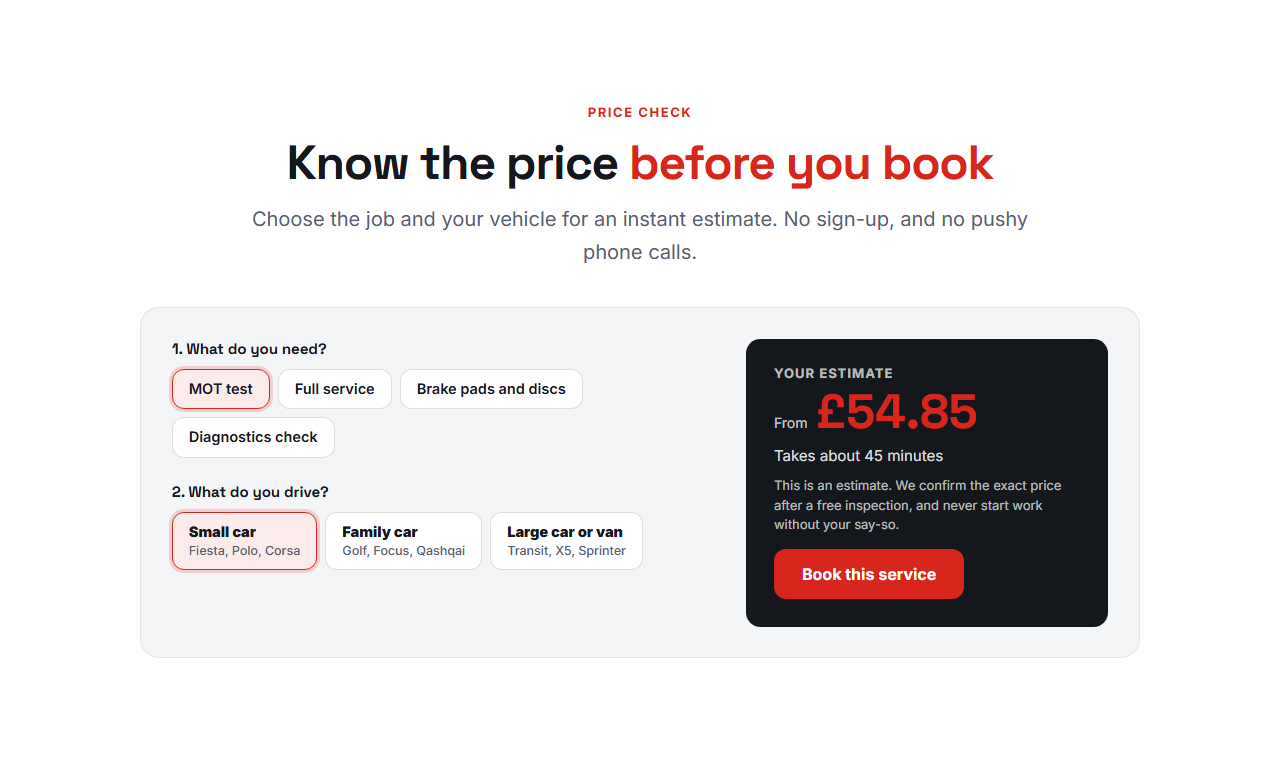
Price Estimator is an instant price check for businesses that charge by the size or type of what they work on. Visitors pick what they need, such as an MOT, a full service or new brake pads, and the size of their vehicle, and the estimated price and the time it takes appear straight away, with a note that the final price is confirmed after inspection and a Book button.
Three prices per service
Each service has a price for small, medium and large vehicles and a length of time. Each vehicle choice, for example "Small car: Fiesta, Polo, Corsa", is mapped to one of the three prices. Change a service or a vehicle and the estimate updates at once. The first choices are selected when the page loads, so an estimate is visible before anyone clicks.
Honest by design
An estimate is not a quote, so the section has a note under the price that you write yourself, such as "We confirm the exact price after a free inspection". The prices are typed as you want them shown, in any currency, so only publish figures you really charge.
No server, no sign-up
The estimate is worked out in the browser from the numbers you typed, so there is nothing to host and no personal data is collected. The Book button links wherever you choose: a booking form, a calendar or a phone number.
Accessible
The choices are real radio buttons in labelled groups, so they work with the keyboard and screen readers. The estimate sits in a region that announces changes politely.
Putting prices live
The estimate is worked out by a short plain-JavaScript script inside the export, so prices change by editing the list, with no rebuild and no plugin. Show the full menu of jobs above it with the Services & Booking List, and let the Book button lead to a booking form where the visitor names the job.
Pricing jobs honestly
Offer the four or five jobs people ask about most, use plain vehicle names with examples, and keep the note honest about what can change the price. Update the prices whenever they change.
Why use it
Why Use the Price Estimator
How it’s different
How It’s Different From Other Free Section Templates
Step by step
How to Use
- 1Edit the contentFill in the heading, services and prices, vehicle choices and estimate box in the panel. Wrap words in *asterisks* to colour them.
- 2Add your imagesUpload your own images (resized in your browser and kept on your device) or paste a hosted image URL.
- 3Match your brandPick a colour preset or exact colours, choose heading and body fonts from Google Fonts or your own uploaded font, set the corner radius and width, or apply your brand kit.
- 4Animate and previewChoose a GSAP entrance effect and speed, press Play animation, and check the section on desktop, tablet and mobile.
- 5Save and exportSave it to My designs, then export a single HTML file, a ZIP with your images, a React or Vue component, or fork it into My Code.
Real-world uses
Common Use Cases
In real websites
Website Templates That Use the Price Estimator Section
The Price Estimator section is part of 2 complete website templates in the free Website Builder, so you can see it in a full page before you use it on its own: Auto Repair Garage Website, Plumber & Heating Engineer Website. Open any of them in the builder to edit the whole page, or keep customising this section by itself.
Got questions?
Frequently Asked Questions
Each service has three prices, for small, medium and large. Each vehicle choice is set to one of those bands, and the section shows the price from the chosen service and band.
Yes. Rename the second group, for example to home size or van size, and set each choice to a price band. It works for any service priced by size.
No. The estimate is worked out in the visitor’s browser from the numbers you typed. Nothing is sent anywhere until they use your booking form.
Not unless you say so. The note under the price is yours to write, so make clear that the final price is confirmed after inspection if that is the case.
It saves an editable copy of your Price Estimator in My Code, the UI Snippets code editor: the section markup goes in the HTML panel, its CSS (theme variables, base styles and layout) in the CSS panel, and the GSAP library is added as a CDN link, so you can keep refining the code and save your own versions.
Yes. Every section is free for personal and commercial work, with no account, no watermark and no attribution: export it on its own as HTML, React, Vue or Next.js from its page, or use it in a website you build and export in the Website Builder.