Desktop · 1280px · shown at 0% · edit the text, images and colours in the panel
Before & After Slider — Free Website Section Template
Gallery & media · v1.0.0 · Updated 2026-10-24 · Responsive · GSAP animation · HTML, React & Vue
What's included
Features
About this section
Before & After Slider — Free Image Comparison Template
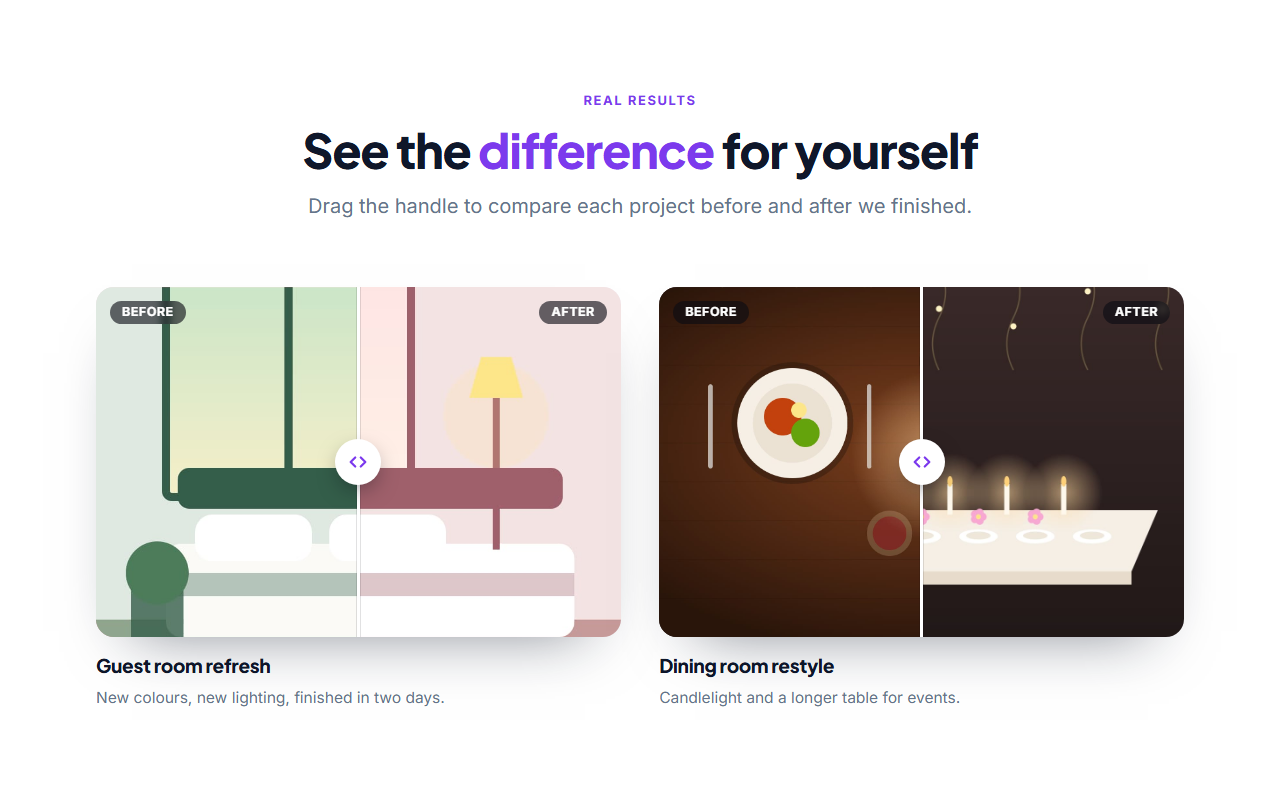
Before & After Slider is a free results section that lets visitors drag a divider to compare two photos. It is the clearest way to show a haircut, a renovation, a cleaning job, a retouched photograph or any change that is easier to see than to describe. Add up to four comparisons, each with a title and a short caption.
Simple to build
Upload a before photo and an after photo with the same size and framing, add alt text for each and write a title and caption. The two images sit on top of each other; the divider reveals more of one or the other as it moves. Before and After labels sit in the corners and you can rename them, for example to "Day 1" and "Day 30".
Works with mouse, touch and keyboard
The divider is driven by a real range input, so it works with the mouse, a finger and the arrow keys, announces its value to screen readers and shows a visible focus ring. The label read to assistive technology is editable. Without JavaScript the slider shows a fixed 50% split, so both photos are always visible.
Layout and motion
Comparisons sit in a grid that fits two across on wide screens and one on phones. Each card has a rounded frame and a soft shadow, a round handle with arrows, and a heading and caption underneath. The cards stagger in with a GSAP entrance animation, which switches off for visitors who prefer reduced motion.
Export it
Copy one HTML file, download a ZIP with the images, copy a React or Vue component, or fork into My Code. Show more photos with the Filterable Image Gallery, or add proof with a Case Study Showcase.
Why use it
Why Use the Before & After Slider
How it’s different
How It’s Different From Other Free Section Templates
Step by step
How to Use
- 1Edit the contentFill in the heading, comparisons and labels in the panel. Switch the heading on or off. Wrap words in *asterisks* to colour them.
- 2Add your imagesUpload your own images (resized in your browser and kept on your device) or paste a hosted image URL.
- 3Match your brandPick a colour preset or exact colours, choose heading and body fonts from Google Fonts or your own uploaded font, set the corner radius and width, or apply your brand kit.
- 4Animate and previewChoose a GSAP entrance effect and speed, press Play animation, and check the section on desktop, tablet and mobile.
- 5Save and exportSave it to My designs, then export a single HTML file, a ZIP with your images, a React or Vue component, or fork it into My Code.
Real-world uses
Common Use Cases
In real websites
Website Templates That Use the Before & After Slider Section
The Before & After Slider section is part of 4 complete website templates in the free Website Builder, so you can see it in a full page before you use it on its own: Gym & Fitness Website, Dental Clinic Website, Local Service Business Website, Hair & Beauty Salon Website. Open any of them in the builder to edit the whole page, or keep customising this section by itself.
Got questions?
Frequently Asked Questions
Use two photos with the same size, framing and lighting, so the only difference is the result. Aim for about 1200 by 800 pixels and write alt text that describes each photo.
Yes. The divider can be dragged with a finger, and the grid moves from two comparisons across to one. Vertical scrolling still works when you swipe outside the handle.
Yes. Edit both labels, for example to "Day 1" and "Day 30" or "Old" and "New", and edit the screen-reader label for the slider as well.
Yes, up to four. Each has its own pair of photos, title and caption, and they sit in a grid that stacks on narrow screens.
It saves an editable copy of your Before & After Slider in My Code, the UI Snippets code editor: the section markup goes in the HTML panel, its CSS (theme variables, base styles and layout) in the CSS panel, and the GSAP library is added as a CDN link, so you can keep refining the code and save your own versions.
Yes. It is free for personal and commercial websites, with no sign-up, no watermark and no attribution required. Everything runs in your browser and your edits are saved locally.