Desktop · 1280px · shown at 0% · edit the text, images and colours in the panel
Reviews Summary & Rating — Free Website Section Template
Testimonials · v1.0.0 · Updated 2026-10-31 · Responsive · GSAP animation · HTML, React & Vue
What's included
Features
About this section
Reviews Summary & Rating — Free Star Reviews Section
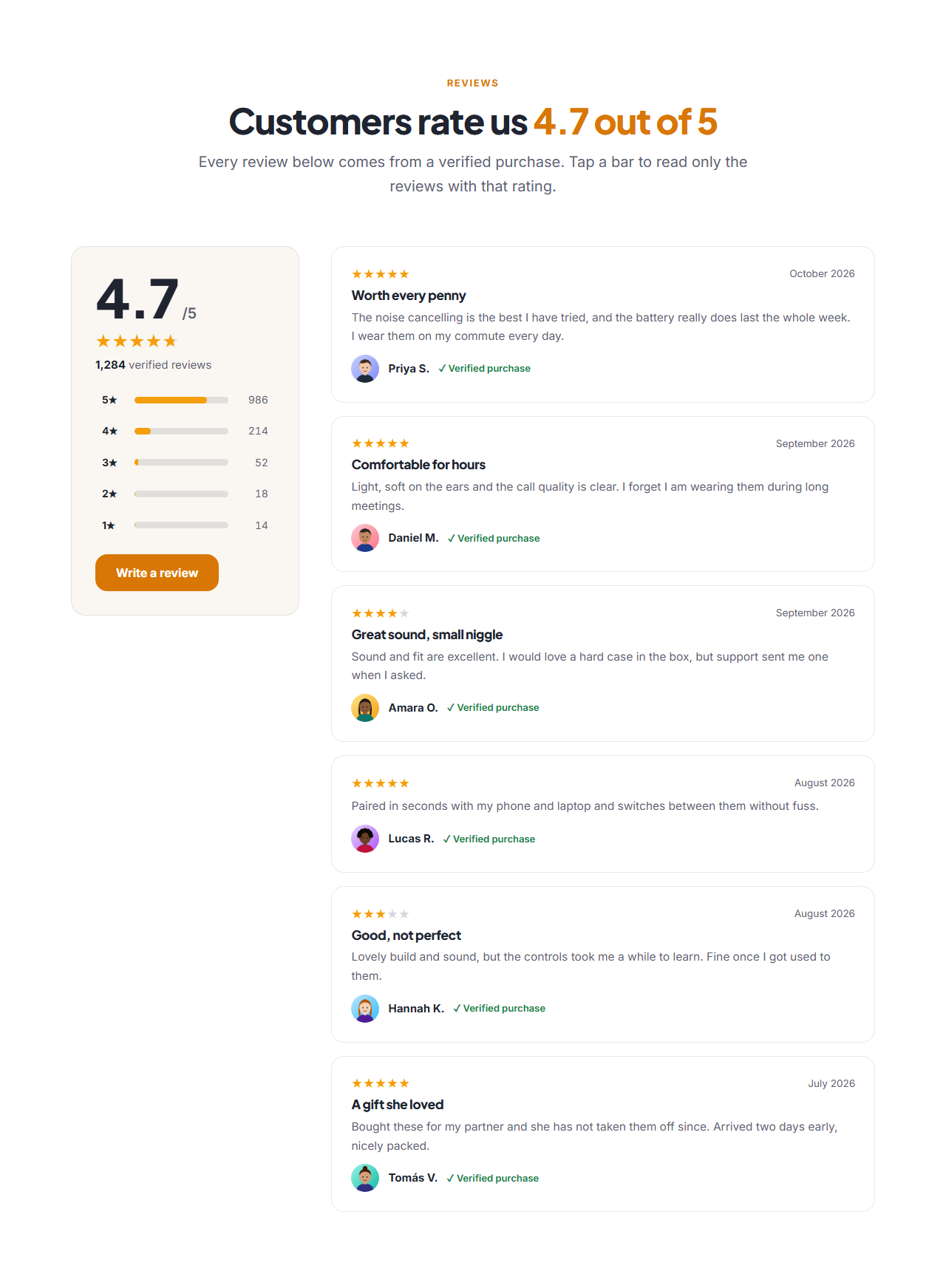
Reviews Summary & Rating is the trust block shops, apps and local businesses put near the buy button. A large average rating with stars and "based on 1,284 verified reviews" sits beside review cards, and a five-bar breakdown shows how many people gave five, four, three, two and one star. Click a bar and only the reviews with that rating stay on screen, which is how shoppers look for the honest middle of the scale.
Type five numbers, get everything else
You enter how many reviews each star level has. The average rating, the total, the bar lengths and the star display are worked out from those five numbers, so the summary can never disagree with its own bars. Each review card has the stars, a date, an optional title, the text, the reviewer with an optional photo, and a label such as "Verified purchase".
Accessible by design
Every star rating has a text description for screen readers ("Rated 4 out of 5"), the bars are real buttons with a pressed state that works with the keyboard, and the filter announces how many reviews are showing. All the wording, including the filter message, can be changed, so it works in any language.
Data for search engines
When you name what is rated, the section writes schema.org AggregateRating and Review data for it. Search engines may show star ratings for products, apps, books and courses; they usually ignore reviews that a business writes about itself, so use it mainly for products. Only publish real reviews: invented ones break the rules of search engines and the trust of customers.
Export it
Download HTML, a ZIP, React or Vue, or fork into My Code. Pair it with the Product Grid, the Testimonials Grid or an FAQ section.
Getting the most from it
Show the real distribution, including the middle ratings; a perfect score looks less believable than a 4.7. Reply to reviews on your own channels, keep the dates fresh, and link the "Write a review" button to a real review form.
Extend with AI
Take This Section Further With AI
Ask an AI assistant to adapt the reviews: load the reviews from your own API, add a sort menu (newest, highest, lowest), or add a helpful-vote button to each review.
Prompt to recreate it
Copy this into your AI assistant of choice to build the effect from scratch, or as a jumping-off point for your own variant:
Create a reviews summary section in HTML, CSS and JavaScript.

- Two columns: a sticky summary card on the left (big average like 4.7 with "/5", gold stars, "1,284 verified reviews", five rows each with "5★", a thin gold bar and the count, and a "Write a review" button) and a list of review cards on the right (stars, date, title, text, round photo, name, a green "Verified purchase" label).
- The rows are buttons: clicking one shows only the review cards with that rating, shows a message "Showing 4 of 6 reviews rated 5 stars" with a "Show all reviews" button, and sets aria-pressed.
- Compute the average, the total and the bar widths from the five counts. Stars are drawn with a CSS gradient clipped to text and a --r custom property.
- Add JSON-LD for the Product with AggregateRating and Review. Stack into one column on narrow screens.
Want to tighten it up first? Run this prompt through the AI Prompt Studio to score it across 8 quality dimensions, catch anti-patterns, and tune the wording for Claude, ChatGPT, or Gemini before you paste it in.
Why use it
Why Use the Reviews Summary & Rating
How it’s different
How It’s Different From Other Free Section Templates
Step by step
How to Use
- 1Edit the contentFill in the heading, what is being rated (for search engines), rating breakdown, review cards, words and filter and write a review button in the panel. Wrap words in *asterisks* to colour them.
- 2Add your imagesUpload your own images (resized in your browser and kept on your device) or paste a hosted image URL.
- 3Match your brandPick a colour preset or exact colours, choose heading and body fonts from Google Fonts or your own uploaded font, set the corner radius and width, or apply your brand kit.
- 4Animate and previewChoose a GSAP entrance effect and speed, press Play animation, and check the section on desktop, tablet and mobile.
- 5Save and exportSave it to My designs, then export a single HTML file, a ZIP with your images, a React or Vue component, or fork it into My Code.
Real-world uses
Common Use Cases
In real websites
Website Templates That Use the Reviews Summary & Rating Section
The Reviews Summary & Rating section is part of 4 complete website templates in the free Website Builder, so you can see it in a full page before you use it on its own: Dental Clinic Website, Local Service Business Website, Hair & Beauty Salon Website, Product Landing Page Store. Open any of them in the builder to edit the whole page, or keep customising this section by itself.
Got questions?
Frequently Asked Questions
From the five review counts you type in: each count is multiplied by its stars, added up and divided by the total number of reviews. The result is shown with one decimal place.
Each bar is a button. Clicking it shows only the review cards whose rating rounds to that number of stars, and a message says how many are showing. Clicking again, or the clear button, shows them all.
The section writes AggregateRating and Review data for the item you name. Search engines decide what to show: stars are common for products, apps, books and courses, and usually ignored for a business rating itself. Use real reviews only.
Yes. Every label, the screen reader text and the filter message are editable fields, and the star rating text uses {n} as a placeholder for the number.
It saves an editable copy of your Reviews Summary & Rating in My Code, the UI Snippets code editor: the section markup goes in the HTML panel, its CSS (theme variables, base styles and layout) in the CSS panel, and the GSAP library is added as a CDN link, so you can keep refining the code and save your own versions.
Yes. It is free for personal and commercial websites, with no sign-up, no watermark and no attribution required. Everything runs in your browser and your edits are saved locally.