Click any text to edit it · drag a photo to reposition it, scroll to zoom, click to replace
Us vs Them Comparison — Free Promo & Sales Social Post Template
Promo & Sales · v1.0.0 · Updated 2026-10-20 · Instagram, Facebook & X · HTML + CSS
What's included
Features
About this template
Us vs Them Comparison — Free Comparison Post Template for Instagram & LinkedIn
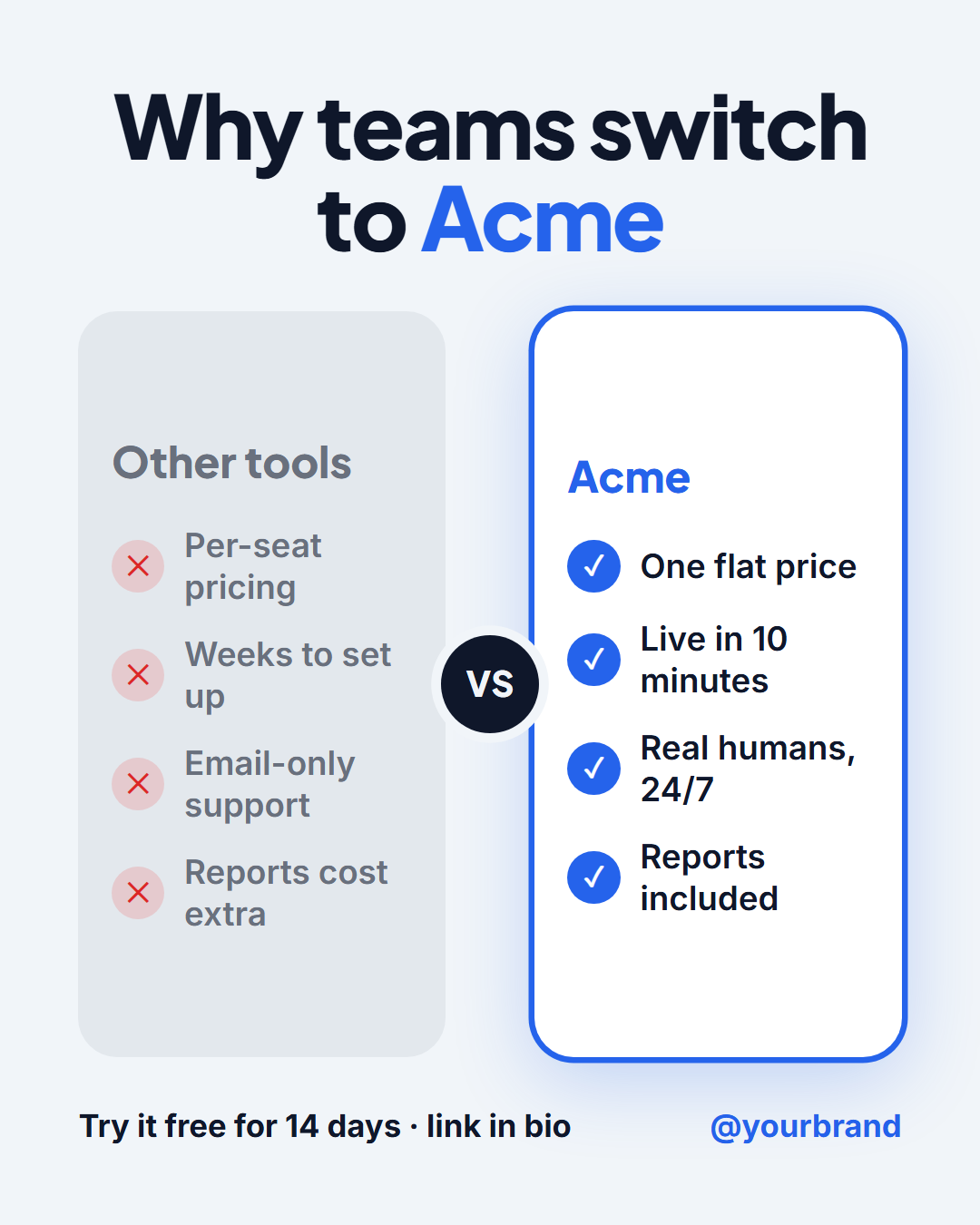
Us vs Them Comparison is a free social media template for showing why customers choose you. A bold headline ("Why teams switch to Acme") sits above two columns: a muted "Other tools" column with four cross-marked drawbacks and a highlighted column for your brand with four tick-marked benefits, separated by a "VS" badge, with a call to action and your handle underneath.
Why comparison posts convert
People considering a purchase are already comparing options. A side-by-side post answers "why you and not them?" in a few seconds, which makes it one of the most effective formats for SaaS, agencies, coaches and product brands. It's equally useful as an "old way vs new way" post that compares a frustrating habit with the better approach your product enables.
Clear at a glance
The visual hierarchy does the persuading: the competitor column is greyed out, while your column is white, outlined in your accent colour and lifted with a soft glow. Crosses and ticks in coloured circles make each row readable without colour alone. Leave any row empty and it disappears, so you can compare three points instead of four.
Keep it fair
Comparisons work best when they're accurate and specific: "one flat price" beats vague claims, and naming a generic "other tools" column keeps it about your benefits rather than attacking a competitor. On the Story size the columns stack vertically; on 16:9 for X and LinkedIn they stay side by side. Pair it with Customer Testimonial to back the claims with a real review, or Before & After for visual results.
Why use it
Why Use the Us vs Them Comparison Template
How it’s different
How It’s Different From Canva-Style Templates
Step by step
How to Use
- 1Pick the sizeChoose Portrait 4:5 (the Instagram feed default), Square, Story / Reel, Landscape 16:9 for X, a 1200×627 LinkedIn image or a 1000×1500 Pinterest pin. Us vs Them Comparison opens at 1080×1350.
- 2Edit the textClick any text in the preview, or use the fields on the left (headline, left column label, left point 1, left point 2 and more). Wrap words in *asterisks* to colour them.
- 3Match your brandApply your saved brand kit or one of 12 palettes, set exact colours, and choose heading and body fonts from any Google Font or your own uploaded font.
- 4Preview it in the feedSwitch the preview to Instagram, Story, X or LinkedIn to see the post with your name, handle and caption, and fix anything the quality checks flag.
- 5Download, save or bulk createDownload PNG, JPG or PDF, every size as a ZIP, or copy the HTML. Save it to My designs to reuse later, or turn a CSV into dozens of posts with Bulk create.
Real-world uses
Common Use Cases
Got questions?
Frequently Asked Questions
Open the Us vs Them Comparison template, write a headline, fill in up to four points for each column and add a call to action. Keep the 1080×1350 portrait size or switch to Story, then download the PNG.
It is usually safer to use a generic label such as "Other tools" or "The old way" and focus on your own benefits. If you name a competitor, make sure every claim is accurate and up to date.
Yes. Leave a row empty in both columns and it disappears, so you can compare two or three points.
Yes. On the 1080×1920 Story size the two columns stack vertically with the VS badge between them.
Portrait post 1080×1350 (4:5): Instagram feed (recommended), Facebook and LinkedIn feeds, X portrait. Square post 1080×1080 (1:1): Instagram, Facebook, LinkedIn and X feeds. Story / Reel 1080×1920 (9:16): Instagram and Facebook Stories, Reel covers. Landscape post 1600×900 (16:9): X feed image, Facebook landscape. LinkedIn image 1200×627 (1.91:1): LinkedIn shared image and link posts, Facebook link images. Pinterest pin 1000×1500 (2:3): Pinterest standard pin (the recommended 2:3 ratio). Switch sizes in the editor and the layout adapts, or click "All sizes (ZIP)" to download every size at once.
Yes. Choose Export, then "Bulk create from CSV", and paste rows from a spreadsheet or upload a CSV whose column names match the Us vs Them Comparison fields. Every row becomes one post, and you download them all as a ZIP.
Yes. The preview switches between the plain design and mock-ups of an Instagram feed post, an Instagram Story, an X post and a LinkedIn post, using the name, handle and logo from your brand kit and the caption you type.
Yes. "Copy HTML" and "Download .html" give you one self-contained file: the markup, all the CSS and links to the Google Fonts it uses. "Fork to My Code" saves an editable copy in the UI Snippets editor. The file records the template name and version (v1.0.0).
Yes. It is free for personal and commercial posts, with no sign-up and no watermark. Everything runs in your browser and nothing you type or upload is sent to a server.