Click any text to edit it · drag a photo to reposition it, scroll to zoom, click to replace

Valentine's Day — Free Holidays & Seasonal Social Post Template
Holidays & Seasonal · v1.0.0 · Updated 2026-11-02 · Instagram, Facebook & X · HTML + CSS
What's included
Features
About this template
Valentine's Day — Free Romantic Post Template With Offer Chip
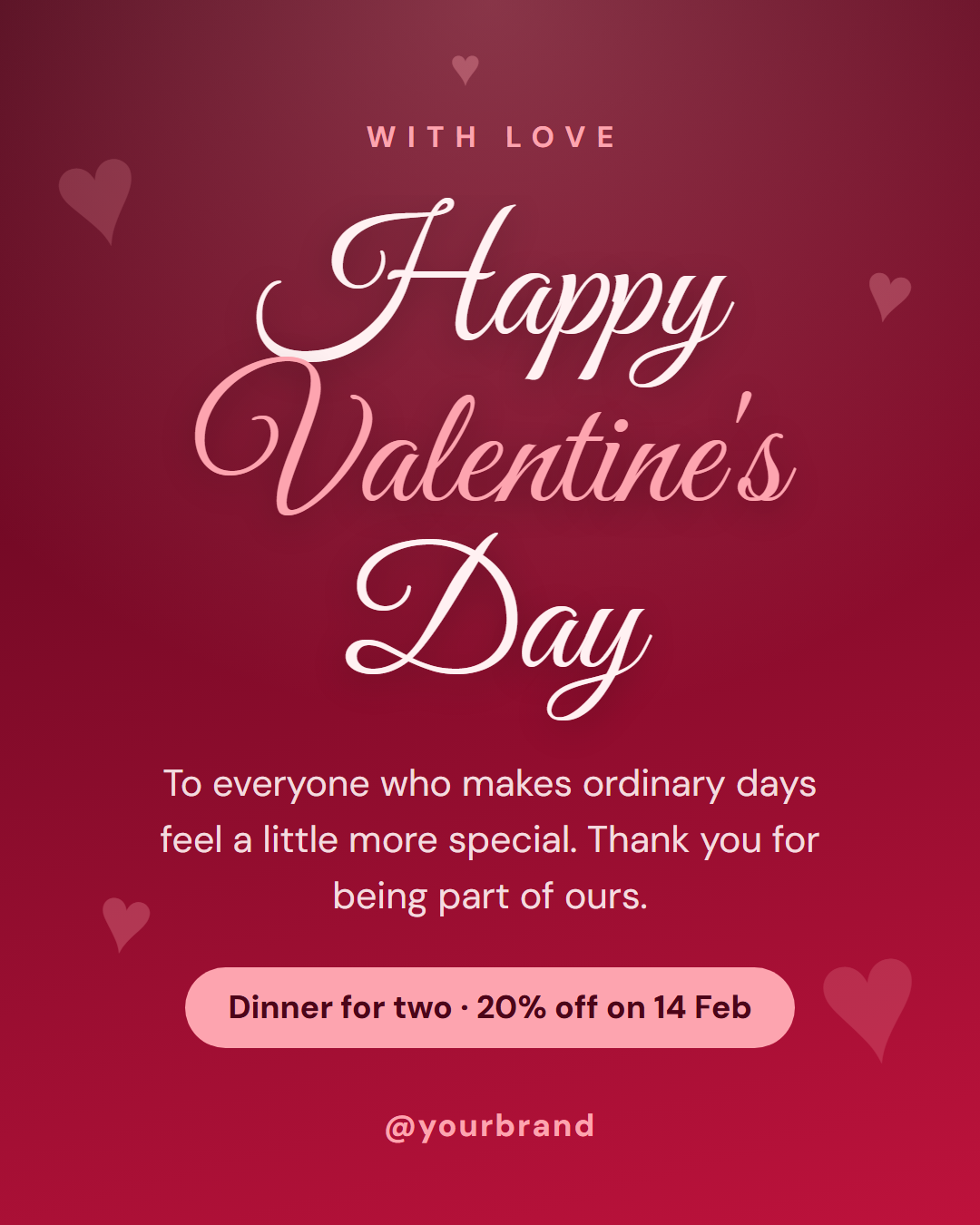
Valentine's Day is a free social media template for 14 February, built around one idea: make the greeting feel hand-written. A deep rose gradient fades from near-black burgundy into raspberry, soft hearts float at different sizes in the corners, and the headline is set in a flowing script face, large enough to be the whole design.
A greeting first, an offer second
The card has room for a short label ("With love"), the script headline, a warm paragraph and, if you want it, a pink chip for an offer such as "Dinner for two · 20% off on 14 Feb". Leave the chip empty and it disappears, so the same card works as a pure greeting for a brand that does not sell anything on the day. Wrap a word in *asterisks* to colour it in the pale rose accent, as in "Happy *Valentine's* Day".
Colour and type that match the mood
The script headline has long, looping strokes that need space, so the text size is large and the line is kept short. The paragraph below is in a clean sans-serif so it stays readable on a phone. The hearts are text characters at low opacity, so they add atmosphere without competing with the words. For a lighter look, switch the gradient to pale pink and the text to dark rose.
Who uses it
Florists, restaurants, jewellers, salons, bakeries and gift shops use Valentine's Day for their biggest promotion of the winter, and a card like this announces a date-night offer or last-order dates. Personal brands and creators use it as a thank-you to their audience. The layout adapts to the Story and 16:9 sizes, and you can export PNG, JPEG, PDF, animated video or HTML.
Post it a few days early for an offer and on the day for a greeting. See also Christmas Greeting and Thank You for the same warm, handmade feel.
Extend with AI
Take This Post Further With AI
Ask an AI assistant to adapt the Valentine's Day HTML and CSS: write a gift-guide caption, turn the offer chip into a countdown to the order deadline, or animate the hearts drifting upward behind the headline.
Prompt to recreate it
Copy this into your AI assistant of choice to build the effect from scratch, or as a jumping-off point for your own variant:
Create a 1080×1350 Valentine's Day social post in plain HTML and CSS.

- A deep rose gradient background from #4c0519 to #be123c with a soft pink radial glow at the top centre.
- Five heart characters (♥) at different sizes and rotations in the corners, pale pink at low opacity.
- A small uppercase pale-pink label "With love" with wide letter-spacing, then a large script headline in Great Vibes, "Happy Valentine's Day", with "Valentine's" in pale pink.
- A short centred paragraph in a clean sans-serif, then a pale-pink pill with dark burgundy text: "Dinner for two · 20% off on 14 Feb".
- The handle at the bottom in pale pink.
- Size everything with a CSS variable --u equal to 1% of the shorter side.
Want to tighten it up first? Run this prompt through the AI Prompt Studio to score it across 8 quality dimensions, catch anti-patterns, and tune the wording for Claude, ChatGPT, or Gemini before you paste it in.
Why use it
Why Use the Valentine's Day Template
How it’s different
How It’s Different From Canva-Style Templates
Step by step
How to Use
- 1Pick the sizeChoose Portrait 4:5 (the Instagram feed default), Square, Story / Reel, Landscape 16:9 for X, a 1200×627 LinkedIn image or a 1000×1500 Pinterest pin. Valentine's Day opens at 1080×1350.
- 2Edit the textClick any text in the preview, or use the fields on the left (label, headline, message, offer and more). Wrap words in *asterisks* to colour them.
- 3Match your brandApply your saved brand kit or one of 12 palettes, set exact colours, and choose heading and body fonts from any Google Font or your own uploaded font.
- 4Preview it in the feedSwitch the preview to Instagram, Story, X or LinkedIn to see the post with your name, handle and caption, and fix anything the quality checks flag.
- 5Download, save or bulk createDownload PNG, JPG or PDF, every size as a ZIP, or copy the HTML. Save it to My designs to reuse later, or turn a CSV into dozens of posts with Bulk create.
Real-world uses
Common Use Cases
Got questions?
Frequently Asked Questions
Start a week to ten days before 14 February, with the order deadline in the offer chip. Post the greeting version on the day itself. Retailers that need delivery time should post even earlier.
Yes. Leave the offer field empty and the chip disappears, so the card becomes a pure greeting. Change the label and the message to speak to customers, friends or followers.
Yes. Both gradient colours, the text and the accent are editable. A light pink gradient with dark rose text gives a softer, daytime look, and the hearts follow the accent colour.
The headline is set very large so the script stays legible on a phone, and the paragraph beneath is in plain sans-serif. Keep the headline short, around three words, so the loops stay clear.
Portrait post 1080×1350 (4:5): Instagram feed (recommended), Facebook and LinkedIn feeds, X portrait. Square post 1080×1080 (1:1): Instagram, Facebook, LinkedIn and X feeds. Story / Reel 1080×1920 (9:16): Instagram and Facebook Stories, Reel covers. Landscape post 1600×900 (16:9): X feed image, Facebook landscape. LinkedIn image 1200×627 (1.91:1): LinkedIn shared image and link posts, Facebook link images. Pinterest pin 1000×1500 (2:3): Pinterest standard pin (the recommended 2:3 ratio). Switch sizes in the editor and the layout adapts, or click "All sizes (ZIP)" to download every size at once.
Yes. Choose Export, then "Bulk create from CSV", and paste rows from a spreadsheet or upload a CSV whose column names match the Valentine's Day fields. Every row becomes one post, and you download them all as a ZIP.
Yes. The preview switches between the plain design and mock-ups of an Instagram feed post, an Instagram Story, an X post and a LinkedIn post, using the name, handle and logo from your brand kit and the caption you type.
Yes. "Copy HTML" and "Download .html" give you one self-contained file: the markup, all the CSS and links to the Google Fonts it uses. "Fork to My Code" saves an editable copy in the UI Snippets editor. The file records the template name and version (v1.0.0).
Yes. It is free for personal and commercial posts, with no sign-up and no watermark. Everything runs in your browser and nothing you type or upload is sent to a server.