

Embla Carousel Auto-Scroll Logo Marquee — Free Logo Strip Snippet
Embla Carousel Auto-Scroll Logo Marquee · Carousels · Plain HTML, CSS & JS · Live preview
What's included
Features
About this UI Snippet
Embla Auto Scroll — A Logo Marquee You Can Also Grab
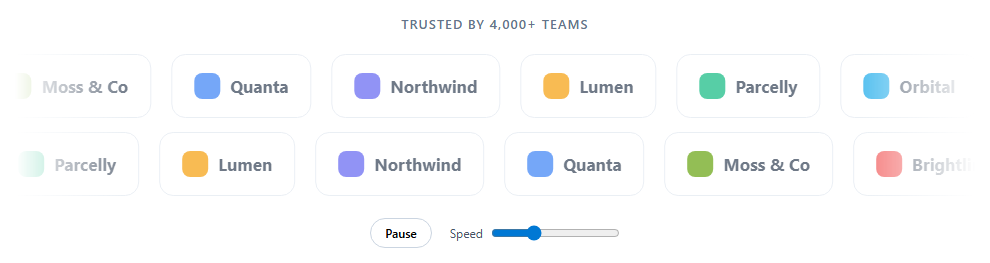
Logo marquees are usually pure CSS animations: cheap, smooth, and impossible to interact with. Embla's Auto Scroll plugin gives the same continuous motion while keeping a real carousel underneath, so visitors can grab the strip, throw it, and let it carry on.
Continuous motion, not slide steps
EmblaCarouselAutoScroll({ speed }) moves the track a fixed number of pixels per frame instead of snapping between slides. Combined with loop: true and dragFree: true, the strip becomes an endless belt that can be dragged with momentum. direction: 'backward' on the second row makes the rows drift past each other.
Enough content to loop
Embla's loop needs slides that cover more than the viewport, otherwise it can't reposition slides out of sight. Ten logos might be too few on a wide screen, so each row renders its set twice.
Interaction settings
stopOnMouseEnter pauses while the pointer is over a row, so visitors can read a logo. stopOnInteraction: false resumes scrolling after a drag instead of stopping forever.
Pause and speed controls
A visible pause button (WCAG 2.2.2 requires one for motion longer than five seconds) calls plugin.stop() and plugin.play() on both rows. Speed is a plugin option, not a method, so the slider destroys each carousel and re-creates it with a fresh plugin, which is the documented way to change plugin options.
Soft edges
A horizontal mask-image gradient fades logos in and out at both ends, avoiding a hard cut at the container edge. Logos sit slightly muted and lift to full strength on hover.
Step by step
How to Use
- 1Load Embla and Auto ScrollInclude the core and embla-carousel-auto-scroll UMD builds.
- 2Paste the snippetTwo logo rows drift in opposite directions.
- 3Grab a rowDrag and release; it glides, then keeps scrolling.
- 4Pause or change speedUse the button and slider below the rows.
- 5Add your logosReplace BRANDS with names and colours, or use img tags in the slides.
Real-world uses
Common Use Cases
speed so premium sponsors stay on screen noticeably longer.dragFree momentum or drop in your own logo markup.Got questions?
Frequently Asked Questions
Use the embla-carousel-auto-scroll plugin with loop: true. It moves the carousel by a set speed each frame. Add dragFree: true so users can throw the strip and it keeps gliding.
Pass direction: 'backward' to the Auto Scroll plugin.
Embla's loop needs enough slides to fill more than the viewport so slides can be moved out of sight before they reappear. Repeating a short list prevents a gap on wide screens.
Speed is a plugin option, so destroy the carousel and re-create it with a new plugin instance using the new speed.
Motion that lasts more than five seconds should be pausable (WCAG 2.2.2). Provide a pause button, pause on hover, and don't autoplay for users who prefer reduced motion. Logos should have text alternatives when they are images.
Build with AI
Build, Understand, Optimize, and Extend It With AI
Paste this snippet into an AI assistant like Claude and ask it to explain why the logo list is duplicated and why changing speed requires re-initialising. Ask it to use real SVG logos with alt text, link each logo to a case study, or slow the strip down while a logo is focused. It can also compare this with a pure CSS marquee for performance.
Prompt to recreate it
Copy this into your AI assistant of choice to build the effect from scratch, or as a jumping-off point for your own variant:
Build a two-row "trusted by" logo marquee with Embla Carousel v8 and its Auto Scroll plugin (loaded from a CDN as UMD) in plain HTML, CSS and JavaScript.

Requirements:
- Ten brand logos (a coloured mark and name), rendered twice per row so the loop never shows a gap.
- The top row scrolls forward and the bottom row backward, continuously, looping and draggable with momentum.
- Pause while hovered, resume after a drag, and don't autoplay when the user prefers reduced motion.
- A pause/play button with aria-pressed that stops or starts both rows.
- A speed slider that re-creates both carousels with a new plugin instance at the chosen speed.
- Fade logos in and out at both edges with a CSS mask, and show logos slightly muted until hovered.
Want to tighten it up first? Run this prompt through the AI Prompt Studio to score it across 8 quality dimensions, catch anti-patterns, and tune the wording for Claude, ChatGPT, or Gemini before you paste it in.
Source Code
<section class="eal">
  <p class="eal-kicker">Trusted by 4,000+ teams</p>
  <div class="eal-row">
    <div class="eal-viewport" id="ealTop"><div class="eal-container" id="ealTopList"></div></div>
    <div class="eal-viewport" id="ealBottom"><div class="eal-container" id="ealBottomList"></div></div>
  </div>
  <div class="eal-controls">
    <button type="button" id="ealToggle" aria-pressed="false">Pause</button>
    <label>Speed <input type="range" id="ealSpeed" min="0.4" max="3" step="0.2" value="1.2"></label>
  </div>
</section>*{box-sizing:border-box;margin:0;padding:0}
body{font-family:system-ui,-apple-system,sans-serif;background:#fff;min-height:100vh;display:flex;align-items:center;justify-content:center;padding:24px}
.eal{width:100%;max-width:960px;text-align:center}
.eal-kicker{font-size:13px;font-weight:600;letter-spacing:.08em;text-transform:uppercase;color:#64748b;margin-bottom:22px}
.eal-row{display:grid;gap:14px;
/* Fade the edges so logos appear and disappear softly. */
-webkit-mask-image:linear-gradient(90deg,transparent,#000 12%,#000 88%,transparent);
mask-image:linear-gradient(90deg,transparent,#000 12%,#000 88%,transparent)}
.eal-viewport{overflow:hidden}
.eal-container{display:flex;touch-action:pan-y pinch-zoom}
.eal-slide{flex:0 0 auto;min-width:0;padding:0 10px}
.eal-logo{display:flex;align-items:center;gap:10px;height:64px;padding:0 22px;border:1px solid #e2e8f0;border-radius:14px;color:#334155;font-weight:700;font-size:17px;white-space:nowrap;opacity:.7;transition:opacity .2s,border-color .2s,transform .2s}
.eal-logo:hover{opacity:1;border-color:#c7d2fe;transform:translateY(-2px)}
.eal-mark{width:26px;height:26px;border-radius:8px;flex:0 0 auto}
.eal-controls{display:flex;justify-content:center;align-items:center;gap:18px;margin-top:22px;font-size:12px;color:#475569}
.eal-controls button{border:1px solid #cbd5e1;background:#fff;border-radius:999px;padding:6px 14px;font:600 12px system-ui;cursor:pointer}
.eal-controls button:focus-visible{outline:2px solid #6366f1;outline-offset:2px}
.eal-controls label{display:flex;align-items:center;gap:8px}var BRANDS = [
['Northwind', '#6366f1'], ['Lumen', '#f59e0b'], ['Parcelly', '#10b981'], ['Orbital', '#0ea5e9'],
['Kitewire', '#ec4899'], ['Hexa', '#8b5cf6'], ['Tidepool', '#14b8a6'], ['Brightline', '#ef4444'],
['Moss & Co', '#65a30d'], ['Quanta', '#3b82f6'],
];
function fill(listId, brands) {
var el = document.getElementById(listId);
// Auto-scroll with loop needs enough content to cover the viewport at
// least once; repeating the set avoids a visible gap on wide screens.
brands.concat(brands).forEach(function (b) {
el.insertAdjacentHTML('beforeend',
'<div class="eal-slide"><div class="eal-logo"><span class="eal-mark" style="background:' + b[1] + '"></span>' + b[0] + '</div></div>');
});
}
fill('ealTopList', BRANDS);
fill('ealBottomList', BRANDS.slice().reverse());
var reduce = window.matchMedia('(prefers-reduced-motion: reduce)').matches;
// AutoScroll moves continuously (pixels per frame) instead of jumping
// between slides. dragFree lets a grab-and-throw feel natural.
function make(id, direction) {
var plugin = EmblaCarouselAutoScroll({
speed: 1.2,
direction: direction,
startDelay: 0,
stopOnInteraction: false,
stopOnMouseEnter: true,
playOnInit: !reduce,
});
var api = EmblaCarousel(document.getElementById(id), { loop: true, dragFree: true }, [plugin]);
return { api: api, plugin: plugin };
}
var rows = [make('ealTop', 'forward'), make('ealBottom', 'backward')];
var toggle = document.getElementById('ealToggle');
var paused = reduce;
function render() {
toggle.textContent = paused ? 'Play' : 'Pause';
toggle.setAttribute('aria-pressed', String(paused));
}
render();
toggle.addEventListener('click', function () {
paused = !paused;
rows.forEach(function (r) { if (paused) r.plugin.stop(); else r.plugin.play(); });
render();
});
// Speed is a plugin option, so changing it means re-initialising each
// carousel with a fresh plugin instance.
document.getElementById('ealSpeed').addEventListener('change', function (e) {
var speed = Number(e.target.value);
rows = rows.map(function (r, i) {
r.api.destroy();
var plugin = EmblaCarouselAutoScroll({
speed: speed, direction: i === 0 ? 'forward' : 'backward', startDelay: 0,
stopOnInteraction: false, stopOnMouseEnter: true, playOnInit: !paused,
});
var api = EmblaCarousel(document.getElementById(i === 0 ? 'ealTop' : 'ealBottom'), { loop: true, dragFree: true }, [plugin]);
return { api: api, plugin: plugin };
});
});