

Lottie Scroll Pulse Dots — Ring Assembles on Scroll
Lottie Scroll Pulse Dots · Scroll · Plain HTML, CSS & JS · Live preview
What's included
Features
About this UI Snippet
How to Build a Scroll-Assembled Ring of Lottie Dots With Staggered Scale Keyframes
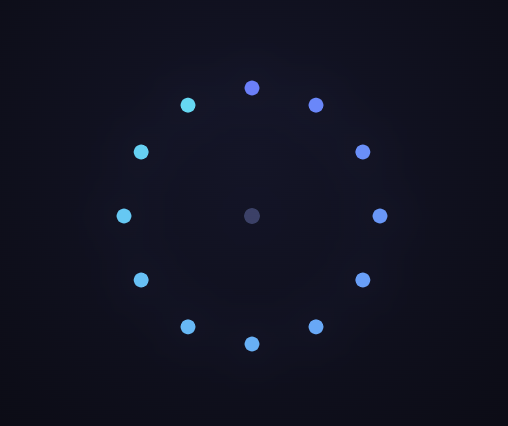
The Lottie Scroll Pulse Dots snippet assembles a ring of coloured dots one at a time as the visitor scrolls — each dot scaling up from nothing and fading in a beat after the last — and scatters them again on the way up. Nothing plays on a timer; the scrollbar drives the assembly frame by frame, and the whole animation is generated in JavaScript so the staggered build is fully visible in the code.
Lottie is JSON, assembled in code
A Lottie animation is a JSON document of vector layers and keyframes. Instead of fetching one, this snippet builds the animationData object directly and passes it to lottie.loadAnimation, so there is nothing to host and nothing that can 404. A loop places each dot around a circle with basic trigonometry and gives it its own scale and opacity keyframes, all carrying the easing tangents lottie-web requires.
Placing dots around a circle
Each dot sits at a point on a circle computed from its index: the angle is the index divided by the total, times a full turn, and the x and y come from the cosine and sine of that angle scaled by the radius. Starting the angle at minus ninety degrees puts the first dot at the top so the ring reads cleanly. Because the position is fixed and only the scale and opacity animate, each dot grows in place rather than flying in from elsewhere.
Scaling in from zero, staggered
Every dot animates its transform scale from 0 to 100 and its opacity from 0 to 100, so it pops into existence at its spot on the ring. The key to the effect is the stagger: each dot's animation starts a little later than the previous one, offset by its index, so the ring assembles as a sweep around the circle rather than all dots appearing at once. That single per-dot delay is what turns twelve separate pops into one flowing build.
The one keyframe detail that matters
When you author a Lottie by hand, every animated keyframe must carry its i (in) and o (out) bezier tangents. Omit them and lottie-web treats the keyframe as a hold keyframe: it never interpolates, so a scale animated 0 to 100 stays stuck at 0 and the dot never appears. The keyframe helpers here attach linear tangents to every keyframe, which is what makes the dots grow.
Autoplay off, scroll on
The animation is loaded with autoplay: false so its internal clock never runs. A GSAP ScrollTrigger pins the stage and scrubs a single plain value from 0 to 1 over a range several viewport-heights tall, and a requestAnimationFrame loop reads that value every frame and calls anim.goToAndStop(p * (totalFrames - 1), true). The true tells lottie-web the value is a frame number, and goToAndStop renders a single still frame without starting playback, so the assembly is welded to scroll position. Because lottie-web interpolates between keyframes, fractional frames render smoothly.
Reversible for free
Deriving the frame from one scrubbed value means scrolling up produces smaller values, so the dots scatter back to nothing in reverse with no extra code. A smoothed scrub: 0.5 lets the assembly glide toward the scroll position rather than snapping to every wheel tick, and the caption fades out the moment the first dot appears. Pair it with the Lottie scroll scrub ring or the Lottie scroll orbit rings for a fuller loader sequence.
Step by step
How to Use
- 1Load the three CDN scriptsAdd lottie.min.js, gsap.min.js, and ScrollTrigger.min.js from the CDN panel, in that order.
- 2Paste the HTML, CSS, and JSA faint core dot appears centred in a pinned stage with a live "% assembled" read-out.
- 3Scroll downThe dots scale and fade in one at a time around the ring, tied directly to scroll position.
- 4Scroll back upThe dots scatter back to nothing exactly, because goToAndStop seeks a single frame rather than playing on a timer.
- 5Change the ringEdit the dot count, radius, dot size, and the hue gradient to design your own loader pattern.
- 6Tune the buildChange the per-dot stagger or the ScrollTrigger end value to speed up or slow the assembly.
Real-world uses
Common Use Cases
Got questions?
Frequently Asked Questions
Each dot uses its index to compute an angle — index divided by the total, times a full turn — and takes its x and y from the cosine and sine of that angle scaled by the radius, centred on the canvas. Offsetting the angle by minus ninety degrees puts the first dot at the top. Because the position is static and only scale and opacity animate, each dot grows in place rather than travelling.
Because lottie-web treats an animated keyframe with no i/o easing tangents as a hold keyframe — it never interpolates, so a scale keyframed 0 to 100 stays stuck at 0 and the dot never appears. The keyframe helpers in this snippet attach linear tangents to every keyframe. If you hand-edit a keyframe and a dot stops appearing, missing tangents are the first thing to check.
Each dot animation starts at an offset derived from its index, so the ring builds in order around the circle. Change that per-index offset to make the assembly faster, slower, or start from a different point; reverse the index to sweep the other way. Adjust the scale and opacity durations to make each dot pop harder or ease in more gently.
play runs the animation on its internal clock, which is exactly what you do not want when scroll should control it. goToAndStop(frame, true) renders one specific still frame and never starts the timer — the second argument tells lottie-web the value is a frame number, not milliseconds. Multiplying scroll progress by totalFrames gives the frame to show, and fractional frames interpolate smoothly so the assembly is continuous.
Yes. Click JSX for a React component, Vue for a Vue 3 SFC, Angular for a standalone component, or Tailwind for a React + Tailwind version. Call lottie.loadAnimation against a ref inside a mount effect, register the ScrollTrigger there, and on cleanup call anim.destroy() and kill the ScrollTrigger instance (or revert a gsap.context) so the SVG and scroll listener are released on unmount.
Build with AI
Build, Understand, Optimize, and Extend It With AI
You do not have to reverse-engineer how a JSON file becomes a scroll-assembled ring. Paste this snippet's HTML, CSS, and JS into an AI assistant like Claude and ask it to walk through how the dots are placed with trigonometry, or why every keyframe needs i/o tangents. The same assistant can help you extend it — ask it to add a connecting line between dots, make each dot pulse after it lands, map the dots to real data, or nest a second inner ring rotating the other way. Treat the code as a conversation starter, not a finished artifact.
Prompt to recreate it
Copy this into your AI assistant of choice to build the effect from scratch, or as a jumping-off point for your own variant:
Build a "scroll-assembled ring of Lottie dots" in plain HTML, CSS, and JavaScript using lottie-web and GSAP's ScrollTrigger plugin, both from a CDN (no bundler).

Requirements:
- A pinned full-height section with a centered container div for the Lottie, an intro caption overlay, and a live "percent assembled" read-out.
- Build the Lottie as an inline animationData JSON object (leave a comment showing how to swap it for path: 'your-animation.json'). Include keyframe helpers that ALWAYS attach i/o easing tangents (linear) — without them lottie-web holds the value and nothing animates.
- The animation is a ring of about twelve dots placed around a circle with trigonometry (angle = index/total * full turn, offset so the first is at the top). Each dot animates its transform scale from 0 to 100 and opacity 0 to 100, staggered by its index so the ring assembles one dot at a time around the circle. Colour the dots across a hue gradient by index, with a faint core dot at the centre.
- Load with lottie.loadAnimation using renderer 'svg', loop false, autoplay FALSE.
- Register a GSAP tween on a ScrollTrigger targeting the pinned section, with pin true, start at top top, scrub around 0.5, and an end several hundred percent tall, animating one value p from 0 to 1.
- In a requestAnimationFrame loop, read p and call anim.goToAndStop(p * (anim.totalFrames - 1), true), update the read-out, and fade the caption out once p passes a small threshold.
- Confirm scrolling up scatters the dots back to nothing.
Want to tighten it up first? Run this prompt through the AI Prompt Studio to score it across 8 quality dimensions, catch anti-patterns, and tune the wording for Claude, ChatGPT, or Gemini before you paste it in.
Source Code
<section class="pdt-stage" id="pdtStage">
  <div class="pdt-intro-overlay"><p>Scroll ↓ to assemble the dots</p></div>
  <div class="pdt-wrap"><div class="pdt-canvas" id="pdtMount"></div></div>
  <div class="pdt-hud"><span id="pdtPct">0</span>% assembled</div>
</section>
<section class="pdt-bottom"><p>The ring is complete — scroll up to scatter it.</p></section>*{box-sizing:border-box;margin:0;padding:0}
html,body{background:#0a0a12;color:#fff;font-family:system-ui,-apple-system,sans-serif}
.pdt-bottom{min-height:70vh;display:flex;justify-content:center;align-items:center;color:#7c83a6;font-size:15px;letter-spacing:.08em;text-transform:uppercase}
.pdt-stage{height:100vh;position:relative;overflow:hidden;background:radial-gradient(circle at 50% 42%,#141527 0%,#0a0a12 60%)}
.pdt-intro-overlay{position:absolute;inset:0;display:flex;align-items:center;justify-content:center;text-align:center;padding:24px;pointer-events:none;z-index:5;color:#8a90c0;font-size:15px;letter-spacing:.08em;text-transform:uppercase;transition:opacity .4s ease}
.pdt-wrap{position:absolute;inset:0;display:flex;align-items:center;justify-content:center}
.pdt-canvas{width:340px;height:340px}
.pdt-canvas svg{display:block;filter:drop-shadow(0 0 24px rgba(116,132,250,.35))}
.pdt-hud{position:absolute;left:24px;bottom:24px;font-variant-numeric:tabular-nums;font-size:13px;letter-spacing:.14em;color:#a5b4fc;text-transform:uppercase;opacity:.85}const mount = document.getElementById('pdtMount');
const pctEl = document.getElementById('pdtPct');
const intro = document.querySelector('.pdt-intro-overlay');
// Build Lottie JSON in code. Every animated keyframe gets its i/o easing
// tangents — without them lottie-web holds the value and the dot never grows.
const S = (v) => ({ a: 0, k: v });
function kfS(pairs) {
return { a: 1, k: pairs.map((p, i) => i < pairs.length - 1
? { i: { x: [0.5], y: [0.5] }, o: { x: [0.5], y: [0.5] }, t: p[0], s: [p[1]] }
: { t: p[0], s: [p[1]] }) };
}
function kfM(pairs, dim) {
const t = Array(dim).fill(0.5);
return { a: 1, k: pairs.map((p, i) => i < pairs.length - 1
? { i: { x: t.slice(), y: t.slice() }, o: { x: t.slice(), y: t.slice() }, t: p[0], s: p[1] }
: { t: p[0], s: p[1] }) };
}
const lerp = (a, b, t) => a + (b - a) * t;
function hue(t) { return [lerp(0.42, 0.4, t), lerp(0.5, 0.85, t), lerp(0.98, 0.95, t), 1]; }
const CX = 170, CY = 170, R = 128, N = 12, DOT = 15;
// Each dot: positioned around a circle, scaling up from 0 and fading in,
// staggered by index so the ring assembles one dot at a time.
const dots = [];
for (let k = 0; k < N; k++) {
const ang = (k / N) * Math.PI * 2 - Math.PI / 2;
const x = CX + R * Math.cos(ang), y = CY + R * Math.sin(ang);
const t0 = Math.round((k / N) * 80);
dots.push({ ddd: 0, ind: k + 2, ty: 4, nm: 'dot' + k, sr: 1,
ks: {
o: kfS([[t0, 0], [t0 + 12, 100]]),
r: S(0), p: S([x, y, 0]), a: S([0, 0, 0]),
s: kfM([[t0, [0, 0, 100]], [t0 + 22, [100, 100, 100]]], 3),
},
ao: 0, ip: 0, op: 120, st: 0, bm: 0,
shapes: [{ ty: 'gr', it: [
{ ty: 'el', d: 1, s: S([DOT, DOT]), p: S([0, 0]) },
{ ty: 'fl', c: S(hue(k / (N - 1))), o: S(100) },
{ ty: 'tr', p: S([0, 0]), a: S([0, 0]), s: S([100, 100]), r: S(0), o: S(100) },
] }] });
}
// A faint center dot to anchor the composition.
const core = { ddd: 0, ind: 1, ty: 4, nm: 'core', sr: 1,
ks: { o: S(30), r: S(0), p: S([CX, CY, 0]), a: S([0, 0, 0]), s: S([100, 100, 100]) },
ao: 0, ip: 0, op: 120, st: 0, bm: 0,
shapes: [{ ty: 'gr', it: [
{ ty: 'el', d: 1, s: S([16, 16]), p: S([0, 0]) },
{ ty: 'fl', c: S([0.6, 0.65, 1, 1]), o: S(100) },
{ ty: 'tr', p: S([0, 0]), a: S([0, 0]), s: S([100, 100]), r: S(0), o: S(100) },
] }] };
const animationData = {
v: '5.7.4', fr: 60, ip: 0, op: 120, w: 340, h: 340, nm: 'pulse-dots', ddd: 0, assets: [],
layers: [core, ...dots],
};
// Load but DON'T autoplay — scroll drives the assembly.
const anim = lottie.loadAnimation({
container: mount, renderer: 'svg', loop: false, autoplay: false, animationData,
});
let total = 0;
anim.addEventListener('DOMLoaded', () => { total = anim.totalFrames; });
gsap.registerPlugin(ScrollTrigger);
const state = { p: 0 };
gsap.to(state, {
p: 1, ease: 'none',
scrollTrigger: { trigger: '#pdtStage', start: 'top top', end: '+=400%', scrub: 0.5, pin: true },
});
function tick() {
requestAnimationFrame(tick);
if (!total) return;
const p = Math.max(0, Math.min(1, state.p));
anim.goToAndStop(p * (total - 1), true);
pctEl.textContent = Math.round(p * 100);
if (intro) intro.style.opacity = p > 0.02 ? '0' : '1';
}
tick();