


Scroll Tape Measure Progress Bar: GSAP Reading Meter
Scroll Tape Measure Progress Bar: GSAP Reading Meter · Scroll · Plain HTML, CSS & JS · Live preview
Copy & paste
Source Code
<header class="tm-bar">
  <div class="tm-case"><b>MEASURE</b><span id="tmRead">0 / 100 cm</span></div>
  <div class="tm-track" id="tmTrack" role="progressbar" aria-label="Reading progress" aria-valuemin="0" aria-valuemax="100" aria-valuenow="0">
    <div class="tm-mask" id="tmMask">
      <div class="tm-tape">
        <span style="left:10%">10</span><span style="left:20%">20</span><span style="left:30%">30</span><span style="left:40%">40</span><span style="left:50%">50</span><span style="left:60%">60</span><span style="left:70%">70</span><span style="left:80%">80</span><span style="left:90%">90</span>
      </div>
    </div>
    <i class="tm-hook" id="tmHook"></i>
  </div>
</header>
<main class="tm-article">
  <h1>How to measure a room before you buy a rug</h1>
  <p class="tm-lead">Watch the tape at the top. It pulls out as you read, one centimetre per percent of the page.</p>
  <section><h2>1. Clear the floor first</h2><p>Move the furniture that normally sits on the rug and take everything off the floor you plan to cover. A tape that catches on a chair leg will give you a number that is quietly wrong, and you only find out when the rug arrives.</p></section>
  <section><h2>2. Measure the longest wall</h2><p>Hook the end of the tape against the skirting board and pull it straight along the wall. Lock the blade, read the number at the opposite corner and write it down at once. Do the same for the width, because very few rooms are perfectly square.</p></section>
  <section><h2>3. Leave a border of bare floor</h2><p>Most rugs look best with eight to twelve inches of floor showing around the edge. Subtract twice that from both measurements. The result is the largest rug that will still look chosen instead of squeezed in.</p></section>
  <section><h2>4. Mark it out with tape</h2><p>Use painter's tape to outline the rug on the floor. Walk around the shape for a day. You will notice if a door swings into it or a chair edge hangs off, long before you have spent any money.</p></section>
  <section><h2>5. Check the doors and the furniture</h2><p>If the front legs of the sofa should sit on the rug, add the depth of those legs to your plan. Then confirm every door can still open over the pile. That is the moment the tape has done its job.</p></section>
</main>*{box-sizing:border-box;margin:0;padding:0}
body{font-family:Georgia,'Times New Roman',serif;background:#fbf8f1;color:#2b2a26;padding-top:88px}
.tm-bar{position:fixed;top:0;left:0;right:0;z-index:10;height:72px;display:flex;align-items:center;gap:0;padding:0 16px;background:#fbf8f1;border-bottom:1px solid #e6dfcd}
.tm-case{flex:none;width:112px;height:54px;border-radius:14px 6px 6px 14px;background:linear-gradient(#ffd23f,#e6a800);box-shadow:inset 0 -4px 0 rgba(0,0,0,.15),0 3px 8px rgba(0,0,0,.2);display:flex;flex-direction:column;justify-content:center;padding:0 12px;font-family:system-ui,sans-serif;color:#1d1700}
.tm-case b{font-size:11px;letter-spacing:.14em}
.tm-case span{font-size:12px;font-weight:700;font-variant-numeric:tabular-nums}
.tm-track{position:relative;flex:1;height:38px;margin-right:12px}
.tm-mask{position:absolute;inset:0;clip-path:inset(0 100% 0 0)}
.tm-tape{position:absolute;inset:0;background:#ffd23f;border-radius:0 3px 3px 0;box-shadow:inset 0 -3px 0 rgba(0,0,0,.12);background-image:linear-gradient(90deg,#1d1700 1px,transparent 1px),linear-gradient(90deg,#1d1700 1px,transparent 1px);background-size:1% 24%,10% 52%;background-repeat:repeat-x;background-position:0 0}
.tm-tape span{position:absolute;top:19px;transform:translateX(3px);font:700 11px system-ui,sans-serif;color:#1d1700}
.tm-hook{position:absolute;left:0;top:-3px;width:10px;height:44px;border-radius:2px 5px 5px 2px;background:linear-gradient(90deg,#9aa0ad,#5b6171);transform:translateX(-10px)}
.tm-article{max-width:640px;margin:0 auto;padding:40px 20px 120px}
.tm-article h1{font-size:clamp(30px,6vw,46px);line-height:1.08;letter-spacing:-.02em}
.tm-lead{margin:14px 0 34px;color:#7a7462;font-family:system-ui,sans-serif;font-size:15px}
.tm-article section{min-height:70vh;padding-top:12px}
.tm-article h2{font-size:24px;margin-bottom:10px}
.tm-article section p{font-size:18px;line-height:1.7;color:#47443a}
@media(max-width:560px){.tm-case{width:92px}.tm-case span{font-size:11px}}gsap.registerPlugin(ScrollTrigger);
var track = document.getElementById('tmTrack');
var mask = document.getElementById('tmMask');
var hook = document.getElementById('tmHook');
var read = document.getElementById('tmRead');
// The tape is always full width inside a clipped mask. Revealing it with clip-path
// (paint only) keeps the tick marks at a constant size while it "pulls out".
var tl = gsap.timeline({
defaults: { ease: 'none' },
scrollTrigger: {
start: 0,
end: 'max',
scrub: 0.3,
invalidateOnRefresh: true,
onUpdate: function (self) {
var cm = Math.round(self.progress * 100);
read.textContent = cm + ' / 100 cm';
track.setAttribute('aria-valuenow', cm);
}
}
});
tl.fromTo(mask, { clipPath: 'inset(0 100% 0 0)' }, { clipPath: 'inset(0 0% 0 0)' }, 0);
tl.fromTo(hook, { x: function () { return -hook.offsetWidth; } }, { x: function () { return track.clientWidth - hook.offsetWidth; } }, 0);Extend with AI
Take This Snippet Further With AI
Paste this snippet into an AI coding assistant and ask it to explain why the tape is revealed with an animated clip-path instead of a changing width, and how a ScrollTrigger with start 0 and end max measures a whole document. Useful follow-ups: show estimated minutes left instead of centimetres, add a snap flash at each ten percent, or turn the bar vertical along the side of the page. Ask it to keep the progressbar ARIA attributes.
Prompt to recreate it
Copy this into your AI assistant of choice to build the effect from scratch, or as a jumping-off point for your own variant:
Build a "scroll tape measure progress bar" in plain HTML, CSS and JavaScript using GSAP with ScrollTrigger (from a CDN).

Requirements:
- A fixed top bar. On the left, a yellow tape-measure case showing the word MEASURE and a live "N / 100 cm" readout. Next to it, a track containing a yellow tape blade and a small metal hook at its end.
- The blade is always full width inside a mask element. Draw the graduations with two linear-gradient layers (small ticks every 1% of the width, tall ticks every 10%) and label 10 to 90 with absolutely positioned spans.
- Below the bar, a long sample article (several sections of at least 70vh each) so the page scrolls.
- One GSAP timeline with a ScrollTrigger that has no trigger element (start: 0, end: 'max', scrub about 0.3, invalidateOnRefresh: true). Animate the mask's clipPath from inset(0 100% 0 0) to inset(0 0% 0 0) and the hook's x from just off the left edge to the track width minus the hook width (use functions for the values).
- In onUpdate, round the progress to a whole number, write it to the readout and set aria-valuenow on the track. The track must have role="progressbar", an aria-label and aria-valuemin and aria-valuemax.
- Make the bar and article work at phone width.
Want to tighten it up first? Run this prompt through the AI Prompt Studio to score it across 8 quality dimensions, catch anti-patterns, and tune the wording for Claude, ChatGPT, or Gemini before you paste it in.
What's included
Features
About this UI Snippet
Scroll Tape Measure Progress: A Reading Meter You Can Read in Centimetres
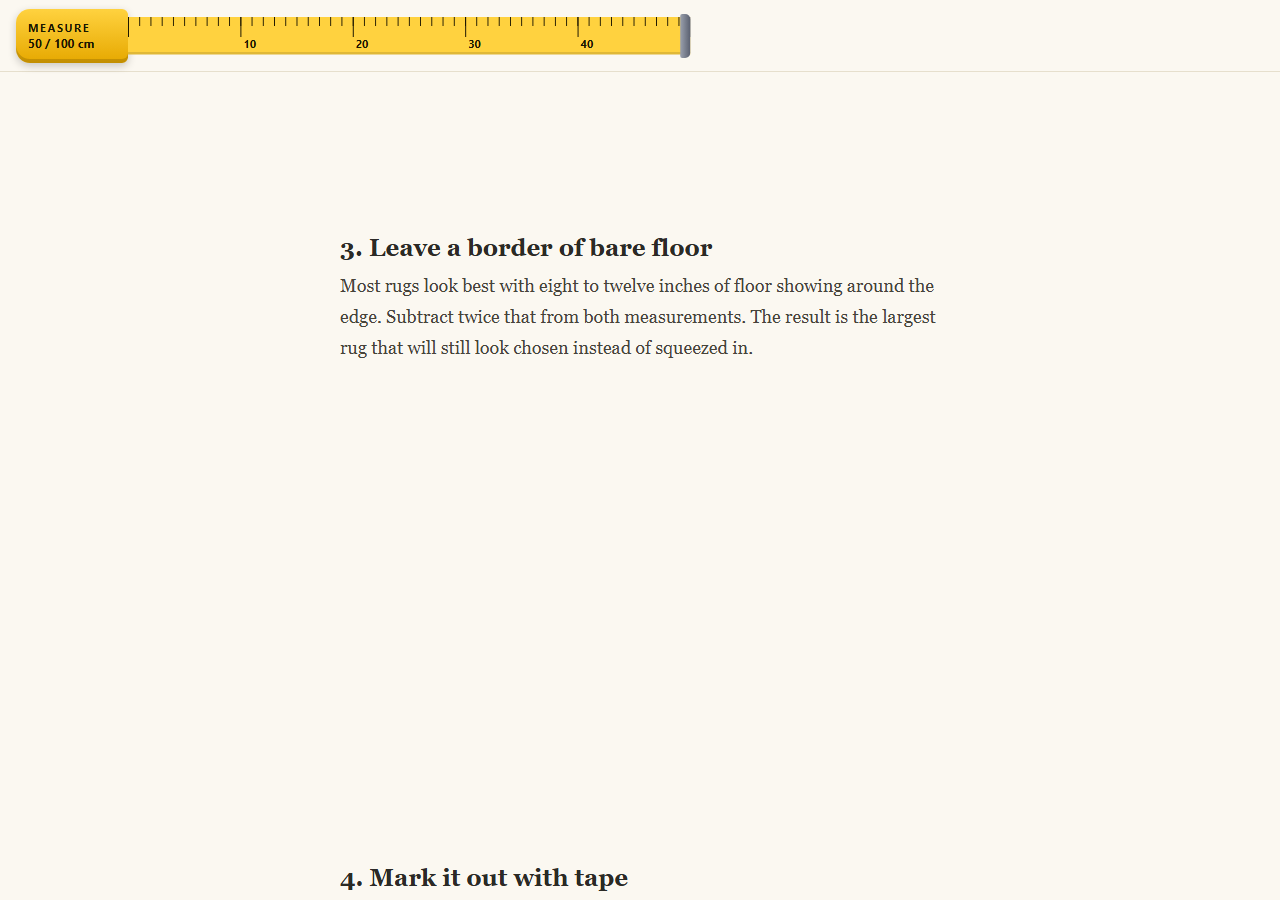
A reading progress bar is normally a coloured line. This version is a pocket tape measure fixed to the top of the page. The yellow blade pulls out of its case as you scroll, ticks and numbers every ten units, a metal hook rides at the end, and the case shows a live count from 0 to 100 centimetres, one for each percent of the page read.
Full-width tape, clipped reveal
The blade is always full width inside a .tm-mask element. GSAP animates clipPath from inset(0 100% 0 0) to inset(0 0% 0 0). Revealing rather than stretching means the tick marks and numbers never squash, and clip-path animates on paint without triggering layout.
Ticks without images
The graduations come from two stacked linear-gradient layers: thin lines every 1% of the width at 24% height, and taller lines every 10% at 52% height. The labels 10 to 90 are a few absolutely positioned spans with percentage left values. It all scales fluidly with the viewport.
Scroll position drives it
One timeline with a ScrollTrigger that has no trigger element, start: 0 and end: 'max', spans the whole document. scrub: 0.3 adds a small lag, and the hook's x is a function of the track width, so invalidateOnRefresh keeps it right after a resize.
A readout that stays honest
The ScrollTrigger's onUpdate receives the progress, rounds it to a whole number, writes it to the case, and sets aria-valuenow on the track. The track is a role="progressbar" with a label, so assistive technology gets the same information as the visible meter.
Fits any page
The article is just example content; any long page works. The bar is position: fixed, so give your body some top padding. See also the CSS scroll-driven progress approach with no JavaScript, or the scroll progress journey trail for a more illustrated meter.
Step by step
How to Use
- 1Add the GSAP CDNsInclude gsap and ScrollTrigger from the CDN panel.
- 2Paste HTML, CSS and JSA fixed tape measure bar and a sample article render.
- 3Replace the articlePut your own long content in .tm-article; the tape measures whatever page height exists.
- 4Scroll downThe blade pulls out, the hook travels and the case counts from 0 to 100 cm.
- 5Style the tapeChange the yellow, tick sizes or the unit text in the case to match your brand.
- 6Check accessibilityThe track is a progressbar whose aria-valuenow updates as you scroll.
Real-world uses
Common Use Cases
Got questions?
Frequently Asked Questions
Changing width stretches or reflows the tape and forces layout every frame. A full-width tape revealed by clip-path stays the same size, so ticks and numbers do not squash, and the browser only repaints. It is smoother, particularly on mobile.
The ScrollTrigger has start 0 and end max, so its progress is the scroll position divided by the maximum scroll distance. The onUpdate handler multiplies by 100, rounds it and shows it as centimetres in the case.
Yes. The 0 to 100 scale is just the rounded progress. Multiply it to show pages, minutes left or inches, and change the labels in the tape spans. Keep aria-valuemax in sync with whatever range you choose.
The bar is fixed at the top. If you already have a header, move the bar below it by changing the top value and the body padding, or place the tape inside your existing header so only one fixed element remains.