

Three.js Scroll Orbit Showcase — GSAP Camera Orbit on Scroll
Three.js Scroll Orbit Showcase · Scroll · Plain HTML, CSS & JS · Live preview
What's included
Features
About this UI Snippet
How to Build a Scroll-Driven 360° Camera Orbit With Three.js and GSAP
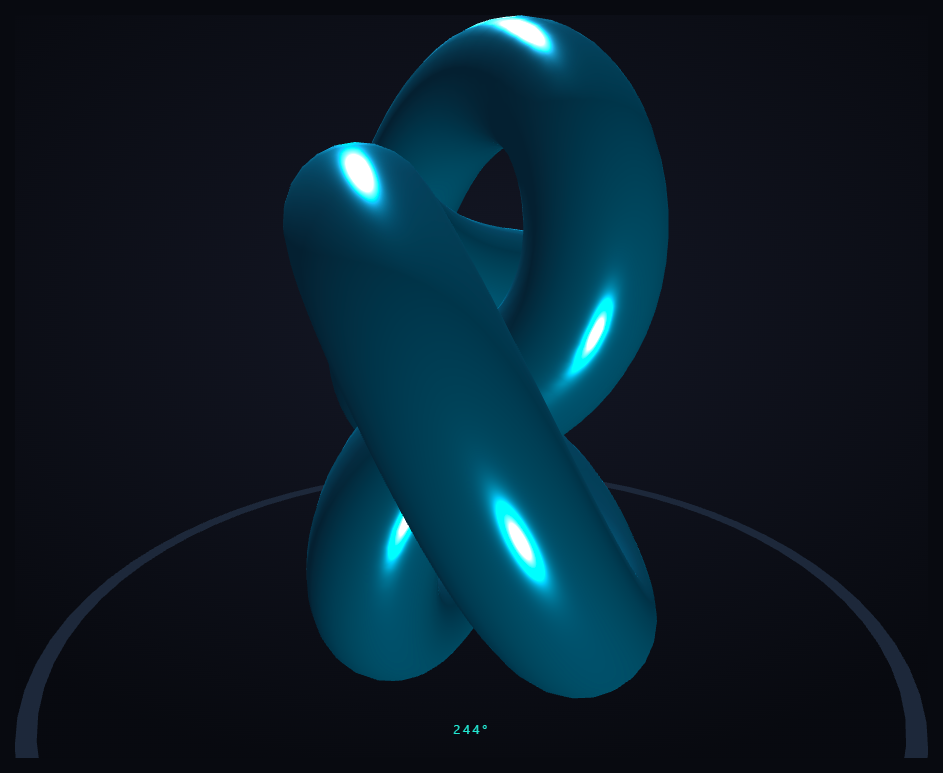
The Three.js Scroll Orbit Showcase snippet holds a hero object still at the center of the scene and swings the camera a full 360° around it as the visitor scrolls, so every face is examined in turn — the scrollbar drives the camera's orbital angle directly, not a timer — using core Three.js and GSAP's ScrollTrigger plugin, both loaded from a CDN.
Spherical coordinates, not a rotating object
The naive way to "show all sides" is to spin the object, but that makes lighting rotate with it and never reveals a true back view. This snippet does the opposite: the object stays fixed while the camera orbits, so highlights stay put and the visitor genuinely walks around the subject. The camera's position is expressed in three spherical values — az (azimuth, the angle around), polar (how high or low it sits), and radius (distance) — which are far more natural to animate than raw X/Y/Z.
One scrubbed tween moves all three angles at once
Scroll advances azimuth a full 2π for one complete revolution, while at the same time the polar angle dips from a high three-quarter view down toward eye level and the radius pulls in from 6.5 to 4.6. Tweening all three together means the orbit isn't a flat turntable — it spirals downward and inward as it circles, a far more cinematic reveal than a level 360° spin. Every frame converts the spherical values to a Cartesian position and calls lookAt(0,0,0) so the camera always faces the subject.
The conversion is the whole trick
The line that turns (az, polar, radius) into a camera position is standard spherical-to-Cartesian math: sin(polar) scales the horizontal circle while cos(polar) sets the height. Understanding this one conversion is what lets you drive a camera around anything — swap the torus knot for a product model and the exact same orbit rig applies unchanged.
A ground ring anchors the motion
A thin ring on the ground plane and the fixed key/rim lighting give the orbit a clear sense of place. Without a ground reference, a camera circling a symmetrical object can look like the object is spinning instead; the static ring makes it unmistakable that the *camera* is the thing moving.
Idle spin so it never freezes
A very slow constant Y rotation is layered onto the hero object so it still breathes when the visitor stops scrolling mid-orbit. The scroll-driven camera provides the structured 360° reveal; the idle spin keeps the frame alive between scroll movements — the same division of labor as the scroll camera path flythrough.
scrub: 0.6, a live angle read-out, fully reversible
A numeric scrub smooths the orbit against noisy wheel and trackpad input, and ScrollTrigger's onUpdate maps self.progress to a 0–360° read-out. Because the camera position is derived entirely from the three scrubbed values, scrolling back up unwinds the orbit precisely. Pair this examine-in-the-round showcase with a product stages tour or a horizontal gallery of variants.
Step by step
How to Use
- 1Load all three CDN scriptsAdd three.min.js, gsap.min.js, and ScrollTrigger.min.js from the CDN panel, in that order.
- 2Paste HTML, CSS, and JSA metallic torus-knot hero appears on a ground ring in a pinned 3D stage with an angle read-out.
- 3Scroll downThe camera orbits a full 360° around the object while spiraling downward and inward, tied to scroll.
- 4Scroll back upThe orbit unwinds exactly, since the camera derives entirely from scrubbed spherical values.
- 5Swap in your objectReplace the torus-knot geometry with your own model; the orbit rig applies unchanged.
- 6Reshape the orbitEdit the polar and radius targets for a level turntable, a steep top-down sweep, or a tighter close-up.
Real-world uses
Common Use Cases
Got questions?
Frequently Asked Questions
Spinning the object rotates its lighting with it and never shows a true back view because the light follows the surface. Orbiting the camera around a fixed object keeps highlights anchored and lets the visitor genuinely walk around the subject, seeing every face lit consistently — the correct way to present an object in the round.
Azimuth (az) is the angle around the object, polar controls how high or low the camera sits, and radius is the distance from the center. These map to how humans think about "walk around, look down, step closer," which makes them far easier to animate than raw X/Y/Z camera coordinates.
Scroll advances azimuth a full 2π for one revolution while simultaneously dipping the polar angle from a high view toward eye level and shrinking the radius. Because all three tween together, the orbit descends and tightens as it circles rather than staying a flat turntable, producing a more cinematic reveal.
A camera circling a symmetrical object can read as the object spinning instead. The static ring on the ground plane, plus fixed key and rim lights, give a clear frame of reference so it is unmistakable that the camera is the thing moving around a stationary subject.
Yes. Click JSX for a React component, Vue for a Vue 3 SFC, Angular for a standalone component, or Tailwind for a React + Tailwind version. Build the object and GSAP timeline inside a mount effect against a canvas ref, keep the spherical values in a ref you read each frame, and on cleanup kill the ScrollTrigger and call renderer.dispose() so the pin and WebGL context are released on unmount.
Build with AI
Build, Understand, Optimize, and Extend It With AI
You do not need to remember the spherical-to-Cartesian formula to orbit a camera. Paste this snippet's HTML, CSS, and JS into an AI assistant like Claude and ask it to explain why the camera orbits while the object stays fixed, and how the three spherical values convert into a camera position each frame. The same assistant can help you extend it — ask it to load a real GLTF model in place of the torus knot, add two full revolutions instead of one for a longer reveal, or fade in a caption at specific azimuth angles to annotate features as the camera passes them. It can also add gentle damping so the orbit eases at the start and end rather than running perfectly linearly. Treat the code as a starting point for a conversation, not a finished artifact.
Prompt to recreate it
Copy this into your AI assistant of choice to build the effect from scratch, or as a jumping-off point for your own variant:
Build a "scroll-driven 360-degree camera orbit" in plain HTML, CSS, and JavaScript using Three.js, GSAP, and GSAP's ScrollTrigger plugin, all loaded from a CDN (no bundler, no build step).

Requirements:
- A pinned section containing a full-size canvas with a WebGLRenderer, PerspectiveCamera, and ambient + key + rim lighting, sized and updated on window resize including aspect ratio.
- Place one hero object (e.g. a torus knot) at the origin, and a thin ground ring below it for spatial reference. Keep the object essentially fixed.
- Keep the camera position in three spherical values: azimuth, polar angle, and radius.
- Register a GSAP tween on a ScrollTrigger targeting the pinned section, with pin: true, start at top top, a numeric scrub (~0.6), and an end several hundred percent tall, animating azimuth from 0 to 2*PI (one full turn) while also dipping the polar angle toward eye level and shrinking the radius, so the orbit spirals down and in. Use onUpdate to show a 0-360 degree read-out from self.progress.
- Every animation frame (requestAnimationFrame), convert the spherical values to a Cartesian camera position (sin(polar) scales the horizontal circle, cos(polar) sets the height) and call camera.lookAt(0,0,0). Add a slow idle spin to the object so it lives when scrolling pauses.
- Confirm scrolling back up unwinds the orbit exactly, since the camera derives entirely from the scrubbed spherical values rather than a timer.
Want to tighten it up first? Run this prompt through the AI Prompt Studio to score it across 8 quality dimensions, catch anti-patterns, and tune the wording for Claude, ChatGPT, or Gemini before you paste it in.
Source Code
<section class="orb-top"><p>Scroll ↓ to orbit the object</p></section>
<section class="orb-stage" id="orbStage">
  <canvas id="orbCanvas"></canvas>
  <div class="orb-angle"><span id="orbDeg">0</span>°</div>
</section>
<section class="orb-bottom"><p>A full turn, examined.</p></section>*{box-sizing:border-box;margin:0;padding:0}
html,body{background:#080a10;color:#fff;font-family:system-ui,-apple-system,sans-serif}
.orb-top,.orb-bottom{min-height:70vh;display:flex;justify-content:center;align-items:center;color:#727a94;font-size:15px;letter-spacing:.08em;text-transform:uppercase}
.orb-stage{height:100vh;position:relative;overflow:hidden;background:radial-gradient(65% 60% at 50% 42%,#141826,#080a10)}
#orbCanvas{display:block;width:100%;height:100%}
.orb-angle{position:absolute;left:50%;bottom:30px;transform:translateX(-50%);font-variant-numeric:tabular-nums;font-size:13px;letter-spacing:.2em;color:#5eead4}const canvas = document.getElementById('orbCanvas');
const degEl = document.getElementById('orbDeg');
const renderer = new THREE.WebGLRenderer({ canvas, antialias: true, alpha: true });
renderer.setPixelRatio(Math.min(window.devicePixelRatio, 2));
const scene = new THREE.Scene();
const camera = new THREE.PerspectiveCamera(45, 1, 0.1, 100);
scene.add(new THREE.AmbientLight(0x334155, 0.7));
const key = new THREE.DirectionalLight(0xffffff, 1.3); key.position.set(5, 8, 6); scene.add(key);
const rim = new THREE.DirectionalLight(0x5eead4, 0.9); rim.position.set(-6, -3, -5); scene.add(rim);
// The hero object at the origin. The camera will orbit it; the object itself
// stays put so every face gets examined in turn.
const hero = new THREE.Mesh(
new THREE.TorusKnotGeometry(1.1, 0.34, 180, 24),
new THREE.MeshStandardMaterial({ color: 0x38bdf8, metalness: 0.7, roughness: 0.22, emissive: 0x0e3a52, emissiveIntensity: 0.4 })
);
scene.add(hero);
// A ground reflection-ish ring and floating detail dots to give the orbit a
// sense of place, so the camera clearly moves around a fixed subject.
const ring = new THREE.Mesh(
new THREE.RingGeometry(2.4, 2.5, 64),
new THREE.MeshBasicMaterial({ color: 0x1e293b, side: THREE.DoubleSide })
);
ring.rotation.x = -Math.PI / 2;
ring.position.y = -1.6;
scene.add(ring);
gsap.registerPlugin(ScrollTrigger);
// Spherical coordinates for the camera: azimuth goes a full turn, polar dips
// from a high angle to eye level, radius pulls in slightly — all scrubbed.
const orbit = { az: 0, polar: 0.9, radius: 6.5 };
gsap.to(orbit, {
az: Math.PI * 2, polar: 1.45, radius: 4.6,
ease: 'none',
scrollTrigger: {
trigger: '#orbStage',
start: 'top top',
end: '+=500%',
scrub: 0.6,
pin: true,
onUpdate: (self) => { degEl.textContent = Math.round(self.progress * 360); },
},
});
function resize() {
const w = canvas.clientWidth, h = canvas.clientHeight;
renderer.setSize(w, h, false);
camera.aspect = w / h;
camera.updateProjectionMatrix();
}
function animate() {
requestAnimationFrame(animate);
// Convert spherical (azimuth, polar, radius) to a Cartesian camera position
// that circles the origin. sin(polar) controls how high/low the camera sits.
const { az, polar, radius } = orbit;
camera.position.set(
Math.sin(polar) * Math.cos(az) * radius,
Math.cos(polar) * radius,
Math.sin(polar) * Math.sin(az) * radius
);
camera.lookAt(0, 0, 0);
hero.rotation.y += 0.002; // slow idle spin so it lives when paused
renderer.render(scene, camera);
}
resize();
window.addEventListener('resize', resize);
animate();