
Three.js Scroll Spiral Staircase Climb — Tower Ascent
Three.js Scroll Spiral Staircase Climb · Scroll · Plain HTML, CSS & JS · Live preview
About this UI Snippet
How to Build a Scroll-Driven Spiral Staircase Climb With Three.js and GSAP
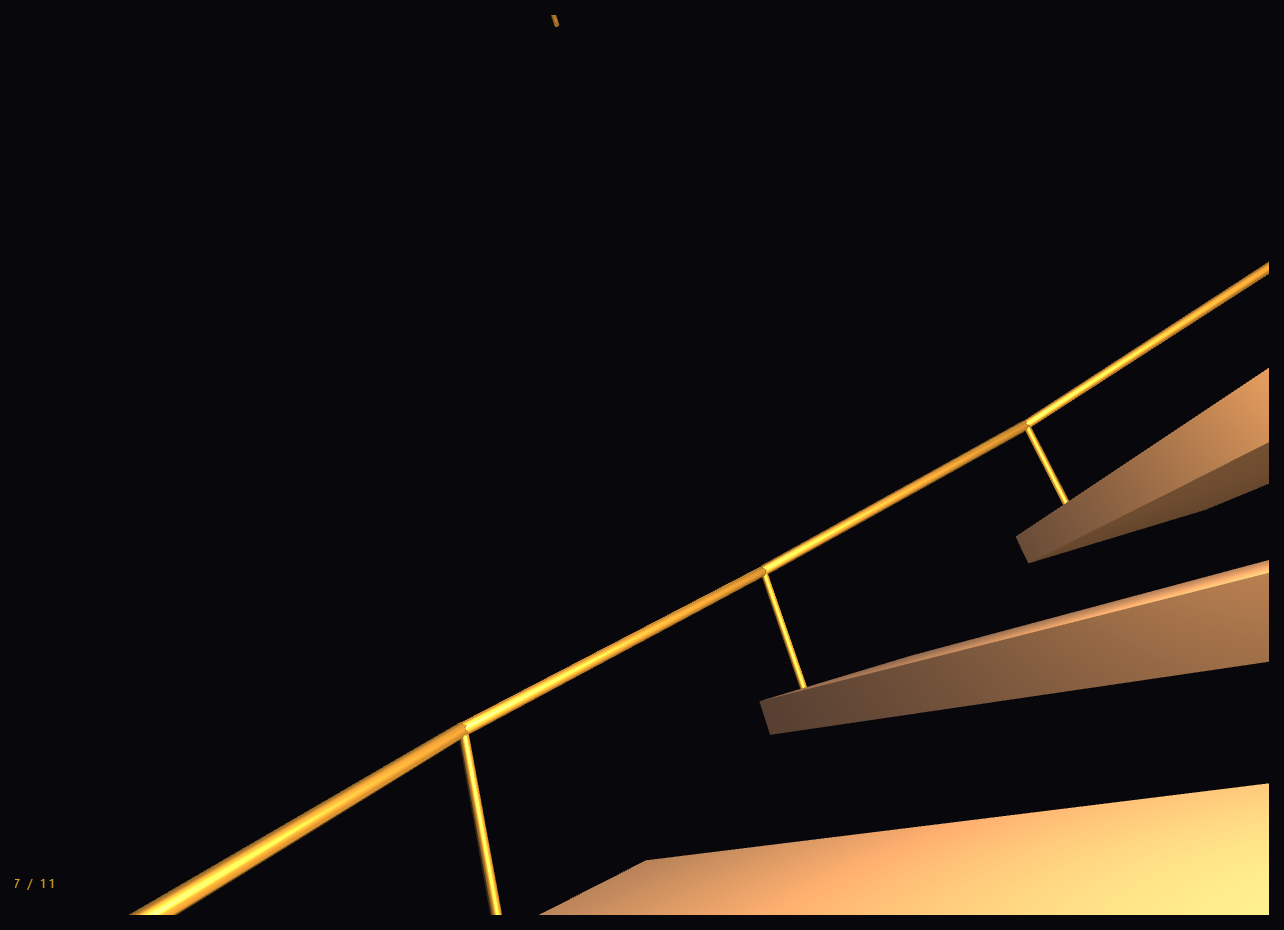
The Three.js Scroll Spiral Staircase Climb snippet walks the visitor up an open-well spiral stair inside an old brick tower, one tread per scroll notch. At the top it leans over the brass rail and looks straight down the well at a glowing compass floor 38 metres below. GSAP's ScrollTrigger scrubs one 0–1 value. The step index, camera position, footstep bob, captions, HUD and the final look-down are all derived from it each frame.
One helix drives the whole tower
Tread i sits at angle i × ANGLE_STEP (24 treads per turn) and height i × RISE. The treads, light strips, balusters, handrail, window and sconce positions, and the camera all use that same mapping. Retune ANGLE_STEP, RISE or the radii and everything stays aligned: the camera always walks the middle of the treads and the rail always follows the well edge.
Wedge treads, instanced
Each tread is an annular-sector Shape (inner arc at the well, outer arc at the wall), extruded with a small bevel and rotated flat. It is drawn with one InstancedMesh of 168 copies, each rotated to its angle, so the whole stair is one draw call. A thin amber strip under every nose and a brass baluster on the well side are two more instanced meshes. The handrail is one TubeGeometry along a custom THREE.Curve that returns helix points, so it is a single smooth spiral with no seams.
A tower that feels lit
All textures are drawn on canvases at load: brick for the wall, speckled stone for the treads, arched night-sky windows with mullions, and a gold compass-rose floor. Windows and warm sconces alternate up the wall as sprites with additive glow. Two point lights move with the visitor, a flickering lantern at the camera and a second one a few steps ahead, so the treads light up as you reach them. A cool hemisphere fill and exponential fog make the stair fade into darkness above and below. A skylight at the top drops a soft shaft of light down the well, and dust drifts in it.
Footsteps tied to scroll, not time
The camera's bob is |sin(stepIndex × π)|: one dip per tread. Because it comes from the scrubbed step index rather than the clock, stopping scroll stops the footsteps and scrolling back walks you down. Only ambient things such as the lantern flicker, dust drift and shaft shimmer run on clock time.
The look-down finale
The climb uses the first 86% of the scroll. In the last 14% the camera slides inward past the rail until it hangs over the open well. Its view direction blends from "ahead and up the spiral" to straight down, and camera.up blends from world Y to the outward radial so the turn never flips. The spiral of treads and rail then recedes into the fog toward the compass floor, which ignores fog so it glows at the bottom. While looking down the light shaft and lantern fade, because seen end-on they would wash out the view. For other single-curve camera rigs, see the scroll tunnel and the scroll camera path.
What's included
Features
Step by step
How to Use
- 1Load the three CDN scriptsAdd three.min.js, gsap.min.js, and ScrollTrigger.min.js in that order before the snippet JS.
- 2Paste HTML, CSS, and JSA pinned view opens at the foot of the tower with the "168 Steps to the Light" title card over the first treads.
- 3Scroll to climbEach scroll notch is a step. The camera bobs once per tread, the lantern lights the stone ahead, and the HUD counts steps and metres.
- 4Read the captionsShort lines fade in at set heights — moonlit windows, the warm brass rail, the draught from the skylight.
- 5Look down at the topOn the landing the camera leans over the rail and turns straight down the spiral well to the glowing compass floor.
- 6Reshape the towerChange STEPS, ANGLE_STEP, RISE, R_IN and R_OUT for a taller, tighter or wider stair — treads, rail and camera follow automatically.
Real-world uses
Common Use Cases
Got questions?
Frequently Asked Questions
Each tread is the same wedge geometry: an annular-sector Shape extruded and laid flat. One InstancedMesh holds all 168 copies, and each instance matrix sets the height and rotates it to its angle on the helix. The nose strips and balusters are two more InstancedMeshes, so the whole stair is a handful of draw calls.
The bob is |sin(stepIndex × π)|, so the camera dips once per tread. Because it is derived from the scrubbed value, it stops the moment scrolling stops and plays backwards when scrolling up. A time-based bob would keep "walking" while the visitor stands still, which feels wrong.
lookAt needs an up vector that is not parallel to the view direction. As the view direction blends toward straight down, camera.up blends from world Y to the horizontal outward direction at the camera, so the two never line up and the turn stays smooth in both scroll directions.
The shaft is an additive cylinder. Seen from the side it is a faint glow, but looking down its length the layers add up to a white-out. The lantern also sits right above the landing. Fading both with the look-down progress keeps the spiral readable.
Yes. Use the JSX, Vue or Angular export. Build the scene in a mount effect against a canvas ref. On cleanup kill the ScrollTrigger, dispose the instanced and tube geometries, materials and canvas textures, and call renderer.dispose() so the pin and WebGL context are released.
Copy & paste
Source Code
<section class="stc-stage" id="stcStage">
  <canvas id="stcCanvas"></canvas>
  <div class="stc-vignette"></div>
  <div class="stc-intro" id="stcIntro">
    <p class="stc-kicker">The old library tower</p>
    <h2>168 Steps to the Light</h2>
    <p class="stc-hint">Scroll to climb <span class="stc-mouse"><i></i></span></p>
  </div>
  <p class="stc-caption" id="stcCaption"></p>
  <div class="stc-hud">
    <div class="stc-hud-row">
      <span>STEP <b id="stcFloor">1</b> / <b id="stcFloorMax">168</b></span>
      <span><b id="stcHeight">0.0</b> m</span>
    </div>
    <div class="stc-bar"><i id="stcBar"></i></div>
  </div>
</section>
<section class="stc-bottom">
  <p class="stc-kicker">Top of the tower</p>
  <h2>Worth every step. Don't look down… too long.</h2>
</section>*{box-sizing:border-box;margin:0;padding:0}
html,body{background:#0a0709;color:#fff;font-family:system-ui,-apple-system,sans-serif}
.stc-stage{height:100vh;position:relative;overflow:hidden;background:#0a0709}
#stcCanvas{display:block;width:100%;height:100%}
.stc-vignette{position:absolute;inset:0;pointer-events:none;background:radial-gradient(ellipse at center,transparent 50%,rgba(6,3,4,.8) 100%)}
.stc-intro{position:absolute;inset:0;display:flex;flex-direction:column;align-items:center;justify-content:center;gap:14px;text-align:center;padding:24px;pointer-events:none;z-index:5;background:radial-gradient(ellipse at center,rgba(10,7,9,.6) 0%,transparent 65%);transition:opacity .6s ease,transform .6s ease}
.stc-intro.is-hidden{opacity:0;transform:translateY(-24px)}
.stc-intro h2{font-family:Georgia,'Times New Roman',serif;font-size:clamp(32px,5.6vw,68px);font-weight:700;line-height:1.05;background:linear-gradient(180deg,#fff7e6 20%,#f5b25b);-webkit-background-clip:text;background-clip:text;color:transparent}
.stc-kicker{font-size:12px;letter-spacing:.32em;text-transform:uppercase;color:#f5b25b}
.stc-hint{display:flex;align-items:center;gap:10px;font-size:13px;letter-spacing:.14em;text-transform:uppercase;color:#e7dccb}
.stc-mouse{width:18px;height:28px;border:2px solid #e7dccb;border-radius:10px;position:relative}
.stc-mouse i{position:absolute;left:50%;top:5px;width:3px;height:6px;margin-left:-1.5px;border-radius:2px;background:#f5b25b;animation:stcWheel 1.4s ease-in-out infinite}
@keyframes stcWheel{0%{opacity:0;transform:translateY(0)}30%{opacity:1}100%{opacity:0;transform:translateY(9px)}}
.stc-caption{position:absolute;left:50%;top:9%;transform:translateX(-50%);width:min(90%,560px);text-align:center;font-family:Georgia,'Times New Roman',serif;font-style:italic;font-size:clamp(16px,2.1vw,22px);color:#fff4e2;text-shadow:0 2px 18px rgba(0,0,0,.9);pointer-events:none;z-index:4;opacity:0;transition:opacity .4s ease}
.stc-hud{position:absolute;left:24px;bottom:24px;width:min(calc(100% - 48px),260px);padding:12px 16px;border-radius:14px;background:rgba(20,12,8,.55);border:1px solid rgba(245,178,91,.25);backdrop-filter:blur(8px);-webkit-backdrop-filter:blur(8px);z-index:4}
.stc-hud-row{display:flex;justify-content:space-between;font-size:11px;letter-spacing:.16em;color:#c8a77a;font-variant-numeric:tabular-nums}
.stc-hud-row b{color:#fff;font-weight:700}
.stc-bar{height:3px;margin-top:10px;border-radius:3px;background:rgba(255,255,255,.1);overflow:hidden}
.stc-bar i{display:block;height:100%;width:0;background:linear-gradient(90deg,#b45309,#f5b25b,#fff1c9);box-shadow:0 0 10px #f5b25b}
.stc-bottom{min-height:80vh;display:flex;flex-direction:column;gap:14px;justify-content:center;align-items:center;text-align:center;padding:0 24px;background:linear-gradient(#0a0709,#1c120b)}
.stc-bottom h2{max-width:640px;font-family:Georgia,'Times New Roman',serif;font-size:clamp(24px,3.6vw,40px);font-weight:700;line-height:1.2;color:#fff4e2}
@media (max-width:600px){.stc-hud{left:16px;right:16px;top:16px;bottom:auto;width:auto;padding:10px 12px}.stc-caption{top:14%}}
@media (prefers-reduced-motion:reduce){.stc-mouse i{animation:none}}const canvas = document.getElementById('stcCanvas');
const introEl = document.getElementById('stcIntro');
const captionEl = document.getElementById('stcCaption');
const stepEl = document.getElementById('stcFloor');
const stepMaxEl = document.getElementById('stcFloorMax');
const heightEl = document.getElementById('stcHeight');
const barEl = document.getElementById('stcBar');
const renderer = new THREE.WebGLRenderer({ canvas, antialias: true });
renderer.setPixelRatio(Math.min(window.devicePixelRatio, 2));
const scene = new THREE.Scene();
scene.background = new THREE.Color(0x0a0709);
scene.fog = new THREE.FogExp2(0x0a0709, 0.028);
const camera = new THREE.PerspectiveCamera(68, 1, 0.05, 200);
// One helix drives everything: tread i sits at angle i * ANGLE_STEP and
// height i * RISE. Treads span from the open well (R_IN) to the wall (R_OUT).
const STEPS = 168, ANGLE_STEP = Math.PI * 2 / 24, RISE = 0.23;
const R_IN = 3.3, R_OUT = 6.9, R_WALL = 7.0, R_WALK = 5.2;
const TOP = STEPS * RISE, TOWER = TOP + 7;
const angleOf = i => i * ANGLE_STEP;
stepMaxEl.textContent = STEPS;
// ---------- Canvas textures ----------
function canvasTex(w, h, draw) {
const c = document.createElement('canvas');
c.width = w; c.height = h;
draw(c.getContext('2d'), w, h);
const t = new THREE.CanvasTexture(c);
t.anisotropy = renderer.capabilities.getMaxAnisotropy();
return t;
}
const brickTex = canvasTex(512, 256, (g, w, h) => {
g.fillStyle = '#2a1d17'; g.fillRect(0, 0, w, h);
for (let row = 0; row < 8; row++) for (let col = 0; col < 8; col++) {
const x = col * 64 + (row % 2) * 32, y = row * 32, l = 30 + Math.random() * 14;
g.fillStyle = 'hsl(' + (16 + Math.random() * 10) + ',30%,' + l + '%)';
g.fillRect(x + 2, y + 2, 60, 28);
g.fillRect(x + 2 - w, y + 2, 60, 28);
}
});
brickTex.wrapS = brickTex.wrapT = THREE.RepeatWrapping;
brickTex.repeat.set(10, TOWER / 2.2);
const stoneTex = canvasTex(256, 256, (g, w, h) => {
g.fillStyle = '#cbbba2'; g.fillRect(0, 0, w, h);
for (let i = 0; i < 1400; i++) {
g.fillStyle = 'rgba(' + (Math.random() < 0.5 ? '60,40,25' : '255,250,240') + ',' + (Math.random() * 0.08) + ')';
g.fillRect(Math.random() * w, Math.random() * h, 2 + Math.random() * 6, 2 + Math.random() * 6);
}
});
const windowTex = canvasTex(128, 256, (g, w, h) => {
g.beginPath(); g.moveTo(8, h); g.lineTo(8, 64); g.arc(64, 64, 56, Math.PI, 0); g.lineTo(120, h); g.closePath();
const gr = g.createLinearGradient(0, 0, 0, h);
gr.addColorStop(0, '#5b7bd6'); gr.addColorStop(1, '#16204a');
g.fillStyle = gr; g.fill();
g.save(); g.clip();
for (let i = 0; i < 40; i++) { g.fillStyle = 'rgba(255,255,255,' + Math.random() + ')'; g.fillRect(Math.random() * w, Math.random() * h * 0.7, 2, 2); }
g.restore();
g.strokeStyle = '#120b08'; g.lineWidth = 6;
g.beginPath(); g.moveTo(64, 10); g.lineTo(64, h); g.moveTo(8, 140); g.lineTo(120, 140); g.stroke();
});
const floorTex = canvasTex(512, 512, (g, w, h) => {
const c = w / 2;
g.fillStyle = '#1c140f'; g.fillRect(0, 0, w, h);
g.strokeStyle = '#c8933f'; g.lineWidth = 3;
[240, 200, 120, 60].forEach(r => { g.beginPath(); g.arc(c, c, r, 0, Math.PI * 2); g.stroke(); });
g.beginPath();
for (let i = 0; i < 32; i++) {
const a = (i / 32) * Math.PI * 2, r = i % 2 ? 46 : (i % 4 ? 150 : 196);
g.lineTo(c + Math.cos(a) * r, c + Math.sin(a) * r);
}
g.closePath();
const gr = g.createRadialGradient(c, c, 0, c, c, 196);
gr.addColorStop(0, '#ffe6a8'); gr.addColorStop(1, '#b7791f');
g.fillStyle = gr; g.fill();
});
const glowTex = canvasTex(64, 64, (g) => {
const gr = g.createRadialGradient(32, 32, 0, 32, 32, 32);
gr.addColorStop(0, 'rgba(255,255,255,1)'); gr.addColorStop(0.3, 'rgba(255,255,255,.45)'); gr.addColorStop(1, 'rgba(255,255,255,0)');
g.fillStyle = gr; g.fillRect(0, 0, 64, 64);
});
const shaftTex = canvasTex(4, 256, (g, w, h) => {
const gr = g.createLinearGradient(0, 0, 0, h);
gr.addColorStop(0, 'rgba(255,255,255,1)'); gr.addColorStop(0.5, 'rgba(255,255,255,.25)'); gr.addColorStop(1, 'rgba(255,255,255,0)');
g.fillStyle = gr; g.fillRect(0, 0, w, h);
});
// ---------- Tower ----------
const wall = new THREE.Mesh(
new THREE.CylinderGeometry(R_WALL, R_WALL, TOWER + 2, 64, 1, true),
new THREE.MeshStandardMaterial({ map: brickTex, roughness: 0.95, side: THREE.BackSide })
);
wall.position.y = TOWER / 2 - 1;
scene.add(wall);
const floor = new THREE.Mesh(new THREE.CircleGeometry(R_WALL, 64), new THREE.MeshStandardMaterial({
map: floorTex, emissiveMap: floorTex, emissive: 0xffffff, emissiveIntensity: 0.55, roughness: 0.6, fog: false,
}));
floor.rotation.x = -Math.PI / 2;
floor.position.y = -0.2;
scene.add(floor);
// Treads: one wedge (annular sector) extruded downward, instanced 168 times.
const half = ANGLE_STEP * 0.47, wedge = new THREE.Shape();
for (let k = 0; k <= 8; k++) { const a = -half + (k / 8) * half * 2; wedge[k ? 'lineTo' : 'moveTo'](Math.cos(a) * R_IN, Math.sin(a) * R_IN); }
for (let k = 8; k >= 0; k--) { const a = -half + (k / 8) * half * 2; wedge.lineTo(Math.cos(a) * R_OUT, Math.sin(a) * R_OUT); }
const treadGeo = new THREE.ExtrudeGeometry(wedge, { depth: 0.16, bevelEnabled: true, bevelSize: 0.03, bevelThickness: 0.03, bevelSegments: 1 });
treadGeo.rotateX(Math.PI / 2);
const treads = new THREE.InstancedMesh(treadGeo, new THREE.MeshStandardMaterial({ map: stoneTex, roughness: 0.7, metalness: 0.05 }), STEPS);
// Amber light strip under the nose of each tread.
const stripGeo = new THREE.BoxGeometry(R_OUT - R_IN - 0.3, 0.035, 0.06);
stripGeo.translate((R_IN + R_OUT) / 2, 0, 0);
const strips = new THREE.InstancedMesh(stripGeo, new THREE.MeshBasicMaterial({ color: 0xffb54d }), STEPS);
// Brass balusters on the well side.
const balGeo = new THREE.CylinderGeometry(0.025, 0.025, 1.0, 6);
balGeo.translate(0, 0.5, 0);
const brass = new THREE.MeshStandardMaterial({ color: 0xc8933f, metalness: 0.85, roughness: 0.3, emissive: 0x3a2508, emissiveIntensity: 0.4 });
const balusters = new THREE.InstancedMesh(balGeo, brass, STEPS);
const m4 = new THREE.Matrix4(), q = new THREE.Quaternion(), Y = new THREE.Vector3(0, 1, 0), one = new THREE.Vector3(1, 1, 1), tv = new THREE.Vector3();
for (let i = 0; i < STEPS; i++) {
const a = angleOf(i), y = i * RISE;
treads.setMatrixAt(i, m4.compose(tv.set(0, y, 0), q.setFromAxisAngle(Y, -a), one));
strips.setMatrixAt(i, m4.compose(tv.set(0, y - 0.1, 0), q.setFromAxisAngle(Y, -(a - half)), one));
balusters.setMatrixAt(i, m4.compose(tv.set(Math.cos(a) * (R_IN + 0.12), y, Math.sin(a) * (R_IN + 0.12)), q.identity(), one));
}
scene.add(treads, strips, balusters);
// Handrail: one tube along the helix above the well-side edge.
class Helix extends THREE.Curve {
getPoint(t, target = new THREE.Vector3()) {
const i = t * (STEPS - 1);
return target.set(Math.cos(angleOf(i)) * (R_IN + 0.12), i * RISE + 1.0, Math.sin(angleOf(i)) * (R_IN + 0.12));
}
}
scene.add(new THREE.Mesh(new THREE.TubeGeometry(new Helix(), STEPS * 6, 0.055, 8, false), brass));
// Top landing with a round rail.
const landing = new THREE.Mesh(new THREE.RingGeometry(R_IN, R_WALL, 64, 1), new THREE.MeshStandardMaterial({ map: stoneTex, color: 0x8a7a66, roughness: 0.8, side: THREE.DoubleSide }));
landing.rotation.x = -Math.PI / 2;
landing.position.y = TOP;
const topRail = new THREE.Mesh(new THREE.TorusGeometry(R_IN + 0.12, 0.055, 8, 96), brass);
topRail.rotation.x = Math.PI / 2;
topRail.position.y = TOP + 1.0;
scene.add(landing, topRail);
// Windows (cool moonlight) and sconces (warm glow) alternate up the wall.
const winGeo = new THREE.PlaneGeometry(1.1, 2.2);
const winMat = new THREE.MeshBasicMaterial({ map: windowTex, transparent: true });
const sprite = (color, size, opacity) => {
const s = new THREE.Sprite(new THREE.SpriteMaterial({ map: glowTex, color, transparent: true, opacity, blending: THREE.AdditiveBlending, depthWrite: false }));
s.scale.set(size, size, 1);
return s;
};
for (let i = 4; i < STEPS; i += 8) {
const a = angleOf(i), y = i * RISE;
if ((i / 8 | 0) % 2 === 0) {
const w = new THREE.Mesh(winGeo, winMat);
w.position.set(Math.cos(a) * (R_WALL - 0.05), y + 2.0, Math.sin(a) * (R_WALL - 0.05));
w.lookAt(0, y + 2.0, 0);
const glow = sprite(0x7a9cff, 3.2, 0.25);
glow.position.copy(w.position).multiplyScalar(0.96);
scene.add(w, glow);
} else {
const bulb = new THREE.Mesh(new THREE.SphereGeometry(0.09, 12, 8), new THREE.MeshBasicMaterial({ color: 0xfff0c8 }));
bulb.position.set(Math.cos(a) * (R_WALL - 0.25), y + 2.1, Math.sin(a) * (R_WALL - 0.25));
const glow = sprite(0xffb054, 1.6, 0.9);
glow.position.copy(bulb.position);
scene.add(bulb, glow);
}
}
// Skylight at the top and a soft shaft of light falling down the well.
const sky = new THREE.Mesh(new THREE.CircleGeometry(R_IN, 48), new THREE.MeshBasicMaterial({ color: 0xdfe8ff, fog: false }));
sky.rotation.x = Math.PI / 2;
sky.position.y = TOWER - 0.5;
const skyGlow = sprite(0xbcd0ff, 16, 0.6);
skyGlow.material.fog = false;
skyGlow.position.y = TOWER - 1;
const shaft = new THREE.Mesh(
new THREE.CylinderGeometry(R_IN * 0.75, R_IN * 0.95, TOWER, 40, 1, true),
new THREE.MeshBasicMaterial({ map: shaftTex, color: 0x9fb6ff, transparent: true, opacity: 0.12, blending: THREE.AdditiveBlending, depthWrite: false, side: THREE.DoubleSide })
);
shaft.position.y = TOWER / 2 - 0.5;
const ceiling = new THREE.Mesh(new THREE.RingGeometry(R_IN, R_WALL + 0.1, 64, 1), new THREE.MeshStandardMaterial({ color: 0x24160e, roughness: 0.9, side: THREE.DoubleSide }));
ceiling.rotation.x = Math.PI / 2;
ceiling.position.y = TOWER - 0.5;
const skyRim = new THREE.Mesh(new THREE.TorusGeometry(R_IN, 0.08, 8, 96), brass);
skyRim.rotation.x = Math.PI / 2;
skyRim.position.y = TOWER - 0.55;
scene.add(sky, skyGlow, shaft, ceiling, skyRim);
// Dust drifting in the well.
const DUST = 900, dpos = new Float32Array(DUST * 3);
for (let i = 0; i < DUST; i++) {
const r = Math.sqrt(Math.random()) * R_IN * 1.1, a = Math.random() * Math.PI * 2;
dpos.set([Math.cos(a) * r, Math.random() * TOWER, Math.sin(a) * r], i * 3);
}
const dustGeo = new THREE.BufferGeometry();
dustGeo.setAttribute('position', new THREE.BufferAttribute(dpos, 3));
const dust = new THREE.Points(dustGeo, new THREE.PointsMaterial({ map: glowTex, color: 0xffe4b8, size: 0.09, transparent: true, opacity: 0.7, blending: THREE.AdditiveBlending, depthWrite: false }));
scene.add(dust);
// ---------- Lights ----------
scene.add(new THREE.HemisphereLight(0x8ea2ff, 0x2a160c, 0.45));
const moon = new THREE.DirectionalLight(0xaabfff, 0.35);
moon.position.set(0, 50, 0);
scene.add(moon);
const lantern = new THREE.PointLight(0xffb066, 1.6, 13, 1.6);
const ahead = new THREE.PointLight(0xffc27a, 1.2, 14, 1.6);
scene.add(lantern, ahead);
// ---------- Scroll ----------
gsap.registerPlugin(ScrollTrigger);
const climb = { p: 0 };
gsap.to(climb, {
p: 1, ease: 'none',
scrollTrigger: { trigger: '#stcStage', start: 'top top', end: '+=600%', scrub: 1, pin: true },
});
const CAPTIONS = [
[0.03, ''],
[0.2, 'One hundred and sixty-eight steps. Keep to the wall.'],
[0.42, 'The well is open. Moonlight through the arched windows.'],
[0.64, 'Halfway up — the brass rail is still warm from the lamps.'],
[0.84, 'Nearly there. Feel the draught from the skylight.'],
[0.9, 'The top landing.'],
[Infinity, 'Now… look down.'],
];
let lastCaption = null, captionTimer = 0;
function setCaption(p) {
const text = CAPTIONS.find(c => p < c[0])[1];
if (text === lastCaption) return;
lastCaption = text;
captionEl.style.opacity = '0';
clearTimeout(captionTimer);
captionTimer = setTimeout(() => { captionEl.textContent = text; captionEl.style.opacity = text ? '1' : '0'; }, 250);
}
function resize() {
const w = canvas.clientWidth, h = canvas.clientHeight;
renderer.setSize(w, h, false);
camera.aspect = w / h;
camera.fov = camera.aspect < 0.8 ? 82 : 68;
camera.updateProjectionMatrix();
}
const sstep = (a, b, x) => { const t = Math.min(1, Math.max(0, (x - a) / (b - a))); return t * t * (3 - 2 * t); };
const clock = new THREE.Clock();
const CLIMB_END = 0.86, LAST = STEPS + 1;
const pos = new THREE.Vector3(), tgt = new THREE.Vector3(), dirA = new THREE.Vector3(), dirB = new THREE.Vector3(), out = new THREE.Vector3();
function animate() {
requestAnimationFrame(animate);
const t = clock.getElapsedTime(), p = climb.p;
introEl.classList.toggle('is-hidden', p > 0.012);
// Climb: step index from 1 to the landing. The bob is tied to the step
// index (one dip per tread), so footsteps follow the scroll exactly.
const s = 1 + (LAST - 1) * Math.min(1, p / CLIMB_END);
const a = angleOf(s), y = s * RISE;
const bob = Math.abs(Math.sin(s * Math.PI)) * 0.07;
const look = sstep(CLIMB_END, 1, p);
const r = R_WALK + (R_IN - 1.1 - R_WALK) * look;
pos.set(Math.cos(a) * r, y + 1.65 + bob * (1 - look) + look * 0.35, Math.sin(a) * r);
camera.position.copy(pos);
// Look ahead and a little up the spiral while climbing...
const la = angleOf(s + 4.5);
tgt.set(Math.cos(la) * 4.0, (s + 4.5) * RISE + 2.3, Math.sin(la) * 4.0);
dirA.copy(tgt).sub(pos).normalize();
// ...then lean over the rail and look straight down the well.
out.set(Math.cos(a), 0, Math.sin(a));
dirB.set(-pos.x * 0.04, -1, -pos.z * 0.04).normalize();
dirA.lerp(dirB, look).normalize();
camera.up.set(0, 1, 0).lerp(out, look).normalize();
camera.lookAt(tgt.copy(pos).add(dirA));
lantern.position.set(pos.x * 0.85, pos.y + 0.4, pos.z * 0.85);
const aa = angleOf(s + 6);
ahead.position.set(Math.cos(aa) * 5, (s + 6) * RISE + 2.2, Math.sin(aa) * 5);
lantern.intensity = (1.5 + Math.sin(t * 7) * 0.06 + Math.sin(t * 13) * 0.04) * (1 - look * 0.75);
dust.rotation.y = t * 0.02;
dust.position.y = Math.sin(t * 0.2) * 0.4;
// Seen end-on from the top the shaft would stack up to a white-out.
shaft.material.opacity = (0.1 + Math.sin(t * 0.6) * 0.025) * (1 - look * 0.85);
const stepNo = Math.min(STEPS, Math.max(1, Math.round(s)));
stepEl.textContent = stepNo;
heightEl.textContent = (stepNo * RISE).toFixed(1);
barEl.style.width = (p * 100) + '%';
setCaption(p);
renderer.render(scene, camera);
}
resize();
window.addEventListener('resize', resize);
animate();Extend with AI
Take This Snippet Further With AI
You do not need to work out instanced wedge treads, a helix handrail, or a camera that turns from climbing to looking straight down — this snippet already does all of it. Paste its HTML, CSS, and JS into an AI assistant like Claude and ask it to explain the instance matrices, the custom Curve behind the handrail, or why camera.up has to blend during the look-down. The same assistant can extend it: a bookshelf wall for a real library tower, doors on landings every full turn that open as you pass, footstep sounds synced to the step index, or a reverse "descent into the dungeon" version. Treat the code as a starting point to interrogate and reshape, not a finished artifact.
Prompt to recreate it
Copy this into your AI assistant of choice to build the effect from scratch, or as a jumping-off point for your own variant:
Build a "scroll-driven spiral staircase climb" in plain HTML, CSS, and JavaScript using Three.js (r128) and GSAP's ScrollTrigger, all from a CDN (no bundler, no build step).

Requirements:
- A pinned full-viewport section with a WebGLRenderer, warm-dark background and FogExp2, a PerspectiveCamera (68° FOV, 82° when the aspect is below 0.8), and a vignette overlay.
- One helix mapping: tread i at angle i × (2π/24) and height i × 0.23, 168 treads, open well radius 3.3, outer tread edge 6.9, brick wall at radius 7.
- Canvas textures drawn at load: brick (wall, BackSide open cylinder), speckled stone (treads), arched night-sky window with mullions, a gold compass-rose floor (emissive, fog: false).
- Treads: an annular-sector Shape extruded 0.16 with a small bevel, laid flat, in one InstancedMesh of 168 rotated copies. An instanced amber MeshBasic strip under each tread nose and an instanced brass baluster at the well edge.
- Handrail: one TubeGeometry along a custom THREE.Curve returning helix points 1.0 above the well edge. A stone top landing with a round brass rail; a dark ceiling ring with a bright skylight disc and glow at the top.
- Windows and warm sconces alternating every 8 steps on the wall, each with an additive glow sprite. A faint additive light-shaft cylinder down the well (vertical gradient map) and ~900 drifting dust points.
- Lights: hemisphere fill, a weak cool top light, a flickering lantern point light at the camera and a second point light a few steps ahead.
- One GSAP tween (ease "none") scrubbing p 0→1 (pin, scrub 1, end +=600%). For p < 0.86 the step index goes from 1 to the landing; the camera walks radius 5.2 at eye height 1.65 with a bob of |sin(step × π)| × 0.07, looking about 4.5 steps ahead and up.
- From 0.86 to 1: the camera slides inward past the rail over the well, its view direction blends to straight down, and camera.up blends from world Y to the outward radial. Fade the shaft and lantern during this so the view does not wash out.
- UI: intro title card ("168 Steps to the Light"), italic serif captions that cross-fade at set progress points (ending "Now… look down."), and a glass HUD with step n / 168, height in metres and a progress bar; HUD on top for mobile.
- Scrolling back must walk back down exactly.
Want to tighten it up first? Run this prompt through the AI Prompt Studio to score it across 8 quality dimensions, catch anti-patterns, and tune the wording for Claude, ChatGPT, or Gemini before you paste it in.