


Canvas Fireworks Physics — Free From-Scratch Particle Explosion
Canvas Fireworks Physics · Animations · Plain HTML, CSS & JS · Live preview
Copy & paste
Source Code
<section class="fwp-wrap">
  <canvas class="fwp-canvas" id="fwpCanvas"></canvas>
  <div class="fwp-content">
    <span class="fwp-tag">canvas 2d · from-scratch physics</span>
    <h1>Happy launch day</h1>
    <p>Click anywhere to launch a rocket. Gravity, drag, and fade are hand-rolled — no particle library.</p>
  </div>
</section>*{box-sizing:border-box;margin:0;padding:0}
body{font-family:system-ui,-apple-system,sans-serif;background:#04050c;color:#fff;min-height:100vh}
.fwp-wrap{position:relative;min-height:100vh;overflow:hidden;cursor:crosshair}
.fwp-canvas{position:absolute;inset:0;width:100%;height:100%}
.fwp-content{position:absolute;inset:0;display:flex;flex-direction:column;align-items:center;justify-content:center;text-align:center;pointer-events:none;padding:26px}
.fwp-tag{display:inline-block;font-size:10.5px;font-weight:700;letter-spacing:.14em;text-transform:uppercase;color:#fca5a5;background:rgba(252,165,165,.1);border:1px solid rgba(252,165,165,.3);padding:5px 12px;border-radius:99px;margin-bottom:16px}
.fwp-content h1{font-size:clamp(30px,7vw,54px);font-weight:800;letter-spacing:-.03em;text-shadow:0 4px 30px rgba(0,0,0,.6)}
.fwp-content p{font-size:14px;color:#b9c0e0;margin-top:10px;max-width:420px;line-height:1.7;text-shadow:0 2px 12px rgba(0,0,0,.6)}var canvas = document.getElementById('fwpCanvas');
var ctx = canvas.getContext('2d');
var wrap = document.querySelector('.fwp-wrap');
var W, H;
function resize() {
W = canvas.width = wrap.clientWidth;
H = canvas.height = wrap.clientHeight;
}
resize();
window.addEventListener('resize', resize);
var GRAVITY = 0.045;
var DRAG = 0.985;
var COLORS = ['#f87171', '#fbbf24', '#a78bfa', '#60a5fa', '#4ade80', '#f472b6', '#e2e8f0'];
var rockets = [];
var particles = [];
function Rocket(x) {
this.x = x;
this.y = H;
this.targetY = H * (0.18 + Math.random() * 0.32);
this.vy = -(9 + Math.random() * 3.5);
this.color = COLORS[Math.floor(Math.random() * COLORS.length)];
this.trail = [];
}
function launchRocket(x) {
rockets.push(new Rocket(typeof x === 'number' ? x : Math.random() * W));
}
// A physics particle: position, velocity, and a life counter. Gravity pulls
// every particle down each frame; DRAG bleeds off velocity so the burst
// decelerates like real debris instead of coasting forever.
function Particle(x, y, color) {
var angle = Math.random() * Math.PI * 2;
var speed = 1.5 + Math.random() * 5.5;
this.x = x;
this.y = y;
this.vx = Math.cos(angle) * speed;
this.vy = Math.sin(angle) * speed;
this.color = color;
this.life = 1;
this.decay = 0.008 + Math.random() * 0.018;
this.size = 1.4 + Math.random() * 1.8;
}
function explode(x, y, color) {
var count = 60 + Math.floor(Math.random() * 40);
for (var i = 0; i < count; i++) particles.push(new Particle(x, y, color));
}
function tick() {
ctx.fillStyle = 'rgba(4,5,12,0.22)';
ctx.fillRect(0, 0, W, H);
for (var i = rockets.length - 1; i >= 0; i--) {
var r = rockets[i];
r.trail.push({ x: r.x, y: r.y });
if (r.trail.length > 6) r.trail.shift();
r.vy += GRAVITY * 0.4;
r.y += r.vy;
ctx.beginPath();
for (var t = 0; t < r.trail.length; t++) {
var p = r.trail[t];
ctx.fillStyle = r.color;
ctx.globalAlpha = (t + 1) / r.trail.length * 0.6;
ctx.beginPath();
ctx.arc(p.x, p.y, 2, 0, Math.PI * 2);
ctx.fill();
}
ctx.globalAlpha = 1;
if (r.vy >= 0 || r.y <= r.targetY) {
explode(r.x, r.y, r.color);
rockets.splice(i, 1);
}
}
for (var j = particles.length - 1; j >= 0; j--) {
var pt = particles[j];
pt.vy += GRAVITY;
pt.vx *= DRAG;
pt.vy *= DRAG;
pt.x += pt.vx;
pt.y += pt.vy;
pt.life -= pt.decay;
if (pt.life <= 0) {
particles.splice(j, 1);
continue;
}
ctx.globalAlpha = Math.max(pt.life, 0);
ctx.fillStyle = pt.color;
ctx.beginPath();
ctx.arc(pt.x, pt.y, pt.size, 0, Math.PI * 2);
ctx.fill();
}
ctx.globalAlpha = 1;
requestAnimationFrame(tick);
}
wrap.addEventListener('click', function (e) {
var rect = wrap.getBoundingClientRect();
launchRocket(e.clientX - rect.left);
});
var autoTimer = setInterval(function () {
if (rockets.length + particles.length < 260) launchRocket();
}, 1400);
// Seed the sky immediately so the demo isn't blank on load.
launchRocket();
requestAnimationFrame(tick);Extend with AI
Take This Snippet Further With AI
The AI prompt for this one is for Patreon supporters ($3 a month), along with a site with no ads. Supporters enter the passcode once and it is remembered in this browser.
What's included
Features
About this UI Snippet
Canvas Fireworks Physics — Gravity, Drag, and Fade From Scratch
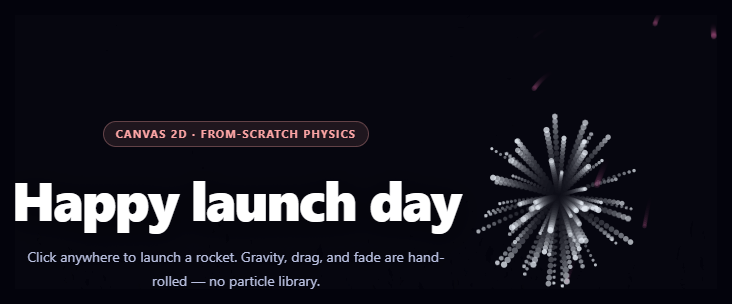
Most confetti and firework effects on the web reach for a particle library. This snippet is the opposite exercise: rockets, trails, explosions, gravity, air drag, and fade are all implemented directly against the 2D canvas API with two small object constructors and a handful of physics constants — useful both as a working effect and as a compact reference for how particle systems actually work under the hood.
Two kinds of particle
A Rocket starts at the bottom of the canvas with an upward velocity and a randomly chosen target height; a Particle is spawned only at the moment of explosion, with a random angle and speed so it flies outward in every direction from the burst point. Keeping these as two distinct, tiny constructors (rather than one particle type with a mode flag) keeps each one's update logic — arc-and-detonate versus radiate-and-fade — easy to read in isolation.
Real gravity and drag, not a lookup table
Every particle's vertical velocity increases by a constant GRAVITY each frame, exactly like a real projectile under constant acceleration. DRAG (0.985) is multiplied into both velocity components every frame, so particles lose speed exponentially rather than linearly — this is what makes a burst's outer edge decelerate and hang for a moment before gravity visibly takes over, matching how real fireworks debris behaves far more convincingly than a fixed-duration animation would.
Life as a countdown, not a timer
Rather than tracking each particle's remaining time with Date.now() comparisons, every particle has a life value starting at 1 that decrements by a random decay each frame, and ctx.globalAlpha is set directly from that value before drawing. Because decay is randomized per particle, a single burst fades out unevenly — some sparks visibly outlast others — instead of every particle in an explosion vanishing on the same frame.
A trail from a short history array
Each rocket keeps its own trail array of its last six positions, and every frame draws all of them with alpha increasing toward the most recent point. This is the same "ring buffer of recent positions, alpha-ramped" technique used for cursor trails and comet effects — it produces a convincing motion streak with no extra state beyond an array you push to and shift from.
Fading the whole canvas, not clearing it
Instead of ctx.clearRect, each frame paints a translucent rgba(4,5,12,0.22) rectangle over everything. That leaves a faint afterimage of the previous frame rather than a hard cut, giving trails and bursts a soft motion-blur quality for almost no extra code. Compare this from-scratch approach with the library-driven canvas confetti burst, or pair it with a starfield backdrop for a night-sky celebration scene.
Step by step
How to Use
- 1Paste HTML, CSS, and JSA rocket auto-launches on load and the sky starts filling.
- 2Click anywhereA new rocket launches from that x position and climbs upward.
- 3Watch it detonateAt its random target height it explodes into 60-100 particles.
- 4Observe the fadeParticles lose speed to drag, fall to gravity, and fade at random rates.
- 5Let it auto-loopA timer launches new rockets every ~1.4s, capped by particle count.
- 6Tune the showChange GRAVITY, DRAG, COLORS, or the particle count per burst.
Real-world uses
Common Use Cases
explode() manually when a timer hits zero, with exponential drag giving a natural deceleration after each burst.Rocket and Particle constructors that each stay simple to read.Got questions?
Frequently Asked Questions
Everything here — rocket launch, arc, detonation, particle spawning, gravity, drag, and fade — is written directly against the 2D canvas API with two small constructors and a few numeric constants, with no external particle engine involved. The canvas confetti burst snippet wraps the canvas-confetti library instead; this one is the from-scratch version, useful when you want full control over the physics or want to see exactly how a particle system works.
Every frame, each particle's vx and vy are multiplied by DRAG (0.985), so velocity decays exponentially rather than dropping by a fixed amount. That produces a burst whose outer ring visibly slows and seems to hang for a moment before gravity pulls it down — much closer to how real firework debris moves through air resistance than a burst with no drag, which would keep expanding outward at a constant rate.
Each particle is given its own random decay value when it is created, and its life counter (starting at 1) drops by that amount every frame, directly driving ctx.globalAlpha. Because decay varies per particle, a single explosion does not vanish as one uniform block — some sparks linger visibly longer than others, the same way real embers burn out at different rates.
clearRect would wipe every trace of the previous frame instantly, leaving hard-edged dots with no sense of motion. Filling the canvas each frame with a low-alpha rgba(4,5,12,0.22) rectangle instead partially erases the previous frame, leaving a fading afterimage behind every moving trail and particle — a cheap way to get a motion-blur look without a shader or an offscreen buffer.
The auto-launch timer checks rockets.length + particles.length against a cap (260) before firing a new rocket, so the total particle count self-limits rather than growing without bound. Combined with particles being removed from the array once their life reaches zero, the scene reaches a steady-state particle count instead of accumulating indefinitely, which keeps frame time roughly constant during continuous play.