


Canvas Snow Overlay — Free Drifting Snowflake Hero Background
Canvas Snow Overlay · Animations · Plain HTML, CSS & JS · Live preview
Copy & paste
Source Code
<section class="sno-wrap">
  <canvas class="sno-canvas" id="snoCanvas"></canvas>
  <div class="sno-content">
    <span class="sno-tag">canvas overlay · 60fps</span>
    <h1>Winter sale</h1>
    <p>A transparent, click-through snow layer drifting over any hero section.</p>
    <button class="sno-btn">Shop the collection</button>
  </div>
</section>*{box-sizing:border-box;margin:0;padding:0}
body{font-family:system-ui,-apple-system,sans-serif;background:#050912;color:#fff;min-height:100vh}
.sno-wrap{position:relative;min-height:100vh;display:flex;align-items:center;justify-content:center;overflow:hidden;background:radial-gradient(120% 90% at 50% -10%,#152a4a,#050912 65%)}
.sno-canvas{position:absolute;inset:0;width:100%;height:100%;pointer-events:none;z-index:2}
.sno-content{position:relative;z-index:1;text-align:center;max-width:460px;padding:26px}
.sno-tag{display:inline-block;font-size:10.5px;font-weight:700;letter-spacing:.14em;text-transform:uppercase;color:#93c5fd;background:rgba(147,197,253,.1);border:1px solid rgba(147,197,253,.3);padding:5px 12px;border-radius:99px;margin-bottom:16px}
.sno-content h1{font-size:clamp(36px,8vw,64px);font-weight:800;letter-spacing:-.03em}
.sno-content p{font-size:15px;color:#a6b3d6;margin-top:12px;line-height:1.7}
.sno-btn{margin-top:28px;padding:14px 30px;border-radius:12px;border:none;background:linear-gradient(135deg,#60a5fa,#a78bfa);color:#0a1020;font:700 14px system-ui;cursor:pointer;box-shadow:0 16px 34px -16px rgba(96,165,250,.7);transition:transform .15s}
.sno-btn:hover{transform:translateY(-2px)}var canvas = document.getElementById('snoCanvas');
var ctx = canvas.getContext('2d');
var wrap = document.querySelector('.sno-wrap');
var W, H, DPR;
function resize() {
DPR = Math.min(window.devicePixelRatio || 1, 2);
W = wrap.clientWidth;
H = wrap.clientHeight;
canvas.width = W * DPR;
canvas.height = H * DPR;
canvas.style.width = W + 'px';
canvas.style.height = H + 'px';
ctx.setTransform(DPR, 0, 0, DPR, 0, 0);
}
var FLAKE_COUNT = 140;
var flakes = [];
function makeFlake(randomY) {
return {
x: Math.random() * W,
y: randomY ? Math.random() * H : -10,
r: 1 + Math.random() * 3,
speed: 0.4 + Math.random() * 1.2,
drift: 0.3 + Math.random() * 0.9,
driftPhase: Math.random() * Math.PI * 2,
opacity: 0.35 + Math.random() * 0.55
};
}
function seed() {
flakes = [];
for (var i = 0; i < FLAKE_COUNT; i++) flakes.push(makeFlake(true));
}
var t = 0;
function tick() {
t += 0.016;
ctx.clearRect(0, 0, W, H);
for (var i = 0; i < flakes.length; i++) {
var f = flakes[i];
f.y += f.speed;
// Wind drift is a sine wave offset from each flake's own phase, so flakes
// sway independently instead of moving in lockstep — the difference
// between "falling dots" and something that reads as snow.
f.x += Math.sin(t * f.drift + f.driftPhase) * 0.6;
if (f.y > H + 10) {
flakes[i] = makeFlake(false);
continue;
}
if (f.x < -10) f.x = W + 10;
if (f.x > W + 10) f.x = -10;
ctx.beginPath();
ctx.fillStyle = 'rgba(255,255,255,' + f.opacity + ')';
ctx.arc(f.x, f.y, f.r, 0, Math.PI * 2);
ctx.fill();
}
requestAnimationFrame(tick);
}
var reduceMotion = window.matchMedia && window.matchMedia('(prefers-reduced-motion: reduce)').matches;
resize();
seed();
window.addEventListener('resize', resize);
if (!reduceMotion) {
requestAnimationFrame(tick);
} else {
// Respect the OS preference: draw one static frame of snow instead of
// running a perpetual animation loop.
ctx.clearRect(0, 0, W, H);
for (var j = 0; j < flakes.length; j++) {
var s = flakes[j];
ctx.beginPath();
ctx.fillStyle = 'rgba(255,255,255,' + s.opacity + ')';
ctx.arc(s.x, s.y, s.r, 0, Math.PI * 2);
ctx.fill();
}
}Extend with AI
Take This Snippet Further With AI
The AI prompt for this one is for Patreon supporters ($3 a month), along with a site with no ads. Supporters enter the passcode once and it is remembered in this browser.
What's included
Features
About this UI Snippet
Canvas Snow Overlay — Drifting Snowflakes Over Any Section
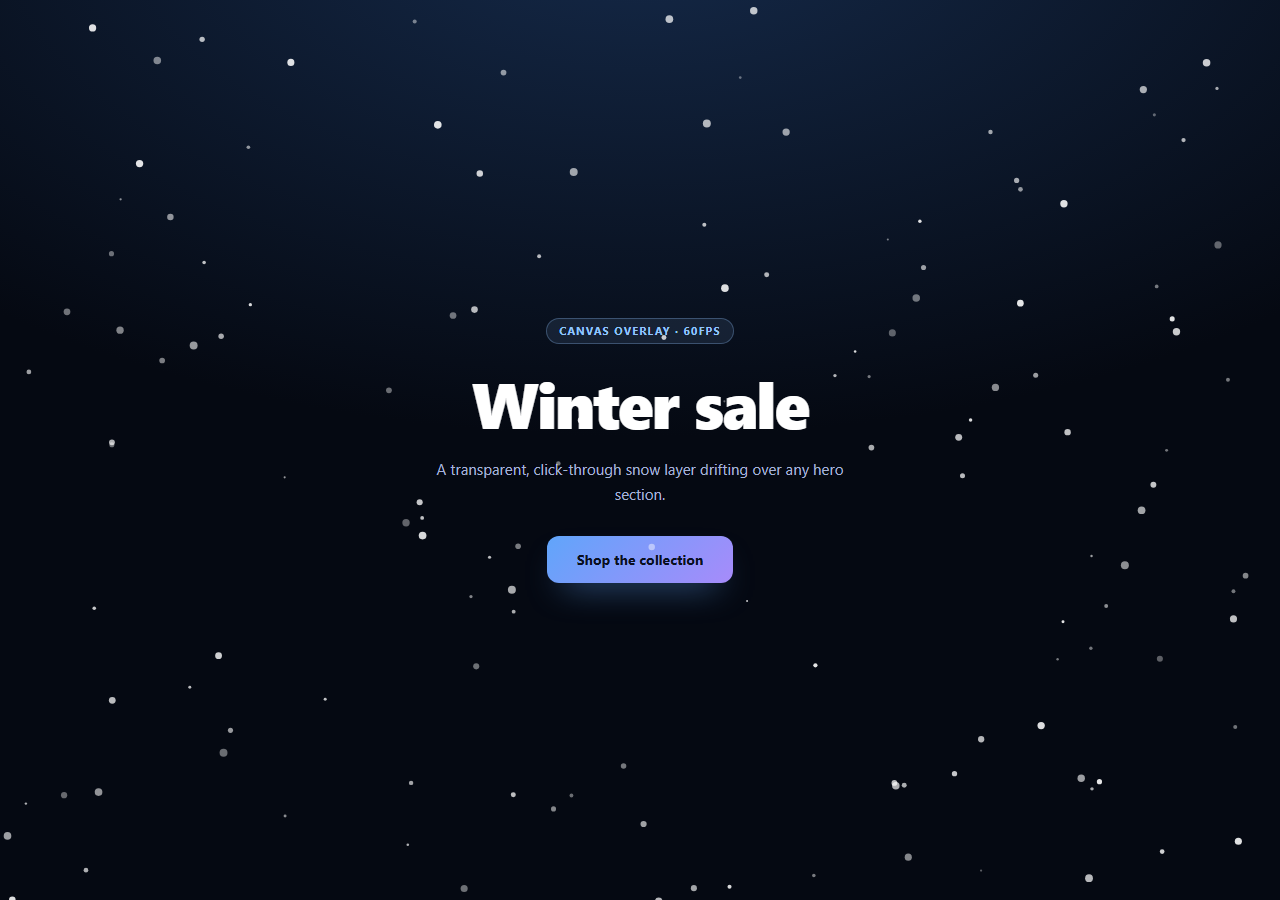
A snow overlay is one of the simplest particle effects to build and one of the easiest to get wrong — flakes that all fall at the same speed in the same straight line read as a bug, not weather. This snippet layers a transparent, non-blocking canvas over a hero section and gives each flake its own size, fall speed, drift rhythm, and opacity so the whole thing reads as gentle, ambient snowfall rather than a repeating sprite.
A transparent, click-through layer
The canvas is positioned absolute; inset: 0 inside a relatively-positioned wrapper, sized to match it exactly, and set to pointer-events: none. That last property is what makes it an overlay rather than an obstacle — every click and hover on the button and text underneath passes straight through the canvas, even though the canvas visually sits on top in z-index.
High-DPI without the blur
resize() reads window.devicePixelRatio (capped at 2 to avoid oversized backing stores on very high-density phones), sizes the canvas's backing store to clientWidth * DPR, and then calls ctx.setTransform(DPR, 0, 0, DPR, 0, 0) so every subsequent drawing call can keep using plain CSS-pixel coordinates. Skip that step and the snow renders soft and slightly blurred on Retina displays — a common canvas mistake that's invisible until you compare it side by side with a native image.
Why each flake needs its own phase
Every flake stores a drift speed and a driftPhase — a random starting angle for its personal sine wave. The horizontal sway comes from Math.sin(t * f.drift + f.driftPhase) * 0.6, so no two flakes swing left and right in unison. That single random phase offset is the entire trick behind the effect looking organic instead of mechanical, the same idea used in the layered waves of aurora background and the particle jitter of starfield.
Recycling instead of removing
Rather than deleting flakes that fall past the bottom edge and spawning new ones (which would need array splicing every frame), a flake that exits is simply reassigned fresh random properties and reset to y: -10 via makeFlake(false). The array length and each element's memory address never change, which keeps the loop allocation-free and steady at any flake count.
Respecting reduced motion
window.matchMedia('(prefers-reduced-motion: reduce)') is checked once on load. If the user has that OS preference set, the loop never starts — instead, one static frame of snow is drawn so the section still looks dressed for winter without any perpetual animation running in the background. Pair this overlay with a particle network hero for tech-brand pages, or dial down the flake count and speed for a subtle year-round texture layer.
Step by step
How to Use
- 1Paste HTML, CSS, and JSA hero section renders with snow drifting over its content.
- 2Watch the driftEach flake sways on its own sine phase, not in lockstep.
- 3Click the buttonpointer-events: none means clicks pass straight through the canvas.
- 4Resize the windowThe canvas rescales for devicePixelRatio and stays crisp.
- 5Enable reduced motion in your OSReload — the loop is skipped and one static frame draws instead.
- 6Tune the stormChange FLAKE_COUNT, speed range, and drift amplitude.
Real-world uses
Common Use Cases
pointer-events: none keeping every button beneath fully clickable.Got questions?
Frequently Asked Questions
The canvas is positioned absolutely over the entire hero section so it can draw snow above the text and button, but without pointer-events: none it would also intercept every click and hover meant for that content. Setting it to none makes the canvas purely visual — the browser routes all pointer events straight through to whatever is beneath it.
Each flake gets its own random size, fall speed, opacity, and — most importantly — its own drift phase, a random starting angle fed into a per-flake sine wave that controls horizontal sway. Because no two flakes share a phase, they never sway in unison, so the aggregate motion reads as organic wind rather than a looping sprite sheet.
Yes. On load it checks window.matchMedia for the prefers-reduced-motion: reduce media feature. If the user has that OS-level accessibility setting enabled, the requestAnimationFrame loop never starts, and a single static frame of snow is drawn instead — so the section still looks seasonally appropriate without a perpetual animation running for users who have asked for less motion.
Without it, the canvas backing store matches CSS pixels 1:1, and on a high-density screen the browser has to upscale the rendered result, producing visibly soft or blurry snowflakes. Sizing the backing store to clientWidth times the device pixel ratio and then calling ctx.setTransform(DPR, 0, 0, DPR, 0, 0) lets every drawing call keep using simple CSS-pixel coordinates while still rendering at full native resolution.
Move the setup into a mount effect: create the canvas ref, run resize() and seed() once mounted, start the requestAnimationFrame loop, and store the frame id so you can cancelAnimationFrame it on unmount. Re-attach the resize listener in the same effect and remove it in cleanup. The HTML and CSS structure — an absolutely positioned canvas inside a relative wrapper — ports unchanged.