

Color Palette Extractor — Free Canvas Pixel-Sampling Snippet
Color Palette Extractor · Tools · Plain HTML, CSS & JS · Live preview
Copy & paste
Source Code
<div class="cpe-card">
<div class="cpe-head">
<h2>Extracted Palette</h2>
<p class="cpe-sub">Sampled from the source image below via Canvas pixel data</p>
</div>
<canvas id="cpeSource" class="cpe-canvas" width="240" height="140" aria-label="Source image the palette is sampled from"></canvas>
<div class="cpe-swatches" id="cpeSwatches"></div>
<button type="button" class="cpe-regen" id="cpeRegen">Generate new image & re-sample</button>
<div class="cpe-toast" id="cpeToast">Copied!</div>
</div>*{box-sizing:border-box}
body{font-family:system-ui,-apple-system,sans-serif;background:#0f1117;min-height:100vh;display:flex;align-items:center;justify-content:center;padding:24px}
.cpe-card{font-family:system-ui,-apple-system,sans-serif;background:#0f1117;color:#e9ebf5;border:1px solid #262a3b;border-radius:18px;padding:22px;max-width:420px;margin:0 auto;position:relative}
.cpe-head h2{font-size:17px;margin:0 0 4px}
.cpe-sub{font-size:12px;color:#8b90a8;margin:0 0 14px}
.cpe-canvas{width:100%;height:auto;border-radius:12px;display:block;margin-bottom:16px;border:1px solid #262a3b}
.cpe-swatches{display:grid;grid-template-columns:repeat(5,1fr);gap:8px;margin-bottom:16px}
.cpe-swatch{aspect-ratio:1;border-radius:10px;border:1px solid rgba(255,255,255,.12);cursor:pointer;position:relative;display:flex;align-items:flex-end;justify-content:center;padding:6px;transition:transform .12s ease}
.cpe-swatch:hover{transform:translateY(-3px)}
.cpe-swatch:active{transform:translateY(-1px) scale(.97)}
.cpe-hex{font-size:10px;font-weight:700;background:rgba(0,0,0,.45);color:#fff;padding:2px 5px;border-radius:5px;font-family:ui-monospace,Menlo,monospace}
.cpe-regen{width:100%;padding:10px;border-radius:10px;border:1px solid #262a3b;background:#161927;color:#c7cae0;font-size:13px;font-weight:600;cursor:pointer}
.cpe-regen:hover{background:#1c2033}
.cpe-toast{position:absolute;top:14px;right:14px;background:#4ade80;color:#0c1a10;font-size:11px;font-weight:700;padding:5px 10px;border-radius:999px;opacity:0;transform:translateY(-6px);transition:opacity .2s ease,transform .2s ease;pointer-events:none}
.cpe-toast.cpe-show{opacity:1;transform:translateY(0)}// Draws a genuinely varied scene (gradients + shapes) to the source canvas,
// then samples real pixel data at 5 points via getImageData — the swatches
// are never hardcoded colors, they come from actual rendered pixels.
var canvas = document.getElementById('cpeSource');
var ctx = canvas.getContext('2d');
var W = canvas.width, H = canvas.height;
function rand(min, max) { return Math.random() * (max - min) + min; }
function hsl(h, s, l) { return 'hsl(' + h + ',' + s + '%,' + l + '%)'; }
function paintScene() {
ctx.clearRect(0, 0, W, H);
// Background gradient with a randomized hue pair each run.
var baseHue = Math.floor(rand(0, 360));
var grad = ctx.createLinearGradient(0, 0, W, H);
grad.addColorStop(0, hsl(baseHue, 65, 55));
grad.addColorStop(1, hsl((baseHue + 60) % 360, 70, 30));
ctx.fillStyle = grad;
ctx.fillRect(0, 0, W, H);
// A handful of randomized circles/shapes so different regions of the
// canvas end up with distinct real colors to sample from.
for (var i = 0; i < 5; i++) {
var hue = (baseHue + 40 * i + rand(-15, 15)) % 360;
ctx.beginPath();
ctx.fillStyle = hsl(hue, rand(55, 85), rand(35, 65));
var r = rand(18, 46);
ctx.arc(rand(r, W - r), rand(r, H - r), r, 0, Math.PI * 2);
ctx.fill();
}
// A soft diagonal band for extra tonal variety.
ctx.fillStyle = hsl((baseHue + 200) % 360, 60, 45);
ctx.globalAlpha = 0.35;
ctx.fillRect(0, H * 0.6, W, H * 0.25);
ctx.globalAlpha = 1;
}
function rgbToHex(r, g, b) {
return '#' + [r, g, b].map(function (v) {
return v.toString(16).padStart(2, '0');
}).join('');
}
// Sample 5 real points from the canvas's actual pixel data (getImageData),
// spread across the image so each swatch reflects a genuinely different
// region rather than a synthetic palette.
function samplePalette() {
var points = [
[W * 0.15, H * 0.2],
[W * 0.5, H * 0.15],
[W * 0.85, H * 0.3],
[W * 0.3, H * 0.75],
[W * 0.75, H * 0.8],
];
return points.map(function (p) {
var x = Math.max(0, Math.min(W - 1, Math.round(p[0])));
var y = Math.max(0, Math.min(H - 1, Math.round(p[1])));
var pixel = ctx.getImageData(x, y, 1, 1).data; // real pixel sample
return rgbToHex(pixel[0], pixel[1], pixel[2]);
});
}
var swatchesEl = document.getElementById('cpeSwatches');
var toast = document.getElementById('cpeToast');
var toastTimer = null;
function renderSwatches(hexes) {
swatchesEl.innerHTML = '';
hexes.forEach(function (hex) {
var sw = document.createElement('button');
sw.type = 'button';
sw.className = 'cpe-swatch';
sw.style.background = hex;
sw.setAttribute('aria-label', 'Copy color ' + hex);
var label = document.createElement('span');
label.className = 'cpe-hex';
label.textContent = hex.toUpperCase();
sw.appendChild(label);
sw.addEventListener('click', function () {
copyToClipboard(hex);
});
swatchesEl.appendChild(sw);
});
}
function copyToClipboard(text) {
var done = function () {
toast.classList.add('cpe-show');
clearTimeout(toastTimer);
toastTimer = setTimeout(function () { toast.classList.remove('cpe-show'); }, 1200);
};
if (navigator.clipboard && navigator.clipboard.writeText) {
navigator.clipboard.writeText(text).then(done).catch(done);
} else {
done();
}
}
function regenerate() {
paintScene();
renderSwatches(samplePalette());
}
document.getElementById('cpeRegen').addEventListener('click', regenerate);
regenerate();Extend with AI
Take This Snippet Further With AI
The AI prompt for this one is for Patreon supporters ($3 a month, 7 days free), along with a site with no ads. Supporters enter the passcode once and it is remembered in this browser.
What's included
Features
About this UI Snippet
Color Palette Extractor — Real Pixel Sampling With Canvas getImageData
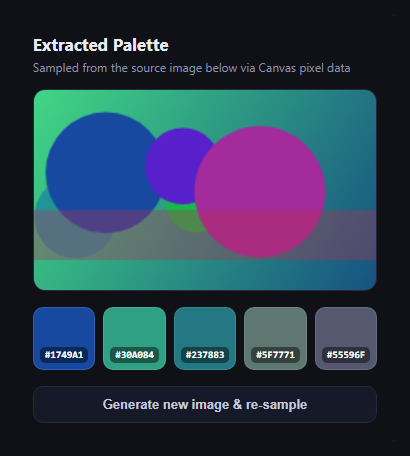
The color palette extractor pulls a small set of representative colors out of an image — the tool behind "extract colors from this photo" features in design apps. This snippet builds a simplified but genuine version: it paints a randomized scene to an offscreen-style canvas, then samples real pixel data at five points with getImageData, so every swatch is an actual color pulled from rendered pixels rather than a hardcoded palette.
A real scene, not a static image
paintScene() draws a randomized linear gradient, five randomly placed and colored circles, and a translucent diagonal band onto the visible canvas each time it runs. Because the hues, positions, and sizes are randomized on every call, the canvas contains genuinely different pixel data run to run — there's no way to fake the extraction with a fixed color list, since the source pixels themselves change.
Real getImageData sampling
samplePalette() reads five fixed-proportion coordinates spread across the canvas and calls ctx.getImageData(x, y, 1, 1).data at each one — the same browser API real color-picker and eyedropper tools use to read raw RGBA values from rendered pixels. Each result is converted to a hex string with rgbToHex(). Nothing here simulates the sampling; it reads whatever pixels actually ended up at those coordinates after painting.
Click-to-copy swatches
Each of the five swatches shows its sampled hex code and copies it to the clipboard via the Clipboard API when clicked, with a small toast confirming the copy — the same interaction pattern as color swatch but driven by extraction instead of manual input.
Regenerate to see it work
The "Generate new image & re-sample" button repaints the canvas with fresh random colors and re-samples, so you can watch the five hex values change in lockstep with the new pixels — visible proof the palette comes from the canvas, not a script constant.
Customizing it
Swap paintScene() for drawing an actual uploaded image via drawImage() and the same getImageData sampling works unchanged; adjust the sample point coordinates, add more swatches, or build a k-means-style dominant-color extractor for production use. Pair it with a gradient picker or color wheel picker for a full color-tools panel.
Step by step
How to Use
- 1Paste HTML, CSS, and JSA source canvas renders with 5 sampled swatches below it.
- 2Click a swatchIts hex code copies to the clipboard with a toast.
- 3Click "Generate new image"The canvas repaints and re-samples 5 new real colors.
- 4Swap in a real imageReplace paintScene() with drawImage() on an uploaded file.
- 5Tune sample pointsEdit the points array in samplePalette() for different coverage.
Real-world uses
Common Use Cases
getImageData rather than invented values.Got questions?
Frequently Asked Questions
They're really sampled. paintScene() draws a randomized gradient and shapes to the canvas, then samplePalette() calls the browser's native ctx.getImageData(x, y, 1, 1).data at five coordinates — the same API real eyedropper tools use — and converts each actual pixel's RGB values to hex. Regenerating changes the underlying pixels and the swatches change with them.
Yes — draw the image onto the canvas with ctx.drawImage(img, 0, 0, W, H) instead of calling paintScene(), then call samplePalette() as-is. Since it reads whatever pixels are on the canvas, it works identically on a real photo.
Five fixed points spread across the canvas keeps the demo simple and fast while still genuinely reading real pixel data. A production-grade extractor would typically cluster all pixels (e.g. with k-means) to find dominant colors rather than sampling fixed coordinates — a good next step to build on top of this.
The Clipboard API (navigator.clipboard.writeText) requires a secure context (HTTPS or localhost) in most browsers. The snippet falls back gracefully by still showing the toast if the clipboard call fails, but the actual copy needs a secure context to succeed.
Keep the canvas as a ref, run paintScene() and samplePalette() inside a mount effect (or on file upload), and store the returned hex array in state to render swatches. The Canvas 2D API calls themselves are framework-agnostic and port unchanged.